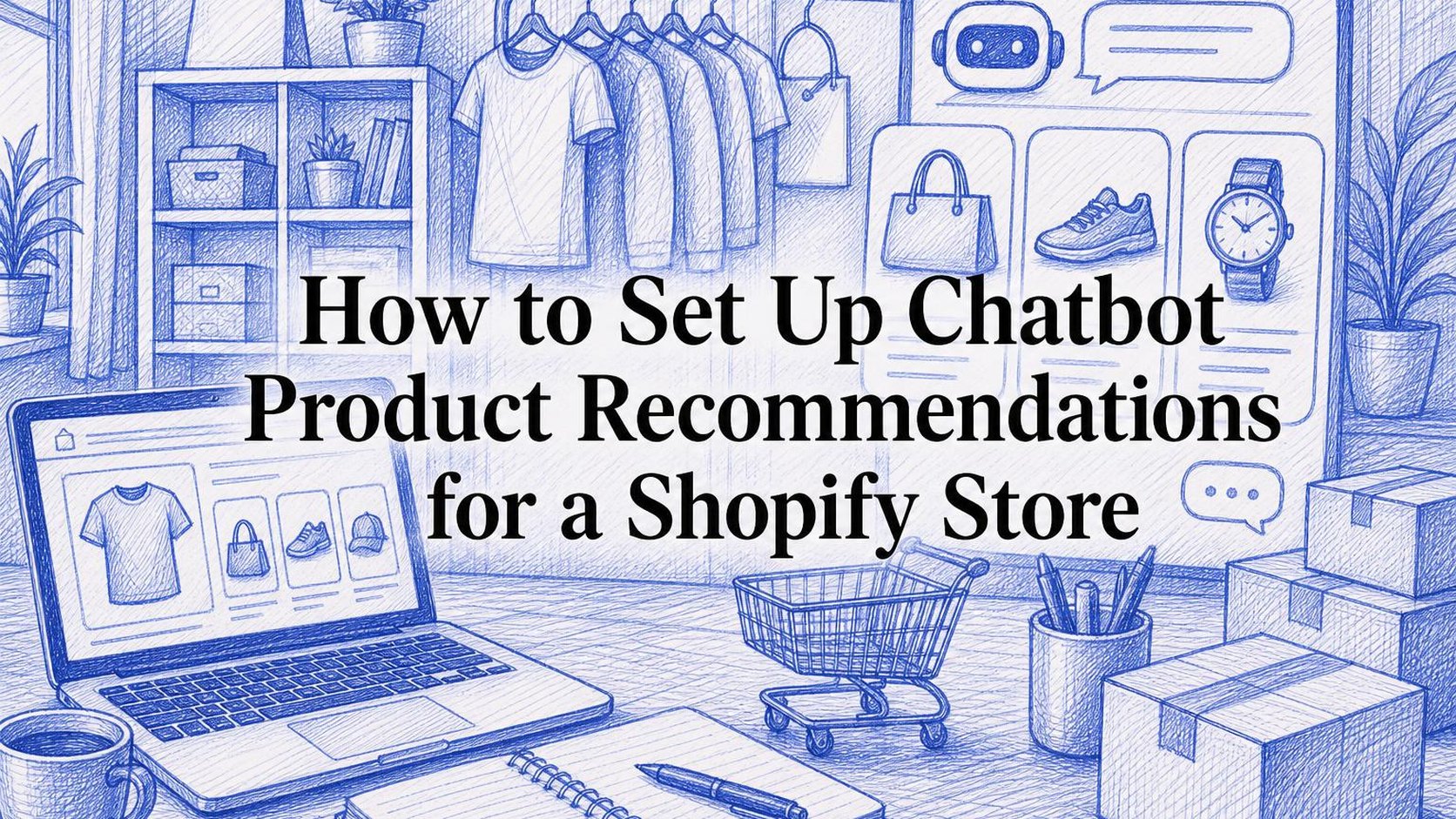
A shopper opens your chat widget and asks which backpack fits a 15-inch laptop and works for a weekend trip. Your store has several options, but the chat sends them to a collection with 40 products. You want shopify chatbot product recommendations to narrow that choice, not hand the search back to the shopper.
How to Set Up Chatbot Product Recommendations for a Shopify Store walks you through preparing your product data, connecting that data to your chatbot, and setting rules for useful suggestions. You also learn what questions the chatbot should ask, when it should show product links, and how to test its answers before customers rely on them.
A product recommendation chatbot uses a shopper’s stated needs and available catalog information to suggest relevant products. For your store, that means matching details such as size, intended use, budget, and availability rather than returning whatever shares a keyword. Better product data makes those matches easier, but the chatbot still needs a clear fallback when a detail is missing.
Start with one shopping task, such as choosing a backpack, instead of enabling suggestions across every collection at once. Keep the first recommendations focused on fit; save upselling and cross-selling for genuinely useful additions. Do not let the chatbot invent compatibility, promise stock it cannot verify, or treat a higher price as a better match.
Table of Contents
- Step 1: Define the job your product recommendation chatbot should do
- Step 2: Prepare accurate product data for chatbot recommendations
- Step 3: Choose a Shopify chatbot that can suggest products
- Step 4: Build a guided product discovery flow
- Step 5: Personalize recommendations and add relevant cross-sells
- Step 6: Set guardrails and test the chatbot before launch
- Step 7: Measure results and improve recommendations over time
Step 1: Define the job your product recommendation chatbot should do
Before you configure shopify chatbot product recommendations, write down the shopping problem your chat should solve. “Help shoppers buy” is too broad to guide your setup. “Help shoppers choose a backpack that fits their laptop and trip length” gives you a task you can test.
Your chatbot can guide discovery, answer buying questions, or suggest complementary items. It can support several tasks, but each needs its own rules and success measure. Start with one shopper moment rather than asking chat to handle every purchase decision.
Choose the shopper moments to support
Review recent chat conversations, customer emails, and on-site search terms. Look for repeated questions that delay a purchase, such as whether a bag meets cabin limits or which refill fits a dispenser. Choose a moment where your catalog contains enough reliable information to answer.
- Guide discovery: Help a shopper narrow a broad category by asking about intended use, budget, or size. Recommend a short selection and explain why each item fits.
- Resolve buying questions: Help a shopper evaluate a product they already have in mind. Use verified dimensions, materials, and compatibility details rather than guessing from a product title.
- Suggest complementary items: Recommend something that works with the selected product, such as the correct replacement filter. Keep optional extras separate from items required for use.
- Support multiple tasks: Define when chat should switch roles. Answer the compatibility question first, then offer an accessory only if it makes sense.
Cross-selling means suggesting a complementary item; upselling means suggesting a higher-priced alternative. Neither should override the shopper’s stated budget or requirements. A Shopify chatbot for product discovery should help someone choose, not turn every answer into a larger basket.
Practical rule: Write one sentence for your first use case: “When a shopper asks about [need], chat should ask [essential question], suggest [suitable options], and explain [reason for fit].” If the necessary product facts are missing, route the question to a person instead.
Set measurable goals for discovery and sales
Record a baseline, your current performance before the new recommendation flow starts. Use a consistent reporting window and note promotions, traffic sources, and stock changes. If chat is new, start with a limited pilot rather than treating all store visitors as a comparable group.
Choose one primary metric for the task and a few supporting measures. Define the denominator before launch so a change in reporting does not look like a sales improvement.
| Task | Metric to track |
|---|---|
| Product discovery | Chats with a recommended-product click divided by chats showing recommendations |
| Buying support | Recommendation chats followed by an add-to-cart event divided by recommendation chats |
| Complementary items | Eligible orders containing the suggested add-on divided by eligible orders |
Choose an attribution window for downstream actions and keep it consistent. A purchase after chat does not prove chat caused it; compare similar groups where possible. Track incorrect suggestions and requests for human help alongside sales metrics.
Use the Shopify chatbot setup and conversion basics to connect this goal to your broader chat workflow. Keep the first test narrow enough that you can identify what needs fixing.
Step 2: Prepare accurate product data for chatbot recommendations
A shopper asks for a waterproof jacket in medium, but your chatbot suggests a water-resistant style with only extra-small left. Accurate Shopify chatbot product recommendations start with catalog information that distinguishes those details. Before connecting more products, check the records behind the suggestions you want shoppers to trust.
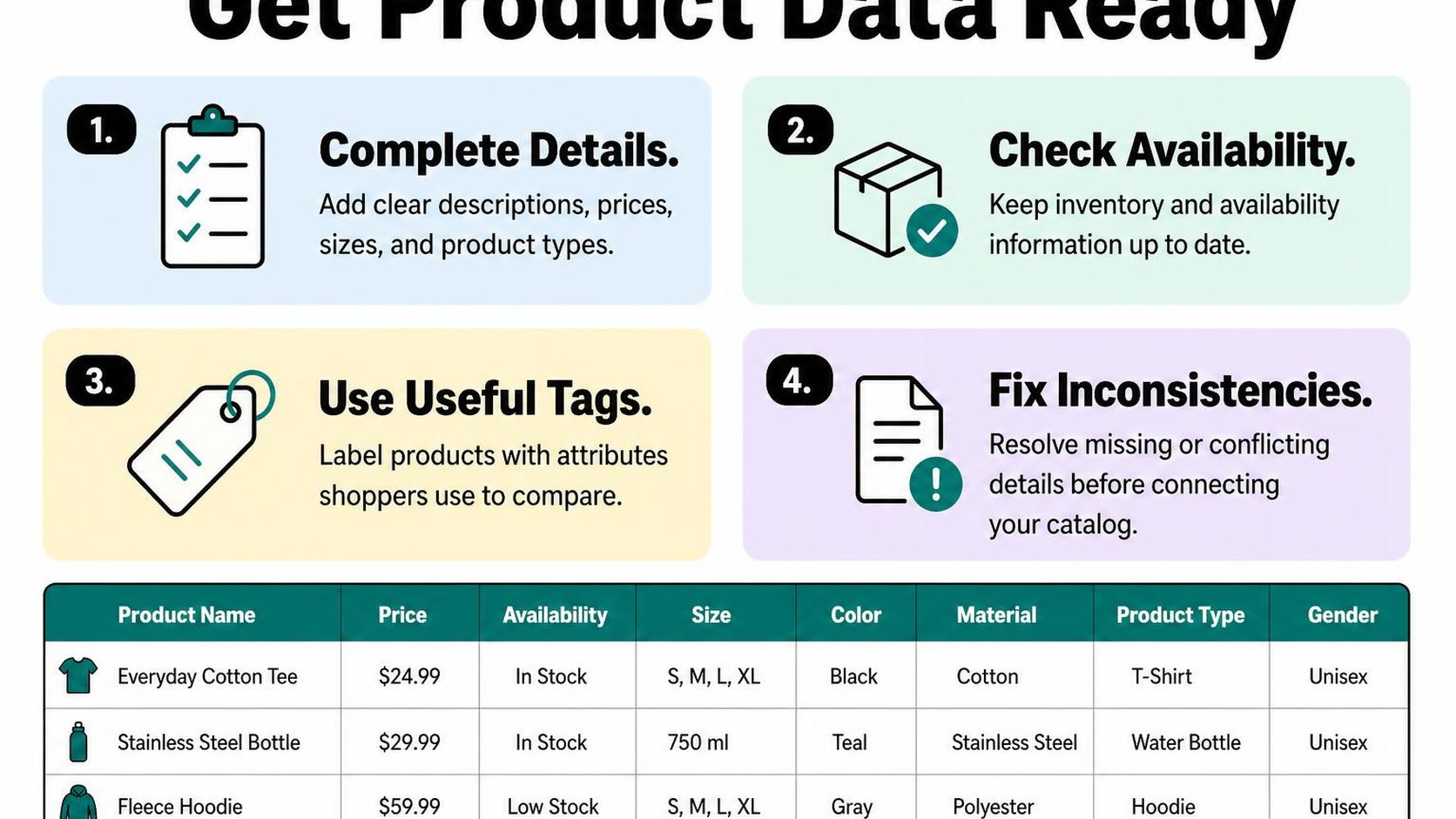
Review product titles, descriptions, variants, and availability
Start with the products in your first test rather than rewriting your entire catalog. Open each product in Shopify and compare its title, description, options, and sales-channel availability with what you actually sell.
A variant is a specific combination of product options, such as a blue jacket in medium. Your chatbot needs access to variant-level details when size, color, price, or availability changes the answer; a product-level description alone is not enough.
- Titles: Use recognizable product names and distinguishing details. Replace vague names such as “The Everyday” with wording that identifies the product type.
- Descriptions: State materials, dimensions, intended uses, care instructions, and limitations. Remove outdated promotions and contradictions between the description and specifications.
- Variants: Check that option names, prices, and size labels match the storefront. Confirm that a recommendation links to the relevant selection when your integration supports it.
- Availability: Verify that each recommended product is published to the relevant sales channel and accessible to the shopper.
Organize attributes shoppers use to compare products
Read recent customer questions and identify the details shoppers use to narrow their choices. For clothing, that might mean fit, fabric, and measurements; for accessories, it might mean device compatibility and connector type.
Metafields store structured details beyond Shopify’s standard product fields. Use Shopify metafields for structured product details to organize these attributes, then verify that your chatbot integration actually reads them. A field stored in Shopify does not automatically become available to every chat tool.
- Consistent values: Use the same units and vocabulary across comparable products. Keep “500 ml” and “0.5 liters” from becoming separate comparison categories.
- Useful collections: Group products around recognizable needs, such as hiking rainwear or small-space desks. Audit automated collection conditions so unrelated items do not enter the recommendation pool.
- Verified claims: Record supporting facts for compatibility, certifications, and performance. Missing information should trigger clarification or staff help, not an invented answer.
Keep recommendations aligned with current inventory
Check how your chatbot retrieves catalog updates: live queries, scheduled synchronization, or a manually refreshed feed. Test a stock change and confirm when the chatbot reflects it. Faster updates reduce stale suggestions, but you still need a fallback when stock cannot be verified.
- Stock checks: Validate the requested variant, not just whether another version of the product remains available.
- Backorder rules: Distinguish immediately available products from items you allow customers to purchase while out of stock. Do not promise a dispatch date without verified information.
- Refresh checks: Recheck recommendations after bulk edits, discontinued products, and collection changes.
Practical rule: Require the chatbot to say when a detail is unknown. It must not infer safety certifications, medical benefits, compatibility, delivery dates, or restock promises from a product name or collection label.
Step 3: Choose a Shopify chatbot that can suggest products
A shopper asks for a waterproof jacket under $150, but your chatbot replies with a link to the entire outerwear collection. That is a search shortcut, not a useful recommendation. When you evaluate shopify chatbot product recommendations, ask for a demonstration using your products and realistic shopping questions rather than relying on a feature checklist.
Choose a tool that helps shoppers narrow their choices without making your team maintain a second storefront. Before you compare plans, review the conversational commerce options for Shopify to decide whether you need guided product discovery, human-assisted selling, or both.
Check catalog access and Shopify integration
Catalog access means the chatbot can retrieve the product information it needs to answer a shopper’s question and suggest relevant items. Ask the provider to show which Shopify fields it reads, including variants, prices, product descriptions, collections, and any metafields that contain buying criteria.
Use a trial to test a shopper request with several constraints, such as “a black daypack under $100 with a laptop compartment.” A Shopify chatbot for product discovery should identify matching products, explain the match using catalog facts, and ask a follow-up question when an essential detail is missing.
- Product detail: Check whether the tool distinguishes products from variants and reads the attributes your shoppers actually use. A size or material hidden in an unsupported field cannot reliably guide a recommendation.
- Clickable results: Require links to the suggested product pages. Open each result on mobile and confirm that its title, price, and selected option match the conversation.
- Availability handling: Ask for a demonstration where no purchasable item meets the request. The chatbot should explain the mismatch and offer to change a constraint, not quietly suggest an unavailable option.
- Installation scope: Confirm required permissions, theme compatibility, and whether setup needs custom development. Test the widget alongside your existing storefront controls before publishing it.
Compare recommendation controls, handoff options, and reporting
Recommendation controls let you set boundaries around what the chatbot suggests. Check whether you can exclude products, prioritize suitable collections, and separate alternatives from add-ons. Shopify chatbot upselling and cross-selling should respect the shopper’s budget rather than turn every answer into a more expensive offer.
Human handoff transfers a conversation to your team when automation cannot resolve it. Test a complex compatibility question and an explicit request for a person; confirm that staff receive the conversation and the products already discussed.
- Personalization: Ask which preferences the chatbot uses, where they come from, and whether you can restrict access. Start with information the shopper shares in the conversation.
- Reporting: Look for recommendation clicks, unresolved questions, handoffs, and clearly defined purchase attribution. Ask how the tool distinguishes an assisted purchase from a sale it merely appears alongside.
- Total cost: Compare conversation limits, usage charges, staff access, and setup work. A lower subscription price may require more manual review.
Practical rule: Choose the chatbot that passes your store’s test conversations, not the one with the longest feature list. Keep human support available, and do not treat attributed revenue as proof of additional sales.
Step 4: Build a guided product discovery flow
A shopper opens chat because your collection page shows twenty similar backpacks. Your shopify chatbot product recommendations should help that shopper choose, not reproduce the same grid inside a conversation.
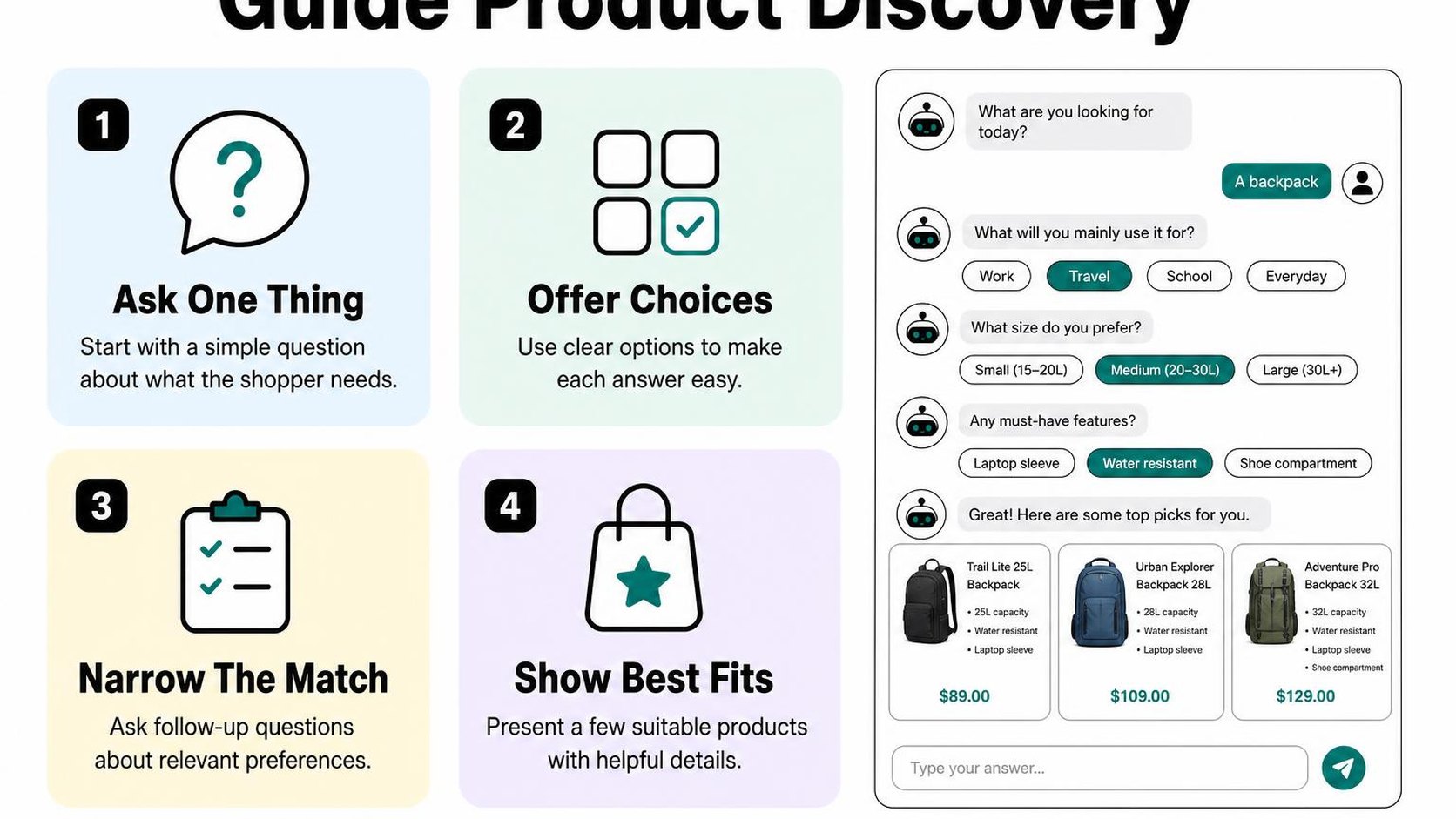
Build a guided discovery flow: a short sequence of questions that turns the shopper’s answers into product selection rules. Start with one category, such as commuter backpacks, so you can check the logic before expanding it across your store.
Ask a small number of useful questions
Begin with two or three questions that change which products qualify. For a backpack, ask what the shopper carries, which laptop size it must fit, and their spending limit. Only ask about color if it meaningfully narrows the available options.
Offer short answer choices where your chat tool supports them, with a free-text option for needs you have not anticipated. Let shoppers skip optional preferences, and avoid asking again when they have already supplied an answer.
- Use case: Ask “Is this mainly for commuting, travel, or day hikes?” rather than “What are you looking for?”
- Required fit: Ask “What size laptop does it need to hold?” when compartment dimensions determine suitability.
- Budget: Ask “What is your maximum budget?” and make the currency clear.
Practical rule: Keep a question only if its answer changes eligibility, ranking, or the explanation you give. A longer questionnaire creates more chances for the shopper to leave.
Use answers to narrow the catalog
Separate hard constraints, which a product must meet, from soft preferences, which influence its ranking. A maximum budget and laptop fit usually act as constraints; a preferred color can be optional if the shopper says so.
Map each answer to reliable catalog data. Use structured fields for dimensions, intended use, material, price, and availability rather than expecting the chatbot to infer every detail from product descriptions. Check the relevant variant, not just the product’s starting price.
- Filter first: Remove unavailable options and products that fail required fit or budget checks.
- Rank second: Order eligible products by the shopper’s stated priorities, such as low weight or extra capacity.
- Handle gaps: If nothing qualifies, explain which constraint blocks a match and ask permission before relaxing it.
For example, if no backpack fits a 16-inch laptop below $80, do not silently show a $110 option. Ask whether the shopper wants to raise the budget or see available alternatives with different requirements.
Show a short, explainable set of matches
Start with two or three matches. For each, show the product name, current price, relevant variant, and a direct product-page link. Give one concrete reason tied to the conversation: “Fits your 16-inch laptop and stays within your $100 limit.”
Include a meaningful tradeoff where your catalog supports it: one option may weigh less, while another offers more capacity. Do not call something waterproof, compatible, or guaranteed to fit unless your product data supports that claim.
Finish with one refinement question, such as “Would you prefer the lighter bag or more storage?” This keeps your Shopify chatbot for product discovery focused on choosing a suitable item before suggesting accessories.
Step 5: Personalize recommendations and add relevant cross-sells
A shopper tells your chatbot that the bag is for a rainy bike commute, not occasional travel. Your shopify chatbot product recommendations should carry that detail forward instead of switching to a generic bestseller pitch. Use what the shopper shares to improve the choice, then offer extras only when they solve a related problem.
Use shopper-provided preferences appropriately
Conversation context is the information the shopper gives you during the exchange, such as intended use, preferred size, budget, or items they already own. Configure your chatbot to retain these details within the conversation and apply them when choosing recommendations. If the shopper changes a requirement, the latest explicit preference takes priority.
Ask a focused question when a missing detail affects suitability: “Which phone model do you need the case for?” Do not infer sensitive characteristics, assume a gift recipient’s preferences, or treat a product view as proof of intent. If previous purchase information is available, confirm that it is relevant rather than assuming the shopper is buying for themselves again.
- Use stated needs: Carry forward “no leather,” “for outdoor use,” or “already owns a charger” when filtering suggestions.
- Confirm uncertainty: Ask about device models, measurements, or compatibility before recommending a matching accessory.
- Respect corrections: Replace an earlier preference when the shopper updates it, and stop suggesting items they decline.
Recommend complementary products only when they fit
A cross-sell is an additional product that complements the main purchase. Suggest it after the shopper shows interest in a suitable main item, not before you understand what they need. A matching accessory earns its place through verified compatibility or a clear use case, not simply because it raises the cart value.
Set up curated product relationships in the catalog data your chatbot uses. Check the relevant model, variant, availability, and any purchase requirements before presenting an add-on. Start with one optional suggestion and explain why it belongs.
| Shopper context | Relevant suggestion | What to avoid |
|---|---|---|
| Chooses a phone case | A screen protector verified for the same phone model | An accessory matched only by brand |
| Buys a duvet insert | A duvet cover with matching dimensions | A cover selected only by color |
| Already owns a compatible charger | No charger recommendation | A duplicate charger bundle |
For bundles, show the included items and total price. Describe savings only when the pricing supports them, and keep the main product available without the extras.
Make upsells helpful rather than distracting
An upsell is an alternative that costs more and offers a relevant improvement. Offer one only when the improvement addresses a stated need, such as greater capacity for a shopper who carries bulky equipment. Explain the extra cost alongside the benefit, without replacing the shopper’s original choice.
For Shopify chatbot upselling and cross-selling, configure a stopping rule: once the shopper declines an upgrade or add-on, return to their chosen product. Repeated offers turn useful assistance into another obstacle before checkout.
Practical rule: If you cannot explain the suggestion using something the shopper actually says, leave it out. A relevant recommendation helps them finish a decision; it does not restart the sales pitch.
Step 6: Set guardrails and test the chatbot before launch
A shopper asks for a waterproof jacket under $100, but your chatbot suggests a $120 water-resistant style. Before you publish, test your shopify chatbot product recommendations against your actual catalog, not just whether the replies sound helpful. A convincing answer still fails if the product, price, or selected variant is wrong.
Prevent inaccurate product, price, and availability claims
Set guardrails: rules that limit what your chatbot can claim and when it must stop answering. Require product claims to come from approved catalog fields or store policies. If a detail is missing, the chatbot should say it cannot confirm it rather than fill the gap.
Require a fresh availability and price check before presenting a recommendation whenever your integration supports it. If it cannot retrieve current information, direct shoppers to the product page to confirm instead of calling an item available or quoting an unverified price.
- Product facts: Do not infer materials, compatibility, certifications, or fit from a product name or image.
- Prices and variants: Match the displayed currency, price, size, and color to the linked variant. Do not present a conditional discount as guaranteed savings.
- Outcomes: Do not promise delivery dates, health results, perfect fit, or guaranteed performance unless an applicable, approved policy explicitly supports the claim.
Test common questions and edge cases
Build a small test sheet using real questions from customer support. Include straightforward requests, conflicting preferences, and questions your catalog cannot answer. Run each conversation through the product link and variant selection, rather than stopping when the response looks correct.
| Test request or change | Required behavior |
|---|---|
| “Show running shoes under $80 in size 9.” | Suggest only matching options with working links and verified variant prices. |
| A recommended variant sells out. | Refresh availability, stop offering that variant, and explain any alternative. |
| “Find something nice.” | Ask one useful question about purpose, budget, or preference. |
| No product meets every requirement. | Explain the mismatch instead of silently relaxing the shopper’s constraints. |
Change a test product’s price and stock status, then repeat the conversation after your integration’s expected refresh interval. Test misspellings, broken links, and follow-up requests such as “the same one in blue.” Record failures and retest them after every configuration change.
Practical rule: Delay launch if the chatbot invents details, links to the wrong variant, or cannot reliably stop recommending unavailable products.
Check mobile presentation and human handoff
Open the storefront on a phone and complete the same tests with the keyboard visible. Check that product cards, prices, and buttons remain readable and that the chat window does not cover essential shopping controls. Keep recommendations short enough to compare without excessive scrolling.
Configure human handoff: a clear route from the chatbot to your support team. Trigger it when shoppers request a person, dispute an answer, or need information the chatbot cannot verify. Pass along the conversation and relevant product links where supported, so shoppers do not need to restart.
- Support access: Test the handoff during staffed hours and when nobody is available.
- Expectations: State your actual support hours and next contact method; do not promise an immediate reply.
Step 7: Measure results and improve recommendations over time
A shopper clicks a suggested product, adds a different size to the cart, and leaves without buying. That sequence tells you more than a chat count alone. Measure shopify chatbot product recommendations as a shopping journey, not just a collection of conversations.
Track engagement and assisted purchases
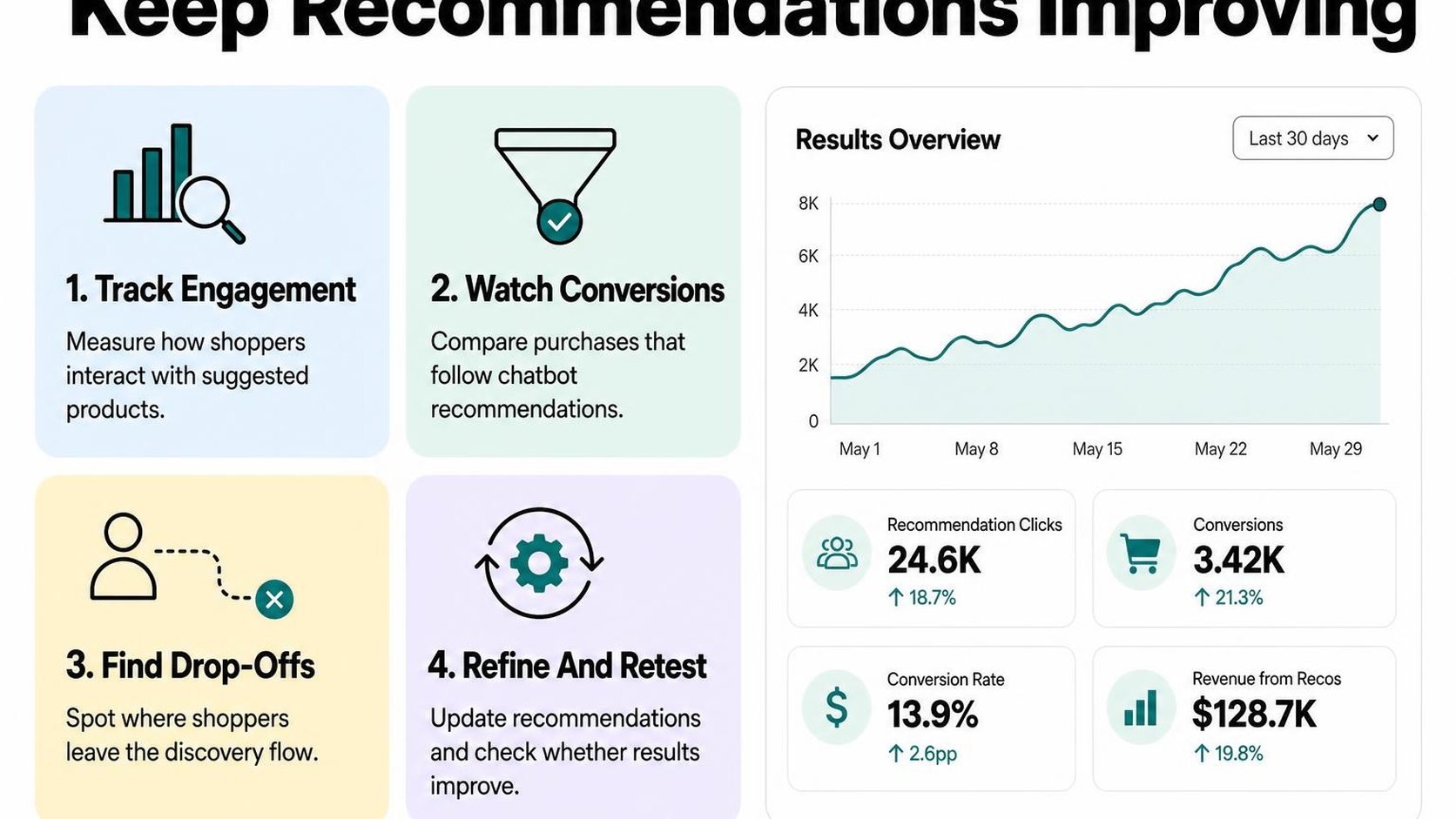
Start with a weekly view of chats that actually show product suggestions. Use reporting your setup supports, and verify that recommendation links and cart events are recorded correctly before comparing results. If a metric is unavailable, mark that gap rather than estimating it from unrelated store activity.
An assisted purchase is an order associated with a shopper who interacts with chat before purchasing, under your chosen reporting rules. Keep the attribution window consistent and document whether your report connects activity across visits or only within one session.
| Signal | What to review |
|---|---|
| Recommendation clicks | Chats with a product click compared with chats showing suggestions |
| Add-to-cart activity | Whether shoppers add suggested products after interacting |
| Purchases | Orders associated with recommendation chats under consistent rules |
| Handoffs and feedback | Reasons shoppers request help or reject suggestions |
Chat users may already have stronger purchase intent than other visitors. An assisted order therefore shows an association, not proof that the chatbot creates an additional sale.
Review unanswered questions and weak recommendations
Read a small sample of conversations each week, including successful purchases, abandoned chats, and support handoffs. Look for the point where discovery stalls: an unanswered sizing question, an unsuitable price range, or an accessory suggested before the shopper finds the main product.
Separate missing catalog information from poor recommendation logic. Better instructions cannot reliably fix absent dimensions or conflicting compatibility details; correct the underlying product information first.
- Unanswered questions: Group repeated requests by topic, then add verified information to the source your chatbot uses.
- Weak matches: Check whether suggestions respect the shopper’s budget, intended use, size, and availability requirements.
- Handoff patterns: Distinguish useful escalations from repeated failures to answer basic product questions.
- Customer feedback: Review comments alongside clicks; a popular suggestion can still disappoint shoppers after delivery.
Keep review notes focused on the shopping problem. Avoid copying unnecessary personal information into testing documents.
Run focused changes and compare results
Choose one recurring problem and change one thing: the first clarifying question, the number of suggestions, or a product eligibility rule. Write down the expected result before publishing, then compare equivalent periods with similar traffic sources, promotions, and stock availability.
Where supported, use a controlled test with comparable groups. Otherwise, treat before-and-after results as directional, especially when chat volume is low or a sale changes shopper behavior.
Practical rule: Review weekly, test one improvement at a time, and keep a change only when it improves the target metric without creating more unsuitable suggestions or avoidable handoffs.
These recommendations reflect store work by Yassine Malti, the developer writing this guide.
Put this into practice
Start with the store you already have, then use the guides on the blog for the next page that needs the same treatment.
Shopify apps by Yassine Malti
Put this into practice
-

Describer · Product descriptions
Product descriptions written from your own product data · Free: 50 descriptions/month
-

LLMs TXT · llms.txt for AI tools
A short llms.txt of your real store links · Free
-

Blogger · SEO blog posts
An AI blog agent that writes and publishes for you · 50 credits/month free