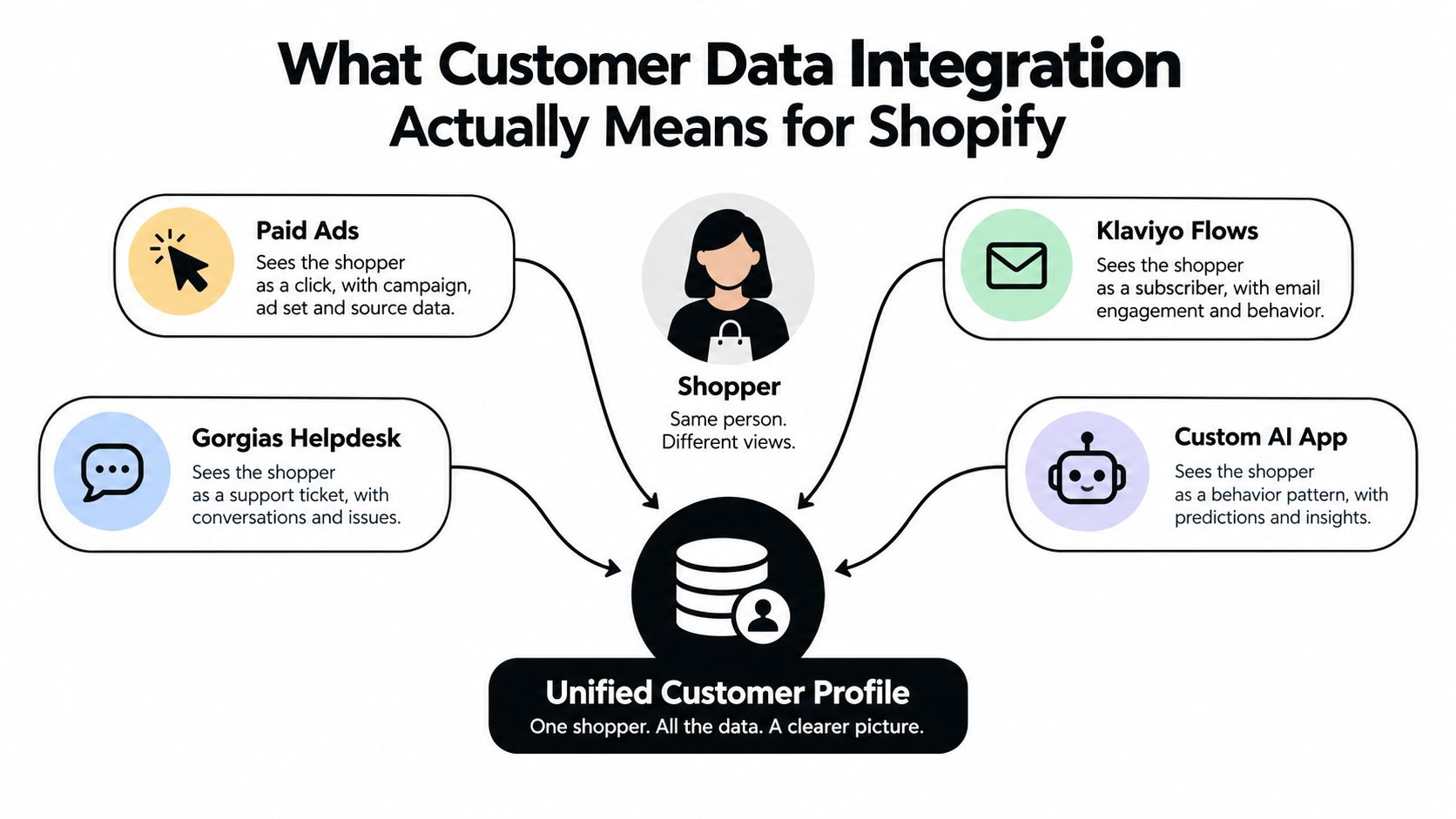
Your Shopify store may be taking orders smoothly while its customer records tell different stories. A shopper clicks a paid ad, joins a Klaviyo flow, asks Gorgias about an order, and interacts with a custom AI app. Each system may recognize a different profile, miss a preference, or use an outdated address. The result is familiar: mismatched segments, confusing support conversations, and reports that don't agree.
Customer data integration helps connect those records and events into a useful, governed view. The hard part isn't moving fields between apps. It's deciding which records belong together, which system can update each field, and whether that data may be used for the purpose you have in mind.
Table of Contents
- What Customer Data Integration Actually Means for Shopify
- Architectures and Patterns Shopify Stores Can Use
- How Identity Resolution Works in a Shopify Stack
- Implementation Decisions for a Shopify Merchant
- Consent, Privacy, and Zero-Party Data as Architecture
- When to Use a Shopify App Versus Building Custom
- Common Pitfalls and How to Recover
- Your Next 30, 60, and 90 Days
What Customer Data Integration Actually Means for Shopify
A Shopify shopper can look like a new prospect to an ad platform, a subscriber to Klaviyo, an order number to Gorgias, and a set of browsing signals to a custom AI app. When those systems don't share reliable identifiers or updates, your team has to reconstruct the customer story by hand. A support agent may not see a relevant preference, while a marketing flow continues as if a recent purchase never happened.
Customer data integration is the practice of connecting customer identities, attributes, and events across those systems so people can make decisions from a coherent record. Think of a loyalty card that works at every counter, or a shipping label that follows a customer after they correct a typo in their address. The systems don't have to become one application. They do need agreed rules for recognizing customers and keeping important information aligned.
That distinction matters because integration is a data-quality and governance problem first, and a plumbing problem second. A connection that faithfully copies an incorrect email, stale consent status, or duplicate profile only moves the problem faster. Teams need to define which fields matter, how to match identities, which system wins when values conflict, and how corrections reach connected apps.
The challenge predates today's cloud tools. A Baseline Consulting survey in late 2005 found that more than half of information-technology respondents said their companies lacked one authoritative customer record, although 77% said executives considered a “single version of the truth” important (the historical customer data integration findings). For Shopify merchants, the same problem appears across storefront, email, ads, support, loyalty, and order data.
A useful profile doesn't mean collecting everything. It means making the information needed for a clear purpose available to the right systems, with the right permissions. For a practical perspective on gathering feedback without treating every response as permission for unlimited reuse, see privacy-first feedback data collection. Consent and voluntarily shared preferences belong in the design, not in a cleanup task after the integrations are live.
Architectures and Patterns Shopify Stores Can Use
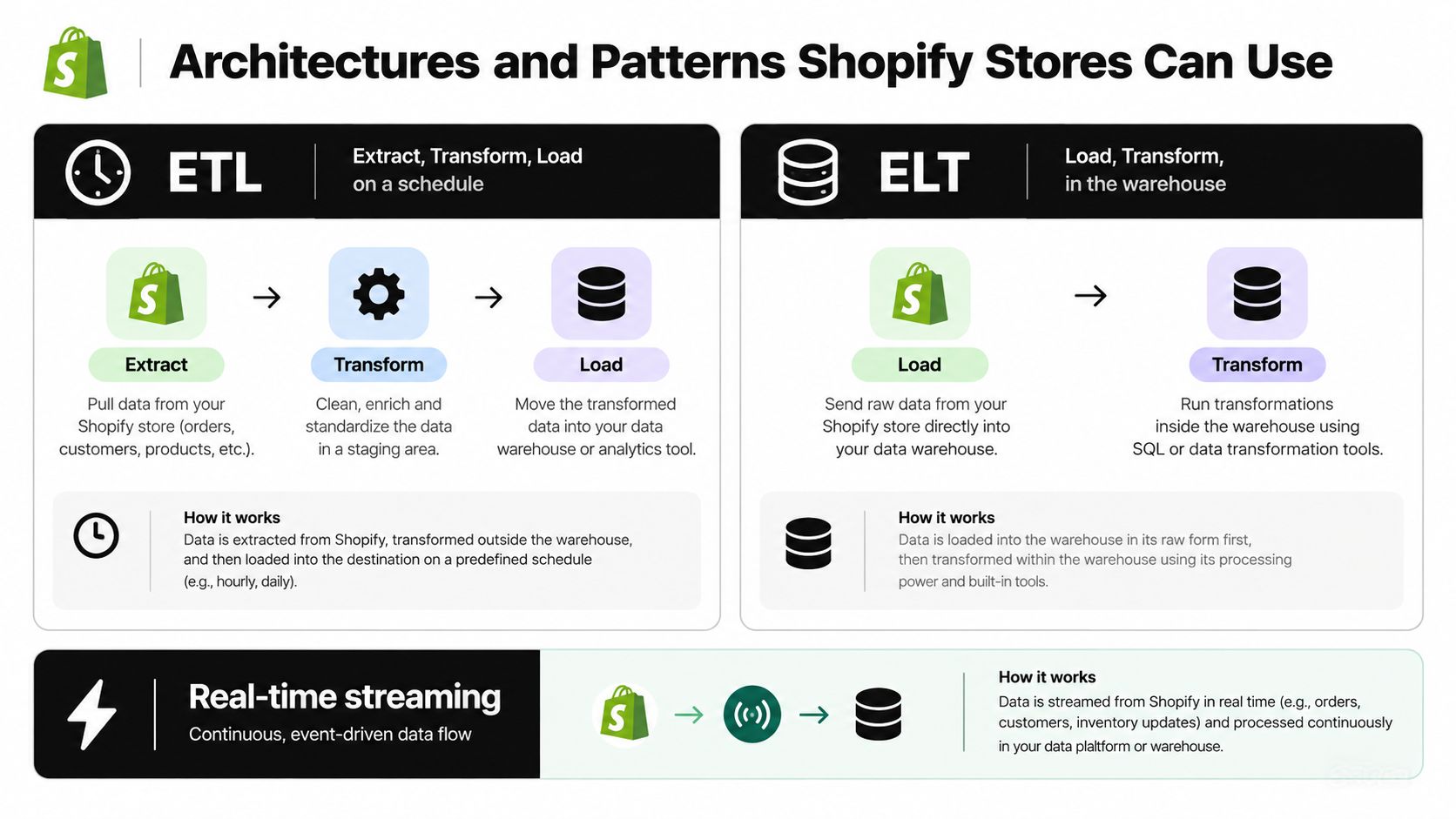
The architecture choice should follow the job. A nightly product and order report doesn't need the same delivery path as a post-purchase message, and a warehouse isn't automatically a customer profile system. In Shopify work, four patterns cover most needs: scheduled ETL, warehouse-centered ELT, event-driven streaming, and a customer data platform.
ETL for scheduled, prepared data
ETL extracts data, transforms it before loading, then sends the prepared result to a destination. A Shopify orders export can be cleaned and mapped into a finance or reporting system on a schedule. That works well when teams value predictable batches over immediate updates. The trade-off is freshness: a sync delay can leave a dashboard behind, while a transformation change can alter what downstream fields mean.
ELT for analysis in a warehouse
With ELT, the pipeline loads source data first and transforms it inside a warehouse. For a merchant with analytics needs across Shopify orders, advertising, and customer support, this preserves detail for later analysis without forcing every question into an app's fixed reporting model. It's a sensible default for analytics-heavy teams, but raw data still needs clear schemas and quality checks. A warehouse can store inconsistent records just as easily as clean ones.
Streaming for actions that depend on events
A webhook can send an event such as an order being created to a destination that triggers a Klaviyo flow or updates a support workflow. That's useful when an action depends on timely information. The failure mode isn't theoretical: endpoints can be unavailable, webhooks can be retried, and duplicate handling must prevent one event from counting twice. Streaming needs logging, retry handling, and a way to replay or reconcile missed events.
CDPs for shared identity and activation
A customer data platform (CDP) can provide a central layer for identity resolution, profile rules, and audience activation. It may be worth evaluating when several activation channels need to use the same definitions and profile logic. The cost is a new system to govern, plus the risk of letting a vendor's model dictate your schema.
Practical rule: Use a warehouse to answer questions, webhooks to act on events, and a CDP only when shared identity and activation solve a real coordination problem.
Most Shopify stacks end up hybrid. For examples of how event-driven workflows connect to commerce campaigns, see marketing automation for ecommerce.
How Identity Resolution Works in a Shopify Stack
A matching system has to answer a deceptively simple question: do these two records describe the same person? Shopify customer IDs, verified email addresses, and consented phone numbers can provide deterministic matches, where an agreed identifier connects records directly. A name, normalized address, device signal, or purchase pattern can provide supporting probabilistic signals, but those clues are not proof on their own.
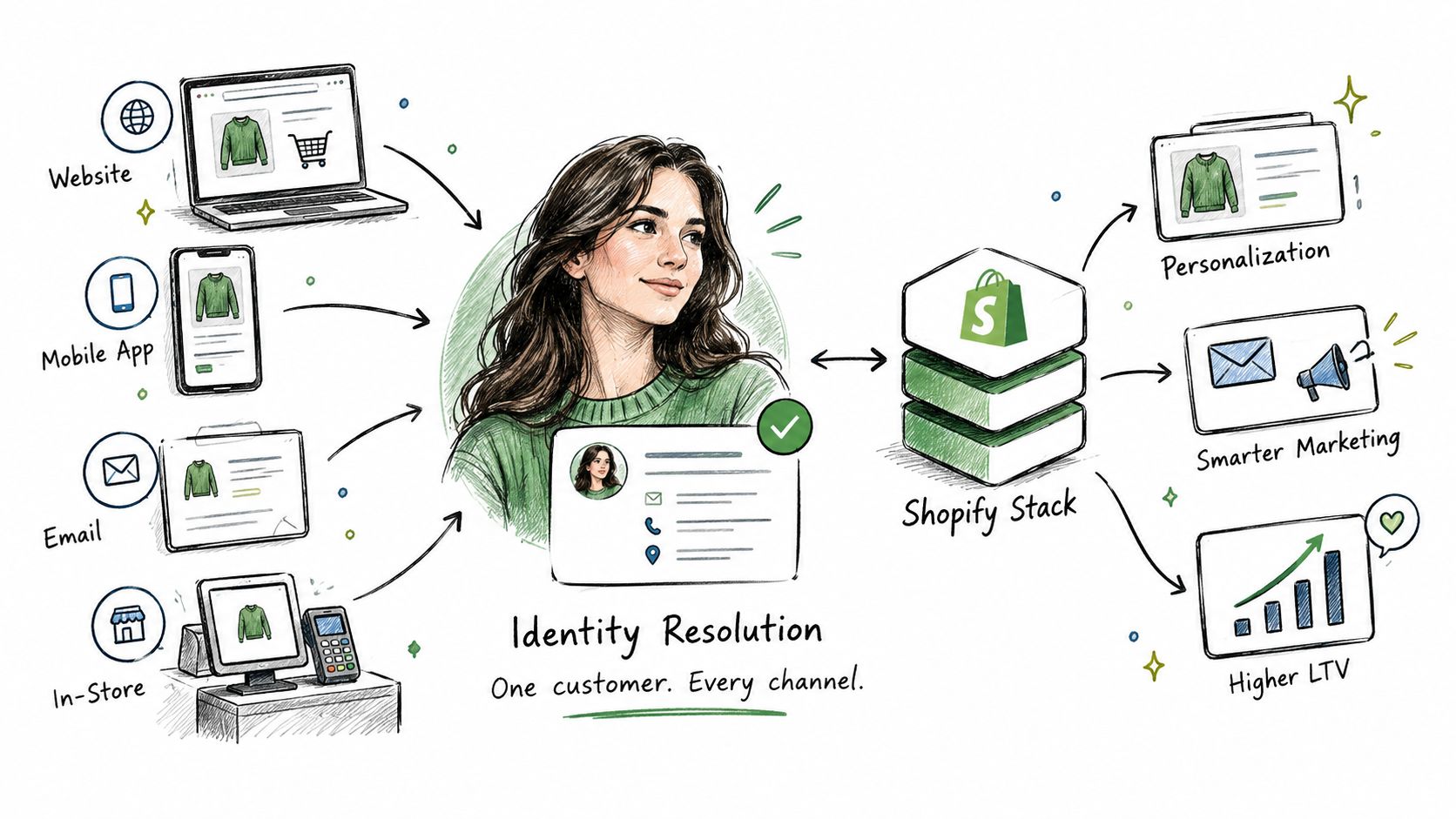
Most useful systems combine both approaches. A direct Shopify ID match can be strong evidence; a shared household address or device may only justify further review. Every threshold trades precision against recall. If a rule is too permissive, it may merge two family members and contaminate purchase history. If it's too strict, a loyal customer who changes email may appear as several disconnected profiles.
Build a match process you can inspect
Identity tools often reduce the number of comparisons through blocking or candidate generation, then score likely pairs instead of comparing every record with every other one. That improves practicality at scale, but the score is only useful if the team knows what it means and how errors are handled.
A defensible setup needs labeled examples of true matches and non-matches. Track precision, recall, false merges, and false splits against that set, then revisit thresholds when channels or data formats change. Enterprise-scale matching research describes blocking and sketching as ways to reduce the comparison space, while noting that there is no universal benchmark for entity-resolution accuracy (enterprise-scale matching research).
For Shopify, don't discard the identifiers that explain where a field came from. Preserve source-system IDs, record why a match occurred, and make profile merges reversible. Those safeguards help developers investigate attribution errors and let the merchant respond to corrections or deletion requests without guessing which source records were combined.
Implementation Decisions for a Shopify Merchant
Start with the job the integration must perform, then choose the data and safeguards around it. A working setup is a sequence of decisions, not a one-time export.
Choose events for a real use case
Subscribe only to the Shopify events your destinations need. orders/create can support a post-purchase workflow, customers/create can initialize a customer record, and checkouts/update may help keep checkout activity current. Confirm which event changes the outcome you care about, then register and test that webhook. Don't subscribe to everything just because it's available.
Set sync timing and field ownership
Decide whether each use case can tolerate scheduled updates or needs near-real-time delivery. Then map Shopify fields to the destination's schema, including identifiers, country codes, currency, and consent status. Set a clear source priority for fields that multiple apps can edit. A sync should not replace a verified shipping address with a stale value from another system.
Make bad data visible
Choose where deduplication happens and define the profile your team considers authoritative. Check required identifiers and shared-field consistency both when data arrives and after transformation. Research on integration quality highlights completeness, timeliness, and consistency as important dimensions, and points to TPC-DI as a benchmark model for assessing both integration performance and data-quality behavior (data integration quality research).
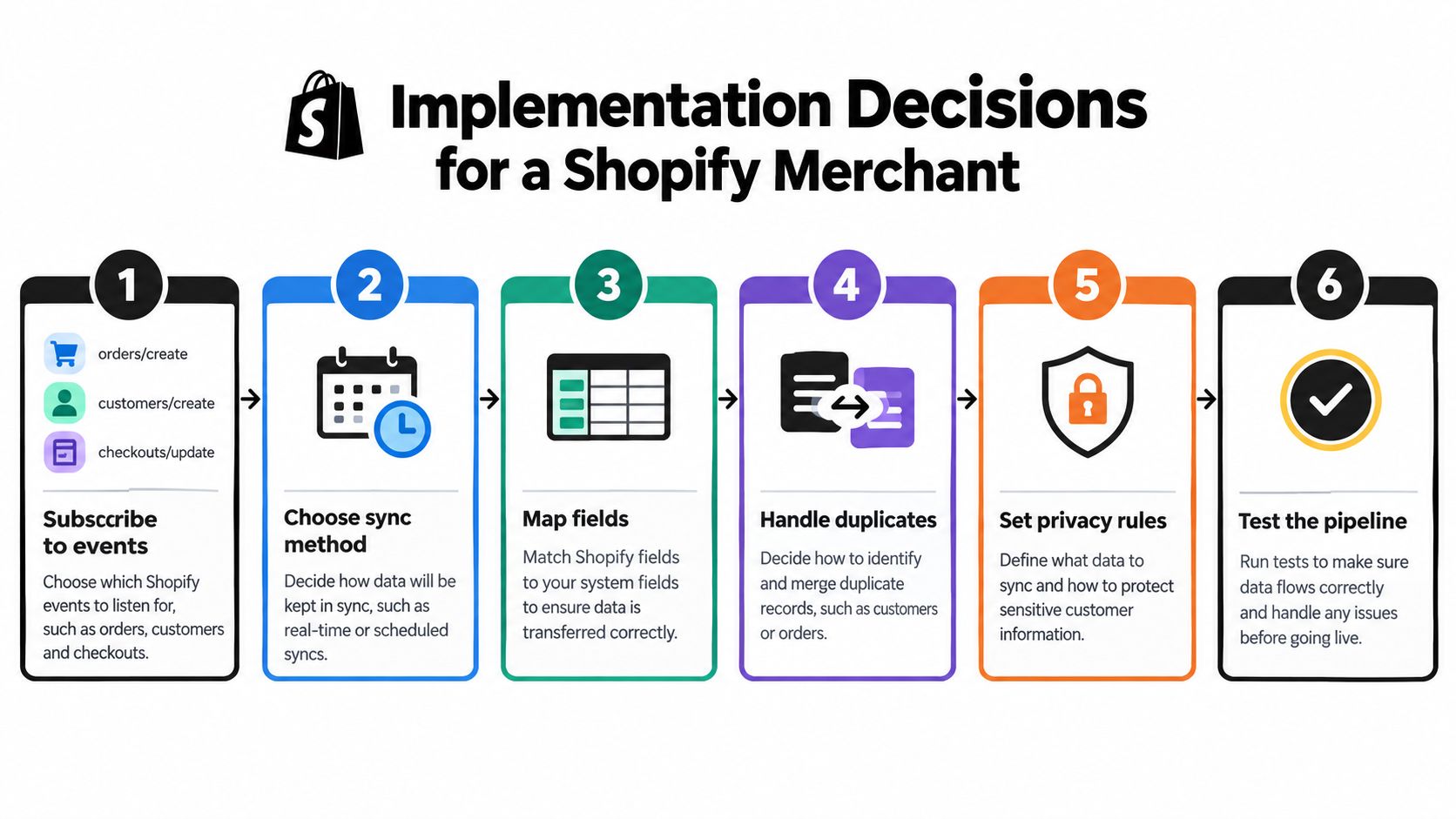
A practical pipeline also needs freshness targets and a correction path. If a record fails validation, quarantine it for review instead of letting it overwrite a clean profile. Keep logs for webhook delivery, transformation errors, and retries so developers can tell the difference between a missing event and a bad mapping.
The same discipline applies to content data. For example, VEOit AI Bulk Videos Generator for Shopify transforms product images into videos and supports bulk processing, custom prompts, and automatic Shopify upload. If media workflows write product or catalog fields, define ownership and update behavior just as you would for customer fields.
Treat the integration as an operating system, not a launch ticket. Assign someone to monitor failed events, review quarantined records, and re-map fields when Shopify or a destination changes its API. Ship one useful flow, test its edge cases, and expand only after you can explain what each field does.
Consent, Privacy, and Zero-Party Data as Architecture
A unified customer profile is useful only when its data can be used for the right purpose. Identity matching asks whether records belong to the same person. Permission matching asks whether those records may be joined or activated for a particular purpose. An email, phone number, cookie, or device signal can connect events, but it does not authorize every downstream use.
Build those limits into Shopify's data model. Attach purpose and consent status to relevant attributes, set retention rules for each destination, and make deletion requests propagate through connected vendors and applicable backups. Track consent coverage alongside match quality. A high match rate is still a problem if the profile includes activity the customer did not agree to connect or use. For global merchants, map regional requirements to the fields and destinations they affect instead of relying on one general setting.
A match is evidence about identity, not permission.
Voluntarily shared preferences need the same controls as inferred data. A study published in 2025 found 34% of shoppers were willing to share zero-party data in exchange for a more personalized shopping experience (research on zero-party data and consumer preferences). That information is useful only when the business records what the customer shared, why it was collected, and whether it is still current. For the underlying data model, see what first-party data means.
For a Shopify store, save an answer such as preferred fit or a request to avoid subscriptions as a versioned attribute, with its source, timestamp, purpose, and expiry. Give the customer's stated preference priority over a conflicting behavioral inference unless there is a clear reason not to. A preference center, quiz, or post-purchase question should explain the value exchange, not collect answers without a defined use.
A narrower profile is usually safer than a “360-degree” record. Connect only the signals required for a defined purpose, and keep unrelated activity separate. That reduces unnecessary exposure while preserving the customer context a team can act on.
When to Use a Shopify App Versus Building Custom
Buying an app usually shortens setup, but its defaults may limit control over identity and schema. Building custom gives the team more control, yet it adds maintenance every time Shopify or a destination changes. Compare the options by time-to-value, control, and total ownership cost, including monitoring and updates.
| Path | Best fit | Watch out for |
|---|---|---|
| Shopify apps | An early-stage store connecting a small number of tools | Default mappings may not reflect your field ownership or consent rules |
| CDP or middleware app | A scaling brand coordinating customer profiles across several activation channels | New platform costs, vendor-specific identity logic, and another system to govern |
| Custom warehouse integration | A mature team with bespoke analytics or workflow requirements | Ongoing engineering, API updates, monitoring, and recovery work |
For SEO workflows, ALT SEO: AI Alt Text Generator creates image alt text and supports catalog-wide processing, scheduled updates, and customization for brand terminology. It illustrates an app-level task that can remain separate from customer identity logic, though teams should still decide who owns product fields and how automated changes are reviewed.
When a workflow must coordinate the storefront, content pipeline, and analytics, bespoke development may make more sense. The trade-offs and build considerations are covered in this guide to custom Shopify app development for agencies and brands.

A simple decision rule works well: buy when a standard app covers the job and its data rules are acceptable; build when your identity, privacy, or workflow requirements are specific. Don't commission custom infrastructure just to avoid configuring an app, and don't force an app to own decisions your team needs to audit.
Common Pitfalls and How to Recover
Use this checklist to find problems before they show up as incorrect campaigns or support answers.
- Silent overwrites: Symptom, an address or preference changes without explanation. Cause, the sync has no source priority. Fix, assign field ownership and log previous and incoming values.
- Duplicate profiles: Symptom, one shopper appears under multiple records. Cause, events arrive late or matching rules are too strict. Fix, run reconciliation and review candidate matches.
- Duplicate order events: Symptom, a purchase triggers the same action more than once. Cause, webhook retries aren't idempotent. Fix, deduplicate using a stable event or order key before activation.
- Schema drift: Symptom, a destination field goes blank after an update. Cause, the source or destination changed its schema. Fix, validate expected fields and alert on mapping failures.
- Deletion gaps: Symptom, a deleted customer remains in a connected tool. Cause, deletion doesn't propagate through every destination. Fix, maintain a deletion workflow and verify completion.
- Stale consent: Symptom, an audience still includes a customer after a permission change. Cause, consent updates aren't reaching activation tools. Fix, send changes promptly and confirm downstream removal.
- Conflicting preferences: Symptom, recommendations contradict an answer the customer provided. Cause, an inferred signal overrides a volunteered preference. Fix, set precedence and track each attribute's source.
- Disagreeing revenue reports: Symptom, dashboards show different customer or revenue totals. Cause, systems define customers, refunds, or attribution differently. Fix, document shared definitions and reconcile them against source records.
A pipeline can be online while the data is wrong. Give someone responsibility for watching delivery failures, reviewing overrides, and confirming that privacy changes make it to their destinations.
Your Next 30, 60, and 90 Days
Use the next phases to make the system inspectable before adding more tools.
In 30 days, map the current stack. List Shopify, ad platforms, email, support, loyalty, analytics, and any custom apps. For each, record which customer fields it reads and writes, who owns it, and what business decision it supports. Assign one accountable owner per system.
In 60 days, standardize the basics. Agree on the customer identifier and consent fields your destinations should recognize. Then ship and test the Shopify webhooks for the order and customer events that matter most to your workflows. Log failures and define what the team does with unresolved matches.
In 90 days, assess whether the architecture is enough. Review match quality, how long deletion takes to reach destinations, and the operational cost of stale segments. Use those results to decide whether a warehouse, CDP, custom layer, or a simpler app stack fits the work.
Frequently asked questions
Is a warehouse the same as a CDP? No. A warehouse is primarily for storing and analyzing data; a CDP typically adds profile resolution and activation. Some architectures use both, because analysis and customer-facing actions have different needs.
Are Shopify customer accounts enough on their own? They provide a customer-facing account experience, but they don't automatically coordinate every marketing, advertising, support, and analytics system. You still need rules for identity, consent, and field ownership across those destinations.
What's the minimum viable setup for a smaller brand? Start with Shopify, the essential email or support app, a clear customer identifier, a documented consent field, and reliable event handling. Add a warehouse or CDP when a specific reporting or activation problem justifies it.
Pick one workflow this week, such as ensuring a completed order suppresses an unnecessary purchase reminder. Trace the event, profile match, consent check, destination update, and failure path, then use that working example as the standard for the next integration.
Yassine Malti builds Shopify apps and custom automations for SEO, content workflows, and store operations, including integrations built for a merchant's existing stack. If you're deciding whether to buy an app or build a custom connection for your customer data workflow, visit Yassine Malti to explore the available tools and development work.
Shopify apps by Yassine Malti
Put this into practice
-

ALT SEO · Image alt text
AI alt text for every product image · 100 images/month free
-

VEOit · Product videos
AI product videos made from your product images · 5 credits/month free
-

Describer · Product descriptions
Product descriptions written from your own product data · Free: 50 descriptions/month