A shopper asks where their order is while you are packing shipments, and another wants to change a delivery address before the parcel leaves. Your inbox fills with questions that look similar but carry different risks. With shopify customer service automation, you use rules and connected order data to handle routine requests while passing sensitive decisions to a person.
How to Automate Shopify Customer Service Without Losing the Human Touch shows you how to separate repeatable questions from requests that need judgment, write useful automated replies, and create a clear handoff to human support. You also learn where a Shopify customer service chatbot fits, what information it needs, and which actions should stay behind an approval step.
Start with the questions you already answer every day: tracking updates, return windows, and basic product details. Automated responses for your Shopify store should answer the question, explain the next step, and offer a way to reach someone. Do not make a customer repeat their order number and explain the problem again after a handoff.
The tradeoff is straightforward: faster replies help only when they are accurate and useful. An order-status response can share the latest tracking event, but it should not invent a delivery promise. Keep exceptions such as missing parcels, disputed charges, and policy overrides in a human queue, then review where customers still get stuck.
Table of Contents
- Step 1: Map your support requests and choose what to automate
- Step 2: Build a reliable source of answers for your store
- Step 3: Automate order status questions with clear handoffs
- Step 4: Set up Shopify FAQ automation for repeat questions
- Step 5: Configure a Shopify customer service chatbot with human handoff
- Step 6: Personalize automated responses without pretending they are human
- Step 7: Test the workflow, review results, and improve it
Step 1: Map your support requests and choose what to automate
Before you configure shopify customer service automation, review what shoppers actually ask. Use the last two to four weeks of conversations from email, chat, social messages, and contact forms, including a busy sales period if possible.
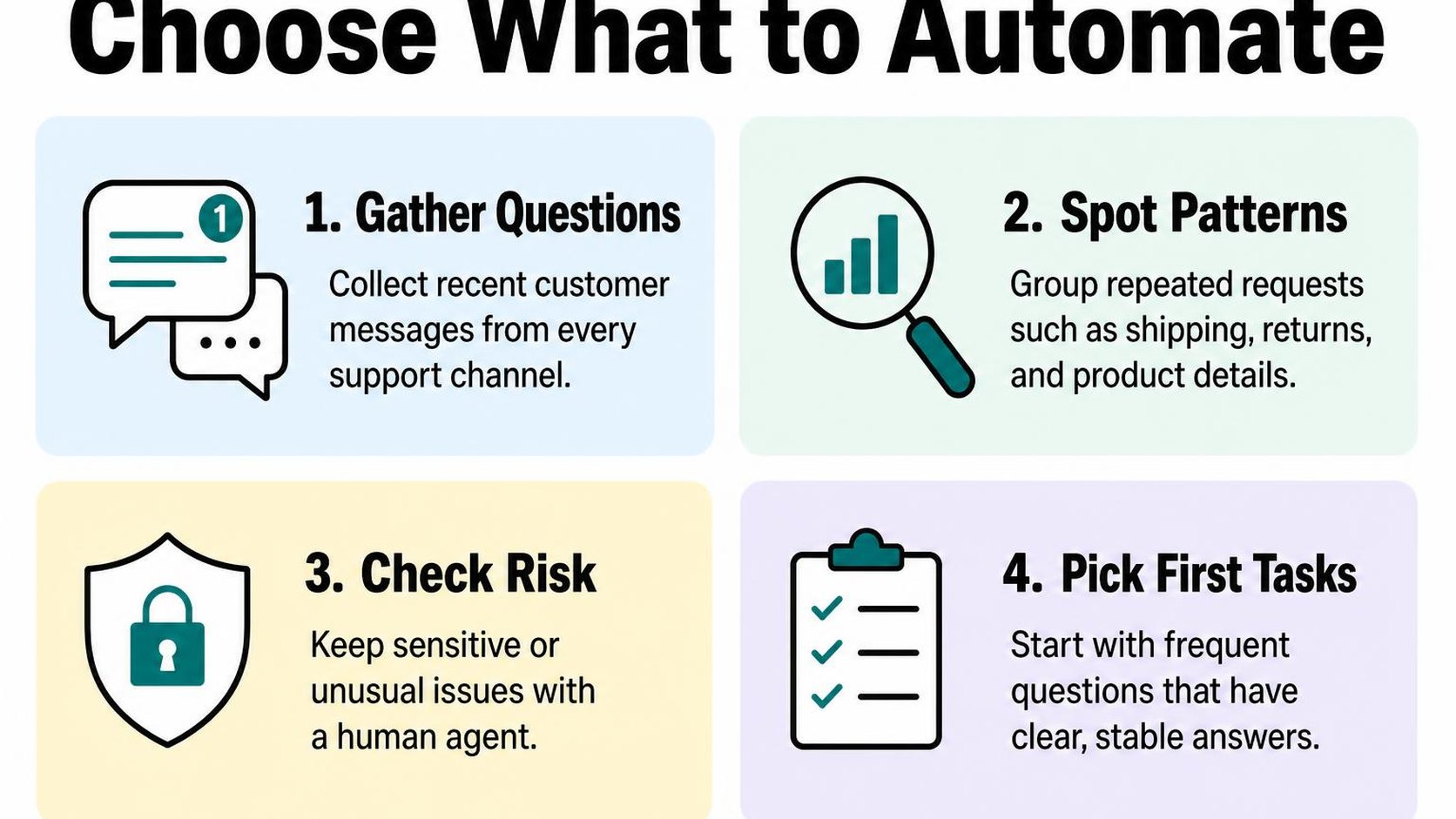
Create a simple spreadsheet with one row per request. Record the topic, urgency, information needed, action taken, and whether the answer depends on someone making a judgment. This gives you a shortlist based on your inbox rather than a tool’s feature list.
Group recurring questions by topic and urgency
Request mapping means sorting support messages into categories that share the same answer or resolution process. Count each category, but also note how much time it takes: a frequent sizing question may be easier to automate than a less frequent delivery dispute.
Separate the question from the action. Explaining how to cancel an order is different from cancelling one, especially when fulfillment may already be underway.
- Order tracking: Group requests for tracking links and shipment updates. Consider automation only when you can retrieve the correct order securely and show current information without inventing a delivery date.
- Store policies: Collect questions about return windows, shipping regions, and payment methods. Use your published policies as the source, and flag anything missing or contradictory before creating automated answers.
- Product information: Group questions about dimensions, materials, care, and compatibility. Automate factual answers only when your product information supports them.
- Urgent changes: Mark address corrections, cancellations, and duplicate orders separately. Route them quickly to someone who can check fulfillment status and act.
For each category, choose one starting treatment: automatic answer, draft for review, or direct human handling. If you need examples of where conversational support fits, the guide to AI customer support for Shopify merchants provides broader context.
Keep sensitive or unusual cases with a person
Human handoff means transferring a conversation to someone with the context and authority to resolve it. Make that transfer part of the workflow, not something shoppers must earn by repeating their question.
Keep damaged-item disputes, payment concerns, suspected fraud, policy exceptions, and repeated failed deliveries with a person. An automated reply can acknowledge the issue and collect essential details, but it should not decide who is at fault or promise compensation.
- Escalation triggers: Route requests when shoppers ask for a person, challenge an answer, report an urgent problem, or receive no useful resolution.
- Useful context: Pass along the conversation, verified order reference, and steps already attempted. Avoid asking shoppers to submit payment details or unnecessary personal information.
- Clear expectations: State your support hours and a realistic response window. Do not imply that someone is reviewing a message immediately unless that is true.
Practical rule: Automate an answer when the facts are reliable and the consequences are limited. When the next step changes an order, spends money, or requires an exception, keep a person responsible.
Start with one or two predictable categories. You gain time without handing every customer problem to a system that cannot judge the circumstances.
Step 2: Build a reliable source of answers for your store
A shopper asks whether a sale item qualifies for a return. Your product page says “final sale,” but your help page still describes last season’s return policy. Before you enable shopify customer service automation, resolve that conflict so shoppers receive the same answer wherever they ask.
A source of truth is the approved store information your automated replies draw from. It needs clear facts, an owner, and a review date—not just a folder of old support conversations. Past replies can reveal common questions, but they can also contain exceptions that should never become standard policy.
Document policies, product details, and shipping expectations
Start with questions you receive repeatedly, then record the exact facts needed to answer them. Check your published pages against your current operations before connecting them to an automated system. If two sources disagree, correct the underlying content rather than asking the system to choose.
- Policies: Record return windows, eligibility conditions, refund timing, cancellation rules, and exclusions. Specify whether a deadline starts at purchase, dispatch, or delivery.
- Product details: Confirm dimensions, materials, sizing guidance, compatibility, and care instructions. Leave unsupported claims out, even if they appear in an older marketing description.
- Shipping expectations: Separate processing time from carrier transit time. Include destination restrictions and business-day definitions without turning estimates into guaranteed delivery dates.
- Maintenance: Assign someone to review each topic and record its last verification date. Recheck affected answers whenever you change a policy, supplier, promotion, or shipping service.
For order-status questions, distinguish general guidance from live order information. A shipping policy can explain how tracking works; it cannot confirm whether a particular parcel has shipped. Without verified order data, the response should explain where to check rather than invent a status.
For example, Shopify’s guidance on Inbox explains that its optional agent can answer using store products, policies, and published content. That makes the accuracy of those pages part of your support setup, not a separate housekeeping task.
Write concise answers in your brand voice
Write each answer around one customer question. Put the direct answer first, add the condition that matters, and finish with a useful next step. Warm language helps, but it should not hide a restriction or suggest an exception you cannot offer.
For automated responses for your Shopify store, replace vague reassurance with specific wording. Instead of “Your order will arrive soon,” write “Your tracking page shows the carrier’s latest delivery estimate.” Use that wording only when shoppers actually have access to a tracking page.
Practical rule: If an answer needs a fact your approved content does not contain, leave that fact unresolved. A clear limitation is more useful than a confident guess.
Test drafts against real questions, including misspellings and requests with missing details. Check whether each answer stays accurate without inventing dates, eligibility, or product capabilities. Keep approved examples together so future edits preserve both your facts and your tone.
Step 3: Automate order status questions with clear handoffs
A shopper asks where their parcel is while your team is offline. Your shopify customer service automation should retrieve verified order information, explain what it means, and offer a human handoff when the answer needs investigation.
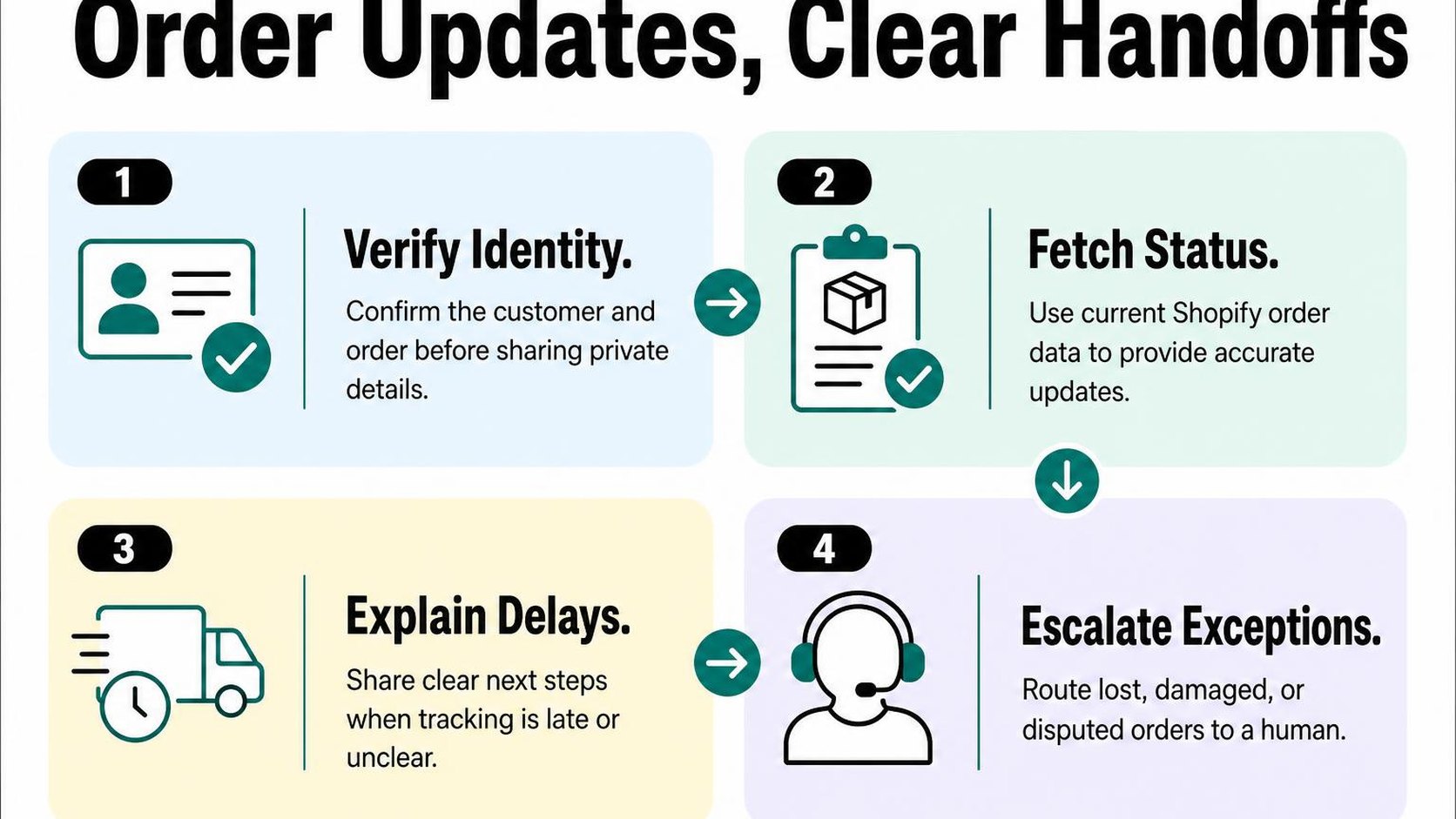
Keep this flow narrow: answer status questions, but do not automatically promise refunds, replace parcels, or change delivery addresses. Those actions need separate permissions and checks.
Connect order information to the support flow
Start with a secure lookup. An order number alone is not proof of identity. Prefer an authenticated customer account or a verification link sent to the email address already attached to the order before revealing private details.
If your support tool cannot verify the shopper, route the request to your team without exposing order contents, addresses, or tracking information. Never ask for passwords, payment card details, or a one-time login code in chat.
Once identity is confirmed, retrieve the fulfillment status, carrier, tracking URL, and latest available update. A handoff transfers the conversation and its context to a person rather than making the shopper start again. Use these workflow automation basics to map each trigger, lookup, condition, and next action before enabling replies.
- Verify access: Confirm that the shopper can access the order through your approved authentication process.
- Check freshness: Separate the order’s fulfillment status from carrier tracking events, and show timestamps when available.
- Return a useful answer: Provide a descriptive tracking link and identify which information comes from the carrier.
- Preserve context: Pass the verified order reference, reported problem, lookup result, and previous replies to your support queue.
Do not treat a failed lookup as proof that an order does not exist. A mistyped reference, connection failure, or temporary permissions issue can produce the same result. Offer a retry or human review without exposing technical details.
Explain what customers can do when tracking is delayed
Build separate responses for common delivery states. “Label created” does not confirm carrier possession, and a carrier estimate is not a guaranteed arrival date. Clear distinctions prevent an automated answer from turning uncertainty into a promise.
| Tracking situation | Automated response | Handoff condition |
|---|---|---|
| Label created, no scan | Explain that tracking does not yet show carrier acceptance. | Your stated dispatch window has passed. |
| In transit, no recent update | Share the tracking link and latest scan date. | Your carrier-specific investigation threshold is reached. |
| Delivery exception | Summarize the carrier notice without guessing the cause. | The next action is unclear or requires your team. |
| Delivered, not received | Suggest checking the delivery location and household members. | The shopper still cannot locate the parcel. |
| Order data unavailable | Explain that the status cannot currently be confirmed. | Route for manual lookup. |
Set investigation thresholds from your actual fulfillment process and carrier guidance, not a universal waiting period. Give the shopper a support reference and an honest response window when a person takes over. If your queue cannot support a precise deadline, state your staffed hours instead.
Practical rule: End every unresolved order-status reply with a next step and a way to reach a person. Stop repeating automated tracking answers once the shopper reports that those answers do not solve the problem.
Step 4: Set up Shopify FAQ automation for repeat questions
A shopper asks whether a sale item can be returned, but your automatic reply only says “View our returns policy.” They still need an answer before buying. This is where shopify customer service automation needs verified details, not another generic acknowledgment.
FAQ automation turns approved answers to recurring questions into responses shoppers can access without waiting for your team. Start with questions that have stable, policy-based answers, and leave exceptions or account-specific decisions to a person.
Prioritize questions customers ask before and after purchase
Review recent support conversations, contact-form submissions, and onsite search terms. Group messages by what the shopper needs to decide, rather than treating every variation in wording as a separate question.
Separate prepurchase questions from postpurchase requests. “Can you ship to Canada?” needs a different answer from “Can you change the address on my order?” The first can usually use published shipping rules; the second requires checking fulfillment progress.
- Before purchase: Prioritize delivery destinations, sizing guidance, product compatibility, payment options, and return eligibility. Answer the specific question before adding supporting details.
- After purchase: Cover how to request a return, where to find care instructions, and how to report a damaged item. Explain the process without automatically approving a refund or replacement.
- Verification: Compare every draft against your current policies, product information, and operational practices. Resolve contradictions before publishing an automated answer.
- Escalation: Route disputed charges, unclear eligibility, and requests outside standard policy to your team. Do not let an automated response invent an exception or reject a valid request.
For example, replace “Returns are easy” with a verified answer such as: “You can request a return within 30 days of delivery for unworn items with tags attached. Final-sale items are excluded. Contact support with your order number to start.” Use those conditions only if they match your actual policy.
Make answers easy to scan and update
Write automated responses for Shopify store visitors with the answer first, followed by the relevant conditions and one next step. Keep each response focused on one question so shoppers do not have to search a long policy summary.
Use the same approved wording across your help pages and automated replies. If your support system generates answers from published content, remove outdated or contradictory pages before enabling it; polished wording cannot fix conflicting source material.
- Readable structure: Use two or three short sentences. State restrictions plainly instead of hiding them behind reassuring language.
- Clear ownership: Assign someone to review answers whenever shipping rates, return windows, product specifications, or seasonal policies change.
- Useful testing: Try alternate wording, incomplete questions, and common exceptions. Check that uncertain requests reach a person rather than receiving a confident guess.
- Feedback checks: Review repeated follow-up questions and requests for human help. These often reveal missing conditions or unclear instructions.
Practical rule: Automate the explanation, not an unverified promise. When an answer depends on the shopper’s order, circumstances, or an exception, explain what your team needs to check and offer a clear handoff.
Step 5: Configure a Shopify customer service chatbot with human handoff
A shopper asks where an order is, then explains that it is a birthday gift arriving too late. Your chatbot can explain tracking, but the conversation now needs judgment. Configure your Shopify customer service automation so that this change triggers help, not another generic shipping answer.
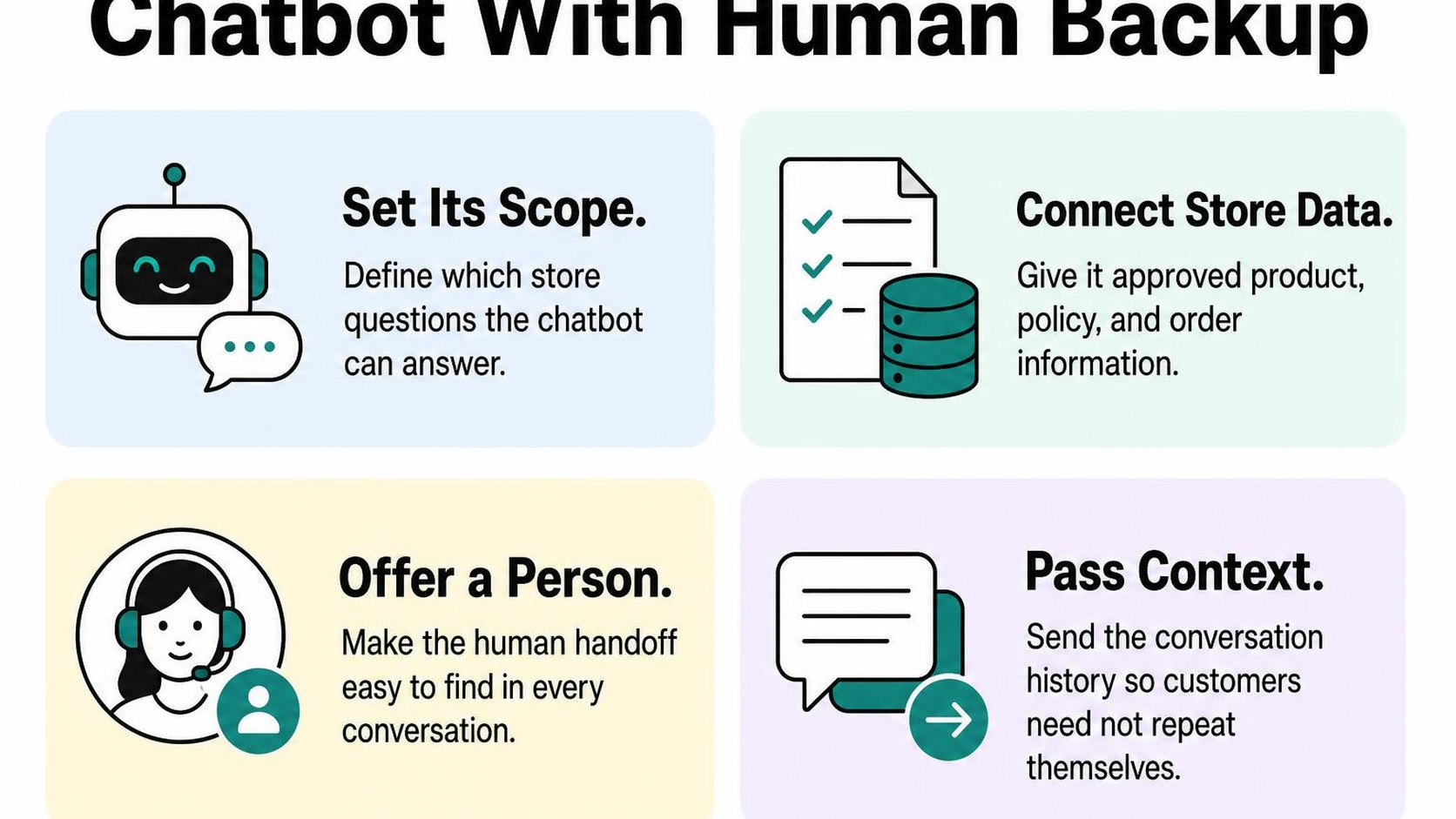
A human handoff transfers the conversation to your team with enough context to continue. The goal is not to keep every shopper inside the bot; it is to answer routine questions and make personal help easy to reach.
Set expectations about what the chatbot can handle
Start your Shopify support chatbot setup with a short introduction that identifies it as an automated assistant. Name its supported tasks, such as explaining delivery options, finding sizing information, or directing shoppers to order tracking. Do not imply that it can view or change orders unless you have connected and tested those capabilities.
Keep a visible “Talk to a person” option available throughout the conversation. State your support hours and a realistic response window before the shopper submits a request, especially when nobody is online.
- Opening message: Say, “You’re chatting with an automated assistant. You can ask about shipping, sizing, and returns, or request a person.” Match this list to the functions you actually enable.
- Order questions: Without a verified order connection, direct shoppers to your tracking page rather than inventing a delivery date. Request identity verification before exposing order-specific information.
- Offline expectations: Explain that a message goes to your team and state when a reply is expected. Only promise a response window your team can consistently meet.
For more context on conversation design, see the guide to using a Shopify chatbot to answer questions. Keep the introduction brief so shoppers can ask their question without reading a long disclaimer.
Route refunds, complaints, and uncertain answers to your team
Configure routing rules around the request, not just individual keywords. A refund request, damaged-item complaint, payment dispute, or request for an exception should enter a team queue. Your bot can collect basic details, but it should not approve compensation or promise an outcome.
Treat missing information and unsupported questions as reasons to pause. If your system offers a confidence score, test its threshold against real support examples; a high score alone does not prove that an answer is correct.
- Direct requests: Route “human,” “agent,” and equivalent phrases immediately. Do not require shoppers to finish a troubleshooting flow first.
- Unresolved exchanges: Escalate after one unsuccessful clarification or when the shopper says the answer does not help. Stop repeating the same response.
- Conversation context: Pass along the transcript, request summary, and relevant details already provided. Collect only what your team needs, and never request passwords or full payment-card details.
Practical rule: Acknowledge the issue, explain the next step, and stop automated replies once your team takes ownership. Say “Your request is queued for the support team” only after the transfer succeeds.
Before publishing, test a routine question, an angry complaint, an unknown answer, and an after-hours handoff. Confirm that each reaches the correct destination and that a teammate can respond without making the shopper start again.
Step 6: Personalize automated responses without pretending they are human
A shopper asks why a parcel has not arrived, and your chat replies with their first name and a cheerful greeting. That is not enough. With shopify customer service automation, the human touch comes from answering the actual concern, explaining what is known, and making human help easy to reach.
Personalization should reduce effort, not make your automation sound like a person watching every move. Use relevant details to save the shopper time, but leave out information that does not help resolve the request.
Use customer and order context only when it helps
Context-based personalization means using verified information about the current request to make a reply more useful. For a delivery question, that might mean the order’s dispatch date and latest carrier update—not the shopper’s lifetime spending or browsing history.
Before you include an order detail, check that your support flow has verified the shopper’s access to that order. A name or order number alone should not become permission to disclose a delivery address or other personal information.
- Relevant detail: Refer to the item or shipment the shopper asks about. If an order ships in two parcels, explain which parcel the tracking update covers.
- Verified status: Distinguish between a shipping label being created and a carrier receiving the parcel. Do not turn an estimated arrival date into a delivery promise.
- Missing information: Say when a tracking update is unavailable. Do not fill the gap with a reassuring claim that the package is moving normally.
- Useful restraint: Use a first name when it fits, but avoid repeating it in every message. Skip purchase-history references unless they directly answer the question.
When you automate Shopify customer support, keep a generic fallback for missing or unreliable data. “The carrier has not posted an update yet” is more useful than a broken order field or an invented explanation.
Keep the tone warm, direct, and transparent
Identify the automated assistant at the start of the conversation, rather than hiding that fact behind a staff name and portrait. A short disclosure sets expectations without making every reply begin with a technical disclaimer.
Use empathetic language that acknowledges the inconvenience without claiming human feelings or actions. “A late delivery can disrupt your plans” is honest; “Your parcel has been personally checked” is not, unless someone actually checks it.
Example automated reply: “You’re chatting with the store’s automated assistant. Your order’s latest carrier update shows a delay, and there is no revised delivery date yet. Sorry for the inconvenience. You can use ‘Contact support’ below to ask the team to review the shipment.”
Only offer that contact option when it exists and works. Keep it visible beside the answer, rather than making the shopper search a help page to find a person.
Set response expectations using your actual staffing hours. Shopify’s availability and automated first-reply settings let you tailor the initial message so shoppers know when to expect a human response.
Review automated responses for your Shopify store against real complaints, not just routine questions. Remove forced cheerfulness, unnecessary apologies, and promises your team cannot keep.
Step 7: Test the workflow, review results, and improve it
A shopper asks where an order is, then adds that the delivery address is wrong. Your automation answers the tracking question but misses the urgent change. That is why shopify customer service automation needs testing against messy conversations, not just clean questions with obvious answers.
Start with a small group of low-risk questions and keep a person responsible for reviewing the results. Faster replies help only when customers receive accurate information and can reach someone when the workflow breaks.
Test common questions and failure cases before launch
Build a test set from recent support conversations, removing personal information before sharing examples outside your support system. Include short messages, spelling mistakes, follow-up questions, and requests that combine two problems. Compare each response with your current policies and actual order information.
Test the full journey on mobile as well as desktop. An accurate answer still fails if the tracking link is broken, the customer cannot send a follow-up, or the handoff loses the conversation history.
- Routine requests: Check delivery estimates, return windows, product questions, and order tracking against the information your team uses.
- Missing information: Try an unknown order number, an unavailable tracking update, and a question your help content does not answer. The workflow should acknowledge the gap rather than invent an answer.
- Privacy checks: Confirm that order details stay protected by appropriate identity checks. Test whether one customer can retrieve another customer’s information.
- Human handoff: Submit a cancellation, payment dispute, and repeated complaint. Verify that each reaches the right queue with enough context for staff to act.
- Safe fallback: Check what happens when an integration stops responding. Prepare a way to disable the affected workflow without closing access to support.
Track resolution, escalation, and customer feedback
Define resolution rate as the share of conversations in your reviewed sample where the customer’s issue is actually resolved. Do not treat a closed chat or an unanswered follow-up as proof of success. Review repeat contacts alongside customer feedback to spot replies that look complete but leave the problem open.
Track escalation rate, the share of conversations passed to a person, by question type. A higher rate is not automatically bad: sensitive requests should reach your team. Investigate avoidable transfers and missed handoffs rather than pushing every number downward.
- Launch narrowly: Enable one tested category first, with a named owner checking conversations daily during the initial rollout.
- Review quality: Sample both apparently resolved chats and escalations. Record inaccurate answers, repeated questions, negative feedback, and time to human response.
- Update answers: Fix the underlying policy or help content, then rerun the affected tests before publishing changes.
- Expand deliberately: Add another category only when accuracy, privacy, and handoffs meet your agreed standards. Pause workflows that create extra customer effort.
Practical rule: Automate the next question only when the current workflow consistently helps customers finish their task, not merely leave the chat.
Yassine Malti is the developer writing this guidance from practical store work.
Put this into practice
Start with the store you already have, then use the guides on the blog for the next page that needs the same treatment.
Shopify apps by Yassine Malti
Put this into practice
-

Describer · Product descriptions
Product descriptions written from your own product data · Free: 50 descriptions/month
-

LLMs TXT · llms.txt for AI tools
A short llms.txt of your real store links · Free
-

Blogger · SEO blog posts
An AI blog agent that writes and publishes for you · 50 credits/month free