Out-of-stock items were the top anticipated back-to-school shopping challenge for 56% of U.S. consumers in Sensormatic Solutions' 2024 survey, reported by the Odessa American. For a Shopify merchant, that reframes a sold-out page: it isn't just an inventory status. It's a customer deciding whether to wait, compromise, or leave.
A back in stock alert gives you a chance to recover that purchase. But the useful question isn't how many people open the message. It's whether the person who clicks can buy what they asked for.
Table of Contents
- Why a Sold Out Page Loses the Sale
- When the Alert Should Actually Fire
- How the Restock Flow Works
- Apps, Flow or Custom Automation
- Messages Segments and Substitutes
- Three Restock Moments on a Real Catalog
- Launch One Honest Alert Before the Next Stockout
Why a Sold Out Page Loses the Sale
A back in stock notification is an opted-in message about one exact variant, such as a medium navy hoodie, sent after sellable quantity returns to that variant. It isn't a promotional blast announcing that hoodies are available. And a notification button that doesn't record the selected size and color can't reliably deliver the right alert.
Say a shopper lands on your Shopify product page after searching for a navy hoodie. They choose medium, check the fit information, and discover that their size is sold out. The small navy hoodie and medium gray hoodie may still be available, but neither is the purchase they chose.
Your product can remain published while that particular sale becomes impossible. Without a useful next step, the shopper must decide whether to buy elsewhere, accept a substitute, or abandon the purchase.
The cost extends beyond the missing item
A U.S. Bureau of Economic Analysis working paper cites grocery research finding that 31% of missing items were necessary enough for shoppers to visit another store, with the fixed cost of a store visit averaging about five times the price of the item studied. Using those assumptions, the paper estimates that a 10% stockout rate creates a minimum consumer-welfare loss of 15%.
That's a measure of consumer inconvenience and cost, not a forecast of your Shopify revenue loss. The practical lesson is simpler: shoppers spend effort resolving stockouts, and they don't have to spend that effort with you.
The distinction between collecting interest and recovering a purchase matters:
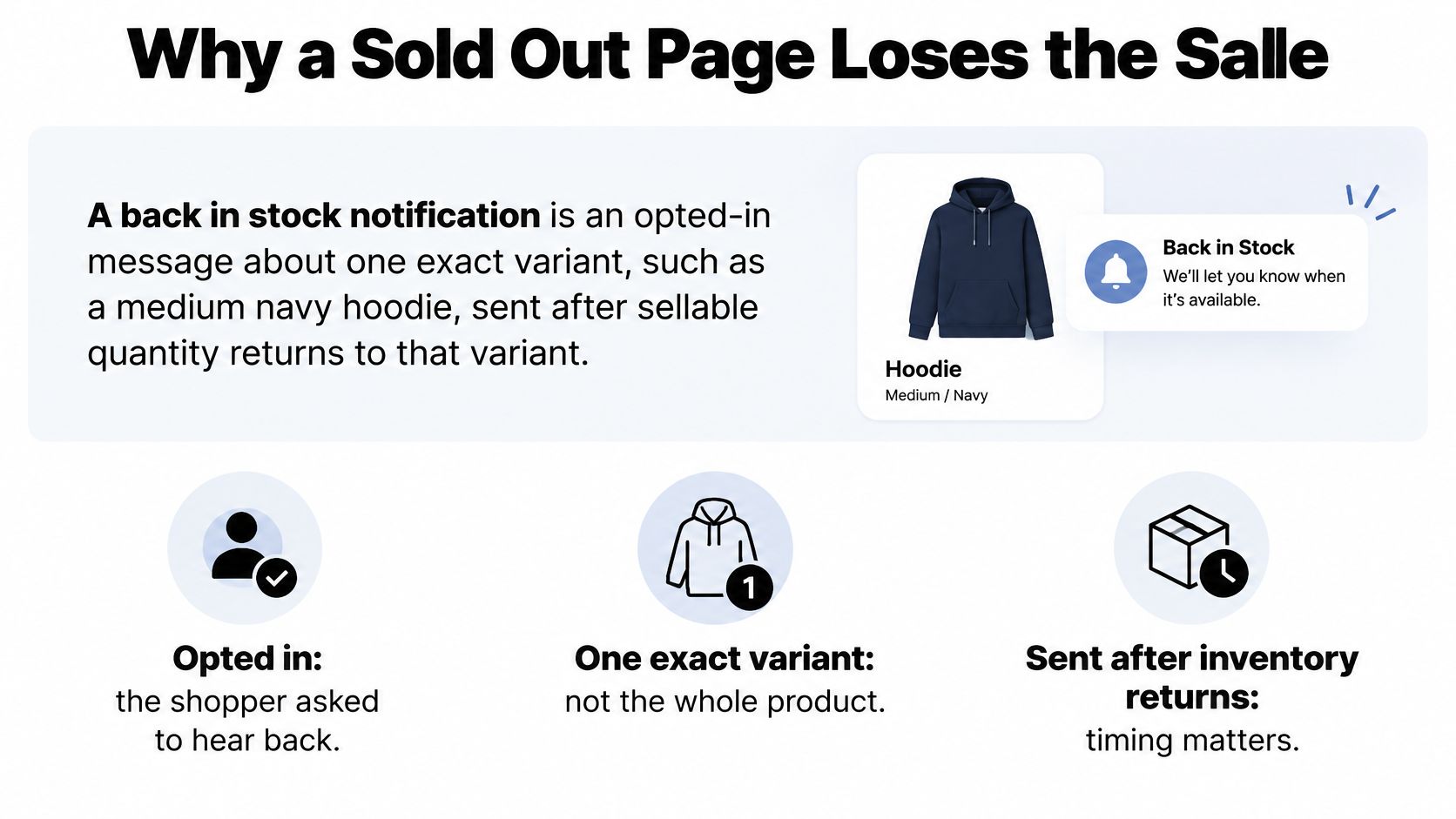
Recover the decision the shopper already made
A useful signup form preserves that original choice. Show the selected variant beside the form, explain what the shopper is requesting, and confirm that you've recorded it. Don't turn a restock request into a general newsletter subscription.
This belongs within Shopify conversion rate optimization because the obstacle isn't necessarily weak persuasion. The customer may already want the product; your store can't fulfill the purchase.
Practical rule: Treat an alert as a recovery tool, not a reservation. Unless you actually hold inventory, don't imply that joining the list guarantees a unit.
When the Alert Should Actually Fire
| Inventory situation | Send alert | Message instead | Reason |
|---|---|---|---|
| Sellable online units above safety stock | Yes | Variant restock notice | Enough units for the expected first wave |
| Partial replenishment below waitlist size | Limited | Priority slice only | A full blast risks an immediate sellout |
| Stock at a location that cannot ship | No | Hold | Online checkout would still fail |
| Regional warehouse only | Conditional | Geo-matched subscribers | Other regions would see a false available state |
| Units in a store but not online | Optional | Pickup note only | Online purchasing is still unavailable |
| Incoming purchase order with a date | No | Preorder or delay update | The item is not back in stock yet |
| Restocked then sold out before send | Suppress | Silence or a substitute offer | The availability claim would already be wrong |
Send only when the exact variant is purchasable for that shopper, with enough sellable stock to support a sensible notification batch. A warehouse receipt alone isn't permission to send.
The visibility problem is substantial: EMARKETER reports that nearly three-quarters of U.S. adults at least sometimes check price or inventory online before visiting a store, while only 24% of retail decision-makers reported full visibility into out-of-stocks in March 2025. An incorrect availability message can therefore create more than a disappointing click. It can send someone on an unnecessary trip.
Read stock through fulfillment rules
For online inventory above your safety-stock buffer, send the variant-specific notice. Calculate the usable quantity after commitments and operational holds, rather than treating every physically present unit as available.
Partial replenishment needs a smaller audience. Start with a defined priority group, such as the earliest eligible subscribers, then reassess remaining stock before releasing another batch. Don't assume that subscriber count translates directly into orders, but don't expose the whole list to a tiny receipt either.
Stock at a location that cannot fulfill the order should stay out of the online trigger. For regional warehouses, match recipients to the serviceable region. If you don't know the shopper's region, collect it or avoid making an unrestricted shipping claim.
Store-only inventory needs different language. Offer pickup at the named location, provided that location can support the transaction. Don't send customers to a standard shipping checkout that still rejects the variant.
Separate arriving from available
An incoming purchase order supports an expected-restock update. If you accept orders against future inventory, use explicit preorder terms and an honest fulfillment estimate. Neither situation justifies saying the item is back in stock.
Recheck availability immediately before dispatching queued messages. If the variant has sold out again, suppress the notice rather than letting an outdated event control the customer experience.
An inventory event tells you something changed. A fulfillment check tells you whether the customer can buy.
Judge this process by purchasable sessions, inventory-related cancellations, and repeat visits. A growing signup list is useful, but it doesn't establish that your alerts are trustworthy.
How the Restock Flow Works
Think of the automation as a callback list, not a campaign calendar. The subscriber asks about a particular variant, and the inventory listener checks when that request can be fulfilled.
The basic customer journey looks like this:
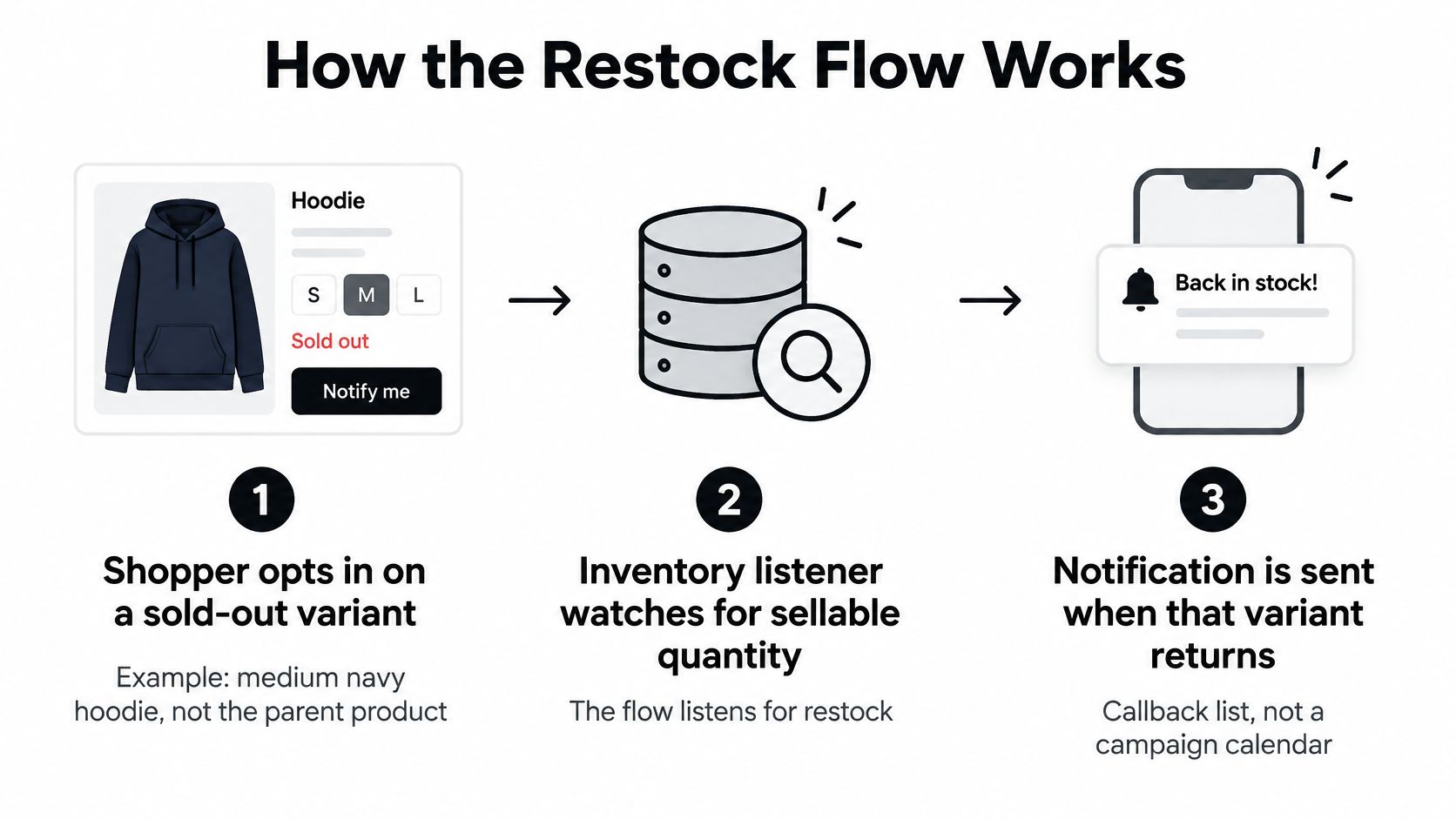
Build the event path
- Capture the request. Store email or phone number, the Shopify variant ID, and the applicable consent type. Include location information if fulfillment requires it.
- Keep one active subscription per person per variant. Repeated form submissions shouldn't create duplicate notifications.
- Listen for zero-to-positive sellable inventory. Use Shopify Flow where supported, or an app webhook and inventory lookup. Don't rely on a parent product becoming available.
- Deduplicate repeated restock events. Inventory adjustments can generate multiple updates during the same day. Associate sends with a replenishment event so routine corrections don't restart the queue.
- Suppress stale messages. Check quantity again before sending and stop delivery when the eligible stock disappears.
- Deep-link to the precise variant. Open the requested selection, then revalidate inventory at checkout. A notification link doesn't reserve stock.
- Report purchases separately from clicks. Track orders attributable to delivered alerts using a defined attribution window, alongside the number of recipients who could still purchase.
For teams connecting these pieces, this introduction to workflow automation explains the relationship between triggers, conditions, and actions. Keep inventory eligibility in the conditions, rather than assuming the trigger proves availability.
Use benchmarks without turning them into promises
Drip's back in stock email guide cites a Barilliance benchmark with a 65.32% open rate and 14% conversion rate, compared with 8.17% average conversion across email campaigns. These are high-intent campaign examples, not universal targets for your store.
| Metric | Back in stock email | Average email campaign | Caveat |
|---|---|---|---|
| Open rate | 65.32% | Not stated in the cited benchmark | Campaign benchmark, not a universal target |
| Conversion rate | 14% | 8.17% | High-intent example, not a guarantee |
Speed matters because subscribers and ordinary store visitors draw from the same inventory. Process eligible events promptly, but don't remove the final stock check to make the automation faster.
For a visual companion to planning the implementation, use this video:
Log the requested SKU, alert delivery time, and checkout availability. Those records let you distinguish weak customer interest from an alert that arrived after the buying opportunity had vanished.
Apps, Flow or Custom Automation
Choose the implementation by its ability to represent your fulfillment rules, not by how attractive its email editor looks. A simple catalog doesn't need a custom inventory service. A complicated warehouse network shouldn't be squeezed into an app that only checks total quantity.
| Path | Speed to launch | Inventory control | Best when | Main risk |
|---|---|---|---|---|
| Back in stock or email app | Fastest when native integrations fit | Basic variant trigger, verify capabilities | One location and a simple catalog | Alerts fire on stock that cannot ship |
| Shopify Flow plus email or SMS | Requires configuration and testing | Quantity and tag conditions where supported | A marketer can maintain branches | Conditions drift when locations change |
| Custom automation | Scoped development project | Location, buffer, reserve, dedupe | Partial drops or multi-node inventory | Overbuilding before the simple flow is proven |
| Manual list export | Immediate but fragile | No automatic stock checks | A single one-off restock | Double sends and messy consent |
Buy the standard pieces
A dedicated restock or lifecycle app is a sensible starting point when it can handle your actual inventory setup. Look for a variant-aware signup form, consent records, stock thresholds, suppression controls, and reporting that connects delivery to purchase.
Test those capabilities rather than inferring them from a feature label. Ask what happens when a variant returns at a non-shipping location, when an order consumes the last unit, and when inventory changes repeatedly before a queued send.
Shopify Flow plus your existing messaging app can offer more branching without replacing the whole stack. Confirm that the required triggers, inventory fields, and messaging actions are available in your configuration. Assign an owner to review those branches whenever locations, tags, or fulfillment policies change.
Build only the exceptions you need
Custom automation becomes useful when your daily operations require regional eligibility, inventory reservations, or controlled partial drops. It also creates maintenance work: someone must monitor failed events, expired credentials, and disagreements between warehouse and storefront quantities.
Implementation trade-off: Apps exchange some control for convenience. Custom development adds control, but also gives your team responsibility for keeping the rules correct.
Don't use an exported spreadsheet as the permanent integration between inventory and messaging. Once staff edit separate copies, it becomes harder to preserve unsubscribe status, identify duplicate requests, or stop a queued send after a sellout.
Keep unrelated catalog automation separate, too. A background-removal workflow and a restock workflow may both process products, but they shouldn't share assumptions about whether a variant is sellable.
For a single warehouse and straightforward channel setup, start with an app. When multiple locations or partial receipts determine who can buy, choose a configurable workflow or custom logic that can express those conditions explicitly.
Messages Segments and Substitutes
The best back in stock automation sometimes sends the customer toward another product. If an available alternative genuinely solves the shopper's problem, preserving the purchase can matter more than generating another click on the original SKU.
Demand for useful availability messages is real: in Wunderkind's 2025 U.S. Consumer Insights Report, about 20% of respondents identified out-of-stock items as their biggest purchase blocker, while back in stock alerts appealed to 28% of Millennials and 25% of Boomers. That doesn't mean every subscriber wants the same message.
Match the message to the need
Urgent and non-substitutable shoppers need precision. Someone waiting for a compatible replacement part shouldn't receive a visually similar component that won't fit. Name the requested variant, state current availability, and provide a direct purchase link without distracting recommendations.
An example message could say: Medium navy hoodie is available to order again. You requested this size and color. Check current availability on the product page.
Flexible shoppers may benefit from an alternative before replenishment. Product-view behavior can suggest interest, but it doesn't prove that a substitute is suitable. Explain the differences and let the customer decide.
For skincare, disclose relevant formula, texture, shade, and ingredient differences. For apparel, explain fit and fabric differences rather than presenting another size as equivalent. Include price and delivery information where these change the decision.
The distinction between urgency and replaceability is worth making visible:
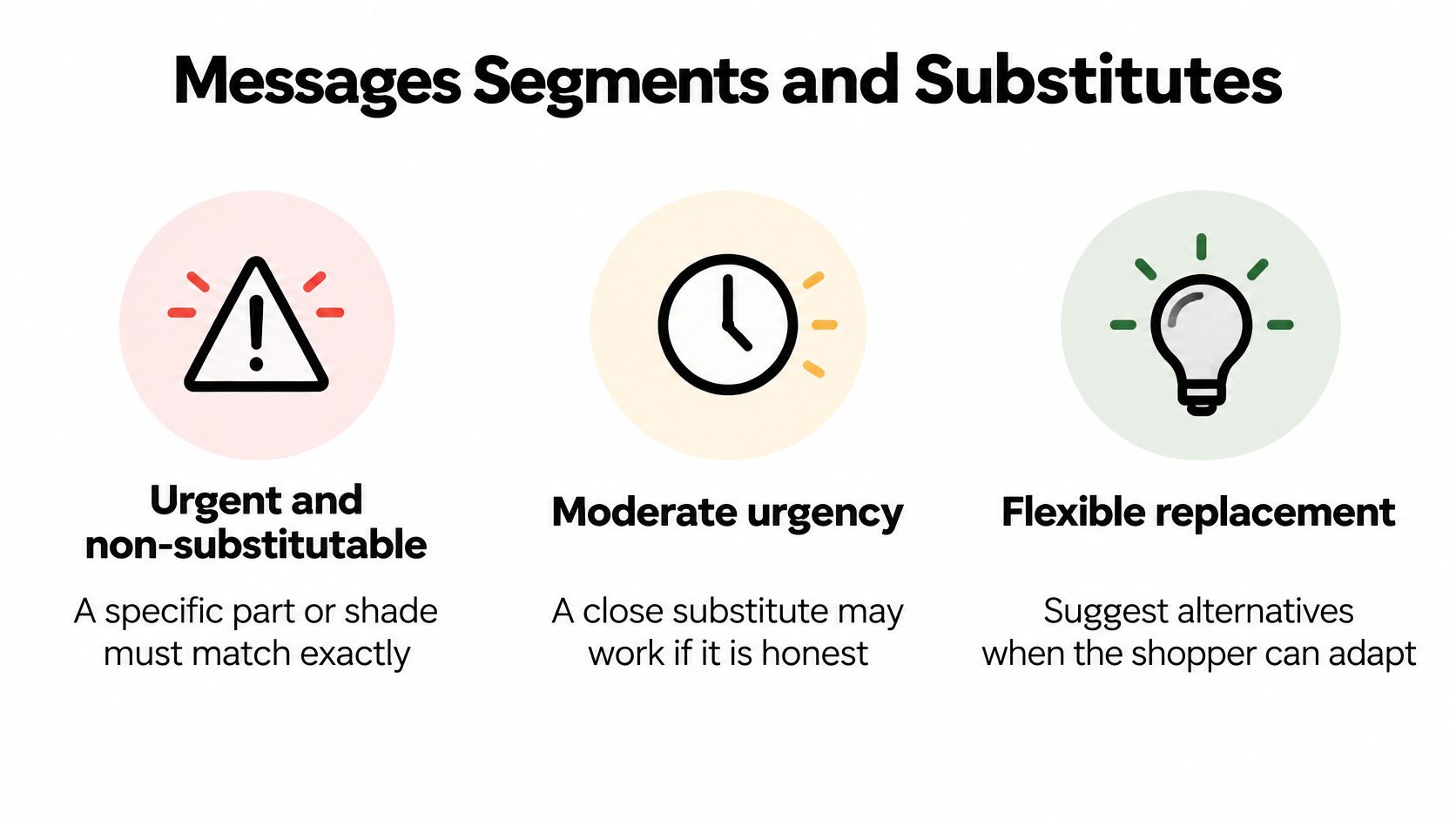
Give quiet subscribers a way out
Subscribers who ignore an alert shouldn't automatically receive every later inventory fluctuation. Offer a clear way to remain on the list, change preferences, or stop notifications. Avoid treating lack of engagement as evidence that the shopper needs stronger urgency.
Before launching SMS, review the customer-facing signup experience. California Cowboy's page to subscribe to clothing text alerts offers a concrete apparel signup touchpoint to examine alongside your own form. Evaluate whether customers can understand what they're requesting without assuming that another store's wording fits your program.
Your ecommerce SMS marketing plan should distinguish a specific availability request from permission for broader promotional messaging. Store those permissions separately, and don't append substitute promotions to a narrowly scoped notification unless the recipient has the appropriate permission.
- Set expectations. Explain whether the request covers the next restock or ongoing alerts.
- Cap repeated contact. Define a stop or reconfirmation rule after non-engagement.
- Respect the purchase. Remove or update the request when the shopper buys the original, and reassess follow-ups after a substitute purchase.
The purpose is to help the shopper finish a decision, not keep them indefinitely inside a sequence.
Three Restock Moments on a Real Catalog
A sneaker size returns in a partial drop
Suppose a sneaker size has a waitlist larger than the incoming receipt. The operator releases a small batch of alerts to the earliest eligible subscribers, with restrained wording explaining that stock is limited.
They don't imply that being notified means a pair is reserved. If the business wants to guarantee access, it must implement an actual reservation policy rather than relying on the email wording.
The useful metric is purchasable checkout sessions from that notified group. If recipients consistently arrive too late, reduce the batch size or change the allocation policy.
A skincare shopper chooses the neighboring formula
Say subscribers waiting for a particular skincare shade also browse a neighboring formula. The merchant offers that alternative during the stockout, clearly describing its different texture and finish.
Academic inventory research on stockout-based substitution explains why substitute and primary-product demand need to be considered together. For this merchant, substitute revenue alongside original-product restock conversion is more useful than judging the later notification alone.
Strong signups with little substitution suggest customers want the exact item. Frequent substitute purchases suggest that better recommendations may recover demand before replenishment. Neither pattern justifies treating every signup as a guaranteed future order.
Compatibility-sensitive categories need extra care. A specialist catalog such as Nothing But Bands' Watch bands is a useful context for thinking about replacement choices: confirm the required fit and attachment specifications before suggesting a neighboring item.
The inventory routes behind these decisions should remain distinct:
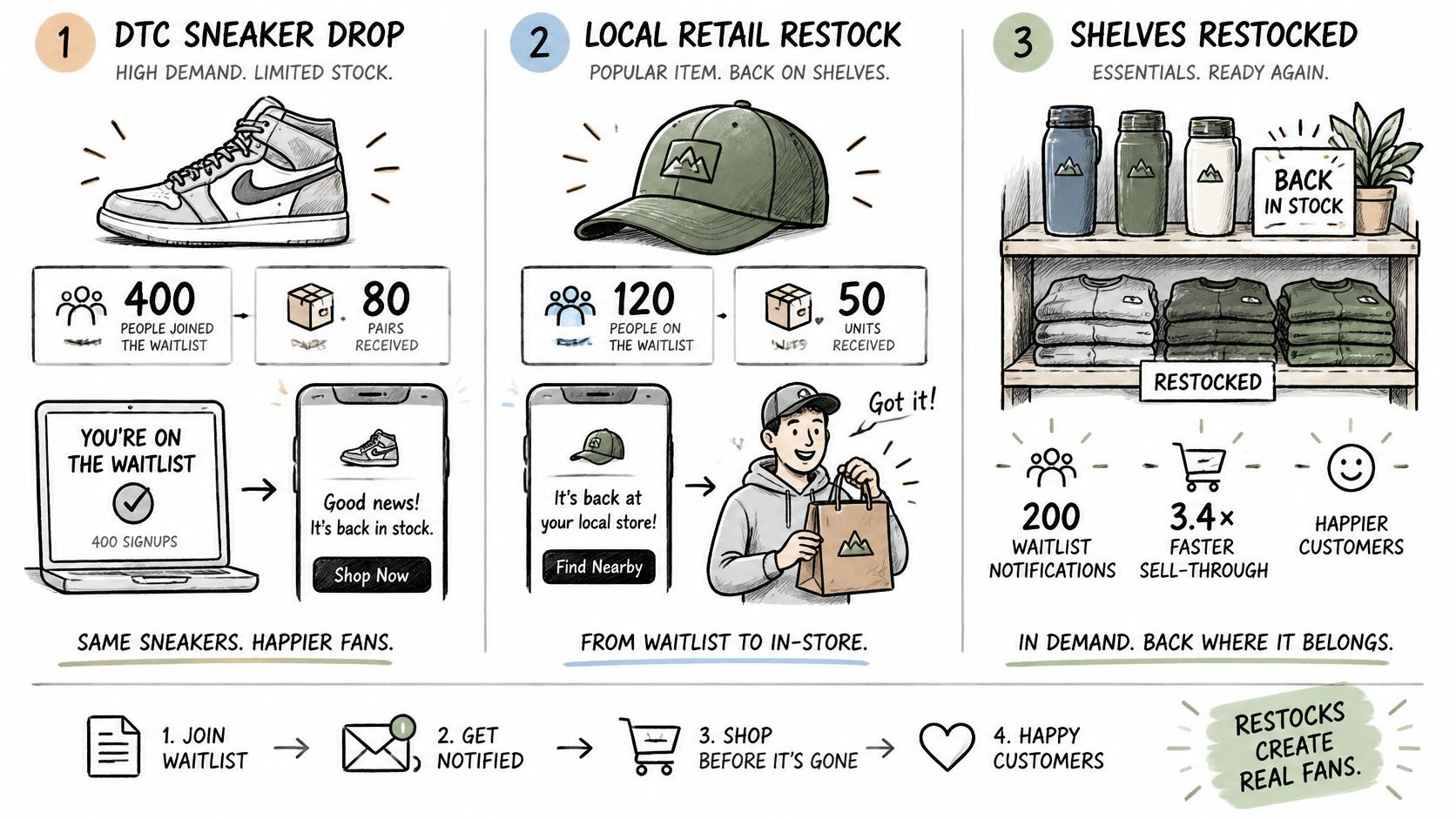
A store shopper needs the online route
In AlixPartners' 2024 survey, reported by SGB Media, 36% of respondents said they would order online from the same retailer when an item was unavailable in-store. A retailer serving that shopper should make the fulfillment route explicit.
A shipping notice should lead to a shippable unit. A pickup notice should identify the store and its pickup process, not leave the customer to discover the restriction at checkout.
Track complaints about availability disappearing between the message and checkout. Each complaint is a reason to inspect the allocation, location mapping, or delivery delay behind that specific send.
Launch One Honest Alert Before the Next Stockout
Pick a sold-out variant with clear customer interest this week. Don't start by redesigning every lifecycle message or migrating your entire messaging stack.
Choose something concrete, such as the medium navy hoodie, and write down what must be true before you would confidently tell a customer they can order it. Include the shipping location, inventory buffer, and any restrictions that affect eligibility.
Prove the smallest useful flow
- Instrument the selection. Confirm that the signup records the chosen variant rather than just the product.
- Test the buying path. Follow a test notification through the selected variant, shipping options, and checkout.
- Define the fallback. Decide what happens if inventory disappears or the customer prefers not to wait.
Use an app or Shopify Flow if it can represent those requirements. Bring in a Shopify developer when location rules, buffers, or partial receipts exceed what the integration can safely express.
Before enabling customer delivery, verify consent records, frequency controls, and the handling of substitute offers. After the first send, inspect purchasable sessions, inventory-related cancellations, and any revenue recovered through alternatives.
Pause the automation if customers repeatedly reach an unavailable variant. A smaller, dependable flow is more useful than a larger list of disappointed subscribers.
Your first implementation should answer a practical question: can a customer who receives the alert still complete the intended purchase? Start with that medium navy hoodie and prove the answer before expanding across the catalog.
Yassine Malti builds Shopify apps and custom automations that connect storefront workflows with the operational rules behind them. Visit Yassine Malti to discuss a variant-level restock flow, especially if regional inventory, partial receipts, or fulfillment restrictions make standard alerts unreliable.
Shopify apps by Yassine Malti
Put this into practice
-

ALT SEO · Image alt text
AI alt text for every product image · 100 images/month free
-

RANKit · Meta titles & descriptions
AI meta titles and descriptions, sized for Google · 50 meta tags/month free
-

TAGit · Product tags
SEO-friendly product tags, generated in bulk · 50 tags/month free