You've got the launch email open, the new collection is live, and Google still hasn't shown it. Or worse, you redesigned the store, traffic dipped, and the pages that used to rank are suddenly hard to find in Search Console. In Shopify, that usually isn't a mystery. It's a sitemap problem, or more often, a sitemap symptom pointing to a broader crawl or indexation issue.
A sitemap for Shopify is the file Google uses to discover what your store wants indexed. Shopify generates it automatically, which helps a lot, but automatic doesn't mean hands-off forever. Bulk imports, new Markets, app-added pages, and theme changes can all shift what appears in that file, sometimes in ways merchants don't notice until rankings wobble.
Table of Contents
- Why Your Shopify Store Sometimes Disappears From Google
- How a Shopify Sitemap Is Built and Structured
- Submitting Your Sitemap to Google Search Console
- Optimizing What Appears Inside Your Shopify Sitemap
- International Markets, hreflang, and Sitemap Coverage
- Custom Sitemaps Through Apps, Themes, and Automation
- Troubleshooting the Most Common Shopify Sitemap Problems
- Putting the Sitemap Back in the Bigger SEO Picture
Why Your Shopify Store Sometimes Disappears From Google
The first sign is usually quiet. A collection you expected to rank sits invisible for weeks, or a product launch gets no organic traction even though the page is live. You check the storefront, everything looks fine, and then Search Console makes the problem feel more confusing because the sitemap is submitted, yet the pages still aren't showing where you want them.
That gap happens because a sitemap is a discovery map, not a ranking switch. Shopify's sitemap helps search engines such as Google and Bing find store content, but submission doesn't guarantee that every URL will be indexed, which is why a store can look healthy to you and still look incomplete to search engines. Shopify also regenerates the file as products, collections, and articles change, so the sitemap is really a live reflection of the store you're running today, not a static checklist item. Shopify's sitemap guidance makes that role clear.
Why the gap shows up later
A merchant usually notices the issue after a change, not on day one. A bulk import can add a lot of products, a theme change can alter canonical behavior, or a new app can inject pages that don't belong in the main discovery set. The sitemap is often the first place those changes become visible.
Practical rule: if Google can't discover the right URLs, it can't index them on your timeline, even if the store looks complete in the browser.
That's why a sitemap for Shopify matters most when the store is changing fast. Frequent inventory updates, ongoing blog publication, and market expansion all make the file more important, because the automation reduces maintenance while still needing periodic checks from a human.
How a Shopify Sitemap Is Built and Structured
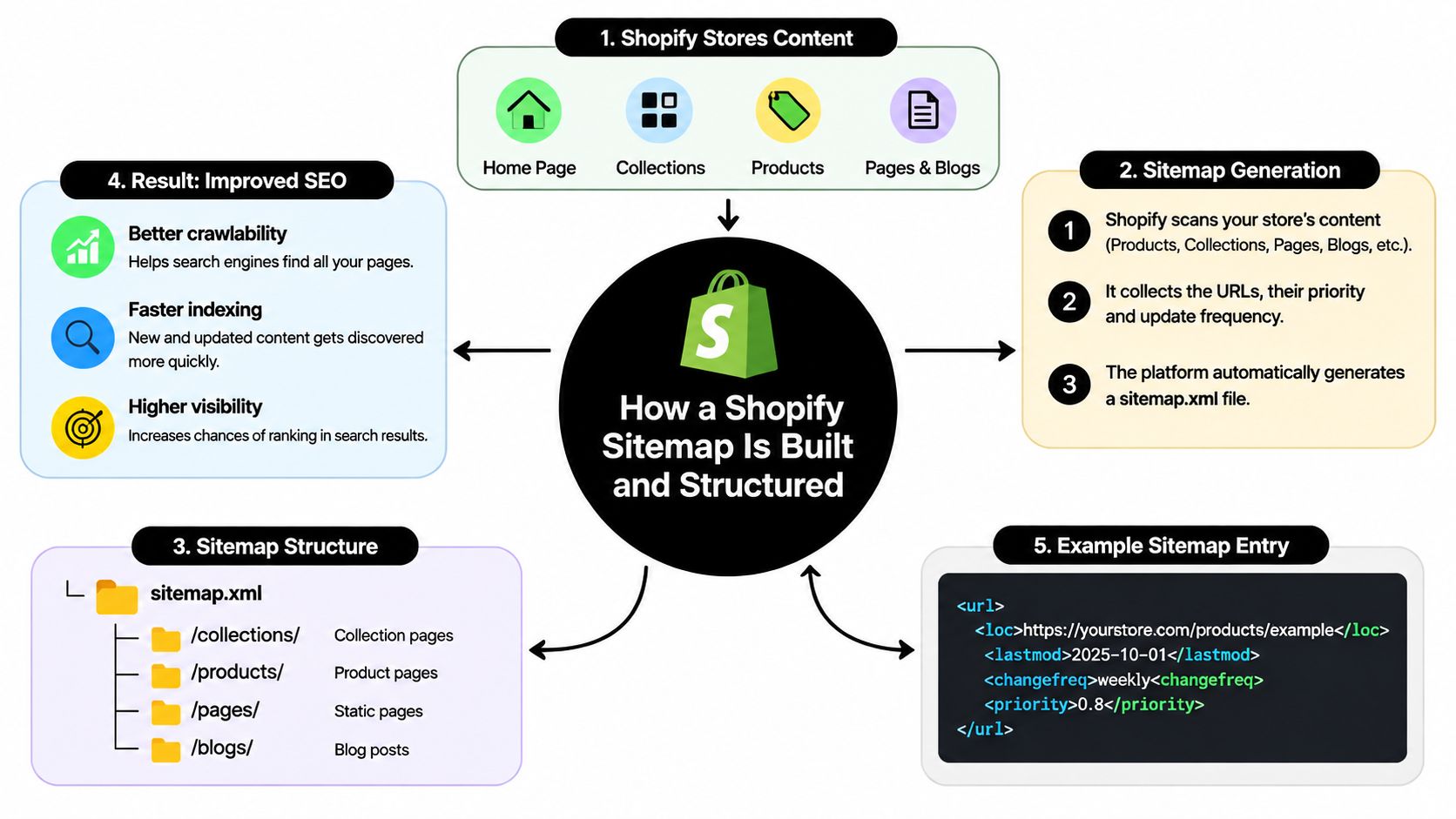
Shopify's sitemap sits at the domain root, usually /sitemap.xml. That file is an index, and it points search engines to smaller child sitemaps for the store's main content types. In practice, that keeps a growing catalog organized without turning one file into a pile of unreadable URLs. Shopify's documentation spells out that the index covers products, collections, blog posts, and webpages, and it also includes primary product images so those assets can be found too. Shopify's sitemap documentation
What you'll usually see when you open it
Open yourstore.com/sitemap.xml in a browser and you will usually see an XML index, not a full dump of every page on the site. The parent file points to child files, and those child files hold the actual URL lists. That split matters because it keeps large stores readable for search engines and easier to diagnose for merchants.
Shopify builds this structure automatically, so you do not usually hand-code the first sitemap or update it every time a product or article changes. That is helpful for stores with frequent catalog turnover, because the file reflects the current store without manual upkeep. Bulk imports, new collections, or edited blog content show up there as the platform regenerates the index.
What's included and what isn't
Only public storefront content belongs in the sitemap. Drafts, password-protected pages, and admin paths do not belong there, because a sitemap should describe what search engines are meant to find, not the backend. If a URL should stay hidden from discovery, it should not be treated as a sitemap target.
This is also where custom builds can go sideways. Apps that inject extra pages, theme changes that affect templates, or duplicate page variants can make the sitemap harder to trust. If you are trying to avoid these Shopify mistakes, the safest test is simple: ask whether the URL is a real, public destination that should be crawled, or just a temporary, duplicate, or internal page.
Submitting Your Sitemap to Google Search Console
Before you submit anything, verify the right property in Search Console. For Shopify, that usually means making sure you're looking at the live domain you want indexed, not a preview host or a mismatched variation. Once that's in place, go to Google Search Console, open Indexing, then Sitemaps, and submit sitemap.xml in the field for adding a new sitemap.
The status Google gives you matters
After submission, Google can show a clean fetch, a warning, or an error. A successful submission means Search Console could retrieve the file. A warning usually means Google fetched it but noticed something worth checking. An error means the file couldn't be processed the way you expected, and that's when you start testing the host, the access rules, or the property selection.
The key move is to submit the parent sitemap, not every child file. Shopify already links the child files through the index, so adding them one by one just creates clutter. Google's sitemap guidance treats sitemaps primarily as URL-discovery aids, and it also notes that inclusion doesn't guarantee crawling or indexing, so the submission itself is only the starting point. Google's sitemap build guide is the relevant reference for that boundary.
Why the protocol limit matters sooner than people think
The XML Sitemap Protocol sets a hard limit of 50,000 URLs or 50 MB of uncompressed data per sitemap file, whichever comes first, and a sitemap index can contain up to 50,000 child sitemaps. That same rule is why large Shopify catalogs, multi-region stores, and sites with heavy blog and landing-page publishing sometimes need segmented architecture instead of one tidy file. The protocol specification defines those limits.
If your catalog is small, the default file is usually enough. If your catalog keeps expanding, the sitemap stops being a simple file and becomes an operational system.
That's also where a catalog helper can become useful. For example, TAGit AI Product Tag Generator for Shopify automatically generates product tags from product images, titles, and descriptions, supports bulk processing, and can auto-process new products as they're added. It doesn't replace a sitemap, but it can help organize a fast-growing catalog so the pages you publish are easier to manage.
Optimizing What Appears Inside Your Shopify Sitemap
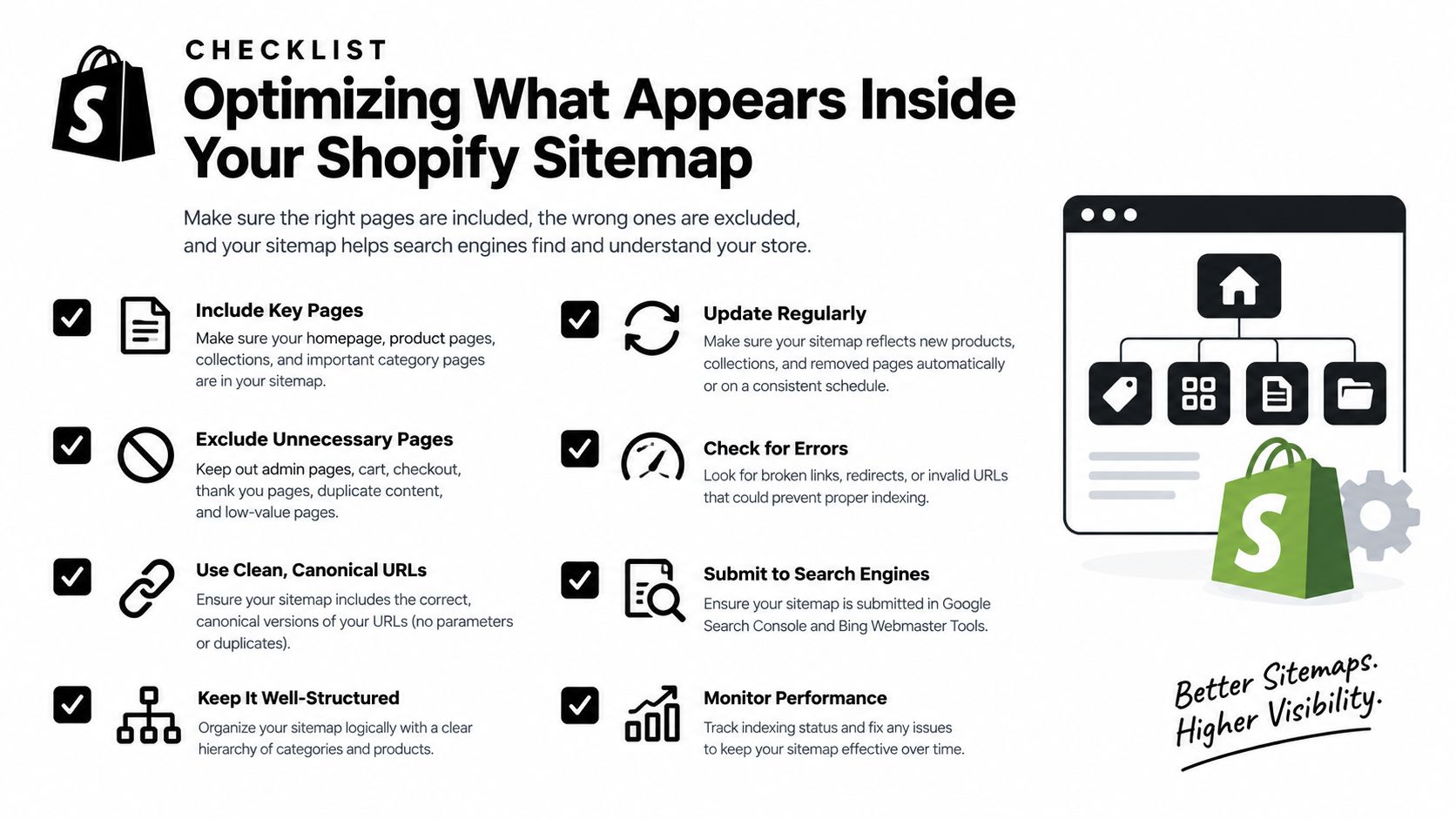
The sitemap mirrors your storefront health. If the catalog is messy, the sitemap reflects that mess. If the catalog is cleaned up, canonicalized, and structured well, the sitemap usually gets better without direct file editing.
Start with what Shopify can actually expose
Active products, published collections, public pages, and blog posts are the obvious candidates. If a page is intentionally hidden, password-protected, or noindexed, it usually shouldn't be treated as a discovery asset. That's why the sitemap and page-level settings need to agree with each other.
Canonical tags matter just as much. If a product variant, filtered URL, or duplicate page resolves to a different preferred URL, the sitemap should not be fighting that decision. Google's guidance is clear that a submitted URL is not automatically indexable just because it appears in the file, so the page itself still has to be eligible and useful.
Image discovery and large collections
Shopify's sitemap also includes primary product images, which helps search engines discover visual assets attached to products. That matters for merchandising pages where product photography carries a lot of search value. It's one of the quieter advantages of the default setup, because the image discovery happens without extra maintenance.
Pagination is the other place merchants get tripped up. Large collections can spawn lots of paginated URLs, and the sitemap alone won't fix weak internal linking or poor canonical logic on those pages. The most effective cleanup usually happens in the store settings, theme logic, and content structure, not inside the XML file.
Helpful checks before you blame the sitemap
- Review product status: Make sure important products are active and intended for public discovery.
- Check canonicals: Confirm the preferred URL matches the page you want Google to treat as primary.
- Inspect noindex rules: Avoid blocking pages that should remain eligible.
- Watch pagination behavior: Large collections should not create a maze of discovery paths.
- Audit indexation separately: A submitted URL can still be excluded for quality or technical reasons.
International Markets, hreflang, and Sitemap Coverage
Once you turn on Shopify Markets, the sitemap stops being just a list of store pages and starts acting like a market map. Shopify's international SEO documentation says automatically generated sitemaps include market-specific URLs and that each URL contains hreflang annotations linking language and regional variants. That means a single global submission isn't enough to trust that the correct regional page is being surfaced everywhere. Shopify's Markets SEO guide is the place to anchor that workflow.
The market-by-market check merchants miss
A product can exist in multiple languages, but that doesn't mean every version is equally discoverable. Some pages resolve cleanly, some redirect, and some end up too close to one another in content and intent. The point of the audit is to verify that each localized version returns HTTP 200, that the reciprocal hreflang relationships make sense, and that canonical tags aren't pointing every market back to one default page.
That's also where geolocation behavior can muddy the picture. If a store redirects visitors based on country or language, it can make the page feel “right” to shoppers while making discovery less obvious to search engines. Sitemap presence doesn't override those signals.
When separate submissions help and when they don't
A separate market-by-market workflow is useful when you need to validate coverage in each region. It's less useful when it turns into duplicate submissions with no clear ownership of which URLs belong where. The safer approach is to inspect market coverage, confirm the alternates, and then make sure each regional page is worth indexing on its own.
Localized discovery fails quietly when translation exists but intent doesn't. If every market page reads like a copy of the default page, the sitemap won't rescue it.
That's why international Shopify stores need more than a generic submit-once routine. They need a repeatable audit that looks at URLs, language variants, canonicals, and redirects together.
Custom Sitemaps Through Apps, Themes, and Automation
Shopify's default sitemap is low-maintenance, but it isn't always enough. Merchants sometimes need a supplemental sitemap for landing pages built outside the normal content types, externally hosted editorial content, or URL patterns that the default inventory doesn't expose the way they want. That's when a custom layer can make sense, provided it doesn't collide with Shopify's own structure.
| Aspect | Shopify automatic sitemap | Custom supplemental sitemap |
|---|---|---|
| Coverage | Published store content Shopify exposes by default | Extra URLs you intentionally add |
| Maintenance | Automatic and low effort | Requires ongoing oversight |
| Risk | Low, because Shopify maintains the file | Higher, because it can conflict with canonicals or file limits |
| Best use case | Standard stores and fast-moving catalogs | Special cases with non-default URLs |
The trade-off is control versus fragility
A custom sitemap gives you more control, but it also gives you more ways to break things. You can accidentally include duplicate URLs, submit pages that shouldn't be indexed, or push the file toward protocol limits without meaning to. If the only reason you're building one is “the default file feels too simple,” that's usually not a strong enough reason.
Theme logic and SEO apps sit somewhere in the middle. They can help expose or exclude URLs more deliberately, but they also add another layer that needs maintenance. If you're comparing app-driven options for the store, a practical roundup like best Shopify SEO apps can help you decide whether you need sitemap controls, meta controls, or both.
When custom is actually justified
A custom sitemap makes sense when you have content that Shopify doesn't naturally organize the way you need, or when a developer has built a content layer around the storefront. It also makes sense if you need to keep a supplemental set of URLs under control while preserving Shopify's default sitemap as the core discovery file.
The rule of thumb is simple. If the custom file makes discovery cleaner, keep it. If it creates another moving part without a clear search benefit, leave it out.
Troubleshooting the Most Common Shopify Sitemap Problems
When Search Console complains, start with the sitemap file itself, then work outward to the URLs inside it. That order saves a lot of time because many merchants jump straight to themes or apps when the actual issue is a host mismatch, a redirect, or a page-level directive.
Read the symptom before you guess the cause
A “Couldn't fetch” message usually points to a retrieval problem. Check whether the property and the sitemap host match, then load sitemap.xml in a browser on the live domain. If the browser can't see the file cleanly, Search Console probably can't either.
A “Sitemap is HTML” message usually means the URL is landing on a page rather than the XML file. That can happen with the wrong domain, a redirect, or a storefront that isn't publicly exposed yet. General HTTP errors usually point to access or availability problems that need to be fixed at the source.
Follow the page, not the submission
If URLs are submitted but excluded, the sitemap is probably doing its job by exposing pages that Google still doesn't want to index yet. That's where you inspect the live page, because the issue might be a noindex tag, a redirect, a canonical conflict, or content that doesn't offer enough distinct value. Re-submitting the same sitemap won't change any of those page-level signals.
A sudden drop after a redesign or app install usually means something in the theme or extension layer changed. That's the point where a focused redirect review helps, especially if product or collection URLs were renamed. A practical reference for that part of the stack is Shopify URL redirects, because broken paths often look like sitemap problems from the outside.
A short triage sequence
- Open
/sitemap.xmlin the browser. Confirm it resolves on the live domain. - Open a few child sitemap files. Check that the links match current store content.
- Inspect representative URLs. Look at status, canonical, and robots behavior.
- Check recent changes. Theme edits, app installs, and bulk imports are common triggers.
- Resubmit only after the fix. Repeated submissions without a real change waste time.
Google also notes that indexing can take time after a correction, so a healthy process includes patience as well as diagnosis.
Putting the Sitemap Back in the Bigger SEO Picture
A healthy sitemap sits downstream of clean URLs, correct canonicals, sensible robots rules, and strong internal linking. If those pieces are broken, the sitemap is usually just the place where the problem becomes visible first. Fixing the sitemap alone rarely fixes the store.
That's why the best routine is small and repeatable. Check Search Console coverage, review sitemap status, and run a quick per-market audit if you sell internationally. If you're managing a more complex catalog, pair that with a broader technical review so the pages you want indexed are also the pages your store promotes.
For teams that want a broader operational checklist, shopify SEO checklist is a useful companion because it keeps the sitemap in context instead of treating it like a standalone task. And if you're comparing outside help, a practical resource on organic search for shops can help you frame the work as part of the wider ecommerce SEO stack rather than a one-file fix.
If your store keeps changing, treat the sitemap like living infrastructure. Review it after catalog migrations, new Markets launches, and major theme changes, then bring in a developer or Shopify SEO specialist when the file looks correct but Google still won't behave.
Yassine Malti builds Shopify apps and custom automations for SEO, content, and store operations, which makes this the kind of technical problem he works with directly. If you want help making your sitemap, indexation, and broader Shopify SEO stack easier to manage, visit Yassine Malti and explore the solutions he offers.
Shopify apps by Yassine Malti
Put this into practice
-

TAGit · Product tags
SEO-friendly product tags, generated in bulk · 50 tags/month free
-

ALT SEO · Image alt text
AI alt text for every product image · 100 images/month free
-

RANKit · Meta titles & descriptions
AI meta titles and descriptions, sized for Google · 50 meta tags/month free