A theme update goes live, a merchant opens a product page, and the familiar trail from collection to product has disappeared. The product still loads, the title and description look fine, and the URL hasn't changed, so the problem is easy to dismiss. Then Search Console shows inconsistent breadcrumb coverage, collection pages lose some internal links, or search results display a less useful path than expected.
That confusion comes from treating breadcrumbs as one feature. On Shopify, breadcrumb navigation SEO spans three layers: the trail rendered by Liquid, the hierarchy chosen by the merchant, and the BreadcrumbList data exposed to search engines. A store can get one layer right and still create a poor experience. This guide focuses on the decisions that hold up across themes, catalog structures, mobile layouts, and template changes.
Table of Contents
- Why Breadcrumb Navigation Matters for Shopify Stores
- How Search Engines Read Your Store Hierarchy
- Choosing the Right Breadcrumb Type for Your Catalog
- Implementing Breadcrumbs in Shopify With Liquid and JSON-LD
- UX and Accessibility Decisions Most Guides Skip
- A Pre-Launch Breadcrumb Audit Checklist
- Measuring Breadcrumb Impact in Search Console and Analytics
Why Breadcrumb Navigation Matters for Shopify Stores
Breadcrumbs aren't a magic ranking switch, but they can solve several practical problems at once. A visible trail gives shoppers a route back to a collection, strengthens the relationship between category and product pages, and gives crawlers additional context about where a page belongs.
For a merchant starting a Shopify store, this matters before the catalog becomes difficult to reorganize. A product page shouldn't rely only on the main menu or the browser back button. A trail such as Home → Running Shoes → Product Name exposes a useful parent page directly in the template and creates a crawlable internal link to the collection.
Three useful outcomes
- More context in search results: Google supports breadcrumb markup as a search appearance feature, although it doesn't guarantee that every result will display an enhanced trail. A well-formed breadcrumb can communicate the page's position more clearly than a bare URL.
- Stronger internal navigation: Collection links in a breadcrumb connect product templates to broader catalog hubs. That relationship can help shoppers discover related products and gives crawlers another route through the store.
- A clearer catalog hierarchy: Smart collections, tags, and merchandising rules can make a Shopify catalog look flat or inconsistent. A stable breadcrumb path gives the product a deliberate place within that structure.
The third benefit is often the most durable. Search-result presentation changes, but a useful on-page trail can continue helping visitors understand whether they're viewing a product, a collection, or a deeper category. The ecommerce SEO best practices that matter here are structural, not cosmetic.
Practical rule: Design the hierarchy first. Add schema only after you know which category should represent the product.
Modern themes commonly hide breadcrumbs at smaller viewport widths, output only visual text, or generate a trail from whichever collection happens to be available first. Each choice can leak value. A mobile shopper may lose a useful route to a collection, while a crawler receives structured data that doesn't match what users can see.
The right expectation is modest and specific. Breadcrumbs won't repair weak product content, poor collection targeting, or blocked crawling. They can, however, make a Shopify store's architecture more understandable and its internal navigation more deliberate. That makes breadcrumb navigation an information-architecture decision first and a schema decision second.
How Search Engines Read Your Store Hierarchy
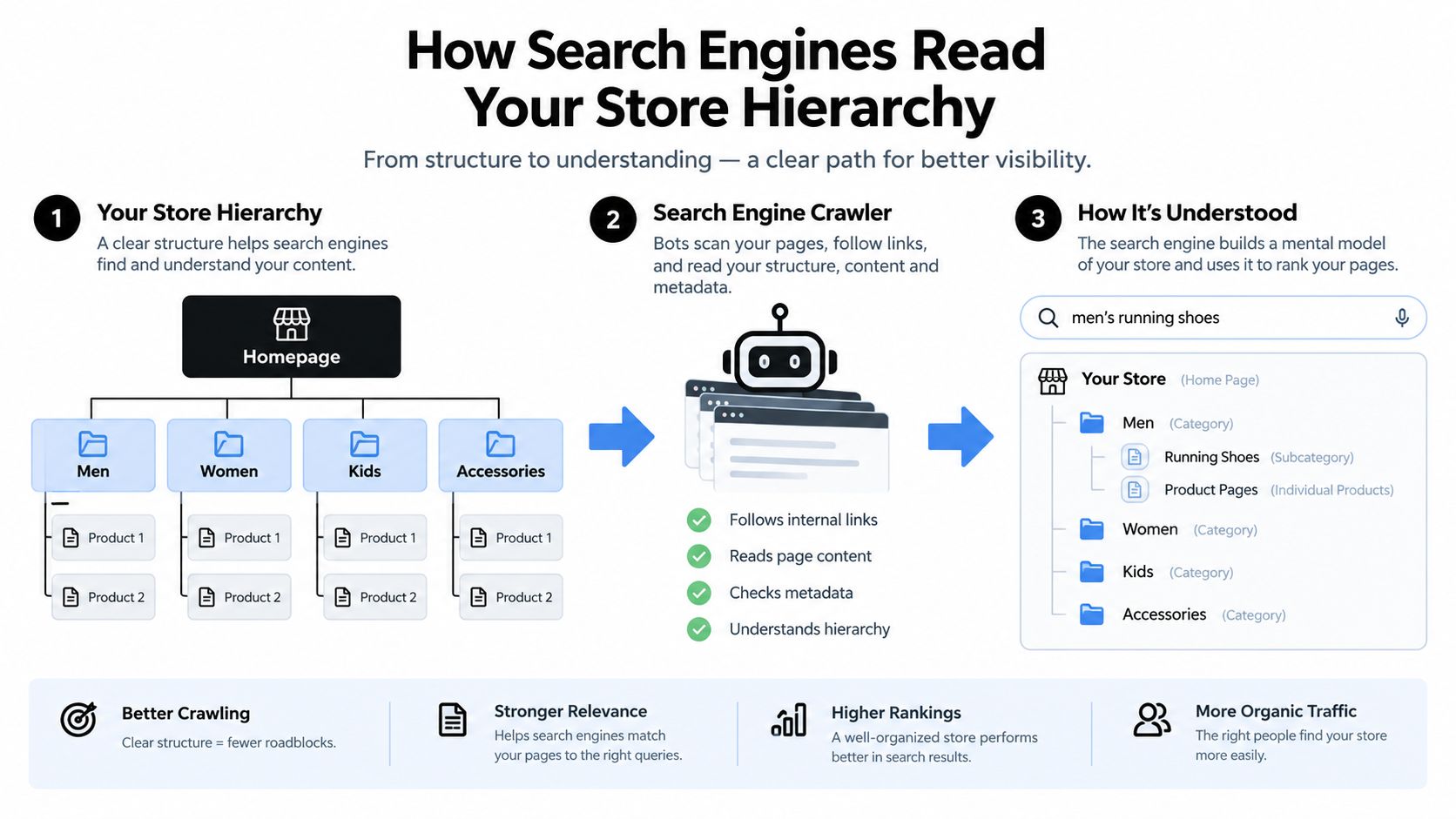
Think of a breadcrumb trail as a map legend. A visitor needs to know where a product sits in the storefront, and a crawler needs consistent signals about the same relationship. If the visible trail says Home → Footwear → Running Shoes → Product, while the structured data says Home → Sale → Product, the store is presenting two maps.
Google reads several signals together. The official breadcrumb structured-data documentation explains that breadcrumbs communicate a page's position within a site hierarchy and can help users understand and explore the site.
The URL is context, not the complete hierarchy
Shopify URLs can contain useful clues, such as /collections/shoes/running/nike-pegasus, but URL strings shouldn't be treated as the store's only taxonomy. Merchants can reorganize collections, change templates, or create alternate product routes without building a clean hierarchy into every path.
A URL can therefore support the interpretation without determining it. Reverse-parsing folders is especially fragile when a product belongs to several collections or when the canonical product URL doesn't preserve the shopper's browsing route.
BreadcrumbList makes the intended path explicit
The second signal is the BreadcrumbList structured-data block. Google requires at least two ListItem entries for breadcrumb eligibility. Each item should identify its position and name, and the page URL is generally supplied through the item property.
That data is useful because it states the intended relationship directly. It doesn't force Google to show a rich result, and it doesn't replace visible navigation, but it gives search engines a machine-readable version of the hierarchy.
Internal links show the relationship on the page
The third signal is the actual link structure. A breadcrumb link from a product to its collection is meaningful because it is both visible and crawlable. Anchor text such as Running Shoes also gives the destination a clear contextual label.
For a catalog with inconsistent tags, an app such as TAGit AI Product Tag Generator for Shopify can generate product tags from images, titles, and descriptions, including bulk processing, multi-language generation, customizable prompts, and automatic processing for new products. Tags can support merchandising and filtering, but they shouldn't automatically become breadcrumb levels. A tag is not necessarily a stable category.
Google's mobile search presentation also changes how merchants should judge this work. On January 23, 2025, Google confirmed that mobile results show the domain rather than the visible breadcrumb trail, while breadcrumbs remain supported on desktop and the Search Console Breadcrumbs report remains available. The on-page trail therefore carries more of the mobile usability burden.
The three signals should agree, but they don't need to be identical strings. A stable semantic path is more useful than a URL copied into a label.
A practical Shopify implementation uses one canonical hierarchy, renders it visibly, links each parent where appropriate, and generates JSON-LD from the same Liquid variables. Perfecting only the schema while leaving the visible trail ambiguous creates technical compliance without clear navigation.
Choosing the Right Breadcrumb Type for Your Catalog
Shopify merchants usually encounter three breadcrumb patterns. They aren't interchangeable, and the one that feels intuitive in a prototype can become confusing once products belong to multiple collections.
| Breadcrumb Type | Best For | Shopify Fit | Watch Out For |
|---|---|---|---|
| Location-based | Stores with a stable category tree, such as Home → Men → Footwear → Running | Usually the strongest default for curated catalogs | A product assigned to several collections needs one canonical parent |
| Path-based | Large catalogs with deep browsing routes and overlapping navigation | A fallback when no consistent taxonomy exists | The trail changes by session, search, email link, or campaign entry point |
| Attribute-based | Catalogs organized around meaningful product properties such as material, use, or variant family | Useful when attributes genuinely describe the catalog's discovery model | Filters and variants can create clutter or imply a hierarchy that doesn't exist |
Location-based trails are the dependable choice
A location-based trail mirrors the store's information architecture. It doesn't try to remember what the visitor clicked. A shopper arriving from an email campaign sees the same useful route as someone who entered through a collection page.
This model works well for apparel, home goods, and other catalogs with deliberately curated groups. The key is choosing the parent based on the store's canonical merchandising structure, not on the first collection returned by a product object.
Path-based trails duplicate browser history
Path-based breadcrumbs replay the visitor's route. That sounds helpful until the same product can be reached through search, a filter, a promotional landing page, or several collections. The result may show a different trail for the same canonical URL.
It also duplicates a function the browser already provides. A breadcrumb should explain where the page belongs, while browser history explains where the visitor came from. Mixing the two makes structured data unpredictable and makes analytics harder to interpret.
Stores dealing with filters should separate breadcrumb architecture from faceted navigation. The guidance in this faceted navigation SEO resource is useful for deciding which filter pages deserve crawlable treatment, but a filter state shouldn't automatically become a permanent product breadcrumb.
Attribute-based trails need discipline
An attribute-based trail can work when attributes represent the way shoppers understand the catalog. For example, a store built around product use cases may reasonably expose a path based on activity or application. It becomes harmful when every color, size, or temporary filter is inserted into the trail.
The practical decision is straightforward:
- Choose location-based breadcrumbs when the store has a curated taxonomy.
- Use path-based breadcrumbs only when the catalog lacks a stable hierarchy and the changing route genuinely helps users.
- Use attribute-based breadcrumbs only when the attributes are durable, meaningful, and supported by a strict parent-child structure.
For most Shopify stores, location-based is the right starting point. A shorter, consistent path is better than a technically detailed trail that changes with every visit.
Implementing Breadcrumbs in Shopify With Liquid and JSON-LD
The safest implementation defines the breadcrumb trail once and uses it for both the visible HTML and JSON-LD. Don't generate the visual trail from one collection and then reverse-parse the URL for schema. Those approaches drift as soon as a merchant changes collection assignments.
The example below uses product.type as the middle label and falls back to a curated product metafield when the product needs a more deliberate parent. The metafield namespace and key are illustrative, so replace them with the namespace used in the store.
First, establish the page data in the product template or a reusable snippet:
{% assign current_page_schema = product.metafields.navigation.breadcrumb_collection.value %}
{% if current_page_schema == blank %} {% assign current_page_schema = collections[product.type | handleize] %}{% endif %}
{% assign breadcrumb_product = product %}
{% if current_page_schema != blank %} {% assign breadcrumb_parent_title = current_page_schema.title %} {% assign breadcrumb_parent_url = current_page_schema.url %}{% else %} {% assign breadcrumb_parent_title = product.type %} {% assign breadcrumb_parent_url = blank %}{% endif %}
The important part isn't the fallback syntax. It's the decision to select one stable parent. If the product belongs to several collections, store the preferred collection reference in a curated metafield instead of allowing collection order to decide the path.
Render the visible trail from those same values:
<nav aria-label="Breadcrumb"> <ol> <li><a href="{{ routes.root_url }}">Home</a></li> {% if breadcrumb_parent_url != blank %} <li><a href="{{ breadcrumb_parent_url }}">{{ breadcrumb_parent_title }}</a></li> {% else %} <li>{{ breadcrumb_parent_title }}</li> {% endif %} <li aria-current="page"><span>{{ breadcrumb_product.title }}</span></li> </ol></nav>
Then generate matching JSON-LD:
<script type="application/ld+json">{ "@context": "https://schema.org", "@type": "BreadcrumbList", "itemListElement": [ { "@type": "ListItem", "position": 1, "name": "Home", "item": "{{ shop.url }}{{ routes.root_url }}" }{% if breadcrumb_parent_url != blank %},{ { "@type": "ListItem", "position": 2, "name": {{ breadcrumb_parent_title | json }}, "item": "{{ shop.url }}{{ breadcrumb_parent_url }}" }, { "@type": "ListItem", "position": 3, "name": {{ breadcrumb_product.title | json }} }{% else %},{ { "@type": "ListItem", "position": 2, "name": {{ breadcrumb_parent_title | json }} }{% endif %} ]}</script>
Position one should always identify the store root. The final item represents the current document, so it can omit item. For a two-item fallback, the product type becomes the second item. For a three-item trail, the collection is the second item and the product is the third.
Shopify implementation checks
Keep the reusable snippet available wherever the relevant template loads, but don't blindly print product crumbs on collection, search, or 404 pages. Each page type needs a meaningful trail, and a search query isn't a stable category.
Also check these details before shipping:
- Use absolute, canonical URLs in JSON-LD where the implementation requires them.
- Escape names through Liquid's JSON filter.
- Keep the visible labels and structured-data names aligned.
- Avoid outputting duplicate
BreadcrumbListobjects from both the theme and an SEO app. - Validate representative product and collection URLs with Google's Rich Results Test and inspect rendered pages after deployment.
For additional mobile-specific considerations, mobile breadcrumb optimization 2026 provides a useful reference point, but the implementation still needs to match the store's current templates and user interface.
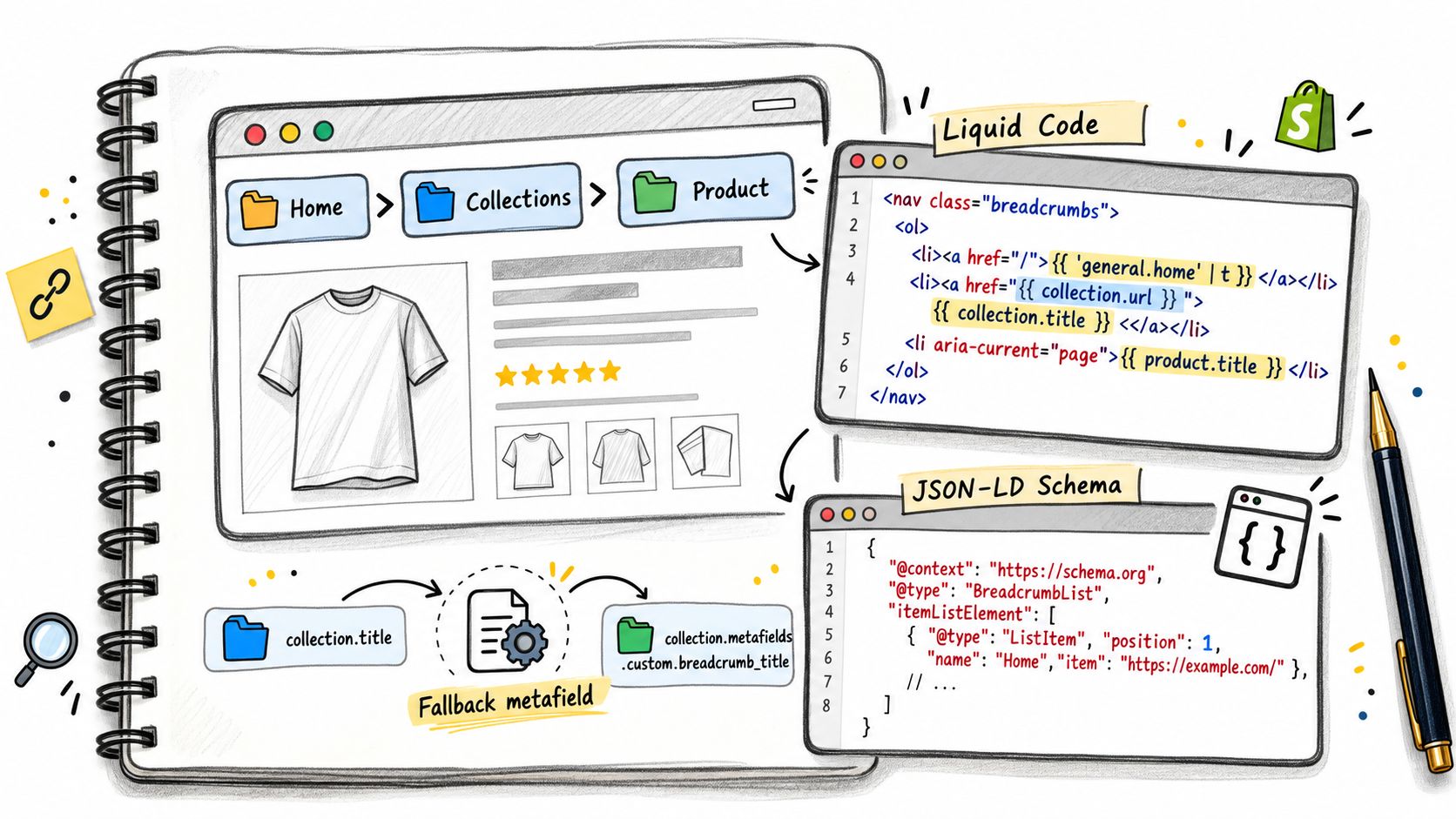
The Liquid-defined trail should drive the schema, not the other way around. JSON-LD can describe the hierarchy, but it can't rescue a breadcrumb path that the storefront doesn't show or that the merchant can't maintain.
UX and Accessibility Decisions Most Guides Skip
Breadcrumbs aren't automatically good navigation. A long trail can push the product title down the page, wrap awkwardly on a narrow screen, or force shoppers to decode labels that mean more to the merchandising team than to customers.
Mobile search makes this trade-off more important. Since Google removed visible breadcrumb lines from mobile search results, the on-page trail must justify its space through navigation and orientation rather than relying on a presumed snippet benefit.
| Scenario | Recommended treatment | Reason |
|---|---|---|
| Short trail with clear parent categories | Show the complete trail | It helps shoppers move to a relevant collection |
| Long labels or several taxonomy levels | Shorten to the meaningful parent and current page | It reduces wrapping and keeps the route understandable |
| Duplicate or arbitrary collection paths | Restructure around one canonical parent | Consistency matters more than displaying every possible route |
| Very narrow mobile layout | Use controlled truncation or horizontal scrolling with clear affordance | It preserves access without letting the trail dominate the page |
| Product page where the trail adds no useful discovery route | Hide or reduce it after testing | Not every template needs decorative navigation |
Design for hands, keyboards, and screen readers
The trail should use a nav element with an accessible label such as aria-label="Breadcrumb" and an ordered list for the sequence. Parent items should be links. The current page should be a text span with aria-current="page", not a link that reloads the same document.
Separators should support visual scanning without becoming confusing announcements for assistive technology. They can be generated with CSS or marked as decorative, while the list structure preserves the actual sequence. Links also need visible focus states, not just hover styling.
A common mobile mistake is allowing a long collection name to wrap between separator characters and the next link. On a narrow viewport, reduce labels to their meaningful form, allow deliberate horizontal scrolling, or expose only the immediate parent. Don't truncate a label so aggressively that shoppers can't identify the destination.
Avoid competing with native interaction
On iOS Safari, users already have a swipe-back gesture. A breadcrumb shouldn't imitate a back button or consume space that belongs to the product title, gallery, or add-to-cart controls. It should take shoppers to a stable category, not merely recreate the previous browser state.
Accessibility is part of breadcrumb SEO. If the trail is hard to tap, hard to focus, or hard to interpret, its technical correctness won't make the navigation useful.
The best mobile treatment depends on the page. A heavily categorized product may benefit from a compact parent link. A simple store may need only Home → Collection → Product. Hiding a redundant trail can be more responsible than keeping every taxonomy level visible for the sake of completeness.
Test the result with a keyboard, a screen reader, and a real touch device. Check whether the first tap lands on the intended link, whether focus remains visible, and whether the current page is announced as current rather than actionable.
A Pre-Launch Breadcrumb Audit Checklist
Run this audit after a theme change, navigation restructure, SEO app installation, or product-template edit. It follows the order in which problems usually appear, from trail generation to search measurement.
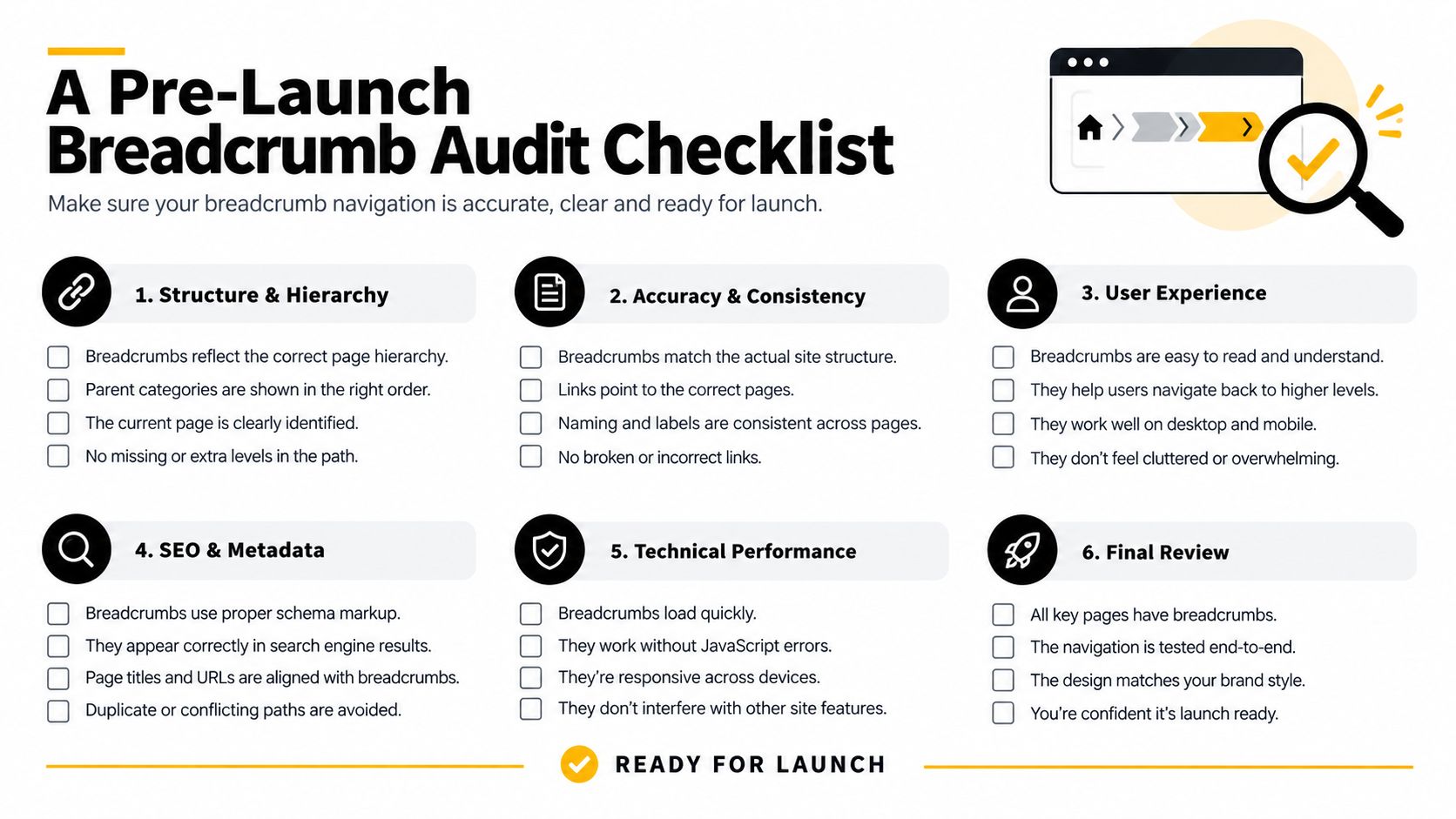
Pass one checks Liquid generation
- Confirm page rules: Product pages should receive product trails, collection pages should receive collection trails, and search or 404 pages shouldn't inherit an irrelevant product path.
- Choose one parent: For products assigned to multiple collections, verify that the curated parent is used consistently.
- Check the root: Confirm that the first visible item links to the store root.
- Check the current page: Make sure the final crumb is text, not a self-link.
- Inspect rendered HTML: Fetch the page as a crawler would and confirm the breadcrumb links exist in the rendered output.
Pass two checks structured data
- Validate the type: Confirm that the object is a
BreadcrumbListcontaining at least twoListItementries. - Validate order: Positions should begin at one and increase sequentially.
- Validate URLs: Parent entries should use stable canonical URLs, without links that immediately redirect.
- Compare representations: Names, order, and hierarchy should match the visible trail.
- Remove duplicates: Check whether the theme and an installed app are both printing breadcrumb schema.
Google recommends the Rich Results Test and URL Inspection for validation. Use both after deployment, because syntactically valid markup can still describe the wrong page or fail to appear in the rendered output.
Pass three checks the interface
- Test desktop and mobile: Look for wrapping, clipping, overflow, and accidental hiding.
- Test touch targets: Tap every parent link on a real device, not only in a browser emulator.
- Test focus states: Use keyboard navigation and confirm every interactive item has a visible focus style.
- Test announcements: Confirm the navigation label, ordered sequence, and current-page state with assistive technology.
- Check labels: Use category names that shoppers understand, not internal collection codes.
Pass four checks crawlability and reporting
- Check indexable parents: Make sure breadcrumb destinations aren't noindexed or blocked from crawling.
- Check redirects: A breadcrumb link shouldn't lead through an avoidable redirect chain.
- Check canonical alignment: Confirm the linked collection represents the intended canonical category.
- Record the deployment: Note the template or app change so later performance comparisons have context.
- Monitor coverage: Review the Search Console Breadcrumbs report and investigate invalid or missing patterns.
Include redirect checks in the same task as the breadcrumb change. A guide to Shopify URL redirects can help when a collection has moved and the breadcrumb still points to an outdated destination.
This checklist belongs in the release process, not only in an SEO backlog. Breadcrumb regressions often arrive with a perfectly ordinary theme update.
Measuring Breadcrumb Impact in Search Console and Analytics
Measurement should answer a narrower question than “did breadcrumbs improve rankings?” Breadcrumbs affect interpretation, internal navigation, and search-result eligibility, but rankings are influenced by many other changes. A cleaner analysis compares the pages and query groups most likely to reflect the implementation.
Start in Google Search Console with the Breadcrumbs report. Review which URLs have valid, invalid, or missing markup, then inspect representative product and collection pages. Pay particular attention to pages where the chosen breadcrumb path differs from the URL structure. That difference is not automatically a problem. It tells you where Google must rely on the visible hierarchy and structured data rather than folder names.
Next, compare organic impressions and click-through rate before and after the change. The historical case described in this SEO breadcrumb case report recorded organic CTR falling from 6.6% to 4.1%, a 2.5 percentage-point decrease, after breadcrumb structured data was accidentally removed during a template change. After restoration, the report recorded recovery to 7% within three weeks, above the original 6.6% baseline. Treat that as a site-specific observation, not a universal benchmark, because other search or technical factors may have moved at the same time.
Segment the evidence
Google's mobile change means desktop and mobile data shouldn't be blended casually. Since mobile results no longer show the visible breadcrumb line, any snippet-related effect is more likely to appear in desktop queries. On-page navigation can still affect mobile behavior, but Search Console CTR won't isolate that effect cleanly.
In GA4, create segments for product and collection URL patterns, then compare organic sessions and engaged behavior around the deployment. Keep the comparison pages stable where possible. If the theme changed product cards, titles, canonical tags, or collection templates at the same time, record those variables instead of attributing every movement to breadcrumbs.
| Metric | Source | What a real win looks like |
|---|---|---|
| Breadcrumb validity | Google Search Console | Fewer invalid or missing patterns on representative templates |
| Organic impressions | Google Search Console | Collection and product pages continue earning visibility after deployment |
| Organic CTR | Google Search Console | Improvement in relevant desktop query groups without a corresponding decline elsewhere |
| Collection sessions | GA4 | More organic visits reach intended collection hubs or continue into related products |
| Crawl and index signals | Search Console and server-side review | Parent links remain crawlable, canonical, and free from avoidable redirects |
| Mobile navigation behavior | GA4 and usability testing | Visitors can reach a useful parent category without confusion or layout friction |
Don't use ranking position as the leading indicator. A product can retain its position while gaining better category discovery, and a ranking change can result from competitors, intent shifts, or content changes. Watch impression share, CTR, collection-page visibility, crawlability, and user navigation together.
A practical review cadence is tied to releases. Inspect the rendered HTML immediately after deployment, validate structured data, then monitor the affected templates in Search Console and analytics. If the trail disappears after the next theme update, the problem isn't SEO theory. It's an untested dependency in the storefront.
Yassine Malti builds Shopify apps and custom automations for SEO-focused workflows, including on-page optimization and operational tooling. Visit Yassine Malti to discuss a breadcrumb implementation, theme fix, or broader Shopify SEO automation that fits your catalog architecture.
Shopify apps by Yassine Malti
Put this into practice
-

TAGit · Product tags
SEO-friendly product tags, generated in bulk · 50 tags/month free
-

ALT SEO · Image alt text
AI alt text for every product image · 100 images/month free
-

RANKit · Meta titles & descriptions
AI meta titles and descriptions, sized for Google · 50 meta tags/month free