A POS debit is a purchase made at a point of sale with a debit card or its credentials, paid directly from the buyer's checking or deposit account.
You're checking your balance before payday, and one line stops you. It reads POS DEBIT, followed by a name you don't recognize and an amount you can't place. Before you assume someone used your card in a store, pause. POS describes the payment-processing context, not the checkout location, so you'll get further by classifying the entry first and only then deciding whether it's fraud.
Table of Contents
- What POS Debit Means on Your Bank Statement
- POS Debit Compared With Credit, Cash and Transfers
- How a POS Debit Travels From Checkout to Your Account
- Common POS Debit Problems and How to Fix Them
- Sorting Out a Disputed Debit
- Reconcile Merchant POS Debit Payments and Fees
What POS Debit Means on Your Bank Statement
Three letters, one piece of information. A POS DEBIT line tells you a payment ran through a point-of-sale system and charged your checking or deposit account directly. It says nothing by itself about where you were standing. That point of sale can be a grocery till, a restaurant terminal, or an online checkout processed through a point-of-sale system.
Say your statement shows POS DEBIT followed by a store name you have never visited. That does not prove a stranger shopped with your card in person. A statement descriptor works like the return address on a package: it names the business that billed you, which can be a merchant's legal name, a subscription's billing name, or an online order you have forgotten. Classify the entry first, then decide whether it is a fraud case.
The label is common because debit is everyday spending. In the Federal Reserve 2024 Diary of Consumer Payment Choice, U.S. consumers made an average of 46 payments per month in 2023, debit cards represented 30% of all payments, and debit and credit cards together accounted for more than 60% of monthly consumer payments.
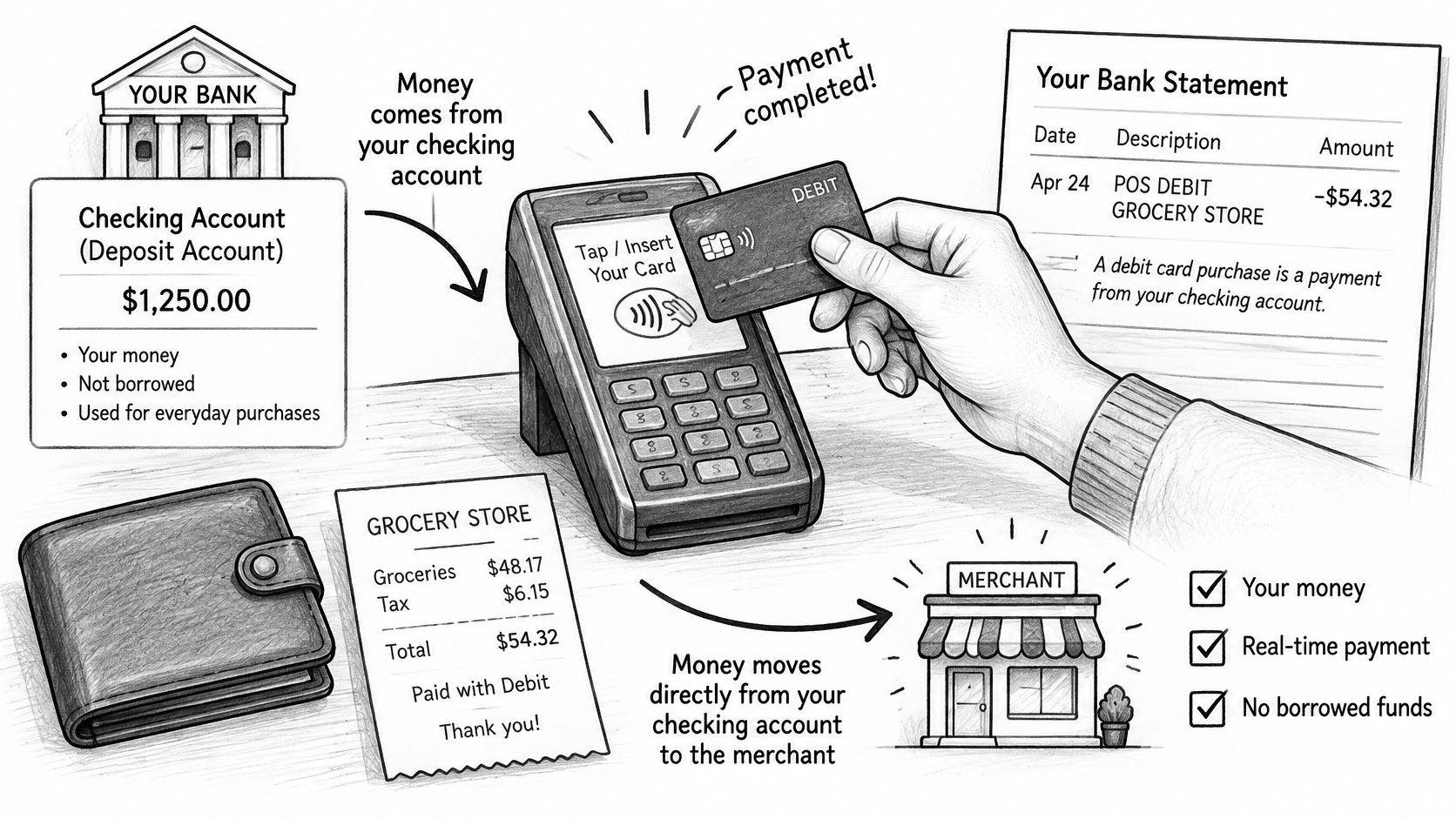
Statement Labels and What They Usually Mean
| Statement label | Usual meaning | What to check next |
|---|---|---|
| POS DEBIT [merchant name] | Card purchase at a terminal or online checkout | Match the merchant name, date and amount to a receipt or order confirmation |
| DEBIT PURCHASE | Same kind of card purchase, worded differently by the bank | Compare the date and amount with your own records |
| POS WITHDRAWAL | Cash taken with a card at a point-of-sale terminal | Confirm whether you requested cash back at the checkout |
| Pending POS DEBIT | Authorized but not yet posted to the account | Wait for the entry to post or drop off before disputing |
To read one line, check four things in order: the date, the merchant descriptor, the amount, and whether the entry is pending or posted. Those four details sort most entries quickly into one of three buckets. Your own purchase under a different billing name. A delayed posting still settling. Or a line that matches nothing in your records, which is the one worth escalating.
POS Debit Compared With Credit, Cash and Transfers
The one-line difference is simple. Debit spends money already in an account, while credit borrows against a line you repay later.
A debit card pulls straight from your checking balance. A credit card draws on a lender's line that you settle afterward. The tap, dip or click looks identical at checkout, yet the money leaves from a different place and follows a different promise. This is also why "POS" on a statement describes the processing context rather than a physical register: an online order routed through a card network carries the same label as an in-store purchase, so the label alone never tells you whether an entry is yours or suspicious.
POS Debit, Credit Card and Cash Compared
| Feature | POS debit | Credit card | Cash |
|---|---|---|---|
| Where the money comes from | Your checking or deposit account | A revolving credit line you repay | Cash you already hold |
| Typical authentication | PIN, contactless tap or signature | Usually signature or no PIN | None needed |
| When your balance changes | Hold at authorization, final debit at settlement | Balance owed rises at purchase, paid later | Immediately when cash changes hands |
| Overdraft or borrowing risk | Overdraft possible if your bank permits it | Limited by your credit line | None |
Bank transfers, checks and direct cash payments follow different rails and carry no card-network authorization, so they never appear as POS debit. If you're comparing how different account types handle payments day to day, a guide to PayPal business and personal accounts shows a similar split between spending your own balance and routing money through a service.
A $60 grocery bill paid by debit leaves your checking balance lower the same day or after settlement. Put the same bill on credit, and it adds to a statement balance due later, possibly with interest if you carry it. Same cart, same card motion, two very different outcomes for your cash flow.
Merchants feel this difference in fees, too, which is why resources on Visa debit fees for Singapore merchants separate debit costs from credit costs by network and region.
Quick test: Classify the entry first. If the money left your bank account, it's a debit. If it created a balance to pay later, it's credit. Only after that classification should you match the merchant name and date to your own records before treating the line as fraud.
How a POS Debit Travels From Checkout to Your Account
Every POS debit makes the same journey: your card details leave the terminal, your bank sets money aside, and the final amount arrives later. The "POS" label on your statement marks where that journey started, inside a payment-processing system. That processing context is the whole story, so the same entry can appear whether you tapped a card at a counter or typed the number into a website.
The infographic below compresses that journey into four stages.
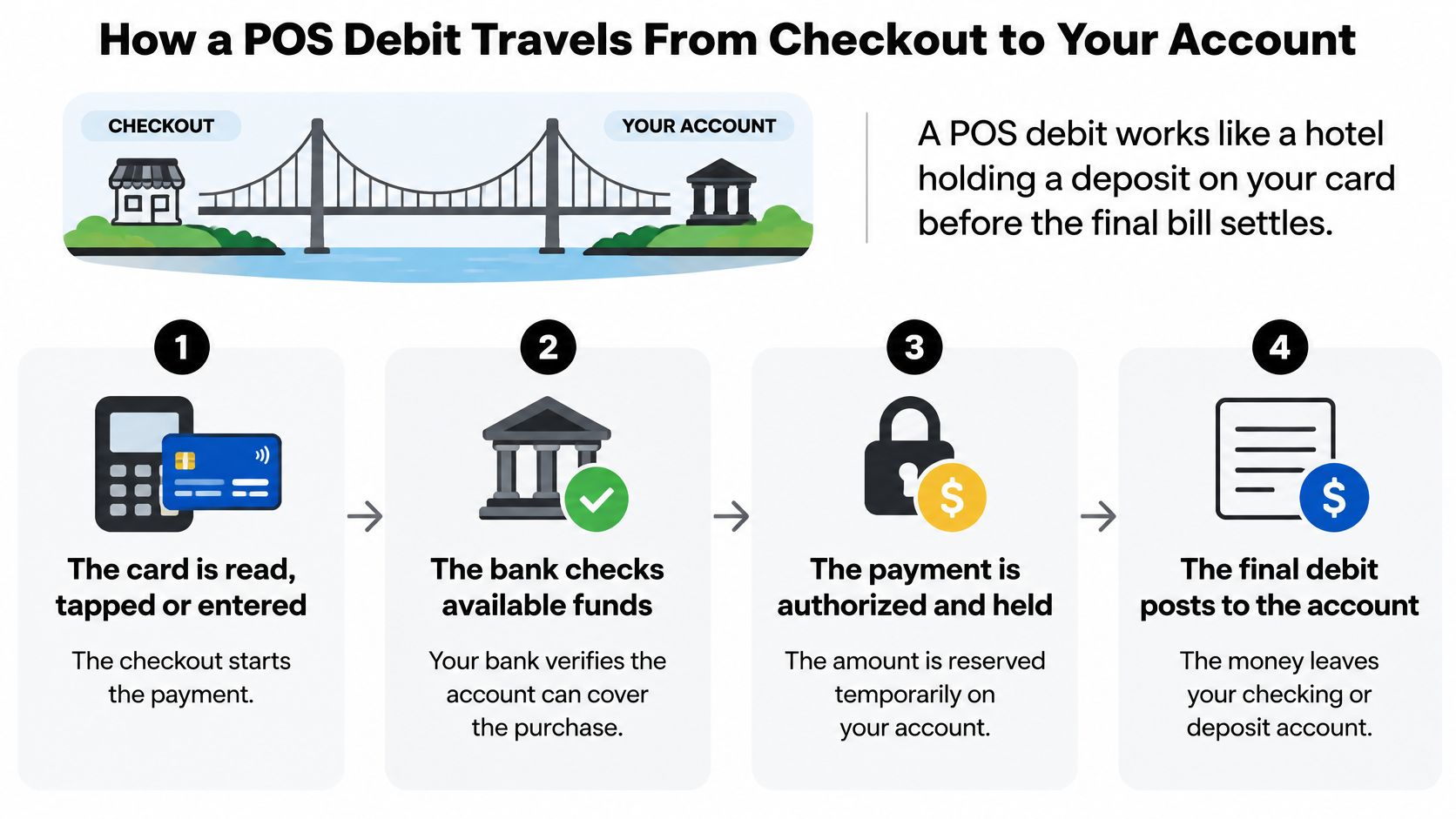
The Seven Steps Behind One Purchase
- The card is read, tapped or entered online. The terminal captures the payment details. Online entry counts here, which is why you don't need a physical terminal.
- You confirm the payment. That's a PIN, a contactless tap, or a signature, depending on the card and network.
- An authorization request travels. It moves through the merchant's acquiring bank and the debit network to your bank, as described in the Federal Reserve Regulation II appendix on debit networks.
- Your issuing bank checks and decides. It verifies the card, authenticates the PIN where one is used, checks available funds, and approves or declines. This step protects both sides from a payment the account can't cover.
- An approval places a hold. Your available funds drop even though the purchase may not have posted yet. This is the step that confuses most readers, because the balance moves before the final line appears.
- The batch is cleared and settled. Banks exchange the final amounts later, so the posting date can lag the purchase date.
- The merchant receives the funds less processing fees. In single-message debit networks, the authorization can also act as the settlement instruction, so timing depends on the network, issuer, and card type.
This short video walks through the authorization and settlement flow visually.
Once the entry settles, the label on the line is a starting point for classification. Match the merchant name, date and amount against your receipts and order confirmations. A line that survives that check as unrecognized is a candidate for a dispute; a line that matches a purchase you forgot about is just a delayed posting doing exactly what steps five and six describe.
Common POS Debit Problems and How to Fix Them
The most frequent complaint is an entry from a store the reader never visited. POS does not require a physical shop, and online orders can post with exactly the same label.
As a Stax guide to POS debit charges explains, the label can also describe debit-card payments routed through a point-of-sale system for online ordering or ecommerce. An online Shopify purchase can appear as POS debit, and so can a subscription renewal processed through a merchant's card software. So the first job is classification, not alarm. Work out what kind of entry you're looking at, and only then decide whether it looks like fraud.
POS Debit Symptoms, Likely Causes and First Fixes
| Symptom | Likely cause | First fix |
|---|---|---|
| Entry shows a store you never visited | Online order routed through a point-of-sale system, or a recurring subscription | Search your inbox and wallet for online orders and subscriptions |
| Amount differs from your receipt | Tip or fuel hold added after authorization, or currency conversion | Wait for the entry to post, then compare the final amount with the merchant |
| Charged twice | Duplicate authorization still in progress, or two captures | Check whether one entry is still processing, then ask the merchant to reverse the duplicate |
| Debit posted days after purchase | Authorization on the purchase date, settlement later | Compare the authorization date rather than the posting date |
| Available balance lower than expected | Hold placed on funds before settlement | Ask the bank for the available balance and the posted balance separately |
| Merchant name does not match the storefront | Bank descriptor differs from the brand name | Ask the merchant which trading name or legal entity they bill under |
If two identical amounts have you worried, it helps to understand double charges with Compass+ before disputing, since a duplicate often drops off on its own while the bank finishes processing.
Work the list in the order that costs you the least. An inbox search takes seconds. A call or chat with the merchant takes minutes. A claim through the bank takes the longest to open and unwind, so it pays to exhaust the cheap checks first. Most confusing entries resolve at one of those early steps, long before a formal dispute is needed.
Match first, then escalate. Most unfamiliar entries resolve once the descriptor, amount, and date line up with an order email or subscription.
Sorting Out a Disputed Debit
Every disputed debit sorts into one of two piles first. The question that decides the path is this: did you approve this payment or not?
An unauthorized transaction is one you never initiated. An authorized scam works differently. A fraudster tricked you into approving the payment yourself, and the two cases follow different dispute rules.
A shopper gets a convincing courier text about a missed parcel. They open a fake page, type their card details to pay a small redelivery fee, and later find a much larger POS debit on the statement. Because they entered the details themselves, the bank may treat the case as authorized, which changes which protections apply.
That distinction matters at scale. According to American Banker reporting on Federal Reserve Financial Services survey findings, 73% of surveyed financial institutions experienced debit-card fraud attempts in 2024, and 52% reported losses from fraudulent debit-card transactions.
What to Do Once You Cannot Match an Entry
- Lock or freeze the card. Use your banking app if you can. This stops further use while you check.
- Call the bank through an official channel. Use the number on the card or inside the official app, never a number from a suspicious text.
- Preserve your evidence. Keep receipts, order emails, delivery records, and messages. Don't delete the text or email that led to the payment.
- Ask the bank how it classifies the entry. An unauthorized charge, an authorized scam, and a plain billing error each follow a different dispute route, and the classification decides which rights apply.
- Report promptly and follow up in writing. Note who you spoke to, when, and what they promised.
For U.S. consumers, the Regulation E text on consumer liability generally limits liability for unauthorized electronic transactions to $50 when reported within two business days and up to $500 when reported within 60 days, subject to the rule's conditions. Those caps apply to unauthorized transactions in the U.S. only.
In the courier example, the shopper approved the payment, so the $50 and $500 caps may not apply. The outcome then depends on the bank's policy and card network rules. Dispute rights turn on jurisdiction, network, timing, and whether you authorized the payment, not on the POS debit label itself.
Reconcile Merchant POS Debit Payments and Fees
If you run a Shopify store, the rule is blunt. Never count an approved POS debit as final revenue until it reaches settled.
A payment moves through five statuses. It is authorized, then captured, then settled, and it can later be reversed or refunded. Say an $80 Shopify order is authorized on Monday, captured that evening, settled on Wednesday, and refunded a week later. Counting it as revenue on Monday would overstate your sales twice: once when the order was still a hold rather than money in your account, and again when the refund reversed income you had already booked.
One thing trips up new merchants here. The "POS" label on a payout report describes how the card was processed, not where the customer stood when they paid, and it says nothing about which stage the payment is in. Classify each line by its status first, then decide whether it is income, a hold, or a problem worth chasing.
Why Fees Differ Between PIN and Signature Debit
PIN and signature debit can use different network rails and fee schedules. Federal Reserve reporting on debit routing gave illustrative historical interchange figures of about $0.34 for a PIN-debit purchase averaging $40 versus about $0.57 for signature debit. Those are historical examples, not current prices, because contracts, card eligibility, routing, and processor markups vary.
Your processor may show fee lines separately. Learn to tell them apart.
- Interchange: The fee paid toward the customer's issuing bank.
- Network assessments: Charges from the card network itself.
- Processor markup: Your processor's margin on top.
Check whether your processor supports compliant routing choices, and whether a displayed fee is one of those lines or a combined merchant discount. A solid order management system helps here, because it keeps order status and payment status in one place instead of two spreadsheets.
A Daily Routine That Catches Problems Early
- Export the day's transactions. Include status, transaction ID, date, and amount.
- Match each order to its transaction ID. Matching by amount alone fails when two orders cost the same.
- Flag old authorizations. Anything older than your normal settlement window needs a look.
- Check captured payments against payouts. The numbers should reconcile after fees.
- Record refunds and reversals against the original order. This keeps revenue honest.
- Log fee lines separately. Interchange and processor charges stay visible instead of hiding in a lump sum.
- Review disputes and chargebacks weekly. Patterns point to unclear descriptors or fulfillment delays.
A store processing 40 orders a day can catch one unmatched authorization on the morning export, while the order number, time, and amount are still fresh. That single line becomes a support request sent the same day instead of at month end.
While you tighten operations, product discoverability still matters. RANKit AI Meta Tags Generator for Shopify automatically generates SEO-friendly meta tags for products using AI, with bulk updates and auto-processing for new products, so catalog hygiene doesn't compete with reconciliation time.
This week's action: Schedule the routine, run it for seven days, and count how many entries still need manual review. That count tells you whether the process works.
If reconciling Shopify payments is eating hours you should spend growing traffic and sales, Yassine Malti builds SEO-focused Shopify apps and custom automations that streamline store operations and cut manual work. Explore ready-made apps or commission a bespoke feature that fits your existing stack, with direct support from development through launch. Visit Yassine Malti to see what we can build for your store.
Shopify apps by Yassine Malti
Put this into practice
-

RANKit · Meta titles & descriptions
AI meta titles and descriptions, sized for Google · 50 meta tags/month free
-

ALT SEO · Image alt text
AI alt text for every product image · 100 images/month free
-

TAGit · Product tags
SEO-friendly product tags, generated in bulk · 50 tags/month free