You update a product page, add new photos, and wait for more shoppers to find it. A week later, Search Console still shows few clicks, and the page barely appears for the searches you expect. A shopify product seo checklist helps you check what needs attention before you rewrite every description or change URLs that already bring traffic.
Shopify Product Page SEO Checklist for Merchants walks you through the parts you can control: product titles, descriptions, search listings, URLs, images, and structured product data. You learn how to optimize Shopify product pages for SEO without making your copy awkward or treating every field as another place to repeat a keyword.
Start with what a shopper needs to know. Your title identifies the product, your description explains its fit and use, and your images show details that words cannot. Shopify product page SEO works best when those elements support the same buying decision. Adding more text does not help if it hides sizing, materials, compatibility, or delivery information.
The tradeoff is between making useful improvements and changing too much at once. Fix missing or misleading information first, then review your search snippets and technical details. Avoid promises of instant rankings, and do not rename established product URLs just to squeeze in another keyword. Track changes so you can judge results rather than guess.
Table of Contents
- Start with search intent and product keyword mapping
- Write product titles and descriptions that answer buyer questions
- Optimize the product meta title and description
- Improve product image SEO and accessibility
- Check product URLs, canonical signals, and internal links
- Validate product schema and page experience
- Run the checklist, measure results, and prioritize fixes
Start with search intent and product keyword mapping
Before you edit titles or descriptions, decide which search each product page should answer. This step in your shopify product seo checklist keeps you from polishing a page around a phrase that belongs on a collection instead.
Search intent is the task behind a query: browsing options, comparing features, or finding a particular item to buy. Your page needs to match that task, not simply contain the same words.
Match each product page to a distinct search need
A shopper searching for “women’s rain jackets” usually needs a selection. Someone searching for “packable waterproof rain jacket women yellow” has a narrower requirement that an individual product may satisfy.
Check the search results for your proposed phrase. If most results are category pages, a collection is usually a better target; if specific products dominate, your product page may fit. Results vary by market, so check the country where you sell.
| Search phrase | Likely page fit | Shopper need |
|---|---|---|
| Women’s rain jackets | Collection | Browse several options |
| Women’s yellow packable rain jacket | Product, if it matches | Find a specific combination of features |
| How to wash a waterproof jacket | Care guide | Learn a maintenance task |
Keyword mapping means assigning a main search topic to a page. Give similar products distinct targets when their features or uses genuinely differ. Do not invent differences just to assign every colour variant a separate keyword.
Choose a primary phrase and useful supporting terms
Choose one accurate primary phrase that describes the product in your customer’s language. Start with product type, then add a meaningful attribute such as material, capacity, compatibility, or intended use.
Use Search Console queries, store search terms, and customer questions to find that language. The guide to long-tail keyword research explains how to find more specific searches rather than relying only on broad category terms.
- Primary phrase: Use “1 litre stainless steel water bottle” if that accurately describes the item, rather than targeting “water bottle” alone.
- Supporting terms: Add verified details such as “double-wall insulation,” “leakproof lid,” or “fits backpack side pockets” where relevant.
- Exclusions: Leave out attractive phrases such as “dishwasher safe” unless your product specifications support them.
Specific phrases can bring fewer searches, but they describe a clearer buying need. Search volume alone does not make a phrase suitable for your product.
Add keywords naturally without stuffing
For Shopify product title SEO, identify the item clearly before adding a brand name or promotional wording. Place the primary phrase, or a natural variation, in the visible product title, search listing title, and opening description where it reads well.
Use supporting terms in specifications, benefits, and care details. Shopify’s guidance on adding keywords explains the editable titles, descriptions, and page content where relevant wording belongs.
Practical rule: If removing a repeated keyword makes the sentence clearer without losing product information, remove it. There is no useful repetition quota to meet.
Write product titles and descriptions that answer buyer questions
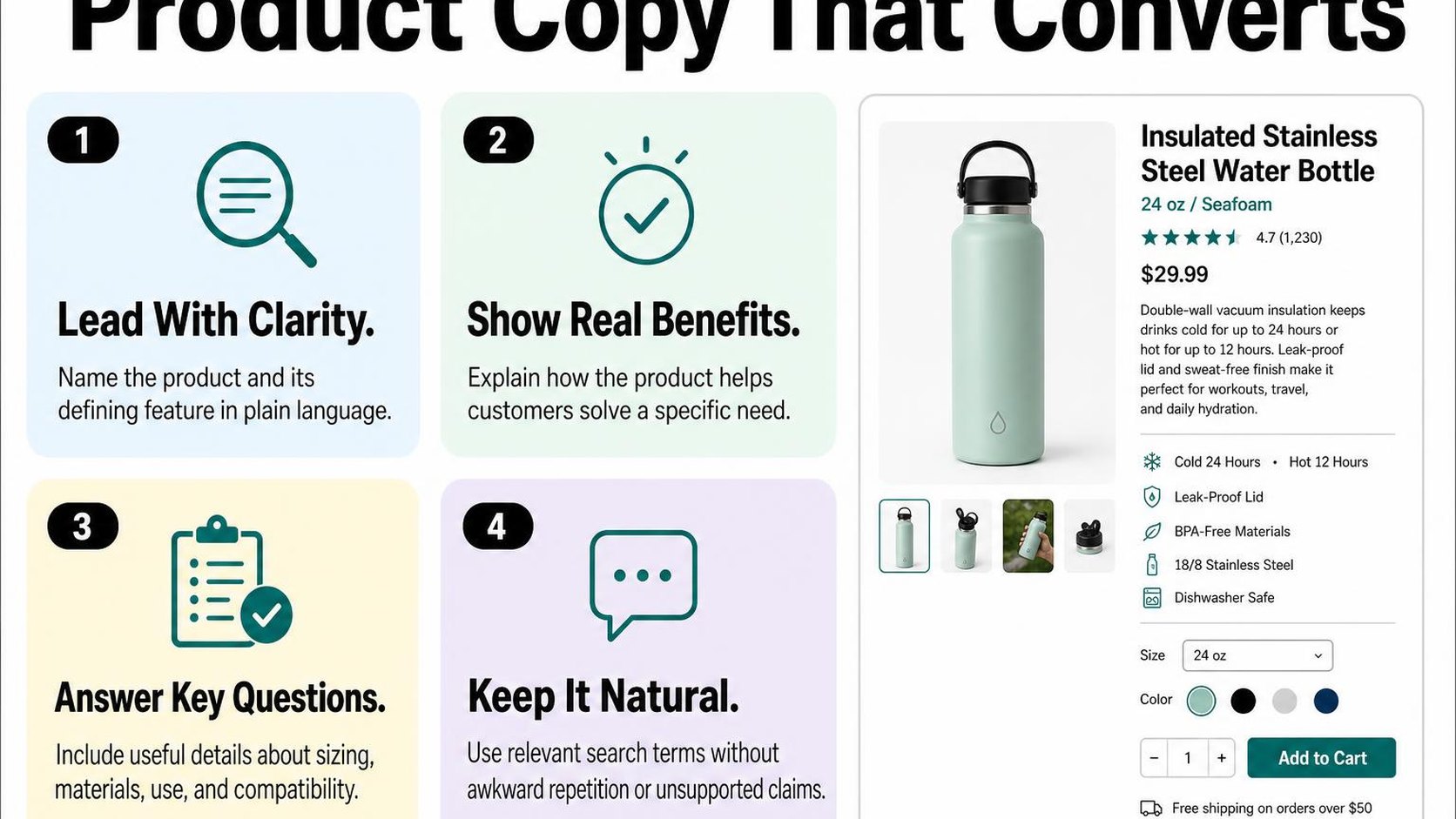
A shopper lands on your product page and sees “The Everyday Essential.” The photos look promising, but the copy does not explain the material, dimensions, or intended use. This part of your shopify product seo checklist helps you replace vague selling language with details that make the product easier to understand and evaluate.
Create clear, specific product titles
Your product title is the visible name shoppers see on the page, not necessarily the separate title you set for the search listing. Treat it as an identification label: someone arriving from search should immediately recognize what you sell and which version they are viewing.
For example, “Linen Duvet Cover — Queen, Natural” communicates more than “The Sunday Collection.” Keep a collection or model name when it helps customers identify the item, but do not let it replace the product type. Check how longer titles wrap on mobile before adding every specification.
- Product identity: Name the item using the language your customers use, rather than an internal stock code.
- Meaningful distinctions: Include material, capacity, size, or compatibility when that detail separates the product from alternatives.
- Readable scope: Leave secondary specifications for the description instead of turning the title into a catalogue entry.
Structure descriptions around features, benefits, and proof
Effective Shopify product description SEO starts with purchase questions, not a longer paragraph. Explain what the item does, who it suits, and what the customer receives. Use relevant search language where it names a real feature or use case, without forcing the same phrase into every sentence.
Connect each feature to a practical benefit, then support the claim. A zippered inner pocket gives shoppers somewhere to separate keys from the main compartment; its measurements help them judge what fits. Claims such as “waterproof” need documented specifications, not an assumption based on appearance.
- Features: State materials, measurements, included components, and compatibility in scannable bullets.
- Benefits: Explain how those details affect everyday use, fit, maintenance, or storage.
- Proof: Add verified test results, accurate specifications, or relevant customer feedback without inventing evidence.
- Purchase questions: Clarify care requirements, assembly, exclusions, and any limitations that could cause a return.
For a fuller drafting process, use this guide to writing product descriptions that sell and rank. Keep essential answers on the product page rather than making shoppers search elsewhere for basic details.
Keep copy original across variants and similar products
Shared specifications are normal across a product range. You do not need to rewrite a factual care instruction for every colour, and repeated wording does not automatically create a search penalty. The problem is thin copy that gives shoppers no useful reason to choose one product over another.
When similar products have separate pages, describe their actual differences: cut, finish, capacity, included accessories, or intended application. For variants selected on one page, make sure the description clearly identifies which specifications change with the selection.
Practical rule: If two descriptions are interchangeable, add the facts that distinguish the products. Do not manufacture differences or swap synonyms simply to make the wording look unique.
Optimize the product meta title and description
Your product looks right on the storefront, but its search preview still shows an old collection name or a generic description. This step in your shopify product seo checklist helps you present the right product before someone visits. The aim is a clear, accurate listing that attracts suitable shoppers, not a promise of higher rankings.
Write a distinct search result title
A meta title is the page title supplied in your HTML, which search engines may use as the clickable title in results. It can differ from the product name displayed on your storefront, but both should describe the same item. Google may generate a different title when another version better matches the page or query.
For Shopify product title SEO, lead with the product type and its most useful distinguishing detail. “Linen Duvet Cover, King — Natural | Brand” tells shoppers more than “Natural Dreams | Brand.” Aim for roughly 50–60 characters as a working range, not a guaranteed display limit: available space varies by device and character width.
- Product identity: Include the product name or type shoppers actually recognize.
- Meaningful difference: Add material, size, model, or another detail that separates this page from similar products.
- Brand placement: Put your brand last when product details matter more, and avoid repeating it if your theme already appends it.
Do not squeeze several keyword variations into one title. A unique, readable title makes the destination clearer; repeating “duvet cover” three times does not make the product more relevant.
Use the meta description to set accurate expectations
A meta description is a short summary supplied for a page that search engines may use as its result snippet. It is not a direct Google ranking factor, and Google may instead select text from the page. Write it to help shoppers decide whether your product matches their needs.
Use roughly 140–160 characters as a drafting range, with the main benefit or specification early. For example: “Choose a natural linen king duvet cover with button closure. Includes one duvet cover; pillowcases sold separately.” This sets expectations without inventing discounts, delivery dates, or stock claims.
Practical rule: Promise only what the landing page confirms. If free shipping has a minimum spend or regional restrictions, qualify the claim or leave it out.
Your Shopify product meta title and description should work together rather than repeat each other word for word. Let the title identify the item and the description explain a useful detail, inclusion, or buying consideration.
Edit SEO fields in Shopify and check how they appear
In Shopify admin, open Products and select your product. Find Search engine listing, choose the edit control, and update Page title and Meta description, then save. Shopify’s keyword guidance explains these search listing fields.
Treat Shopify’s preview as an estimate, not a guaranteed Google result. Check the live page’s title for unexpected brand suffixes, and review Search Console impressions and clicks over time without attributing every change to metadata. For larger catalogs, use this guide to optimizing Shopify meta titles and descriptions to plan consistent edits without making every listing identical.
Improve product image SEO and accessibility
You upload sharper product photos, but your mobile gallery now feels slow and every image has the same generic description. This part of your shopify product seo checklist helps you make images useful to shoppers, screen-reader users, and search engines without sacrificing page speed.
Use descriptive filenames and relevant image context
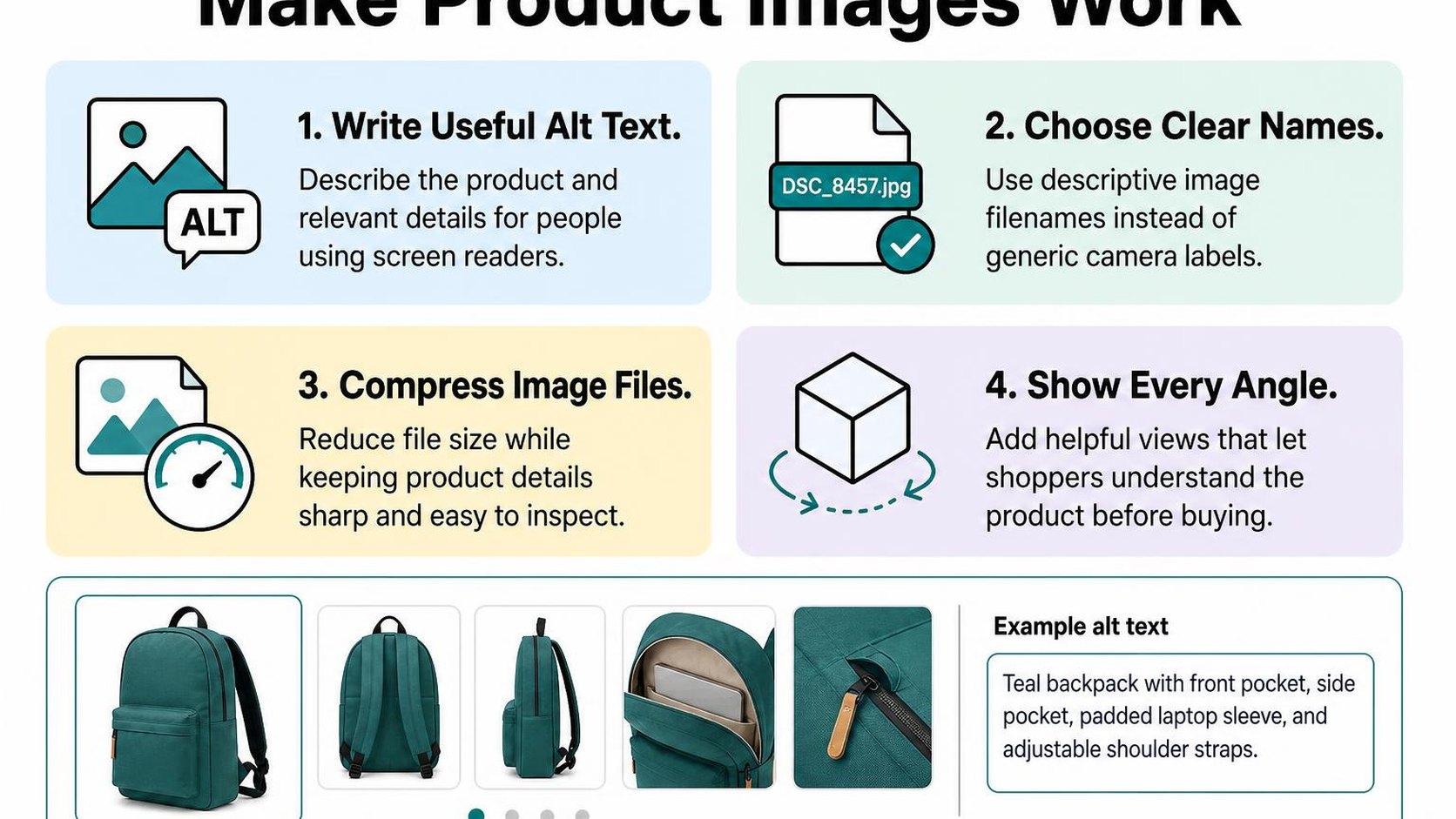
Shopify product image SEO starts before upload. Give new files short, readable names such as olive-canvas-backpack-front.jpg rather than DSC00482.jpg. Describe the visible item and view; do not append a string of search terms.
Place each image near relevant product information. A close-up of a reinforced shoulder strap makes more sense alongside details about construction than beside unrelated promotional copy. Check that selecting a color variant shows the matching photos.
- New uploads: Use consistent filenames that identify the product, color, or angle when those details matter.
- Existing images: Do not delete and reupload your entire catalog just to change filenames. Prioritize missing descriptions, incorrect variant photos, and oversized files.
- Useful context: Show details shoppers need to evaluate, including texture, scale, closures, and included accessories.
Write concise, accurate product image alt text
Alt text is a text alternative that describes an image’s meaning in its context. Screen readers can announce it, and search engines can use it to understand the image. Shopify product image alt text should describe what is visible, not repeat your full product description.
For a detail photo, write “Olive canvas backpack with brass zipper and front pocket,” rather than “Best backpack buy backpack online.” Give different views distinct descriptions when they reveal different information. Avoid claims about comfort, durability, or materials that you cannot verify.
In Shopify admin, open the product and select the image in its media area to edit its alt text. Follow Shopify’s instructions for adding alt text to product media, then check the saved text against the actual photo.
For bulk work, ALT SEO: AI Alt Text Generator generates image descriptions in bulk or automatically for new uploads. Review the results: generated text can misidentify materials, colors, or accessories and does not replace an accessibility check.
Practical rule: Describe what this particular image helps someone understand. Include a product keyword only when it fits that description naturally.
Balance image quality with page performance
A shopper needs enough detail to judge your product, but oversized photos can delay the first useful view. Export images at dimensions suited to your theme’s gallery and zoom behavior, rather than uploading the largest originals by default.
Shopify can deliver resized, optimized images, but your theme must request suitable sizes. Test the live product page on mobile after a theme update; do not assume a sharp desktop preview means the gallery loads efficiently.
- Visual check: Compress photos without blurring labels, textures, or details shoppers inspect.
- Loading order: Keep the main visible product image from being unnecessarily lazy-loaded; defer offscreen gallery images where appropriate.
- Layout stability: Reserve space for images so product information does not jump as they load.
Check product URLs, canonical signals, and internal links
You rename a product, move it into a new collection, and notice several addresses opening the same page. This part of your shopify product seo checklist helps you keep those paths consistent without breaking links shoppers already use.
Keep product handles readable and stable
A product handle is the editable part of your product URL after /products/. For a new product, choose a short, descriptive handle such as /products/linen-duvet-cover rather than a string of supplier codes.
Shopify product URL SEO is mostly about clarity and continuity. Include the product type naturally, use hyphens between words, and leave out temporary details such as sale dates. You do not need to change the handle every time you update the product title.
If an established URL already receives traffic or has links pointing to it, avoid changing it just to add another keyword. A slightly imperfect address is usually worth keeping when the alternative creates unnecessary redirects and maintenance.
- New products: Set a readable handle before publishing and sharing the page.
- Necessary changes: Create a permanent redirect from the old address to the new one, then test it.
- Existing links: Update navigation, collection links, and blog references to point directly to the new address rather than through a redirect.
Understand variant URLs and canonical behavior
A canonical URL identifies the preferred address for indexing when similar or duplicate pages are available at multiple URLs. It is a signal to search engines, not a redirect that changes the shopper’s address bar.
Shopify products can appear through collection-based paths, while variant selections can add a parameter such as ?variant=123456789. Standard theme implementations generally identify the main product URL as canonical, helping consolidate those duplicate paths. Verify your live output rather than assuming every customized theme behaves the same way.
Open the page source and search for rel="canonical". Check the main product URL, a collection-based product path, and a selected variant. For a product whose variants share one page, expect those versions to identify the same preferred product address.
Practical rule: Keep variant URLs when they help shoppers land on the right size or color. Do not remove useful selection behavior simply to make every visible URL identical.
If your theme outputs conflicting canonical tags, fix the implementation before changing handles. Canonical signals help manage duplicates; they do not guarantee which URL Google chooses.
Link products from relevant collections and guides
Internal links connect pages within your store. They help shoppers reach products and give search engines paths to discover them, so do not rely on search or a sitemap alone.
Add products to relevant collections and link them from buying guides where they answer a specific need. Descriptive wording such as “linen duvet cover” explains the destination better than “view this.”
- Context: Link where the product supports the surrounding advice, not in every paragraph.
- Destination: Use the preferred product URL unless a selected variant is useful.
- Availability: Review links when products are discontinued so shoppers do not reach dead ends.
Validate product schema and page experience
You update a product’s price, but a search result still shows the old amount. This part of your shopify product seo checklist checks whether your page’s machine-readable details match what shoppers see, then tests whether the page works comfortably on a phone.
Check product structured data for accurate details
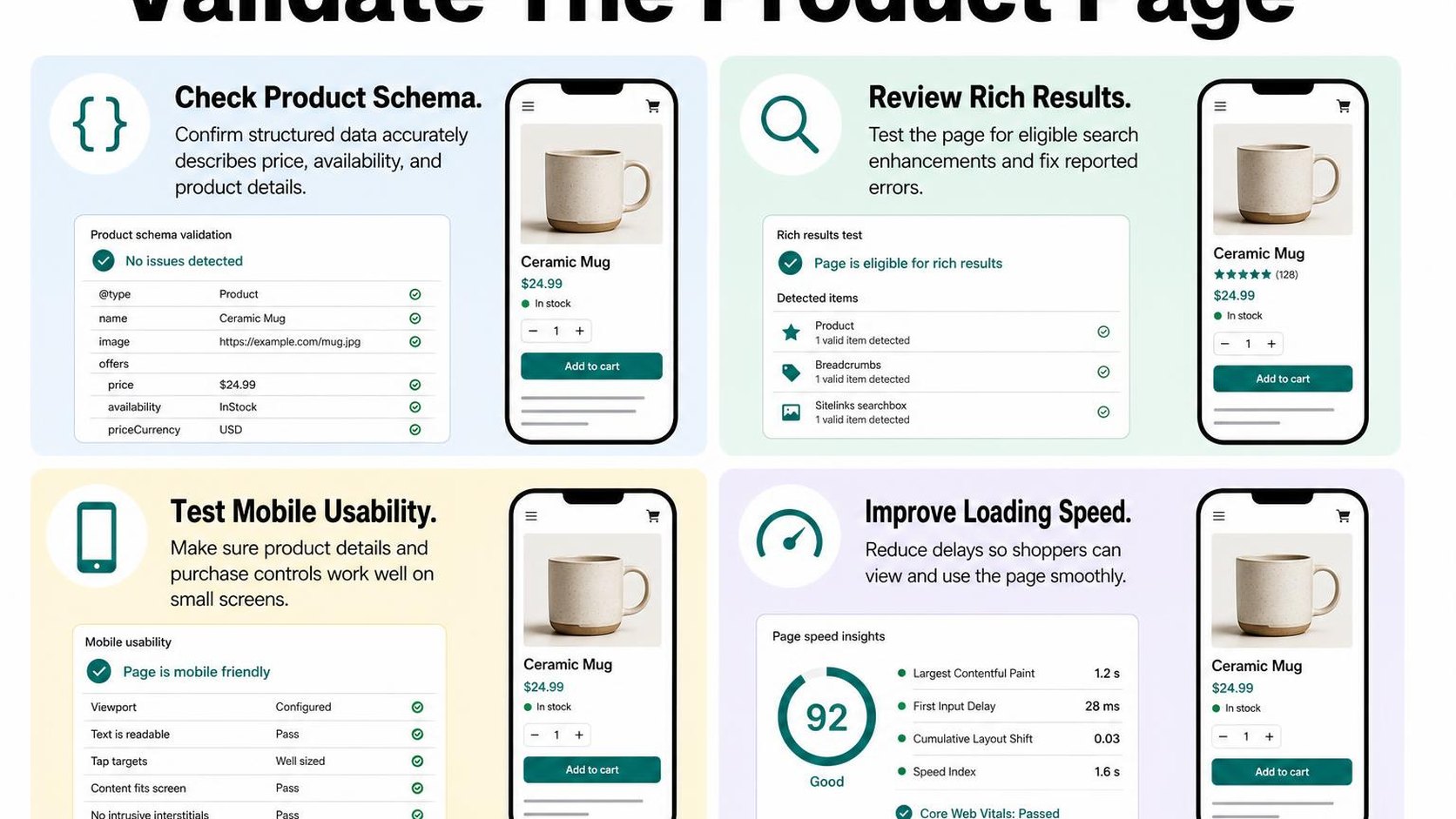
Shopify product schema markup is structured data that describes your product and its offers to search engines. It can communicate details such as the product name, image, price, currency, availability, and genuine customer ratings.
Open a live product URL in Google’s Rich Results Test and inspect the detected product data. Google’s structured data testing guidance explains how the test identifies supported rich results; passing the test does not guarantee that Google displays an enhanced listing.
Fix errors that block eligibility first, then review warnings for relevant missing details. Do not invent ratings, shipping terms, or return policies just to fill a recommended field.
- Source: Check whether your theme, custom code, or an installed integration generates the markup before editing it.
- Consistency: Investigate conflicting product entries rather than adding another block of structured data.
- Retesting: Test again after theme updates and changes to anything that generates product data.
Review availability, price, and variant information
Offer data describes the commercial terms attached to a product, including its price and stock status. Compare those values with the visible page and the option a shopper can actually purchase.
A product with several sizes or colors needs particular care. Select different variants and check their URLs, images, prices, and availability; do not assume that accurate default-product data covers every option.
| Detail | What to verify |
|---|---|
| Price and currency | The active selling price and currency agree with the displayed offer. |
| Availability | In-stock, out-of-stock, or preorder status reflects actual purchasing conditions. |
| Variant identity | The name, image, and identifiers describe the relevant size or color. |
| Sale price | The offer uses the current sale price, not the crossed-out comparison price. |
Practical rule: If the markup and the shopping experience disagree, correct the underlying data or implementation. Do not hide contradictory details from shoppers to make a validator pass.
Test mobile usability and page speed
A valid product listing still disappoints shoppers if the page jumps around or the add-to-cart button responds slowly. Test a representative product on your phone, including a page with many variants, reviews, and large images.
Core Web Vitals measure loading performance, responsiveness, and visual stability. Use PageSpeed Insights to investigate these issues, but treat its lab score as diagnostic feedback rather than a sales or ranking guarantee.
- Purchase path: Select a variant, read delivery information, dismiss overlays, and add the item to your cart.
- Images: Serve appropriately sized images and avoid delaying the main product image unnecessarily.
- Scripts: Review unused widgets and heavy embeds before removing features shoppers need.
Prioritize changes that make buying easier. Faster loading supports the shopping experience, but it does not replace useful product information or guarantee higher rankings.
Run the checklist, measure results, and prioritize fixes
Your Search Console report shows products gaining impressions, but orders remain flat. Use this shopify product seo checklist to separate visibility problems from pages that attract the wrong shoppers or leave buying questions unanswered.
Start with a manageable sample, record what changes, and expand only after checking the results. Editing every product at once makes mistakes harder to contain and useful changes harder to identify.
Audit a representative set of product pages
Select 10 to 20 products across your main collections, including bestsellers, new arrivals, low-traffic items, and products with multiple variants. Include pages that share a template so you can distinguish a catalog-wide issue from missing information on one product.
- Relevance: Match the product title, main heading, and description to the item and its intended buyer. For Shopify product title SEO, use specific product language rather than repeating every keyword variation.
- Content: Check dimensions, materials, compatibility, care, and delivery details. Shopify product description SEO should help shoppers decide, not simply add more text.
- Search presentation: Review the Shopify product meta title and description for accuracy and differentiation. Confirm that the product URL remains descriptive; avoid changing established URLs without a clear reason and a redirect plan.
- Technical accuracy: Check indexability, canonical URLs, and Shopify product schema markup against visible prices, availability, and variants.
- Buying support: Check image clarity, descriptive Shopify product image alt text, variant selection, and visible shipping and return information.
Record each issue beside its URL, affected template, owner, and planned fix. This turns your Shopify product page SEO checklist into a work queue rather than a score with no next step.
Track impressions, clicks, and conversions
Save a baseline before editing. In Search Console, review product URLs and their search queries; in your analytics, review organic landing-page sessions, add-to-cart activity, and purchases where tracking allows.
Check weekly for errors and review performance over comparable periods, such as consecutive 28-day windows. Account for promotions, stock changes, seasonality, and reporting delays before attributing a movement to SEO.
| Pattern | What to investigate |
|---|---|
| Few impressions | Indexing, search demand, internal links, and relevance |
| Impressions without clicks | Query fit, ranking position, and search presentation |
| Clicks without cart activity | Product information, price, imagery, and buyer fit |
| Cart activity without purchases | Delivery costs, availability, and checkout friction |
These patterns suggest investigations, not diagnoses. A low click-through rate does not automatically mean your title needs rewriting, especially when ranking positions or query mixes change.
Fix high-impact issues before scaling changes
Resolve accidental indexing blocks and incorrect product data first. Next, improve relevant pages that already earn impressions, then address missing buying information and expand successful edits across similar products.
Practical rule: Prioritize by severity, number of affected products, and evidence of shopper demand. Change one issue group at a time where practical, and keep a dated change log.
Apply this routine alongside guidance from Yassine Malti, the developer writing from hands-on store work.
Put this into practice
Start with the store you already have, then use the guides on the blog for the next page that needs the same treatment.
Shopify apps by Yassine Malti
Put this into practice
-

ALT SEO · Image alt text
AI alt text for every product image · 100 images/month free
-

RANKit · Meta titles & descriptions
AI meta titles and descriptions, sized for Google · 50 meta tags/month free
-

TAGit · Product tags
SEO-friendly product tags, generated in bulk · 50 tags/month free