Your fulfillment tool needs Shopify orders, the marketing team wants customer updates, and someone has suggested installing another app. The connection looks straightforward until an order stops syncing and nobody knows whether to retry it, reconnect the store, or call the developer.
A dependable Shopify app integration needs more than a successful API response. It needs a clear distribution model, secure authorization, recoverable synchronization, and a named person responsible for what happens after launch.
Table of Contents
- Shopify App Types and Which One Fits
- How to Set Up OAuth and the Install Flow
- Scopes, APIs and Webhooks That Keep Data in Sync
- Metafields, App Proxy and Theme Integration
- Testing, Launch Thresholds and Readiness Check
- Troubleshooting Common Integration Errors
- Keeping Integrations Reliable Through API Changes
Shopify App Types and Which One Fits
Say a brand needs to push orders into a fulfillment tool. Before building the connector, decide whether you're solving that brand's internal problem or creating a product that unrelated merchants will install.
Shopify app types compared
| App type | Who it serves | Where it is available | Review and billing |
|---|---|---|---|
| Public app | Many merchants and SaaS products | Shopify App Store | Must pass App Review; billing through Shopify |
| Custom app | One merchant or one store | Installed on a single store, not publicly listed | No App Store review; billing handled outside the App Store |
| Private app | Legacy direct API access | One store | Deprecated; use a custom app for new work |
The distribution choice affects more than visibility. A public app needs repeatable onboarding, merchant-facing configuration, and support for stores with different catalogs and operating practices. A custom integration can target a specific fulfillment workflow, but someone still needs to maintain its credentials, deployment, and recovery procedures.
Choose around the operational requirement
Install an existing app when its plan covers the actual workflow, including exceptions. Check how it handles partial fulfillment, canceled orders, credential changes, and existing records before treating a feature-list match as a solution.
For our ready-made apps, each app is installed from the Shopify App Store and billed separately, so customers pay only for the apps they use. Check the individual listing's plan and pricing rather than assuming that installing one app includes another.
Build a public app when many stores need substantially the same capability. Our public Shopify apps for SaaS companies are built to pass App Review and bill through Shopify. That route makes sense when configuration can accommodate merchant differences without maintaining a separate codebase for every installation.
Decision rule: Choose custom development for a business-specific synchronization contract, not merely for a different settings screen.
A custom app becomes justified when a store needs a durable audit trail, controlled conflict resolution, or recovery after an external system accepts only part of a transaction. Those requirements are easy to overlook during a demo and expensive to improvise after an inventory discrepancy.
For that choice, our Shopify app development services cover custom and public builds. Start with a written workflow and ownership model, then choose the distribution method that fits it.
How to Set Up OAuth and the Install Flow
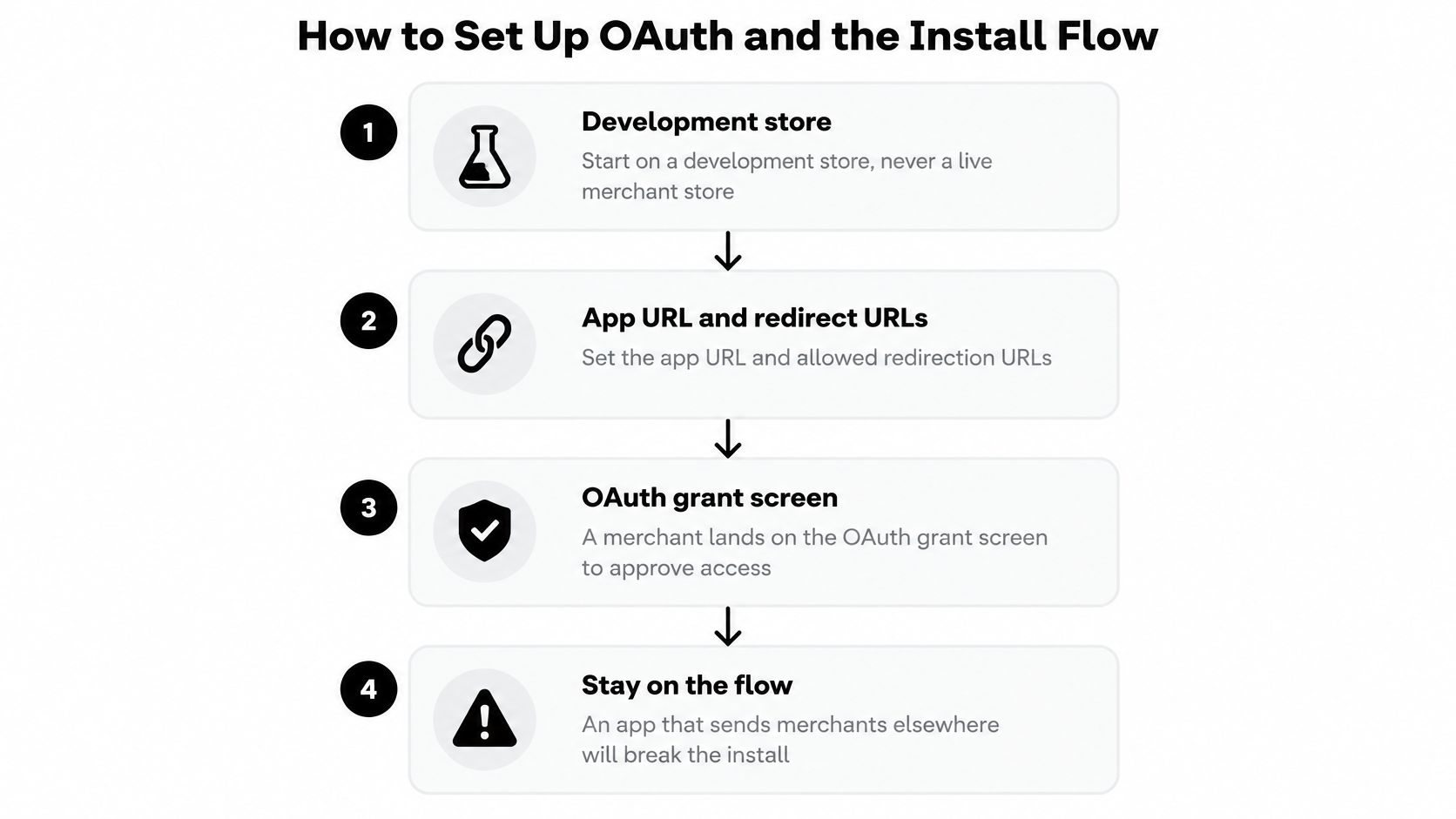
Start on a development store, not a live merchant store. Use test products and orders, separate environment credentials, and an installation record you can safely delete while testing.
For an authorization-code OAuth flow, keep the redirect, callback validation, and token exchange on the server. Use Shopify's maintained authentication tooling where it fits your app architecture instead of assembling signature validation from memory.
The install sequence should stay predictable from the merchant's first click through authorization.
Build the authorization path
Configure the app URL and allowed redirection URLs. Make the installation entry point begin authorization when the shop lacks a valid installation, and register the exact callback address for each environment. Hard-coded staging redirects commonly survive deployment and send a production installation to the wrong server.
Request only the first feature's scopes. An order-export integration shouldn't request customer-write access because a later roadmap item might use it. Keep a scope-to-feature mapping in the repository so a future developer can explain every permission.
Create state before redirecting. Generate a cryptographically random state value, store it in the server-side session with an expiration, and associate it with the installation attempt. Redirecting before the session has persisted can produce a callback that your own server can't validate.
Validate the callback before trusting its contents. Reject missing, expired, forged, or mismatched state, verify the query HMAC using the app secret, and validate the shop domain before making outbound requests. Use the authentication library's canonicalization rules, because rebuilding the signed query incorrectly can reject legitimate callbacks.
Exchange the code and protect the token. Perform the exchange server-side, compare granted scopes with the feature's requirements, and store the token encrypted against the normalized shop record. Never return the token to browser JavaScript or include it in diagnostic logs.
Uninstall and reinstall deliberately. Mark the old installation inactive, stop its background work, and ensure a new authorization updates the existing shop record rather than creating a competing installation. The common mistake is testing only the first install, leaving stale credentials or duplicate subscriptions behind.
Prove the installation is usable
A redirect that reaches your callback isn't enough. For an embedded app, confirm that the app opens inside Shopify admin and that navigation doesn't restart authorization unnecessarily.
Run a small GraphQL Admin API query with the stored token and inspect both the response and granted permissions. Then repeat the installation lifecycle with a fresh browser session so success doesn't depend on cookies left over from development.
Treat installation as a state transition, not a page visit. Your database should distinguish an authorized shop from an incomplete, revoked, or uninstalled connection.
Keep failures actionable for merchants. If authorization fails, show a reconnect action and a safe diagnostic reference, not the access token, app secret, or raw callback query.
Scopes, APIs and Webhooks That Keep Data in Sync
Build synchronization around events, not a polling loop. Receive a webhook, validate its signature, persist its delivery identifier and payload, then enqueue processing before acknowledging successful receipt.
Use the GraphQL Admin API from your backend for privileged operations and the Storefront API for buyer-facing features with its own access configuration. Shopify's App Store requirements require necessary scopes and accurate, consistent synchronized data; they also support webhooks as the production mechanism for change notifications rather than repeated polling.
Data domains, scopes, APIs and webhook topics
| Data domain | Typical scope | API to use | Example webhook topics |
|---|---|---|---|
| Products | read_products, write_products when writing |
GraphQL Admin API | products/create, products/update |
| Orders | read_orders |
GraphQL Admin API | orders/create, orders/updated |
| Customers | read_customers |
GraphQL Admin API | customers/update |
| Inventory | read_inventory, write_inventory when writing |
GraphQL Admin API | inventory_levels/update |
| Metafields | Scope of the owning object, such as read_products |
GraphQL Admin API | Owner updates such as products/update; verify coverage |
| Buyer-facing data | Storefront access token, no admin scope | Storefront API | Not applicable |
Treat those topics as starting points, not a complete subscription manifest. Include deletion and other lifecycle events your workflow needs, check availability against your pinned API version, and verify metafield-change coverage rather than assuming every owner update contains the required data.
Separate delivery from business processing
A delivery identifier prevents processing the same webhook twice. A business idempotency key prevents repeating the same external effect, such as creating the same fulfillment request, even when separate events trigger it.
Schedule reconciliation to compare Shopify records with the external system and repair missed or reordered changes. Define which system owns each field first, otherwise a repair job can overwrite a legitimate merchant edit. This distinction between moving events and maintaining agreement is central to reliable data synchronization.
Watch for stale tokens, access-denied responses from insufficient scopes, assumptions about event order, and retries that disappear without a terminal status. Record failures against the shop, resource, and operation so support can identify the affected business record.
Control API cost and prove convergence
Read GraphQL cost and throttle information in responses, combine related reads, and use bulk operations for large backfills. Cache stable shop settings and avoid fetching an entire product whenever a narrow image or metadata change arrives.
For an image workflow, ALT SEO: AI Alt Text Generator supports automatic alt-text generation for new images, catalog-wide processing, and scheduled updates. An integration around that workflow should identify eligible images and preserve the merchant's overwrite choices, rather than repeatedly rewriting the entire catalog.
Before release, replay duplicate and out-of-order events. The final records should converge on the expected state, with no unexplained differences left in the test fixtures.
Metafields, App Proxy and Theme Integration
Custom data needs a defined storage location and a safe presentation path. Keep product attributes in metafields, dynamic server responses behind a verified proxy, and storefront placement in theme app blocks.
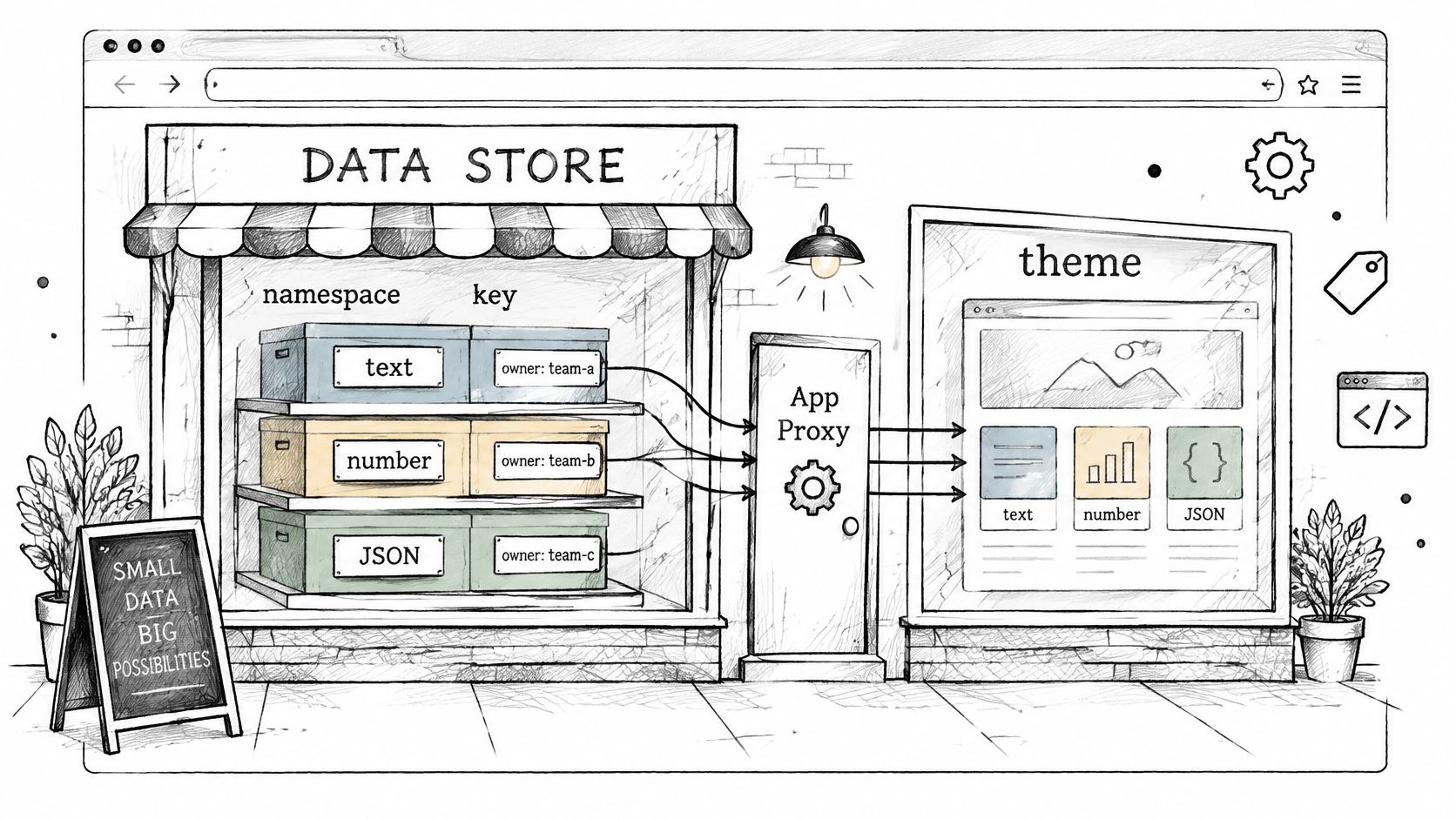
The illustration shows the separation between stored data and proxy connections.
Define storage before rendering
Create a metafield definition with a namespace, key, matching type, and owner. For a shipping-estimate app, use a product-owned integer metafield such as delivery.lead_time_days; the theme block can read it and calculate an estimate using the merchant's shipping rules.
Don't store a display sentence when the application needs a number for calculations. The Shopify metafields guide provides additional context for organizing custom store data.
An app proxy routes a storefront path under /apps/ to your server. Verify its signature before serving data, and authorize access to personalized records separately: a signed proxy request isn't, by itself, proof that a visitor may read a particular customer's information.
Use a theme app extension for merchant-placeable app blocks instead of editing theme files manually. Test placement in the target theme, because replacing a theme can still require merchant configuration.
This video provides an additional walkthrough.
Keep AI processing within the agreed purpose
Send AI or chatbot processors only the data needed for the request, removing customer names and addresses unless necessary. Document the recipient, retention period, deletion process, and whether data is retained for service improvement.
The Shopify Partner Program agreement FAQ states that merchant and customer data, including derived or aggregated data, can't be used to develop or train AI or machine-learning systems without explicit written consent from Shopify or, for merchant-specific data, the merchant. Permission to answer a support question isn't blanket permission to train a model.
Finish with these storefront checks:
- Metafield rendering: The expected value appears in theme preview.
- Proxy verification: A tampered request fails signature validation.
- Merchant placement: The app block appears in the theme editor and renders without exposing credentials.
Testing, Launch Thresholds and Readiness Check
The riskiest work is authorization, installation routing, compliance, and production readiness. A successful API query proves only that a credential worked at a particular moment. It says nothing about whether the integration survives a failed installation, a revoked token, or a fulfillment service that goes quiet mid-order.
Shopify's App Store review guidance calls for working authorization routing, complete setup demonstrations, and valid third-party test credentials. Its security checks cover common web vulnerabilities, encryption in transit, closed network ports, secure token generation, and unsafe shortened URLs.
Run the tests in business order
Start where failure costs the merchant money. Exercise compliance handlers using realistic customer data-request and deletion records, including records already copied to downstream processors.
For each external service, test success, timeout, retry, and revoked credentials. Capture screenshots or screencasts that show the setup and expected results, and make sure review credentials reach a usable test account rather than an expired sandbox.
Test failures after the external side effect as well as before it. If the fulfillment provider accepts an order but your worker crashes before recording success, the retry must discover or reuse that operation instead of creating a second shipment.
Release gate: A happy-path demonstration isn't a substitute for evidence that interrupted work can resume safely.
Broad order or customer access without justification, broken redirects, and neglected uninstall handling can prevent approval. For public apps, don't introduce external charging that bypasses Shopify's billing requirements.
Use explicit acceptance criteria
The targets below are engineering release gates. App Store approval remains Shopify's call.
Launch thresholds for a Shopify app
| Check | Target | What to test |
|---|---|---|
| OAuth redirect | All install and reinstall cases pass | Every install path through the OAuth flow |
| Secrets exposure | No secrets in client-side code or logs | Browser source and log output |
| Retry behavior | Deterministic on every run | Timeout and retry on each external call |
| Uninstall cleanup | Verified removal of stored data and tokens under the applicable retention policy | Uninstall, then check the database and deletion jobs |
| Reconciliation | No unresolved discrepancies in test fixtures | Replay duplicate and out-of-order events |
| Compliance webhooks | Registered and answered | Deletion and data-request test records |
Don't force an immediate deletion policy that conflicts with required retention or scheduled compliance handling. Revoke operational access immediately, stop jobs, and verify that retained records have a documented purpose and deletion path.
Before approving launch, confirm the distribution model, scope justifications, and recovery evidence, and name the operational owner who handles webhook failures, version upgrades, and data reconciliation once the app is live. Readiness is a maintenance commitment: a row that passes today still needs someone watching it next quarter. A failing row needs a fix or an explicit release-blocking decision, recorded where the team will see it.
If an existing app already covers the job, test it before commissioning a replacement. Every Yassine Malti app installs from the Shopify App Store with a free plan, so a merchant can run it on real products before paying for anything.
Troubleshooting Common Integration Errors
Start with the failing request's logs and capture the shop, operation, API version, response category, and correlation identifier. Log no credentials and no more customer data than the diagnosis needs.
The log entry tells you which boundary failed: install routing, token permissions, delivery processing, or state sync. The table maps each symptom to the fix worth trying first.
Symptoms, causes and fixes
| Symptom | Likely cause | First fix |
|---|---|---|
| App loops back to install page | Installation routing never reaches or completes authorization | Correct app URL and allowed redirection URLs |
| Callback reports state mismatch | State not stored or session lost | Store state before redirect and check session cookies |
| Callback fails HMAC check | Wrong secret or incorrectly reconstructed query | Verify app secret and use canonical validation |
| API returns access denied | Missing scope on the token | Add the justified scope, reauthorize, confirm the grant |
| Webhook deliveries repeat | Slow response triggers retry | Persist and queue work promptly; store an idempotency key |
| Final state differs from Shopify | Out-of-order or dropped events | Run reconciliation and replay fixture events |
| Requests return throttled responses | Query cost exceeds available capacity | Reduce fields, batch reads, use bulk operations |
| Metafield missing in theme preview | Namespace, key, or owner mismatch | Match the block reference to the metafield definition |
Follow the failure boundary
For an install loop, compare the logged redirect against the configured app URL and allowed redirection URLs, then determine whether authorization never completes or the app loses its installation state afterward. A loop in one browser points at session cookies. A loop on every install points at routing.
For access-denied responses, remember that a token keeps the scopes it was granted at authorization. Adding a scope to your configuration changes nothing until the merchant reauthorizes and the grant is confirmed.
For throttled requests, check the query's cost before retrying. Broad field selection is the usual cause, and bulk operations absorb large reads that per-request queries cannot.
State mismatches, HMAC failures, and repeated webhook deliveries trace back to the OAuth and webhook mechanics covered earlier; a recurrence means that setup regressed.
If the symptom doesn't fit the table, reproduce it on a development store with matching scopes and API version. Preserve the failing payload as a sanitized regression fixture before changing production behavior, and assign an owner to any row that recurs. A repeating error is a maintenance gap, not a one-off incident.
Keeping Integrations Reliable Through API Changes
Maintenance determines whether a working connection stays usable. Treat API upgrades, webhook failures, and reconciliation exceptions as assigned operational work, not tasks someone will remember when the next feature ships.
Shopify's 2026-04 release notes identify changes involving payment customizations, inventory mutations, webhooks, metafields, and checkout extensions, including mandatory idempotency for certain inventory adjustments and refunds. Inventory and payment workflows need migration tests that verify business effects, not merely successful response codes.
Maintain an upgrade and recovery playbook
Inventory dependencies. Record API versions, webhook topics, scopes, extensions, and external endpoints. Include the responsible developer so each changed dependency has an owner.
Pin supported API versions. Make version selection explicit in configuration and track support status. Pinning controls the upgrade process, but it doesn't make an old version supported indefinitely.
Test migrations on a development store. Replay representative fixtures and compare resulting records and external effects. Include partially completed operations, because migration failures rarely respect transaction boundaries across systems.
Assign webhook incident response. Alert on failed delivery processing, queue age, and exhausted retries using thresholds suited to the workflow. Name who investigates and who can authorize a replay.
Protect writes against repetition. Persist operation keys and outcomes, using platform-supported idempotency mechanisms where available. A transport retry must not become another refund or inventory adjustment.
Prepare a usable rollback. Keep a feature flag for the new code path and a previous supported configuration where feasible. Document irreversible changes separately, because rolling back code won't undo an external shipment or refund.
Give reconciliation a business owner
The developer owns the repair mechanism; an operations lead should own decisions about disputed inventory, fulfillment, or order records. Define who can choose the authoritative value when both systems contain legitimate edits.
No-code tools can reduce setup effort, but they don't remove these responsibilities. Before handing over the integration, put the next upgrade review on the calendar and name the people responsible for version changes, failed jobs, and reconciliation exceptions.
We build custom Shopify integrations, public apps for SaaS companies, and automations for brands, and we also fix existing apps. Visit Yassine Malti with your workflow, current failure points, and recovery requirements so we can help you choose between improving an existing app and building the missing integration.
Shopify apps by Yassine Malti
Put this into practice
-

ALT SEO · Image alt text
AI alt text for every product image · 100 images/month free
-

RANKit · Meta titles & descriptions
AI meta titles and descriptions, sized for Google · 50 meta tags/month free
-

TAGit · Product tags
SEO-friendly product tags, generated in bulk · 50 tags/month free