A 2026 academic study of the Shopify App Store analyzed 24,826 applications and reported a marketplace of more than 24,000 third-party apps used by approximately 2.7 million merchant stores generating $706 billion in annual sales. Among 16,698 active applications, 74.8% had recorded zero installations, and only 4,213 of the 24,826 had reached market entry, defined as at least one install. The researchers flagged both scraping limits and real barriers. Shopify app building that stops at a working repo still fails that test.
Shopify had already shown how deep app use sits in daily operations. As of August 2021, more than 3,800 developers were building for an App Store of over 6,000 apps in 175 countries. In 2020 alone, merchants installed 16 million apps and developers earned more than $230 million. Three out of four merchants used apps, and those who did had an average of six installed.
The work from an empty folder to a listing is therefore a launch plan, not a coding sprint. You pick one merchant job, wire OAuth and GraphQL without wasting scopes or cost points, ship one visible surface, and treat billing, review, and the first paid installs as part of the build.
Table of Contents
- Plan Your App Type and Tech Stack
- Set Up Your Development Environment
- Build OAuth and the Embedded App Shell
- Work With Admin GraphQL, Storefront API and Webhooks
- Ship Extensions on Admin Checkout and Themes
- Add SEO and AI Automations That Merchants Pay For
- Test Locally, Troubleshoot and Deploy
- Prepare Billing, Permissions and App Review
- Your Next Step Toward a Published App
Plan Your App Type and Tech Stack
Most projects stall before the first commit, because the builder ships a feature list into a store that already ignores most listings. Talk to five store owners who still do the job by hand. If you want an alt-text app, sit with people who type image descriptions one product at a time. If they won't pay to stop, don't build it. I would rather kill a vague idea in a week than spend a month on an app nobody installs.
Public app, custom app, and extension are different products. A public app is a SaaS listing any merchant can find, billed through Shopify, and it must pass full App Store review. A custom app serves one store, installed by invite, paid on a direct contract, with no App Store review. Extensions don't stand alone. They embed UI on admin, checkout, or the theme, and they ride the host app's review and price.
| App type | Distribution | Best for | Monetization | Review required |
|---|---|---|---|---|
| Public app | Shopify App Store, any merchant | SaaS products sold to many stores | Shopify Billing, recurring or usage-based | Full App Store review |
| Custom app | One store, installed by invite or direct access | Merchant-specific integrations and admin automation | Direct contract with the merchant | No App Store review |
| Admin UI extension | Embedded panels inside the admin | Custom workflows on top of a host app | Bundled with the host app | Reviewed with the host app |
| Checkout UI extension | Checkout blocks, fields and widgets | Upsells, trust badges, custom checkout data | Bundled with the host app | Reviewed with the host app |
| Theme app extension | App blocks added to merchant themes | SEO content, reviews, recommendations on the storefront | Bundled with the host app | Reviewed with the host app |
Public is the right call when many stores share the same job and you can support onboarding. Custom is the right call when the workflow is one brand's ERP, warehouse, or admin shortcut that no listing should expose. Extensions are how merchants see the product. A backend with no block, panel, or checkout target feels unfinished.
A default stack
For an embedded public app, I would start with the Shopify CLI Remix / React Router template, a TypeScript backend, and PostgreSQL for sessions and job queues. Node is the smoothest path with the official packages. Ruby or Python are fine when the team already runs services there. Don't split the first version across three languages.
Scope and hosting change the budget more than the framework does. The breakdown of what drives a Shopify app development budget is worth reading before you promise a date.
Before you scaffold, write three lines: app type, the merchant you serve, and one number the app must move, such as hours saved per week or products with alt text.
Set Up Your Development Environment
You can stand this up in one sitting. The proof at the end is simple. The embedded app loads inside your development store admin, not only on a local port.
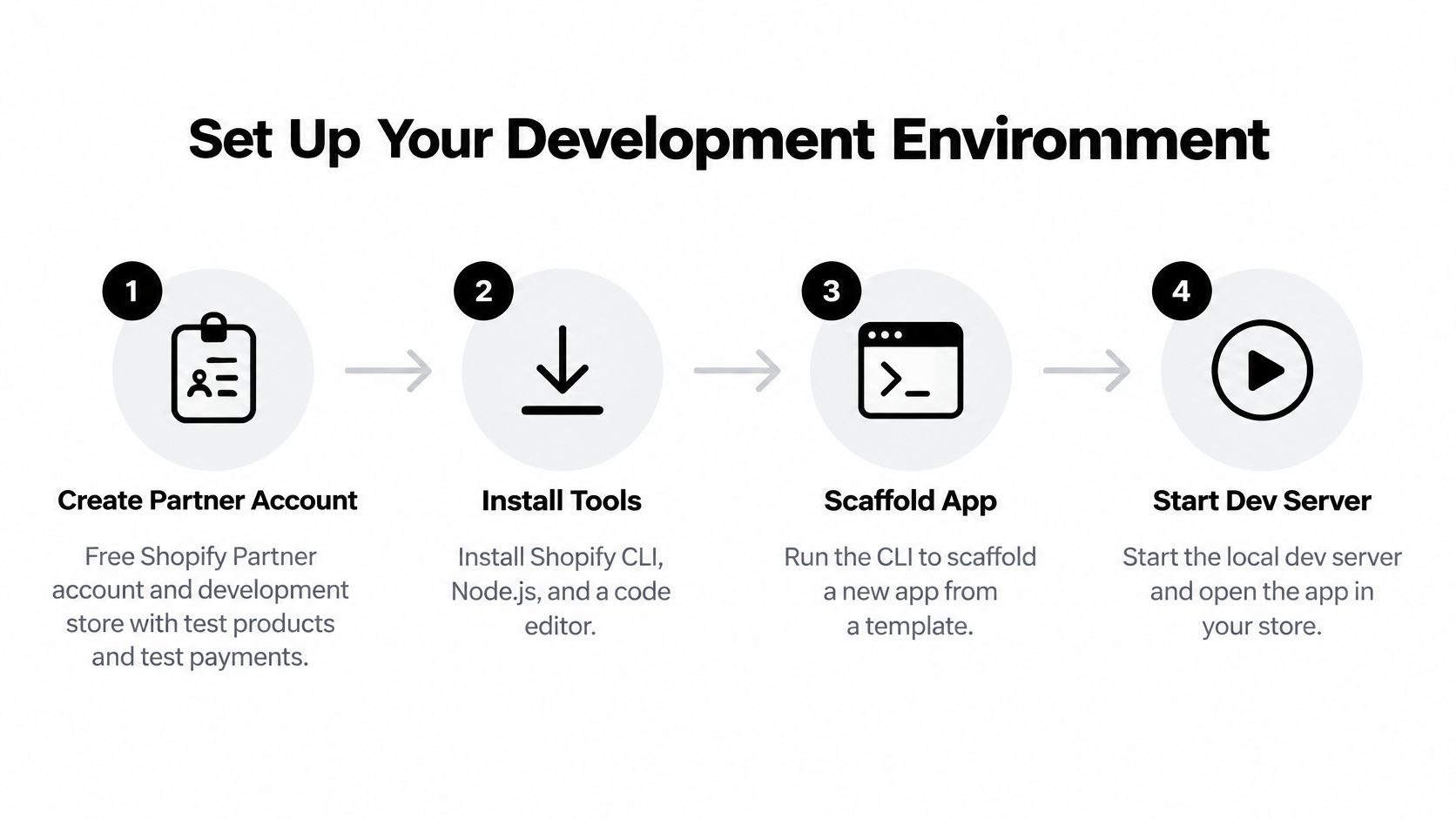
- Create the Partner account and a development store. Sign up for a free Shopify Partner account, then create a development store. Add test products with images and variants, and turn on test payments. A store with three products hides every limit you'll hit later.
- Install the toolchain. Install Node.js LTS, 20 or newer, plus npm and Git. Install the Shopify CLI globally only if you want it on your path. Otherwise the scaffold pulls it in.
- Scaffold the app. From an empty folder run
npm init @shopify/app@latest. Choose the Remix / React Router template and an embedded app. Commit the generated tree before you edit it. - Start the dev server. Run
shopify app dev. The CLI starts the local server and an HTTPS tunnel so Shopify can call back to your machine. Leave that process running. - Set
shopify.app.toml. Name, handle, application URL, redirect URLs, and the scopes your app requires belong in that file, and the file belongs in Git. Secrets do not. Put API keys and the client secret in environment variables. - Install on the development store. Open the CLI install link, approve the scopes, and confirm the app iframe renders in admin. If the frame is blank, the tunnel URL and the application URL don't match.
- Choose session storage. SQLite is enough on your laptop. Plan PostgreSQL before the first real merchant, because local files don't survive a restart on a host.
Update the CLI before each deploy. Seed a large catalog now, a few thousand products if you can, so cost limits show up while you're still on a dev store.
If you want the same flow on screen, this walkthrough covers Partner setup through the first running app.
Build OAuth and the Embedded App Shell
Installation is an OAuth handshake plus an iframe. Skip a check here and review, or a later merchant, will fail you.
- Send the merchant to authorize. The install link redirects to Shopify's authorize URL with
client_id, the scopes from your config,redirect_uri, and a randomstate. Store thatstatein the session before the redirect. It exists to stop CSRF, not to decorate the URL. - Take the code on the way back. After consent, Shopify redirects to your callback with an authorization code and the same
state. Reject the request ifstatedoesn't match. Don't log the code. - Exchange the code for a token. Your backend posts the code and
client_secretto the token endpoint. Use an offline token when jobs must run after the merchant closes the tab. Use an online token when the action is tied to the staff user in front of the screen. Public apps must use expiring offline access tokens and a refresh flow. A token that never expires is a review problem, not a shortcut. - Persist the session by shop. Save it through a
sessionStorageadapter, keyed by shop domain, in PostgreSQL or SQLite. One row per shop is the unit you'll debug later. - Trust App Bridge inside the iframe. Embedded admin calls should send an App Bridge session token, a JWT, and your server should verify it. Don't accept a bare shop query parameter as proof of identity.
- Register the privacy webhooks.
customers/data_request,customers/redact, andshop/redactare mandatory. Handle them even if your app stores little customer data.
In @shopify/shopify-app-remix, shopifyApp() wires this, and authenticate.admin is the gate on admin routes. Read that implementation before you write a custom handshake.
Practical rule: Request only scopes the first shipped screen calls. A speculative
write_orders"for later" slows review and widens the blast radius if a token leaks.
Don't print tokens in logs, don't skip the state check, and don't keep a non-expiring offline token "because refresh is annoying." Those three mistakes show up in rejected listings more often than broken React.
Work With Admin GraphQL, Storefront API and Webhooks
Design around cost points, not request counts. Every Admin GraphQL response includes extensions.cost. Read requestedQueryCost, actualQueryCost, and throttleStatus before you enqueue the next job.
Shopify's Admin API rate limits restore points per second by plan, and a single query cannot exceed 1,000 points. Standard stores restore 100 points per second, Advanced Shopify 200, Shopify Plus 1,000, and enterprise Commerce Components stores 2,000. The bucket is per app and store, not global, so one Plus merchant doesn't subsidize a standard store.
| Store plan | Points restored per second | Max points per query | What it means for your app |
|---|---|---|---|
| Standard Shopify | 100 | 1,000 | Queue catalog jobs and lean on bulk operations |
| Advanced Shopify | 200 | 1,000 | More headroom, but backoff and per-shop queues are still required |
| Shopify Plus | 1,000 | 1,000 | High-frequency syncs are practical, yet no single query may exceed 1,000 points |
| Commerce Components (enterprise) | 2,000 | 1,000 | Built for large multi-store integrations with heavy background work |
Small queries, then bulk
Start with a narrow read. products(first: 10) { edges { node { id title } } } is enough to prove auth. Add fields only when a screen needs them. On every mutation, branch on userErrors before you treat data as success.
Catalog-wide work should not paginate a connection in a loop. Run an asynchronous bulk query with bulkOperationRunQuery. Bulk operations are GraphQL-only, and API versions 2026-01 and later allow up to five simultaneous bulk queries per app per shop. Poll status, then download the JSONL result. Complex nested selections are the classic failure. They look innocent and blow past the 1,000-point ceiling before a single edge returns.
Webhooks and the storefront
Register subscriptions with webhookSubscriptionCreate. Verify the HMAC on the raw body, return 200 immediately, and process on a queue. A slow handler invites retries, and retries invite duplicate writes. Key jobs by shop and resource ID so a second delivery is a no-op.
Treat 429 as temporary. Exponential backoff plus one queue per shop beats a global worker pool, because a busy catalog would otherwise starve everyone else.
Storefront features, recommendations or cart-adjacent reads, use the Storefront API with an unauthenticated access token. That token is not an Admin token. New public apps should not build new Admin behavior on REST. REST is the legacy path.
If the automation is conversational, the same Admin and Storefront split shows up in a Shopify ChatGPT integration. The model can draft. The app still has to spend cost points to write.
Ship Extensions on Admin Checkout and Themes
Merchants judge the app by the surface they can point at. Ship one extension type in the first release so admin, checkout, and storefront performance checks stay small enough to pass.
Theme app extensions put content on the storefront without a theme edit. Run shopify app generate extension, choose a theme app extension, and add an app block in Liquid for reviews, recommendations, or SEO copy. The merchant drops the block in the theme editor. You don't ask them to paste snippets.
Admin UI extensions sit on product or order pages. Render the panel with App Bridge, call your backend with a session token, and write with productUpdate or metafieldsSet. Keep the panel to one job. A settings dump inside a product page gets closed and forgotten.
Checkout UI extensions target blocks, fields, or trust widgets. Declare the checkout target, keep the bundle small, and run a full test checkout with test payments on the development store. Checkout is the least forgiving surface for extra network calls.
Register each extension in shopify.app.toml and publish configuration with shopify app deploy. Review covers the host app and its extensions together, so an undeclared block is an incomplete submission.
Limit scopes to that surface. read_products and write_products cover catalog blocks. Checkout scopes belong only on a widget that reads cart data. A theme block that also asks for orders will look like overreach.
One extension in the MVP. Add the second surface after the first one survives review and a real catalog.
Add SEO and AI Automations That Merchants Pay For
Differentiation starts after install, OAuth, and one write path work. Merchants pay for a result they can count.
ALT SEO launched in 2025 to fill product images that had no alt text. TAGit generates SEO-friendly product tags in bulk. Backlinker places backlinks on real Shopify blogs, and each backlink costs 20 credits, image included. VEOit generates product video on a credit model. None of these is "AI for your store." Each one moves alt coverage, tag coverage, referring links, or video output.

Say a home-goods store has 800 products and empty alt text on most images. The app should not offer a blank prompt box. It should subscribe to products/create and products/update, generate text for images that lack it, and write back with metafieldsSet or productUpdate. The merchant picks products, collections, or images, and whether existing values can be overwritten. That boundary is what keeps an automation from clobbering copy a marketer already wrote.
Patterns that survive a large catalog
- Webhook in, mutation out. Trigger the job from the product webhook, not from a button the merchant must remember. Persist the resource ID so a retry doesn't double-write.
- Bulk for the backlog, webhooks for the delta. Staged uploads via
stagedUploadsCreatemove image assets. Asynchronous bulk mutations clear the historical gap. After that, incremental webhooks are enough. - Put the control where the merchant already works. A Shopify Flow action or a small Admin UI extension beats a separate dashboard nobody opens.
- Chat only when identity and cart context matter. A storefront assistant should read through the Storefront API and customer account APIs, then hand writes back to your app. Don't let the model call Admin GraphQL with a wide token.
Tie price to the outcome. Alt-text credits, tag runs, or backlink credits are easier to explain than a vague "pro" tier. Every one of our apps has a free plan and installs from the Shopify App Store, so a merchant can run the first task on real products before paying.
Pick one metric and refuse the rest until that metric moves. Ranking, conversion, or hours saved. A feature list loses to a narrower app that finishes the job. The same focus shows up in ecommerce SEO practices merchants already try to do by hand.
Test Locally, Troubleshoot and Deploy
Run a development-store matrix before you touch a host. Fresh install, reinstall, token renewal, uninstall cleanup, billing upgrade and downgrade, a denied permission, webhook retries, duplicate deliveries, and one pass over a large catalog. If uninstall leaves sessions or shop data behind, fix that before review.
| Symptom | Likely cause | Fix |
|---|---|---|
| OAuth redirect_uri mismatch | Callback URL differs from the registered application URL | Set the exact callback URL in shopify.app.toml and redeploy |
| 429 Too Many Requests | Query cost exhausted the token bucket | Read extensions.cost, add exponential backoff and a per-shop queue |
| Webhook received twice or more | Shopify retries until it receives a 200 | Acknowledge instantly and make handlers idempotent by event and resource ID |
| Invalid scope error at install | Requested scopes exceed what the app actually uses | Request only the scopes each shipped feature needs |
| Token stops working mid-job | Public apps use expiring offline tokens | Implement the token refresh flow and re-run the failed job |
| Bulk operation returns nothing | Query rejected or completion webhook missed | Poll bulkOperation status and inspect error fields before retrying |
A mismatch on redirect_uri is almost always a trailing slash or a tunnel URL you forgot to write back into config. A silent bulk job is usually a rejected query, not an empty catalog. Open the operation's error fields before you rerun it.
Deploy path
- Publish config.
shopify app deploypushes application URLs, scopes, and extensions. Run it whenevershopify.app.tomlchanges, not only when React changes. - Host the backend. Fly.io, Render, or Railway with managed PostgreSQL is enough. Secrets stay in the host's environment, not in the image.
- Log the shop and the cost. Structured logs should carry shop ID and request cost. Track webhook acknowledgment latency, retry counts, 429 rate, and failed jobs. A dead-letter queue you can replay beats a log line you can't.
- Isolate tenants. Idempotent jobs keyed by shop and resource ID, plus a worker queue per shop, stop one large catalog from blocking the others.
Release when critical errors from the matrix are gone, reinstall and uninstall both succeed, and a forced throttle recovers without manual restarts. I would not submit on the same day you first see a 429.
Prepare Billing, Permissions and App Review
Launch readiness includes billing, permissions, and a listing that gives merchants a clear reason to install. Public Shopify apps built for SaaS companies must pass App Review and bill through Shopify. Treat submission as a release pipeline, not a form to fill out at the last minute.
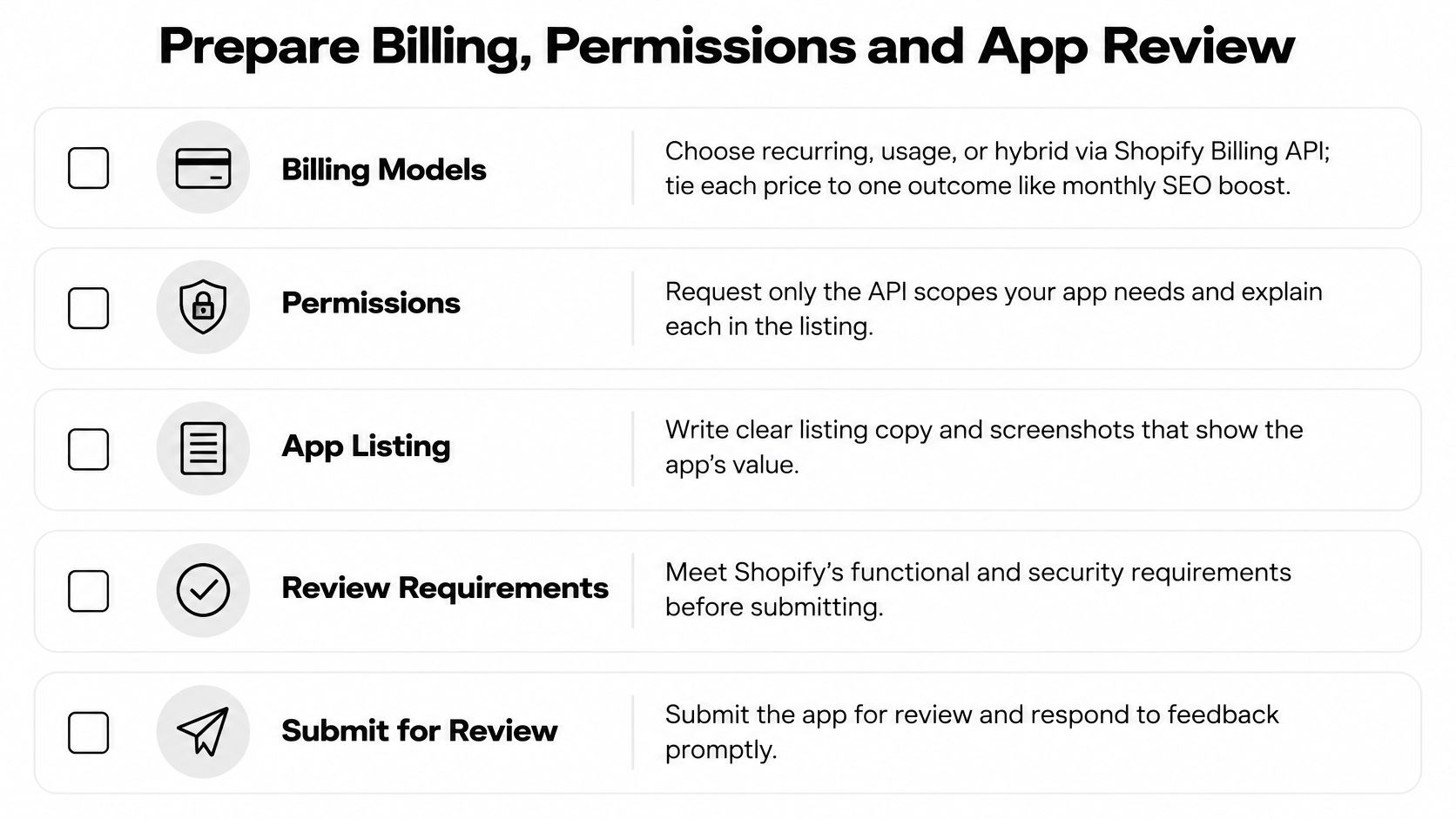
- Price one outcome. Recurring subscriptions, usage charges, or a hybrid can be handled through Shopify billing. A plan tied to a specific merchant job, such as SEO coverage or alt-text credits, is easier to evaluate than a bundle of unrelated toggles.
- Set up and test billing. Create plans in the Partner Dashboard, then test a charge, upgrade, downgrade, and cancellation on a development store. Confirm that subscription webhooks update access when payment status changes. Enforce the new access state without waiting for another page load.
- Justify every scope. In the listing notes, name the screen or feature that needs each scope, such as
write_productsor a metafield permission. If no shipped feature needs a scope, remove it. Requesting less access makes the app's purpose and data use clearer to reviewers and merchants. - Follow the current API rules. Shopify's app review guidance requires new public apps to use the GraphQL Admin API exclusively. Build around GraphQL rather than relying on REST Admin API behavior. The guidance also covers expiring offline tokens and privacy webhooks. Test the app on a development store and resolve bugs before submission.
- Give reviewers a listing they can assess. Include clear screenshots, a short demo video, pricing, and a support contact. Review proceeds one app at a time, so make the app's purpose and core workflow easy to verify. Shopify's app quality requirements cover necessary scopes, protected customer data, and performance across admin, checkout, storefront, and POS. A rejection may require changes and resubmission, so leave time to address review feedback.
Version-pin the API client, log shop ID with request cost, and keep a replayable dead-letter queue. Set the release gate before submitting: no unresolved critical errors, a clean reinstall, verified throttle recovery, and a clear reason for every requested scope. These checks support a review-ready app and a listing merchants can understand and use.
Your Next Step Toward a Published App
Before opening the editor, write down three decisions: public App Store app or custom app, the merchant's specific job, and the outcome the app should improve, such as time saved or product images with alt text. A narrow job makes the listing easier to explain and gives merchants a clear reason to install it.
Use a month-long plan to turn that decision into a launch:
- Days 1 to 7. Talk with store owners who handle the job manually. Keep features tied to a problem they would pay to solve.
- Days 8 to 18. Scaffold with Shopify CLI, complete OAuth, build one GraphQL write and one extension, then install the app on a development store.
- Days 19 to 25. Test installation, token renewal, billing, duplicate webhooks and a large catalog. Fix critical failures before polishing the interface.
- Days 26 to 30. Submit the listing and invite interested merchants and an agency to try the app. Treat early adoption as part of launch work, not a task to leave until later.
The App Store already holds thousands of listings. A focused merchant problem is a practical distribution choice; a broad feature set alone gives shoppers little reason to install.
Yassine Malti is an independent Shopify app developer and Shopify Partner based in Ottawa, Canada. He builds custom apps for brands, white-label apps for agencies and public App Store apps for SaaS companies, and can take over an existing Shopify app. Each app is installed from the Shopify App Store, with a free plan to try it. Questions go directly to the person who builds the apps.
Start by writing the merchant problem in one sentence. If you want help turning it into an app, contact Yassine Malti with the job it should solve and the outcome you want to improve.
Shopify apps by Yassine Malti
Put this into practice
-

ALT SEO · Image alt text
AI alt text for every product image · 100 images/month free
-

TAGit · Product tags
SEO-friendly product tags, generated in bulk · 50 tags/month free
-

Backlinker · Backlinks on other stores' blogs
Backlinks placed automatically on real Shopify blogs · 30 credits/month free