A drip campaign is a pre-planned sequence of messages sent automatically over time or when a customer takes an action, such as signing up, abandoning a cart or buying. Each person enters on their own clock, so the next email depends on what they did, not on a date you picked for the whole list.
You've probably got the collecting part sorted. A pop-up on the storefront, a discount code in exchange for an email, a list that grows every week. What you don't have is anything happening after that first message, which means most of those addresses sit there while you write another newsletter and hope. That gap between "someone gave me their email" and "someone bought" is exactly what a drip sequence fills, and it's also where most stores lose money by sending too much, too late, to the wrong people.
Table of Contents
- What Is a Drip Campaign
- Drip Campaigns Compared With Broadcasts and Newsletters
- How a Drip Campaign Works Behind the Scenes
- Ecommerce Drip Campaign Examples You Can Copy
- How to Set Up a Drip Campaign on Shopify
- Metrics That Show Whether a Drip Campaign Works
- Common Pitfalls and Best Practices for Drip Campaigns
- Launch One Sequence Before You Scale
What Is a Drip Campaign
A drip campaign is a pre-planned sequence of messages sent automatically over time or in response to a customer action, such as signing up, abandoning a cart, downloading content or buying.
The name comes from a tap left slightly open. Water arrives one drop at a time instead of a bucket thrown at the wall, and each drop falls because the one before it fell. In email terms, a message goes out because a trigger fired or a delay finished, never because you happened to be at your desk on Tuesday.
Here's the same idea mapped out from sign-up to the emails that follow.
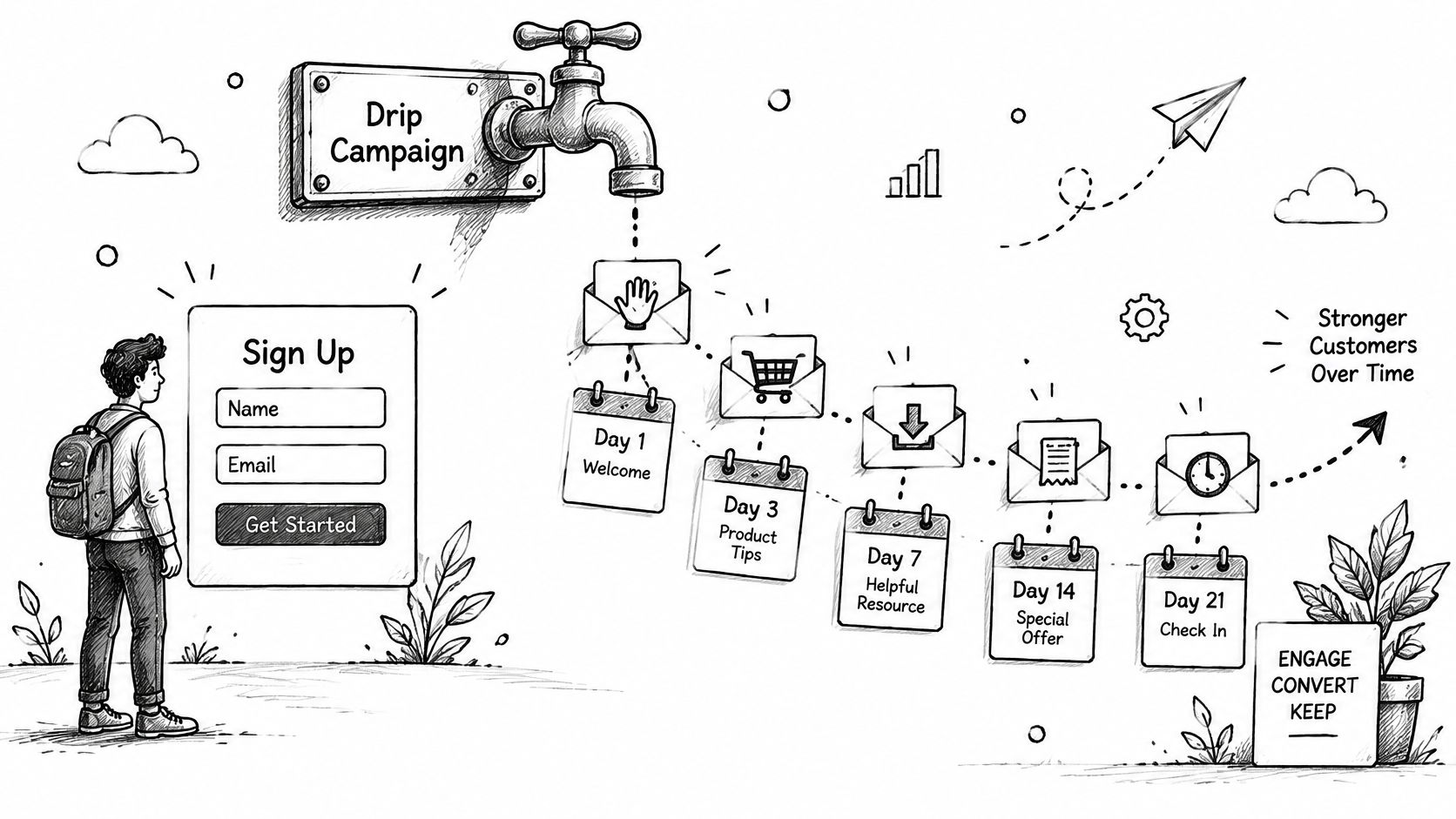
You've received dozens of these already. The welcome email that landed seconds after you joined a list, the reminder about the shoes you left in a cart, the thank-you note with care instructions after you bought a jacket. Two subscribers who join a week apart get their emails a week apart, and if one of them buys on day two, the rest of that sequence stops for them.
The approach grew out of 1980s and 1990s database marketing, when companies segmented customer records instead of mailing everyone the same thing, and it became practical for email once marketing-automation platforms arrived in the late 1990s and early 2000s, as Scrumball's history of marketing automation documents.
Drip Campaigns Compared With Broadcasts and Newsletters
| Email type | What triggers it | Timing | Typical goal |
|---|---|---|---|
| Broadcast campaign | Manual send to a list | One fixed date for everyone | Announce a sale or news |
| Newsletter | Regular publishing schedule | Same date for every subscriber | Build habit and brand trust |
| Drip campaign | Subscriber action or elapsed time | Each person's own timing across several steps | Onboard, nurture or recover a sale |
| Transactional email | One event, such as an order | Sent immediately | Confirm an order or shipping update |
Two questions classify any email you're planning. First, what makes it send: your finger on a button, or something the customer did? Second, does everyone get it at the same moment, or does each person's clock start separately?
If the answer is "I chose the date and everyone gets it," you're writing a broadcast. Black Friday announcements, restock news, a founder update: all broadcasts, and all useful. If the answer is "the customer's behaviour starts it and several messages follow at their own pace," you're building a drip.
The overlap trips people up. A welcome series is triggered and a drip, because one event starts a multi-step flow. Your app might label it an "automation," a "flow" or a "journey," and none of those labels change what it is. Classify by the message pattern, not the menu name.
Transactional messages sit outside this argument. An order confirmation or shipping update goes out because the customer is owed that information, regardless of their marketing preferences.
Say a store runs a 20 percent off weekend. Everyone on the list gets that email Friday morning, including the person who bought yesterday. That's correct for a broadcast and wrong for a cart sequence, where the buyer should already have been removed. Keeping the two logics separate in your head prevents most of the "why did I get this?" complaints.
How a Drip Campaign Works Behind the Scenes
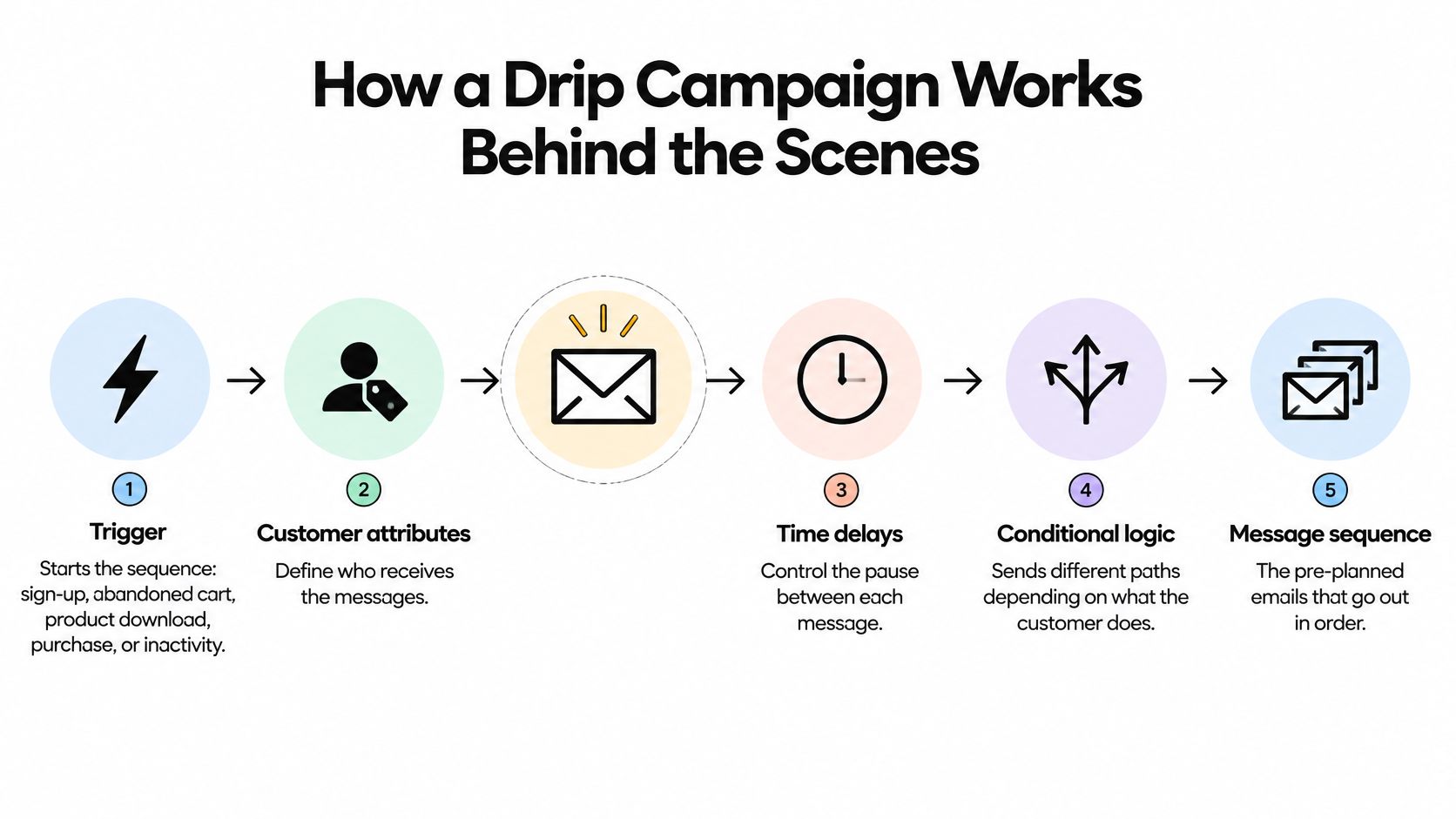
Every flow is built from the same six parts, and a message passes through them in order:
- Trigger: the event that starts everything, such as sign-up, abandoned cart, content download, purchase or a stretch of inactivity.
- Customer attributes: the facts that decide who qualifies, like country, order count or product category browsed.
- Time delays: the pause between messages, measured from the trigger rather than from a calendar.
- Conditional branches: the forks that send clickers down one path and non-clickers down another.
- Suppression rules: the conditions that stop a message, including unsubscribes and purchases.
- One conversion event: the single outcome you'll count as success.
One flow, walked through
A visitor signs up on Monday. The trigger fires, the attributes confirm she hasn't ordered before, and email one goes out immediately. Two days later she gets a sizing guide. She clicks the link to a product page, so the branch sends her a message about that specific product instead of the generic reminder. If she'd ignored the guide, a softer nudge would arrive three days later instead. She buys on Thursday, and the purchase exits her from the flow before email four sends.
That's a stateful system: her position updates with every action, and the rules read that position before deciding anything. Relevance is the whole mechanism, and it shows up in the numbers. Shopify's email marketing statistics roundup reports automated flows averaged a 5.58% click-through rate versus 1.69% for one-off campaigns.
One technical detail worth insisting on: each event should fire a send once. If your cart webhook retries, a customer shouldn't get three identical reminders. Ask your app how it handles duplicate events.
Operating principle: automation only improves results when the trigger and the content match where the customer actually is right now.
Ecommerce Drip Campaign Examples You Can Copy
| Sequence | Message | Send timing | Purpose |
|---|---|---|---|
| Welcome series | Email 1: welcome and brand story | Immediately after sign-up | Set expectations |
| Welcome series | Email 2: best sellers or how-to content | Day 2 | Build product interest |
| Welcome series | Email 3: first-order offer or social proof | Day 5 | Convert the first purchase |
| Abandoned cart | Email 1: reminder with the items left behind | 1 hour after abandonment | Recover intent while fresh |
| Abandoned cart | Email 2: shipping, returns and reviews | Day 2 | Answer objections |
| Abandoned cart | Email 3: final reminder, incentive only if margin allows | Day 4 | Close the loop |
| Post-purchase | Email 1: thank-you and care guide | Day 0 | Reduce returns and support tickets |
| Post-purchase | Email 2: complementary product | Day 7 | Drive a repeat order |
| Post-purchase | Email 3: review request | Day 30 | Collect social proof |
| Win-back | Email 1: new arrivals for lapsed buyers | About 90 days after the last purchase | Re-engage inactive customers |
Why the timing looks like this
The first cart reminder works because the shopper still remembers what they were doing. It's like tapping someone on the shoulder while they are still holding the product, rather than calling them after they have left the shop. An hour beats a day here.
By day two, the reason they did not buy is usually a question, not forgetfulness. That email should answer shipping costs, return windows and what other buyers said. The day four message closes the loop. A discount belongs there only if your margin survives it. If you want the mechanics wired up properly, this step-by-step guide to automated abandoned cart recovery on Shopify covers the setup in detail.
Post-purchase timing follows the product's arrival, not your promotional calendar. Care instructions on day zero prevent the support ticket before it starts. A complementary recommendation on day seven lands after the customer has used the thing. The review request waits until they have had a real opinion.
Win-back works on a longer clock. About 90 days after the last purchase, new arrivals give a lapsed buyer a reason to return that does not feel forced. The message should open a door, not pretend nothing happened.
Subject lines you can adapt
- Welcome: "Welcome, here's where to start"
- Cart: "You left something behind"
- Post-purchase: "How to get the most from your order"
- Win-back: "New arrivals since you last visited"
One purpose per email, one call to action, and no repeating the same promotion across steps. Remove buyers from acquisition flows immediately, otherwise you will advertise a first-order discount to someone who ordered yesterday.
Judge these sequences by incremental lift and inbox placement, not open rates. Apple Mail Privacy Protection has made opens unreliable, because some opens are recorded before a person reads anything. A better test is whether the sequence beats a comparable group that did not receive it, and whether the emails reach the inbox instead of promotions or spam.
For a service business angle on the same structure, these onboarding emails that convert trial leads show how the welcome step carries most of the weight.
How to Set Up a Drip Campaign on Shopify
The build order matters more than the tool. Here's the sequence of decisions, with the slip that usually follows each one.
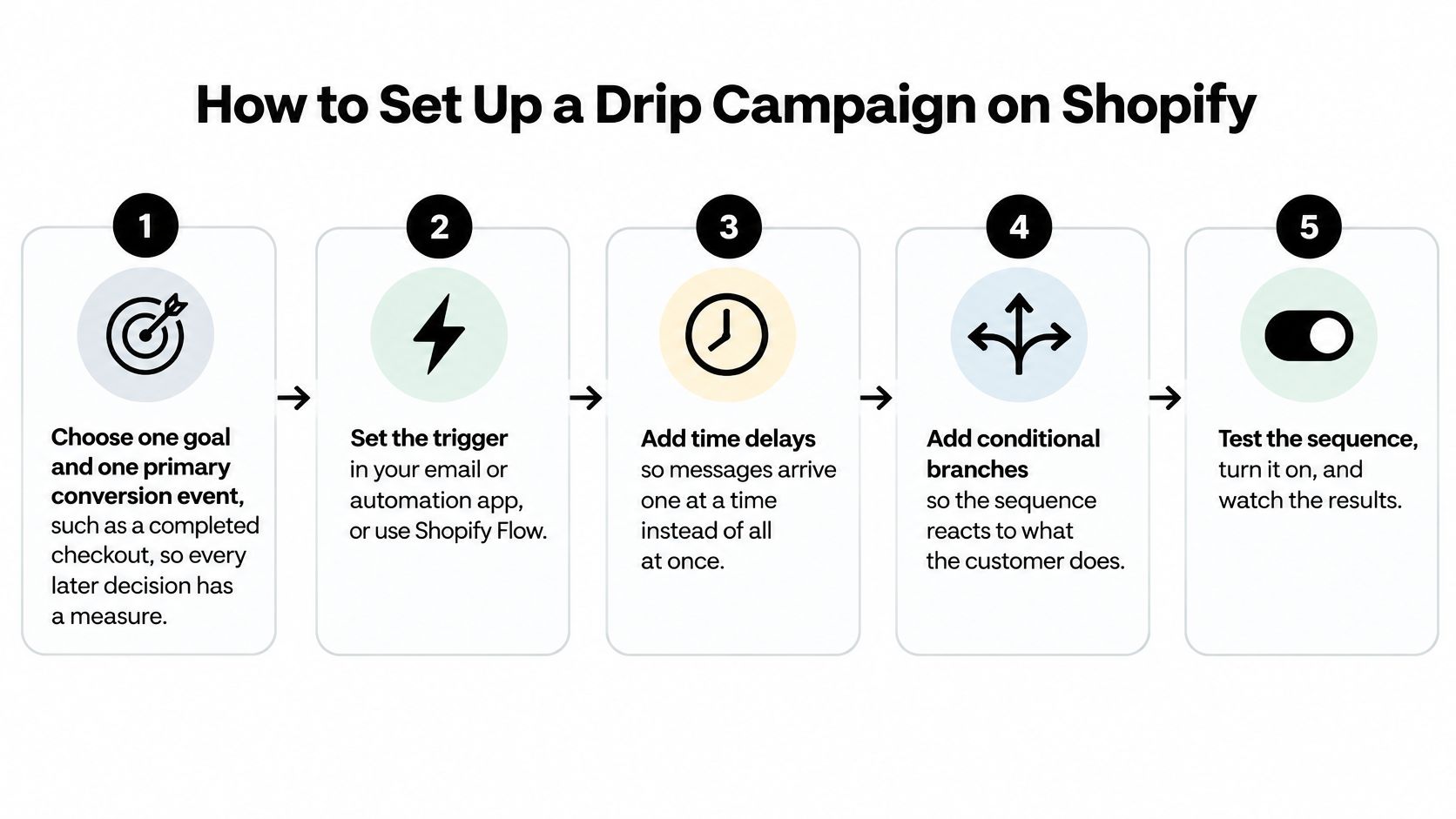
- Pick one goal and one conversion event. Completed checkout, usually. Without a single named outcome you'll end up arguing about opens. The common slip is choosing "engagement," which can't be counted.
- Set the trigger. Use your email app's native triggers, or Shopify Flow for store events like an order or cart update. Check the trigger fires on a test order before you write a word of copy.
- Build the audience segment. Exclude existing buyers from anything designed to win a first purchase. Stores skip this and then wonder why the welcome discount is being used twice.
- Write each message with one job, then set delays. Day 0, day 2, day 5 is a workable welcome rhythm. Writing five emails that all say "shop now" is the failure mode here.
- Add branches and an exit rule. Clickers get product detail, buyers leave the flow. A missing exit rule is the single most common bug, and it sends "complete your purchase" to someone who already did.
- Cap frequency across flows. Someone can be in a cart flow and a welcome flow at once. Without a cap they get two emails before lunch.
- Hold out a small group. Keep roughly a tenth of eligible subscribers out of the sequence entirely. No holdout means you can never prove the flow added anything.
- Test one variable at a time. Delay length or subject line, not both. Change three things and you learn nothing.
If you're mapping several flows against each other, this overview of marketing automation for ecommerce helps you see where sequences overlap before customers do.
Watch the walkthrough below for the platform side of the build.
Where AI helps
Use AI to draft subject-line variants and first-pass product copy for each step, then check every price, claim and brand phrase by hand. It's also good at reading a pile of reviews and summarising the recurring objections, which is exactly what email two of a cart flow should answer.
Metrics That Show Whether a Drip Campaign Works
Apple Mail Privacy Protection preloads tracking pixels, so an email can register as opened when the recipient never looked at it. That breaks two things at once: your sense of what's working, and any inactivity rule built on opens, which can suppress engaged Apple users while leaving dead addresses in place.
Delivery deserves attention too. In Validity's 2025 benchmark cited in Omnisend's drip campaign guide, Apple messages reached the inbox 76.3% of the time globally, against 87.2% for Gmail. A sequence can underperform because a chunk of it never arrived, which has nothing to do with your copy.
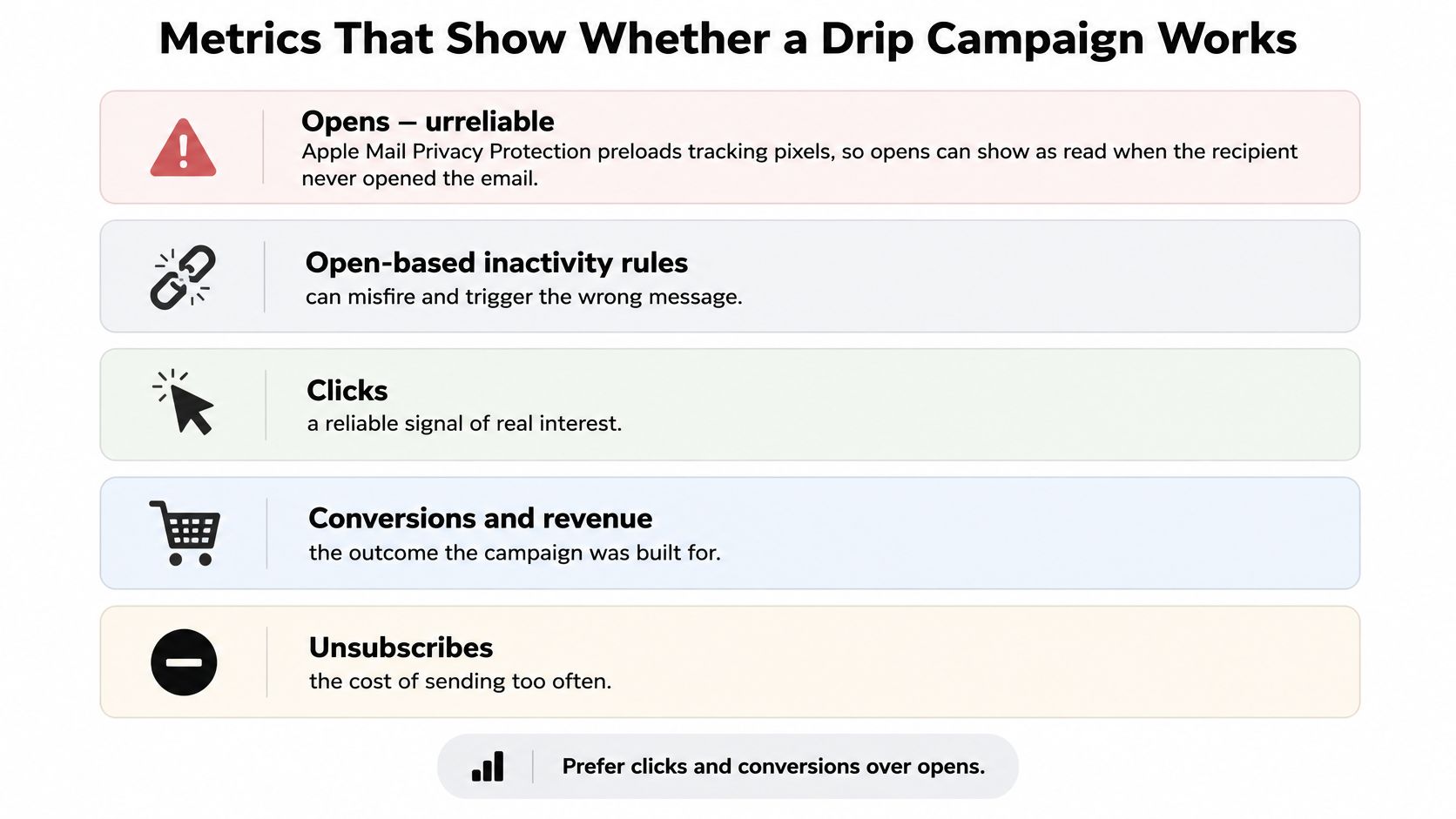
| Metric | What it tells you | How to use it |
|---|---|---|
| Delivery and inbox placement | Whether messages reach the inbox | Check first, every week |
| Click-through rate | Interest in the content | Compare by step and by branch |
| Conversion rate per recipient | Whether the sequence sells | Primary decision metric |
| Revenue per recipient | Value each subscriber brings | Compare against the holdout group |
| Unsubscribe rate | Over-contacting risk | Check after every send |
| Time to conversion | Speed of purchase after the trigger | Tune delays between messages |
| Open rate | Diagnostic signal only | Never use alone for suppression or judgement |
The final test is incremental lift: revenue per recipient in the sequence minus revenue per recipient in the holdout. If people who got nothing bought at the same rate, your emails decorated a purchase that was happening anyway.
A workable routine: deliverability weekly, conversion and unsubscribes after each send, lift after four to six weeks. Resist rewriting the flow on day three.
Common Pitfalls and Best Practices for Drip Campaigns
More contact isn't automatically better. A randomized field experiment on roughly 17,000 charity-list members found that adding one reminder email a week after the first message raised donations by 66%, while unsubscribes rose 76%, according to the drip marketing statistics collection at MarketSplash. You can buy short-term revenue with list attrition, and the bill arrives later.
The failures worth checking for:
- The same promotion in three flows: a customer in welcome, cart and browse sequences gets one offer three times in two days.
- Buyers left in acquisition flows: they receive a first-order incentive after ordering.
- No exit rule: the sequence keeps talking after the goal is met.
- Judging by opens: you optimise subject lines while revenue stays flat.
- Sequences with no end: eight emails where three would do, each one weaker.
- No holdout: you can describe activity but never prove impact.
The fixes are unglamorous. One purpose and one call to action per message. Write for a phone screen first, since that's where it'll be read. Ask for as few form fields as you can get away with, because every extra field costs you subscribers, and a smaller clean list beats a large reluctant one. If your list needs work before any of this pays off, start with how to build an email list properly.
Audit every sequence monthly for overlap and expired offers. A stale discount code in an automated email runs for months unnoticed.
Practical rule: if a message doesn't change what the subscriber knows, feels or does next, delete it.
Launch One Sequence Before You Scale
Start with the abandoned cart flow. The trigger is clear, the goal is tied to revenue, and the feedback arrives in days rather than months.
Record your baseline first: conversion rate and revenue per recipient for cart abandoners over the last 30 days. Then build a three-email cart flow with a holdout of about a tenth of eligible shoppers who receive nothing. Run it for four to six weeks without changing the delays, the copy or the offer. The temptation to tweak mid-test is strong, but a moving test gives you a blurry answer.
Then decide. Expand to a welcome or post-purchase sequence only if revenue per recipient beats the holdout and unsubscribes hold steady. If lift is flat or negative, change one variable, usually the first delay or the first subject line, and run it again. Track inbox placement alongside revenue, because a sequence that lands in spam may look busy while doing little good. Open rates are a weak guide here, since Apple Mail Privacy Protection has made them unreliable. The same discipline applies to tooling: try the free plan first, run one collection, and check the results before upgrading.
One question settles it: did the sequence add revenue beyond the holdout without pushing unsubscribes up?
We build custom Shopify apps for brands that need integrations, admin automation and behaviour-triggered workflows no App Store app covers, including the trigger logic and exit rules that stop a sequence once the customer has bought. If your cart flow is sending duplicates or your buyers are stuck in a welcome series, that's a build problem we can solve. Visit Yassine Malti to see the ready-made apps and tell us what your store needs automated.
Shopify apps by Yassine Malti
Put this into practice
-

Describer · Product descriptions
Product descriptions written from your own product data · Free: 50 descriptions/month
-

LLMs TXT · llms.txt for AI tools
A short llms.txt of your real store links · Free
-

Blogger · SEO blog posts
An AI blog agent that writes and publishes for you · 50 credits/month free