AI product tagging means a model reads your product photos and descriptions, then assigns tags such as category, material, color, fit or season, so every item is labeled the same way without anyone typing each tag by hand. For a Shopify store with hundreds or thousands of products, the practical answer is a dedicated tagging app that works in bulk, follows your own rules and lets you review what changed. That is what TAGit, our AI product tag generator for Shopify, is built for.
TL;DR
- AI tagging turns images and product text into structured labels, which makes collections, filters, on-site search and product feeds easier to run.
- Large retailers and Shopify itself already use multimodal models for this, and published studies tie better product attributes to better retrieval and conversion.
- The quality of a tag set depends on your rules: a fixed list of allowed tags, consistent formatting and a review step.
- Bulk or scheduled runs with a change review beat tagging products one at a time, especially for catalogs with gaps.
- TAGit is a single-purpose Shopify app for product tags, with configurable rules, bulk or scheduled tasks and review controls.
Table of Contents
- What AI product tagging actually is
- How AI reads images and text to produce tags
- What good tags do for your store
- Where AI tagging fits in your SEO work
- How accurate is it, and what you should review
- A tagging routine for a growing Shopify catalog
- What it costs
- Start with TAGit
- Notes for Shopify developers
- Common mistakes to avoid
- FAQ
- Sources
What AI product tagging actually is
A product tag is a short label attached to an item so it can be found, grouped and filtered. On Shopify, tags drive manual and automated collections, storefront filters, internal search, reporting and many third-party integrations. “Linen”, “summer”, “relaxed-fit” and “gift-under-50” are typical examples.
An AI tag is the same label, but assigned by a machine-learning model that looks at the product’s image, title, description and other data. Instead of a team member opening each listing and deciding what to write, the model proposes the tags and a rule set decides which ones are allowed.
This is not the same as tagging people or products in a social media post. In e-commerce, “AI product tagging” is catalog work: attaching consistent, searchable attributes to the items you sell.
The reason it matters is consistency. When one person writes “navy”, another writes “dark blue” and a supplier import brings in “Navy Blue”, your filters split into three groups that should be one. Manual tagging also stalls when the catalog grows, so new arrivals launch with no tags at all and never show up in the collections built around them.
How AI reads images and text to produce tags
Modern tagging systems are multimodal: they read pictures and words together. Three public examples show how the approach works at scale.
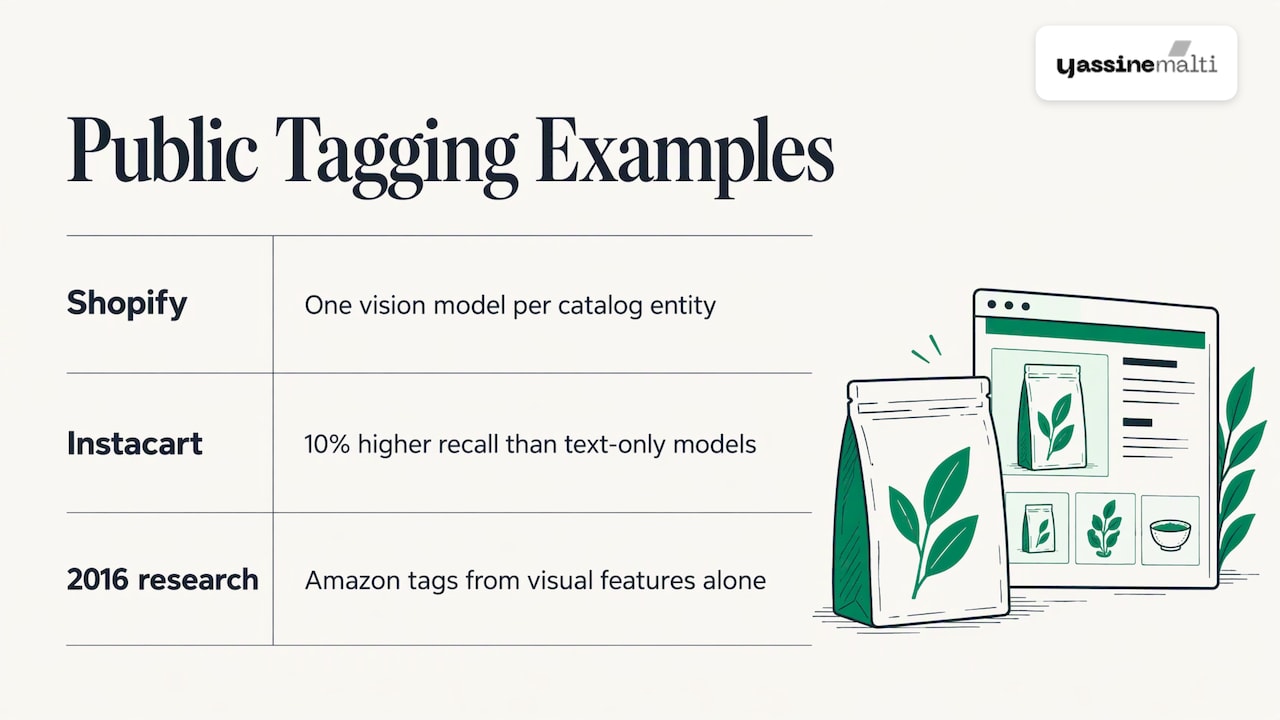
Shopify’s own catalog. Shopify’s engineering team describes a product understanding layer that turns unstructured catalog data into standardized metadata. It covers hierarchical product classification, attribute extraction (color, size, material, brand, model), image understanding such as color codes and image-quality checks, title standardization and description summarization. Shopify fine-tunes one vision model per catalog entity to handle several tasks at once, because classification and text summarization depend on each other.
Instacart. Its attribute extraction platform builds prompts from product features and attribute definitions, extracts values from text and images, and scores its own confidence with a second yes-or-no check. In its experiments on one attribute, multimodal models raised recall by 10% over text-only models, and text-only models already beat the older SQL-based extraction.
Earlier research. The idea is not new. A 2016 academic paper already proposed tagging Amazon products from visual features alone, using deep neural network features and a nearest-neighbor classifier.
What this means for a merchant: a model can read a packaging photo, notice the fabric in a description and combine both into a tag. What it cannot know is your store’s vocabulary. That comes from the instructions you give it.
What good tags do for your store
The evidence for structured product attributes is stronger than most merchants expect.
- Search and discovery. The BEATS paper tagged more than 5.4 million products at Rakuten Taiwan with generated attributes. Dense retrieval improved, with Recall@10 rising from 66.6 to 70.4, without changing the retrieval model itself.
- Conversion. In an online A/B test of enriched product pages, checkout conversion rose 0.48% overall, and the rate of missing or incorrect items fell.
- Catalog completeness. A CIKM 2025 paper reported that an LLM-based system improved product information completeness by 78% on a random sample, with no major drop in accuracy.
- Shopper and SEO benefit. In Meta’s case study of Shopify’s Llama-based extraction, the improved attributes helped shopper discovery, SEO and site performance, including natural-language search.
These are large-platform results, so treat them as direction rather than a promise for your store. The mechanism is the same at any size: clean, consistent attributes give search, filters and feeds more to work with. If you also sell through Google Shopping, the same attributes feed your product data, which we cover in our guide to Google Shopping feed optimization.
Where AI tagging fits in your SEO work
Tags are one layer of product data. Alt text describes the image, meta titles and descriptions shape the search result, product descriptions carry the keywords, and tags organize everything into collections. Tags help search engines and shoppers understand how products relate, but they work best next to the other layers.
That is why we build one app per task. TAGit handles tags, ALT SEO handles image alt text and RANKit handles meta tags. Each is optional and designed to work with the others, so you can start with the gap that hurts most. For the writing side, see our guide on writing better Shopify product descriptions with AI.
How accurate is it, and what you should review
Published results are encouraging. The TRACE study reported 98.2% human-validated extraction accuracy at 74.7% attribute coverage on a grocery and alcohol dataset, and 98.4% of the values its judge agent approved were confirmed correct by human reviewers. BEATS reported LLM-judged tagging quality scores around 0.93 across its sampled products.
Two lessons carry over to a Shopify store.
- Coverage and accuracy are separate. A system can be very accurate on the attributes it fills and still leave some blank. Look at which products ended up with no tags.
- Confidence-based review works. Instacart routes low-confidence values to human review and monitors production quality with periodic sampled audits. You can copy that habit at small scale: spot-check a sample from every run, and look hardest at products where the image is unusual, the description is thin or the category is borderline.
A practical review list for each batch:
- Are all tags drawn from your allowed list?
- Do any tags contradict the product (a “wool” tag on a cotton item)?
- Are formatting rules applied the same way (lowercase, hyphens, no duplicates)?
- Did any existing tags you rely on for collections get changed?
TAGit includes review controls that show what changed, so this check happens on a clear before-and-after view instead of by scrolling through the admin.
A tagging routine for a growing Shopify catalog
Here is the process, step by step, with where each step usually goes wrong.
1. Define your tag taxonomy first
Write down the tag groups you actually use: category, material, color, fit, season, feature, occasion. Under each, list the allowed values. This is the single most important step. Without it, a model invents plausible but inconsistent tags, and you end up with “eco-friendly”, “ecofriendly” and “sustainable” side by side.
Where it goes wrong: building the list from what you wish shoppers searched for rather than what your collections and filters need. Start from your navigation and work backward.
2. Audit what you have
Export your products and look for gaps: untagged items, products with one tag, products with dozens of near-duplicates. Decide what stays and what gets replaced. New products and older imports usually need different treatment.
Where it goes wrong: running a big job before you know which existing tags power live collections. Removing a tag can empty a collection overnight.
3. Set rules, not prompts you retype
A repeatable setup beats ad hoc requests. Rules should say how many tags per product, which groups are required, how to format them and whether existing tags are kept. In TAGit these are configurable rules that you control, so the same instructions apply to every product in a run.
4. Run in bulk or on a schedule
Tagging a few products by hand is fine. Tagging a few thousand, or every new arrival each week, is a job for bulk and scheduled runs. TAGit supports both: you can process the existing catalog in one pass and set scheduled tasks so new products pick up tags without anyone remembering to do it.
Where it goes wrong: doing a one-off cleanup and never scheduling follow-ups, so the catalog drifts back into disorder within a season.
5. Review before and after
Check a sample of results against the list above. With review controls, you see what changed and approve it rather than discovering problems through a drop in a collection’s traffic.
6. Connect tags to the rest of your content
Once tags are consistent, use them: build automated collections, set up storefront filters and keep your feed attributes aligned. Then move on to the next layer, whether that is meta tags or AI-written product content.
What it costs
Our apps are freemium Shopify apps with paid monthly subscriptions and one-time credit packs. The plans on our pricing page are Starter at $29 per month or $290 per year, Professional at $59 per month or $590 per year, and Enterprise at $119 per month or $1,190 per year. Describer and LLMs TXT are offered free. You can see every app, including TAGit, on the apps page.
Start with TAGit
If your catalog has untagged products, inconsistent labels or a steady flow of new arrivals, TAGit is the focused way to fix it. It generates product tags in bulk or on a schedule, follows the rules you set and lets you review what changed. Because each of our apps does one job, you add only what you need and keep full control of the output.
You can open TAGit directly, or compare plans on the pricing page.
Notes for Shopify developers
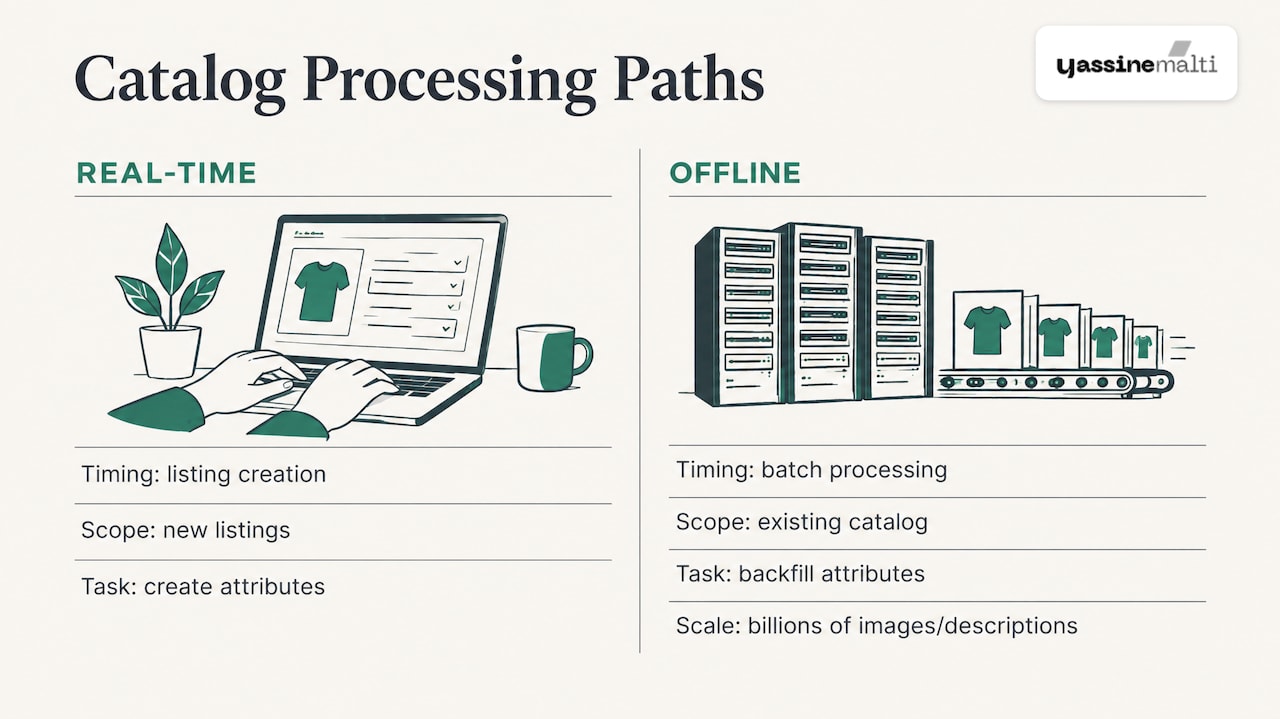
If you build catalog workflows for clients, the architecture Shopify and Meta describe is a useful model. Their case study describes two agents: a real-time agent that helps merchants create accurate attributes as they enter new listings, and a high-volume offline agent that processed billions of existing images and descriptions across more than 10,000 possible attribute categories.
Translated to a client project, that means two paths: tag new products at creation, and backfill the existing catalog in batches. Shopify’s own evaluation approach is also worth borrowing. It measures precision and recall at several taxonomy levels, uses an LLM judge for generated fields and tracks field compliance, which together tell you whether a tagging run followed the instructions it was given.
When a ready-made app covers the standard tagging job, it saves your project hours for the parts that are truly custom. For those, we also take on custom Shopify apps and white-label development.
Common mistakes to avoid
- Tagging without a taxonomy. Free-form output creates the same mess you were trying to clean.
- Too many tags per product. More is not better. Tags that do not drive a collection, filter or feed field add noise.
- Overwriting tags that power collections. Decide up front whether runs add to existing tags or replace them.
- Treating tags as a substitute for good descriptions. Tags organize; descriptions persuade and rank. Our guide to AI-powered content generation shows how the pieces fit.
- One-time cleanups. A scheduled run keeps new products consistent.
FAQ
What is AI product tagging?
It is the use of a machine-learning model to read product images and text and assign labels such as category, color, material and style. The labels make products easier to find, filter and group. In a Shopify store, those labels are the product tags that drive collections and search.
How does AI know what tags a product needs?
Multimodal models read the photo and the written details together, then match what they see against attribute definitions. Shopify’s engineering team describes extracting color, size, material, brand and model this way. Your own rules decide which tags and formats are acceptable for your store.
Can I tag my whole Shopify catalog at once?
Yes. Bulk runs are the main reason to use an app instead of editing listings one by one. TAGit supports bulk and scheduled tasks, so you can process the existing catalog and then keep new products tagged automatically.
Do I need to review AI-generated tags?
Reviewing a sample of every run is good practice. Large catalog systems route low-confidence values to people and audit samples regularly, as Instacart describes. TAGit’s review controls show what changed so you can check results quickly.
Which Shopify apps go with product tagging?
Tags work best alongside alt text, meta titles and descriptions, and product descriptions. Our ALT SEO, RANKit and Describer apps each handle one of those jobs and are designed to work together while staying optional.
Sources
- Leveraging multimodal LLMs for Shopify’s global catalogue
- Scaling Catalog Attribute Extraction with Multi-modal LLMs at Instacart
- Automatic tagging and retrieval of E-Commerce products (ACL Anthology, 2016)
- BEATS: Bootstrapping E-commerce Attribute Taxonomies
- TRACE: Agentic Catalog Enrichment
- Using Large Language Models to Improve Product Information (ACM CIKM 2025)
- Ensuring accurate product attributes at the source (Meta developer case study)
Recommended
Shopify apps by Yassine Malti
Put this into practice
-

TAGit · Product tags
SEO-friendly product tags, generated in bulk · 50 tags/month free
-

ALT SEO · Image alt text
AI alt text for every product image · 100 images/month free
-

RANKit · Meta titles & descriptions
AI meta titles and descriptions, sized for Google · 50 meta tags/month free