
You open a Shopify product page and find the same supplier copy you use on six other listings. It lists materials and dimensions, but never explains whether the bag fits a laptop or how the jacket handles rain. You search for “Shopify product descriptions AI” because rewriting your catalog by hand takes time you need for orders and customers.
How to Write Better Shopify Product Descriptions With AI shows you how to turn verified product details into useful copy, build prompts that reflect your brand, and review drafts before publishing. You also learn how to optimize Shopify product descriptions for SEO without forcing search phrases into every sentence.
AI product descriptions for Shopify give you a starting point, not a finished sales pitch. A generator can organize features and suggest clearer wording, but it can also invent a certification, exaggerate durability, or promise a fit your product cannot deliver. Your job is to supply the facts and check every claim against them.
Start with one product before you generate descriptions in bulk. Give the draft a clear shopper, a practical use case, and a few details that help someone decide whether to buy. The tradeoff is simple: automation saves drafting time, but skipping review can turn that saving into returns, complaints, and more editing later.
Table of Contents
- Step 1: Gather accurate product details before using AI
- Step 2: Choose a Shopify AI product description workflow
- Step 3: Write a prompt that guides useful product copy
- Step 4: Edit the draft for clarity, accuracy, and conversion
- Step 5: Optimize Shopify product descriptions for SEO
- Step 6: Bulk generate descriptions with a controlled review process
- Step 7: Publish, measure, and improve your product copy
Step 1: Gather accurate product details before using AI
You open a supplier sheet and find “premium fabric,” but no fiber percentages or washing instructions. Before you draft Shopify product descriptions AI can help rewrite, collect the facts that let a shopper decide whether the item fits their needs.
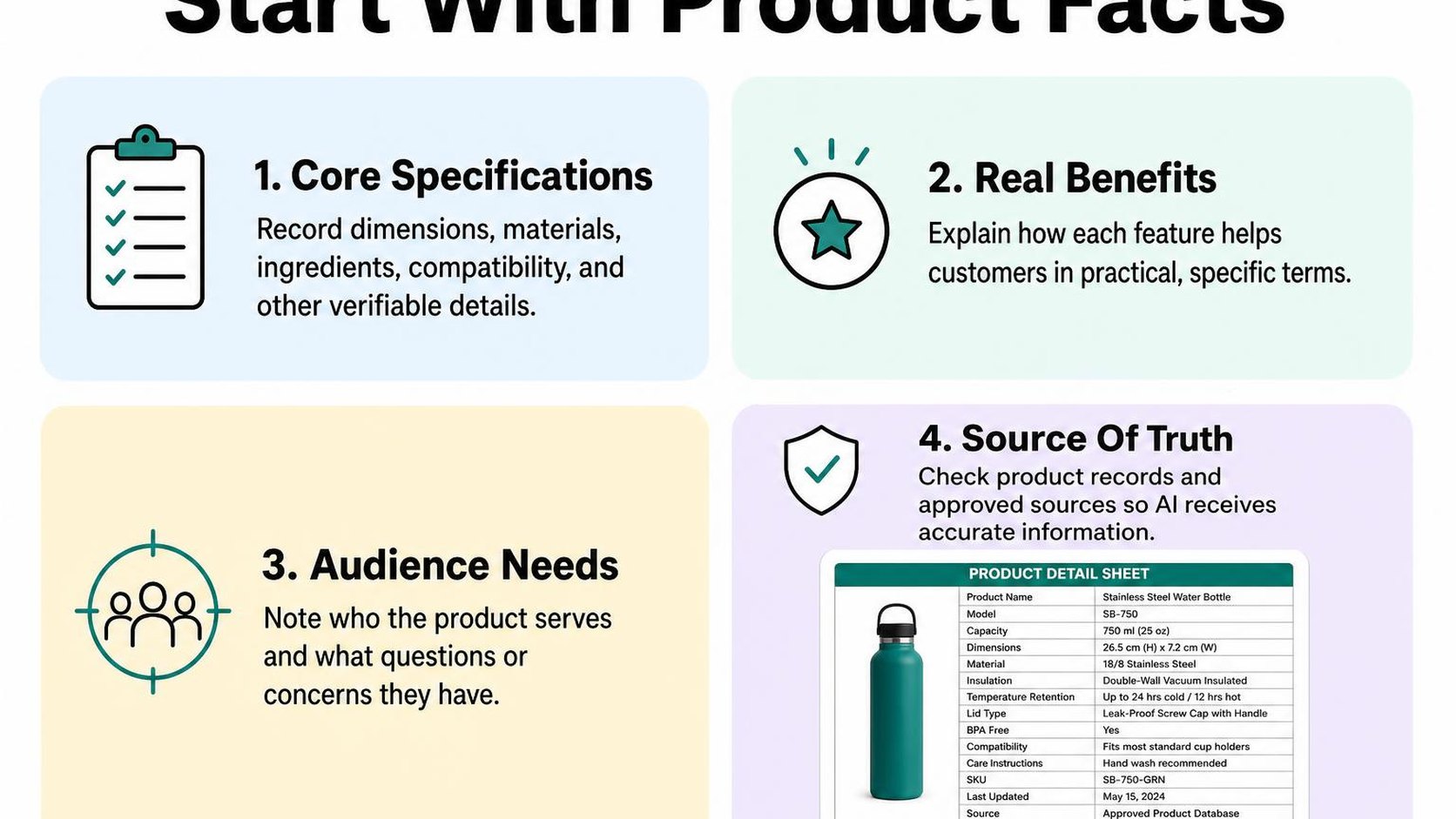
A product brief is a structured record of verified specifications, customer questions, and limits on what your copy can claim. Preparing it takes longer than pasting a product name into a prompt, but gives you fewer unsupported statements to correct later.
Collect features, materials, dimensions, and care instructions
Start with the current supplier documentation, packaging, and the item itself. Check that each source matches the exact SKU and variant you sell, rather than a similar model.
Record units alongside every measurement and distinguish product dimensions from packaging dimensions. If a detail is missing or conflicting, mark it as unknown instead of asking AI to fill the gap.
- Features: List observable details such as pocket count, closure type, included accessories, and adjustable parts.
- Materials: Record fiber percentages or component materials, distinguishing the outer shell from lining, trim, and hardware.
- Dimensions: Include measured size, weight, capacity, and variant differences. Do not turn external bag measurements into a laptop-fit promise.
- Care: Copy the verified washing, drying, storage, or maintenance instructions into your brief without adding advice.
- Source: Note where each specification comes from and when you check it, so you can resolve discrepancies before publishing.
The product description fundamentals explain how to turn those specifications into useful buying information rather than a copied supplier paragraph.
Identify the target customer and their buying questions
Describe the shopping situation, not just an age range. A commuter buying a backpack may ask about laptop fit, access to small items, and cleaning; a weekend traveler may care more about capacity and carry comfort.
Use support messages, reviews, and return reasons to identify recurring questions. Keep customer comments separate from specifications: one shopper saying a jacket feels warm does not establish a temperature rating.
- Use case: State where and how the customer expects to use the item.
- Buying questions: List three questions your description should answer using available facts.
- Unanswered questions: Flag anything that needs a measurement, supplier confirmation, or product test.
Shopify’s guidance on automatically generating descriptions recommends supplying product features, keywords, target-customer details, and tone, then checking the result for accuracy. That context helps AI product description writing stay focused on your actual item.
Separate verified facts from claims that need proof
Label each statement as verified, awaiting confirmation, or excluded from the draft. Claims such as “waterproof,” “hypoallergenic,” and “lasts all day” need relevant evidence, not more confident wording.
A benefit should follow from a confirmed feature without promising an untested outcome. “Zipped pocket for small items” is narrower than “keeps valuables completely secure.”
Practical rule: Tell the AI: “Use only the verified facts below. Do not infer certifications, compatibility, performance ratings, or health benefits. List missing information separately instead of guessing.”
Step 2: Choose a Shopify AI product description workflow
You have six new products to launch, or 600 descriptions that still read like supplier notes. Choose a workflow for AI product descriptions for Shopify based on that workload, not on which tool produces the longest draft.
A workflow is the path from product information to a checked description in your store. Manual prompting gives you control over individual drafts; store-integrated generation reduces copying but makes mistakes easier to spread.
Use a general AI assistant for one-off drafts
Use a general AI assistant when you need a few descriptions, want to test a different tone, or need help restructuring a complicated product page. Paste your approved product brief, specify the format, and ask for one draft at a time.
For example, request a short opening paragraph, three feature-and-benefit bullets, and a specifications list. Keep the same structure across similar products so shoppers can compare them without hunting for dimensions or care instructions.
- Best fit: Small launches, unusual products, and pages that need individual attention.
- Tradeoff: You transfer information into the assistant and copy the edited result back into Shopify, which adds handling time.
- Avoid: Reusing a conversation containing another product’s specifications without clearly separating the new brief.
Choose a Shopify product description generator for catalog work
A store-integrated generator works within, or connects to, your store’s product workflow. For catalog work, check which fields it reads, whether you can select products, and whether generated text stays separate from published copy until approval.
If you are comparing approaches, these AI product content options help you assess where content generation fits into your store operations. Prioritize control over inputs and updates rather than treating bulk generation as automatic publishing.
| Workflow | Use it when | Check before proceeding |
|---|---|---|
| Manual prompting | You need a few tailored drafts | The brief matches the exact product |
| Generation in the product editor | You work through products individually | You can edit the result before saving |
| Store-connected bulk generation | You update a larger catalog | Selection, overwrite behavior, and review controls are clear |
To bulk generate Shopify product descriptions with AI, start with a small batch from one product category. Keep a copy of your current descriptions and confirm whether the workflow overwrites existing content before expanding the batch.
- Test: Include products with variants, missing fields, and different specifications in your pilot.
- Inspect: Check formatting, duplicated wording, and whether variant details appear on the correct product.
Decide when human review is essential
Review every description before publishing, regardless of how you generate it. Give extra attention to technical products, safety instructions, compatibility statements, and anything whose wording affects a purchase decision.
Read the draft beside the product record, then preview it on your storefront. Accuracy alone is not enough: shoppers also need a clear explanation of what they receive and whether it suits their needs.
Practical rule: Automate drafting, not approval. If you cannot review a batch properly, reduce its size rather than publishing unchecked descriptions.
Step 3: Write a prompt that guides useful product copy
You ask for a product description and get “premium quality” instead of an explanation of what the shopper receives. For your Shopify product descriptions AI workflow, replace that vague request with a prompt brief: instructions that define the reader, the available facts, and the shape of the draft.
A detailed brief takes longer to prepare, but gives you fewer empty claims to remove. Keep the instructions reusable; change the product facts and customer questions for each item.
Specify audience, tone, format, and length
Describe the buying situation rather than asking for copy “for everyone.” A commuter choosing a small bag needs different details from a traveller packing for a week.
Give the AI a structure that fits your product page. A word limit controls length, but it does not guarantee useful copy; specify what each part needs to explain.
- Audience: Name the shopper and the task, such as commuters carrying a phone, keys, and wallet.
- Tone: Request plain, practical language. Exclude superlatives, pressure, and unsupported comparisons.
- Format: Ask for a short opening paragraph, three benefit bullets, and a specifications line.
- Length: Set a range, such as 120–160 words, and ask the AI not to pad sparse facts.
Reusable prompt: Write a Shopify product description for [product] aimed at [shopper and buying situation]. Use a [tone] tone. Produce [format] in approximately [length] words. Prioritize the details that help this shopper decide whether the product fits their needs. Avoid generic praise and repeated points.
Tell the AI which facts it can use and what it must not invent
Separate your instructions from the product data with a clearly labelled facts block. Include dimensions, materials, included items, care instructions, and verified compatibility where available.
Tell the AI how to handle gaps. Otherwise, a request for persuasive copy can produce invented certifications, delivery promises, or performance claims.
Facts prompt: Use only these facts: adjustable crossbody strap; zip closure; one internal pocket; dimensions 22 × 15 × 6 cm; recycled polyester outer fabric. Do not invent capacity, waterproofing, certifications, warranty, or shipping details. If a missing fact prevents you from answering a shopper question, list it separately under “Questions for the merchant,” not in the customer-facing copy.
Keep keywords separate from evidence. Including “waterproof commuter bag” as a target phrase does not make the bag waterproof; remove any keyword that implies an unverified attribute.
Ask for benefits, objections, and a clear next step
Ask the AI to connect each feature to a practical use without stretching the evidence. A zip closure supports a statement about keeping the opening closed, not a promise of theft protection.
Good AI product description writing also addresses hesitation. Request answers to supported questions and flag unanswered ones rather than forcing a reassuring response.
Customer-focused prompt: Using the bag facts above, explain how the adjustable strap and internal pocket help with everyday carrying. Address the question “How large is it?” using the dimensions, without guessing what devices fit. End by inviting the shopper to compare those measurements with their essentials before choosing. Avoid urgency or guarantees.
Save these three prompt blocks together as your template. Change the audience and facts for each product, rather than recycling the same benefits across your catalog.
Step 4: Edit the draft for clarity, accuracy, and conversion
Your draft looks polished in the Shopify editor, but a confident sentence can still contain an invented detail. Treat AI product description writing as a starting point: keep the useful structure, verify the facts, and remove anything that makes the product sound better than your evidence supports.
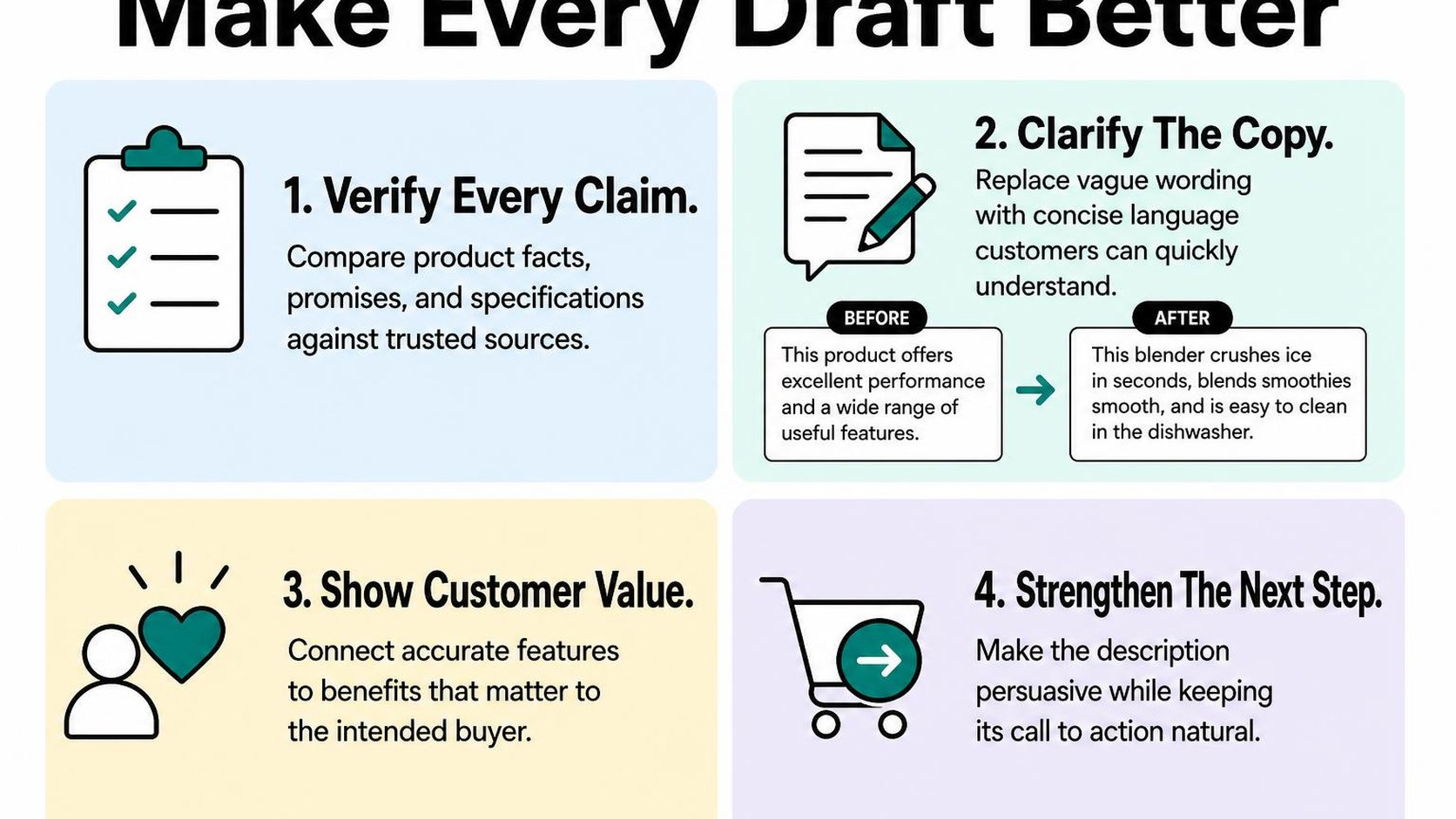
Review one product at a time before publishing. A faster editing process only helps if shoppers receive accurate information about what they buy.
Check every specification and product claim
Compare the draft with your supplier documentation, product measurements, packaging, and verified store policies. A product claim is any statement about what the item contains, does, or delivers, including claims that appear in casual wording.
Shopify’s guidance on generating product descriptions recommends editing the output and checking its accuracy before publishing. Do not treat a plausible detail as a confirmed specification.
- Specifications: Check dimensions, units, materials, capacity, compatibility, care instructions, and included accessories against the exact product and variant.
- Performance: Remove unsupported words such as “waterproof,” “hypoallergenic,” or “unbreakable.” Keep certifications and test results only when you have documentation that applies to this item.
- Store promises: Verify delivery, warranty, and returns statements separately. Delete guarantees the AI adds without an approved policy behind them.
Practical rule: If you cannot identify the source for a claim, remove it or leave it unpublished until you can confirm it. Asking the AI whether its own claim is true is not verification.
Replace generic phrases with concrete customer benefits
Cut phrases such as “premium quality,” “perfect for everyone,” and “designed to transform your routine.” They occupy space without helping shoppers judge whether this product suits them.
A customer benefit explains why a verified feature matters in a specific situation. For a mug with a documented 350 ml capacity, state the capacity plainly; do not invent heat-retention performance or claim that it fits every coffee machine.
- Useful detail: Replace “effortless maintenance” with the verified care instruction, such as “Dishwasher-safe on the top rack.”
- Distinctiveness: Ask whether the sentence could describe five unrelated products. If it could, add a relevant fact or delete it.
- Purchase hesitation: Answer questions about sizing, care, contents, or compatibility when you have evidence. Do not cover missing information with reassurance.
Apply conversion optimization principles by making the purchase decision clearer, not by adding pressure. Persuasive copy helps shoppers assess fit without promising an outcome you cannot support.
Make the copy easy to scan on mobile
Preview the product page on a phone, not just inside the editor. Put the most useful information first, then separate supporting details into short paragraphs and focused bullets.
- Opening: Identify the product and its main supported benefit in one or two sentences.
- Structure: Group specifications, care, and included items consistently so shoppers can find answers quickly.
- SEO: Keep a relevant product phrase where it reads naturally. Do not repeat near-identical keywords in every bullet.
Read the final version aloud and remove awkward repetition. Publish only after the description remains accurate, specific, and readable in your actual theme.
Step 5: Optimize Shopify product descriptions for SEO
Your AI draft reads smoothly, but it repeats “waterproof hiking backpack” in almost every sentence. Before publishing, check whether the copy helps a shopper choose the product or simply repeats the phrase you want to rank for.
To optimize Shopify product descriptions for SEO, connect relevant search language to verified product details. You need enough specificity to explain the item, not enough repetition to make the page sound automated.
Use relevant search terms naturally
Choose one main product phrase based on what you sell and how shoppers describe it. Check relevant Search Console queries, customer questions, and your product specifications rather than asking AI to invent a keyword list without context.
Keyword stuffing means repeating search terms unnaturally to try to influence rankings. Replace repeated phrases with useful details about materials, dimensions, compatibility, or intended use. Google recommends informative descriptions that reflect shoppers’ search language in its guidance on ecommerce content that can appear on Google.
- Main phrase: Include the product type where it fits naturally, such as “insulated stainless steel lunch container.”
- Supporting language: Add verified details such as capacity, lid type, and care instructions instead of several near-identical keyword variations.
- AI instruction: Ask for natural wording, no keyword-density target, and no claims beyond the supplied facts.
Write unique copy for each product and variant
Give AI the facts that distinguish each product before requesting a rewrite. Changing adjectives in a shared template does not explain why a shopper should choose one item over another. Avoid copying a manufacturer’s description verbatim or generating hundreds of interchangeable paragraphs.
For separate product pages, describe genuine differences: fit, material, capacity, included accessories, or intended use. Variants that share one Shopify product page usually share its description, so explain meaningful option differences within that page rather than creating repetitive copy for every color.
Practical rule: If two descriptions could swap places without becoming inaccurate, add verified distinguishing details. If the only difference is color, state that difference plainly; do not invent a new benefit to make the copy unique.
Align the description with the product page and search intent
Search intent is what the shopper wants to accomplish with a query. Someone searching for a “laptop sleeve for 14-inch laptops” needs usable internal dimensions and compatibility guidance, not a paragraph promising effortless productivity.
Check the description against the title, photos, selected options, specifications, and shipping information. Do not let AI turn “water-resistant” into “waterproof,” or suggest a certification you cannot document.
| Page element | What to write |
|---|---|
| Product description | Detailed facts, uses, limitations, and option differences that help shoppers decide. |
| SEO title | A concise, accurate page label using the relevant product phrase. |
| Meta description | A short, page-specific summary that may appear in search results. |
Metadata describes the page for search engines and other systems; it does not replace visible product copy. Edit Shopify’s search engine listing separately, and keep its wording consistent with the description. Google may display a different snippet, so avoid promises about exact search-result wording or guaranteed rankings.
Step 6: Bulk generate descriptions with a controlled review process
You have dozens of products waiting for new copy, but publishing every draft at once makes mistakes harder to trace. For Shopify product descriptions AI workflows, separate generation from approval: create drafts in manageable batches, check them against product records, and publish only what passes.
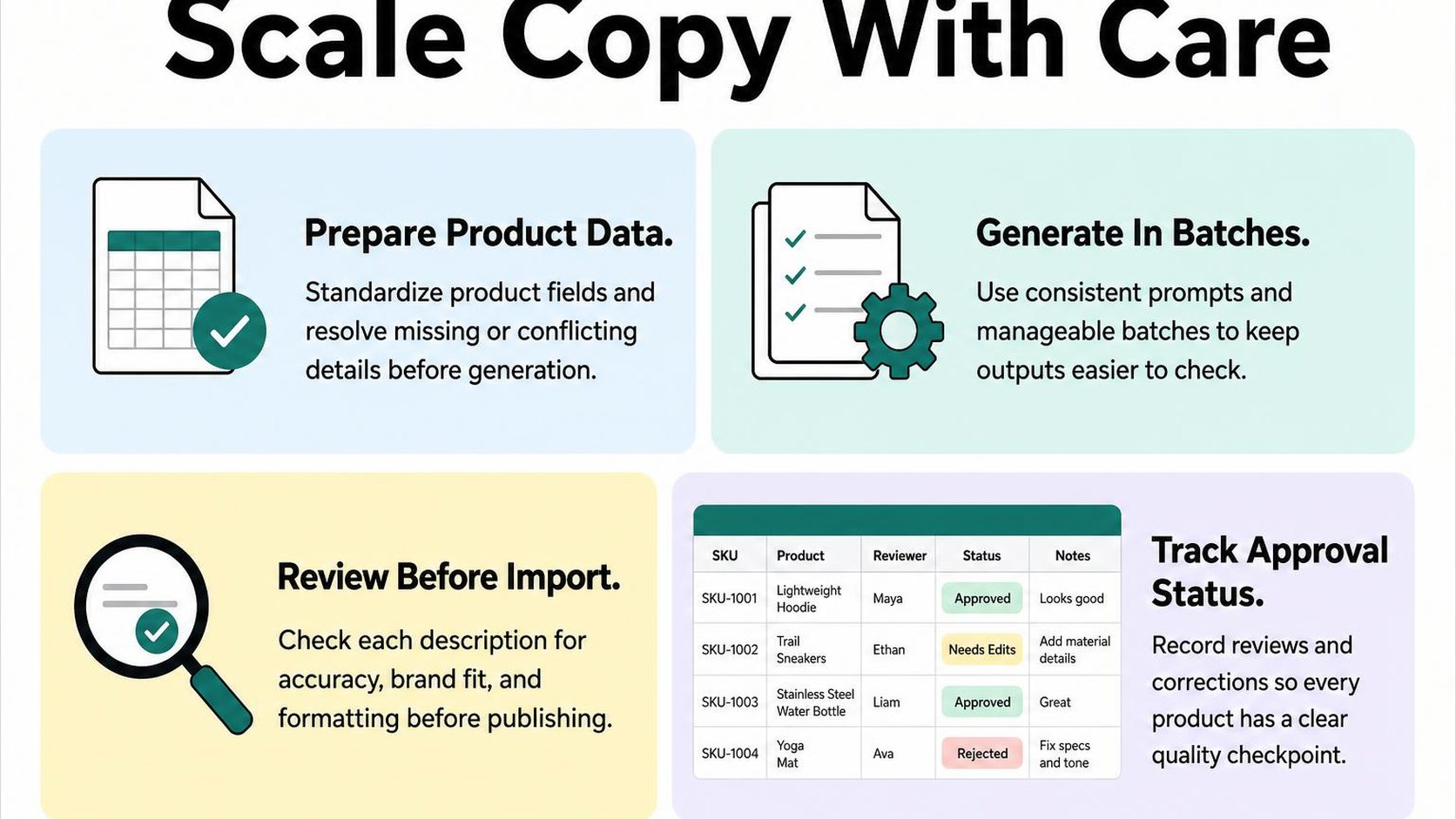
The tradeoff is speed versus oversight. Bulk generation saves drafting time, but it does not remove the work of verifying product facts or deciding whether the copy helps shoppers choose.
Group products by type and shared attributes
Start with a narrow group, such as cotton T-shirts with the same sizing system, rather than your entire clothing collection. Keep products with different materials, care requirements, or compatibility rules in separate batches so one instruction does not spread incorrect details across unrelated items.
Prepare a source record for each product before generating anything. Include its identifier, verified attributes, intended customer, and any information the draft must leave out because it is unknown.
- Group boundaries: Use product type and genuinely shared attributes, not just a broad collection label.
- Individual facts: Keep each product’s dimensions, materials, included items, and option differences attached to its own record.
- Output rules: Specify paragraph length, section order, tone, and how to handle missing information.
AI Product Description—ChatGPT writes descriptions from each product’s title, existing copy, tags, and up to five photos, using your language and tone. Instructions can tell it never to invent materials, sizes, or claims, but you still need verified inputs and a human accuracy check.
Test a small batch before scaling generation
Generate five to ten drafts first, including one straightforward product and several with unusual details. This sample shows whether your instructions preserve differences or produce interchangeable copy that merely repeats product names.
Use a consistent checklist and assign one person to approve each batch. Shopify’s best practices for AI-powered tools recommend clear instructions and reviewing suggested changes before applying them.
- Accuracy check: Compare every factual statement with the source record; reject unsupported claims rather than softening them.
- Shopping check: Confirm the draft answers the product-specific questions customers ask before buying.
- Approval check: Mark each draft as approved, needs revision, or blocked by missing data; publish only approved copy.
Practical rule: If the same error appears twice, fix the source data or instructions before generating the next batch. Do not spend the entire rollout correcting a repeatable mistake by hand.
Review exceptions and track changes after publishing
Keep an exception queue: a list of products that need individual attention instead of routine approval. Products with conflicting specifications, unfamiliar terminology, or regulated claims belong there until someone resolves the issue.
Save the previous description, revised text, product identifier, reviewer, and publication date in a change log. Publish in waves so you can pause the rollout or restore earlier copy if a batch introduces problems.
Track product-page conversion rate, add-to-cart rate, and recurring customer questions alongside search impressions and clicks. Compare similar periods and record promotions, stock changes, and traffic shifts; a short-term increase does not prove the descriptions caused it. Use persistent confusion or weak engagement to prioritize the next review.
Step 7: Publish, measure, and improve your product copy
You publish a description, then open the product page and find that the size details sit below a long paragraph on your phone. Publishing is not the finish line: AI product descriptions for ecommerce need to work inside your actual theme, where shoppers choose variants and decide whether to buy.
Start with a live-page check, then evaluate whether the copy answers purchase questions. More text is not automatically better, and a polished description still fails if shoppers cannot find the detail they need.
Check the live product page on desktop and mobile
Open the published page on both screen sizes, rather than relying only on the product editor. Expand description tabs, select variants, and check whether the copy remains easy to scan beside your images, price, and purchase controls.
Use this launch checklist before you treat the page as ready. Keep essential buying information visible without turning the description into a wall of specifications.
- Opening: Confirm that the first sentences identify the product and its practical use, rather than starting with generic praise.
- Formatting: Check paragraph spacing, bullet alignment, and headings for awkward display on narrow screens.
- Variant details: Make sure materials, dimensions, quantities, and compatibility statements apply to the options shoppers can select.
- Consistency: Match care instructions, delivery statements, and included items with the information elsewhere on the page.
- Accessibility: Keep essential details as readable text, not only inside a product image.
Monitor organic clicks, engagement, and sales signals
Give each signal a specific question to answer. Search Console shows whether relevant searches bring visitors to the page; storefront analytics show what those visitors do after arriving.
Purchase friction is anything that makes a shopper hesitate or work harder before buying. Look for it in support conversations and page behavior, not just in a single sales total.
| Signal | Question to investigate |
|---|---|
| Organic search queries | Do visitors arrive looking for the use case your description explains? |
| Product-page engagement | Can shoppers reach useful details without unnecessary searching? |
| Cart and purchase activity | Does interest carry through to buying, or does hesitation remain? |
| Support and return reasons | Does the copy leave expectations unclear or create incorrect ones? |
Interpret these signals together. Longer visits can mean useful reading or confusion, while fewer questions can mean clearer copy or simply fewer visitors. If shoppers add products to their carts but abandon checkout, investigate shipping costs and checkout issues before rewriting the description.
Refresh descriptions when products or customer questions change
Review the copy whenever a supplier changes a material, a bundle changes contents, or customers repeatedly ask the same buying question. Feed verified updates into your AI product description writing instructions instead of asking for a vague rewrite.
Practical rule: Change the smallest passage that solves the shopper’s problem, verify the replacement, and check it on the live page again.
Keep accurate, useful descriptions even when their wording is not especially creative. Refresh for a concrete reason, not merely to make every product sound new.
Yassine Malti is the developer writing this guidance from store work.
Put this into practice
Start with the store you already have, then use the guides on the blog for the next page that needs the same treatment.
Shopify apps by Yassine Malti
Put this into practice
-

Describer · Product descriptions
Product descriptions written from your own product data · Free: 50 descriptions/month
-

LLMs TXT · llms.txt for AI tools
A short llms.txt of your real store links · Free
-

Blogger · SEO blog posts
An AI blog agent that writes and publishes for you · 50 credits/month free


