Roughly seven in ten shopping carts never become orders, and a coupon will not close most of them. On Shopify, the useful split is between visitors who were browsing and buyers who hit a concrete blocker. The first group needs time, a saved cart, and clear information. The second group needs the step that stopped them removed. Treating every abandoned cart as a discount opportunity spends margin on people who were not ready, and it sends ready buyers back into the same broken checkout.
Table of Contents
- Why Cart Abandonment Is a Funnel Problem, Not a Discount Problem
- Auditing Your Shopify Checkout to Find the Real Blockers
- Fixing the Checkout Friction That Blocks Ready Buyers
- Choosing Recovery Automations That Match Shopper Intent
- Measuring Recovery With Metrics That Do Not Mislead
- Running Checkout A/B Tests That Actually Change Conversion
- Your 30-Day Cart Abandonment Reduction Plan
Why Cart Abandonment Is a Funnel Problem, Not a Discount Problem
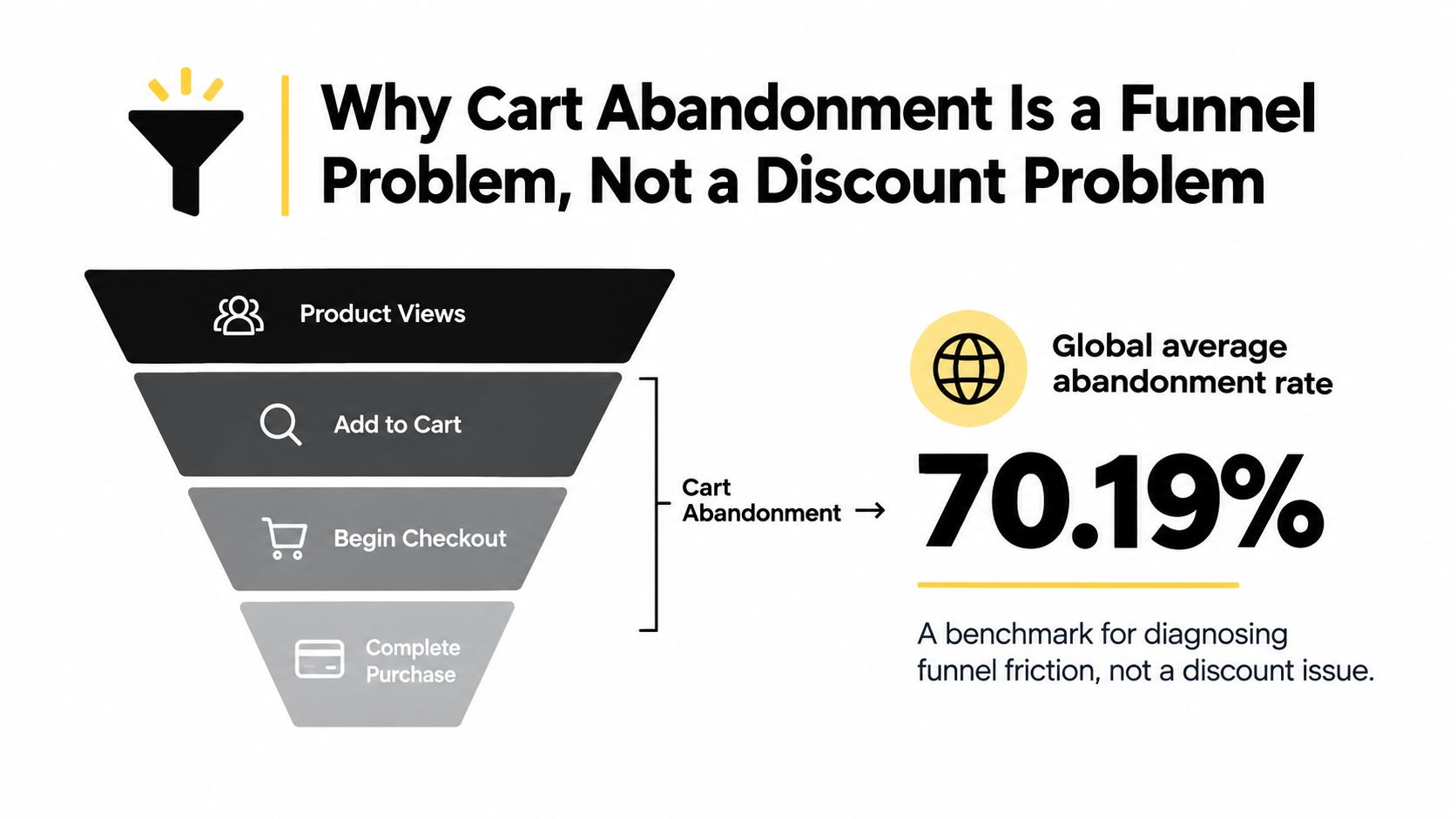
Baymard Institute's checkout research puts the global average cart abandonment rate at 70.19%. That figure is a benchmark for diagnosing funnel friction, not a store KPI and not a reason to fund a blanket promotion. Browsing intent, product price, delivery constraints, and traffic quality differ so much between stores that chasing the average pushes merchants toward the wrong fix.
Two intent states sit inside that average.
Browsing carts belong to people comparing options, saving a shortlist, or waiting on payday. A pop-up coupon can train them to wait, and it cuts margin on customers who would have returned on their own. It does almost nothing for visitors who lack confidence or a reason to buy today.
Blocked carts belong to people who were ready and then stalled. Typical stalls are a total that appears too late, a forced account, a slow delivery promise, a payment method they don't use, or a form error they can't interpret. A discount doesn't remove any of those walls. It only makes a frustrating checkout slightly cheaper.
Practical rule: If the shopper never reached shipping or payment, assume low intent until the session says otherwise. If they reached payment and bounced, assume a blocker and fix that step before you offer money off.
Classify your own drop with four questions before you change an incentive.
- Where did they stop? Cart, shipping, payment, or confirmation.
- Have they bought before? Returning customers who stall are more often blocked than browsing.
- What was in the cart? High value with a complete address looks different from a single low-price item added and left.
- Did checkout throw an error? Payment failures and validation errors are blockers, not hesitation.
The sequence after that classification is audit, fix, recover, measure, then test one change at a time. How to reduce cart abandonment starts with knowing which carts were never going to convert.
Auditing Your Shopify Checkout to Find the Real Blockers
Guessing from a blended abandonment rate wastes the next sprint. Instrument the funnel first, then watch people fail it.
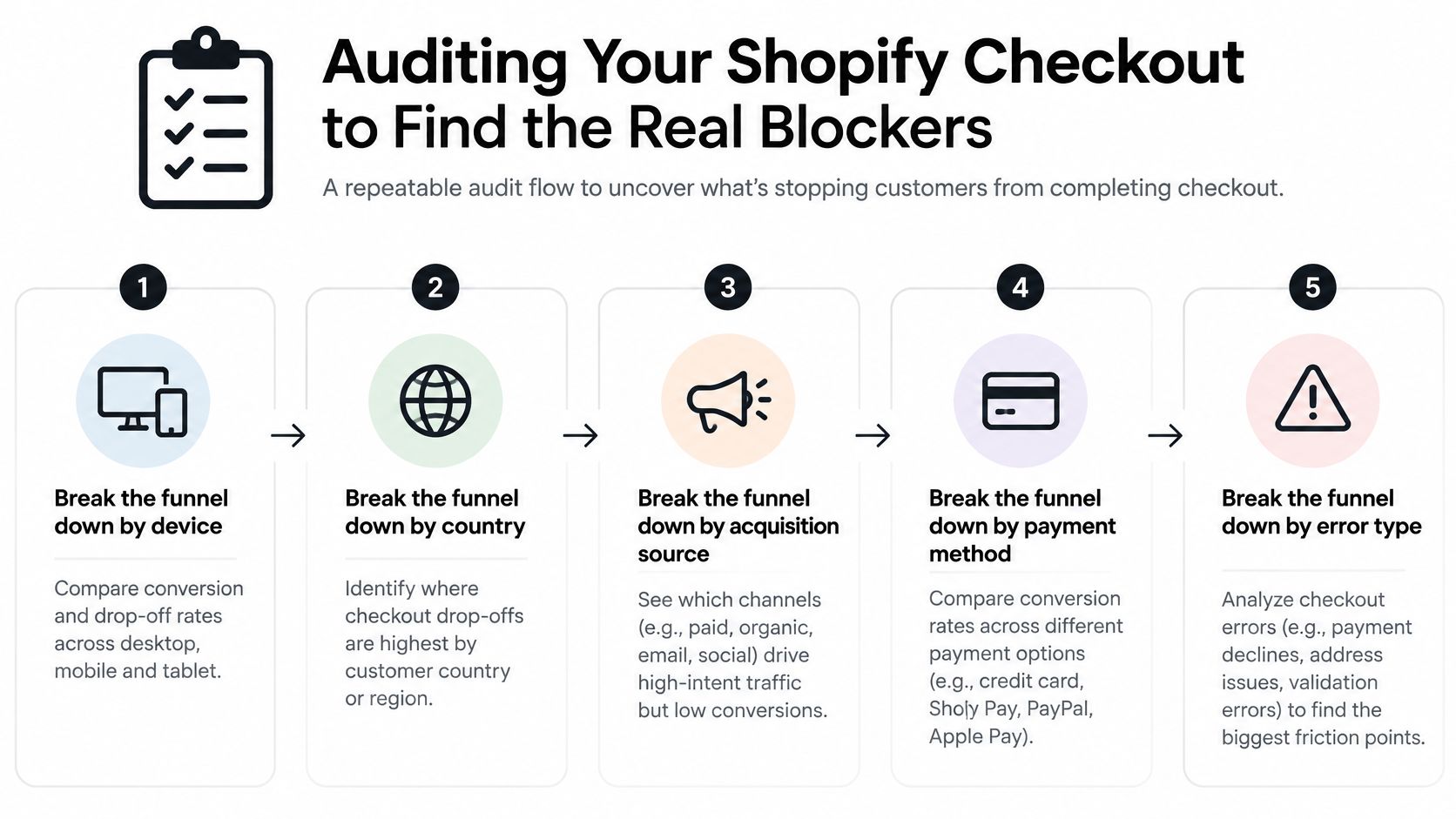
Break the funnel before you redesign it
In Shopify admin, read checkout behavior by device, country, acquisition source, payment method, and error type. A mobile drop on paid social is a different problem from a desktop drop among returning email subscribers. Payment declines clustered in one country point at method coverage or 3-D Secure friction, not at your hero image.
Pair the report with sessions. Watch a handful of representative buyers complete a purchase on the device they use. Note hesitation, backtracking, and the field where typing stops. Cosmetic complaints (a dated button, a font you dislike) go to the bottom of the list. Anything that blocks task completion goes to the top.
Baymard's checkout usability benchmark is built from moderated think-aloud testing with 272 test sessions, eye tracking, more than 850 benchmarked checkout steps, and nine quantitative studies with 11,777 participants, distilled from 2,700+ checkout issues into 134 design guidelines. The same research finds the average U.S. checkout presents 23.48 fields and elements, and estimates most sites can remove 20% to 60% without losing required information.
What to score on every step
- Full delivered cost: Can a shopper see shipping, tax, and the order total before the last click?
- Guest checkout: Is account creation optional and visually obvious, not a buried link?
- Cart persistence: Does the cart survive a refresh, a device switch, and a return visit?
- Inline validation: Does the field explain the error where it happens, in plain language?
- Field count: Are phone, company, and second address line required when operations don't need them?
Rank blockers by how often they stop completion, not by how old the layout looks. A cleaner theme that still hides shipping until payment will not move the rate. The same caution applies to the global average: don't paste 70.19% into your dashboard and call a month a failure or a win. Your price point and traffic mix set a different baseline. If you want a wider conversion view beyond checkout, the notes on Shopify conversion rate optimization cover how upstream traffic quality changes what this audit should even expect.
Fixing the Checkout Friction That Blocks Ready Buyers
Once the audit ranks the blockers, change the step that matches the complaint. Don't restyle the whole flow because a theme looked dated.
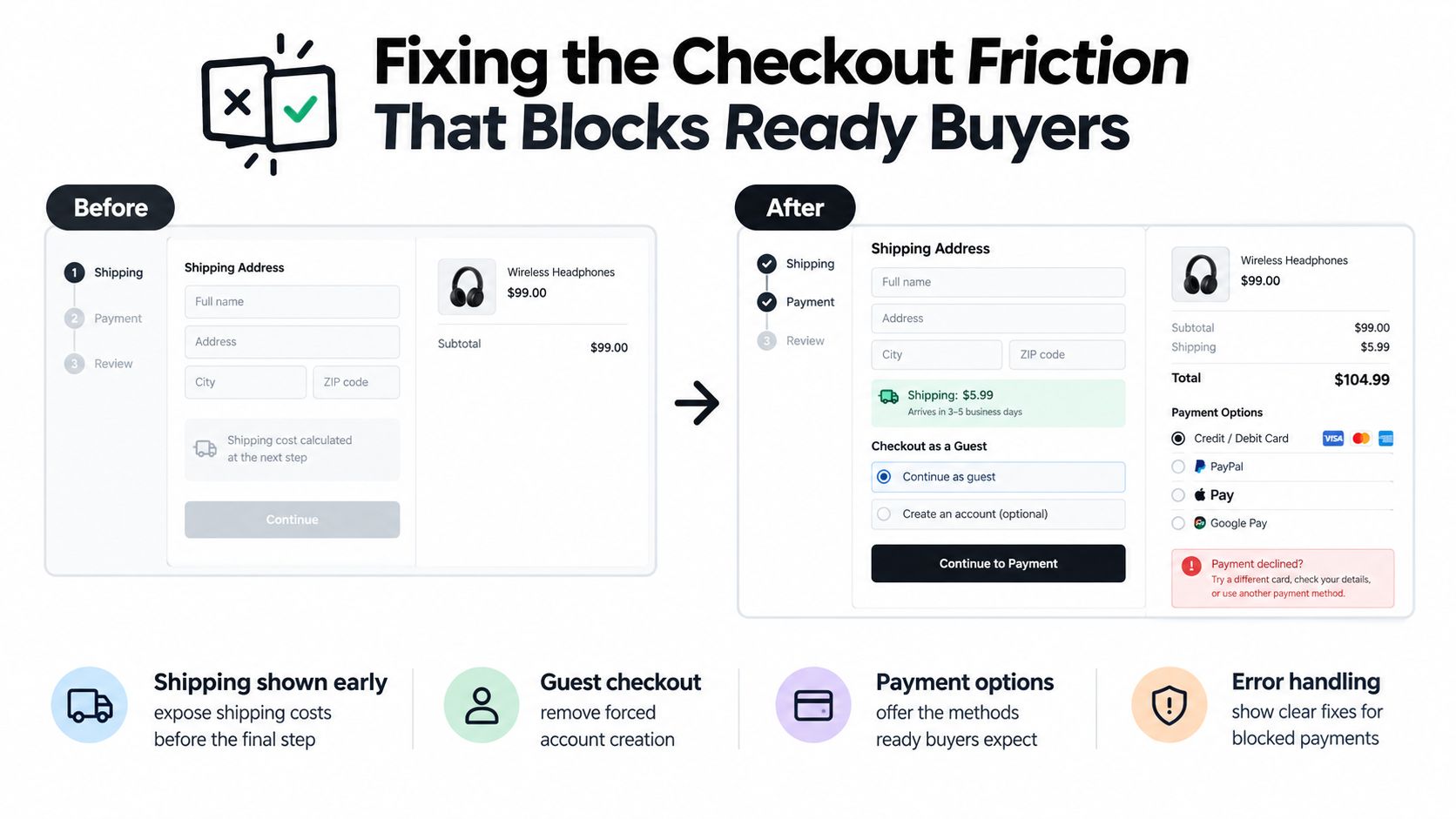
After excluding people who were only browsing, Baymard's UX statistics found 48% of U.S. users abandoned because extra costs, including shipping, taxes, and fees, were too high, 24% because the site asked them to create an account, 22% because delivery was too slow, and 18% because they didn't trust the site with their credit-card information. The same body of work shows an optimized checkout can contain as few as 12 form elements: seven fields, two checkboxes, two drop-downs, and one radio-button interface.
Put the money and the date where the decision happens
Show shipping, tax, and the order total in the cart, or as soon as you have a destination, not on the final review. In Shopify, use a shipping calculator on the cart where your theme supports it, and keep delivery profiles honest so the rate at cart matches the rate at checkout. If you can't quote an exact tax before an address, say what the estimate includes. Shoppers who can't calculate the total treat the surprise as a bait-and-switch even when the fee is ordinary.
State delivery timing next to the product or in the cart, not only after the address step. "Arrives Thursday" beats "5 to 7 business days" when the buyer is deciding whether to stay.
Stop forcing an account and shrink the form
Make guest checkout the default path. In Shopify checkout settings, don't require a customer account to complete an order. If you want an account, offer it on the thank-you page, after payment, when the buyer already has a receipt.
Then cut fields. Drop company name, a second address line, and a required phone number unless fulfillment or fraud checks need them. Turn on address autofill. Write error text that says what to fix ("Enter a five-digit postal code") instead of "Invalid input." Baymard's testing also shows checkout design alone can be the sole reason a cart dies when a shopper gets stuck on a field, so inline messages matter more than a prettier progress bar.
For the 18% who hesitate on card trust, show familiar payment marks, a clear seller identity, and a short line on how card data is handled. Don't add a wall of badge images that push the pay button below the fold on a phone.
A short walkthrough of where those checkout settings live:
Payment options belong in this same pass. Add the wallets your buyers already use, such as Shop Pay, Apple Pay, or Google Pay, and only the local methods your country report shows. More on measuring that coverage comes later. Don't install every gateway "just in case." Each extra option is another way to fail.
Choosing Recovery Automations That Match Shopper Intent
Recovery is several workflows, not one abandoned-cart email with a code in the subject line.
Baymard's cart abandonment rate list reports that 42% of U.S. online shoppers abandoned because they were just browsing or not ready to buy. A blanket discount pop-up spends margin on people who might have returned, and it doesn't help visitors who lack confidence. The question isn't "Should I send an abandoned-cart email?" It's "Which carts deserve an incentive, and which need reassurance or time?"
Three channels, different jobs
Email is the default for low-intent and mid-intent carts. It's cheap, it can carry product images and a delivery promise, and it doesn't demand an instant reply. Send a plain reminder first: what's in the cart, when it ships, what the total looked like. Hold any offer for a later message, and only if the cart still looks blocked rather than casual.
SMS is narrower. Use it when there is a real deadline, a high cart value, or a returning customer who already opted in. A text for every abandoned cart feels invasive and burns the channel. If you are setting that program up, the practical constraints are covered in this guide to SMS marketing for ecommerce.
Chat fits when the blocker is a question, not a price. A buyer stuck on duties, sizing, or a failed payment will often answer a short message faster than they'll open a third email. Don't let the bot lead with a coupon. Lead with the question they stalled on.
Before any of those sends, run the message through an email tester so a recovery sequence doesn't land in spam. A perfect segment is useless if the reminder never arrives.
Classify the cart, then pick the action
Tag abandonment by cart value, returning-user status, checkout stage, and any stated friction (payment error, shipping shock, no message at all). Track recovered revenue net of discounts, not gross. A workflow that "recovers" $40 by giving away $25 didn't recover $40.
| Cart Signal | Likely Intent | Recommended Action | Channel |
|---|---|---|---|
| Added item, never opened checkout | Browsing | Save the cart, remind later, offer stock or price alerts | |
| Reached shipping, left on cost or date | Blocked on delivery | Restate total and arrival, no code yet | |
| Reached payment, card error or missing method | High intent, blocked | Fix the method or explain the error, then a short nudge | Email or chat |
| Returning customer, high cart value, opted in | High intent | Personal follow-up, incentive only if silence continues | SMS or chat |
| First visit, low cart value | Low intent | One reminder, then stop |
Privacy sits inside this setup. Keep guest checkout as the path that doesn't demand a phone number. If you collect a number, say why at the field ("Used only if the carrier can't find the address") and leave it optional when operations allow. A recovery SMS you weren't clearly invited to send is a new reason to distrust the store, not a save.
Measuring Recovery With Metrics That Do Not Mislead
Checkout completion rate is the primary metric. Read it with guardrails or a "win" will hide a worse business.
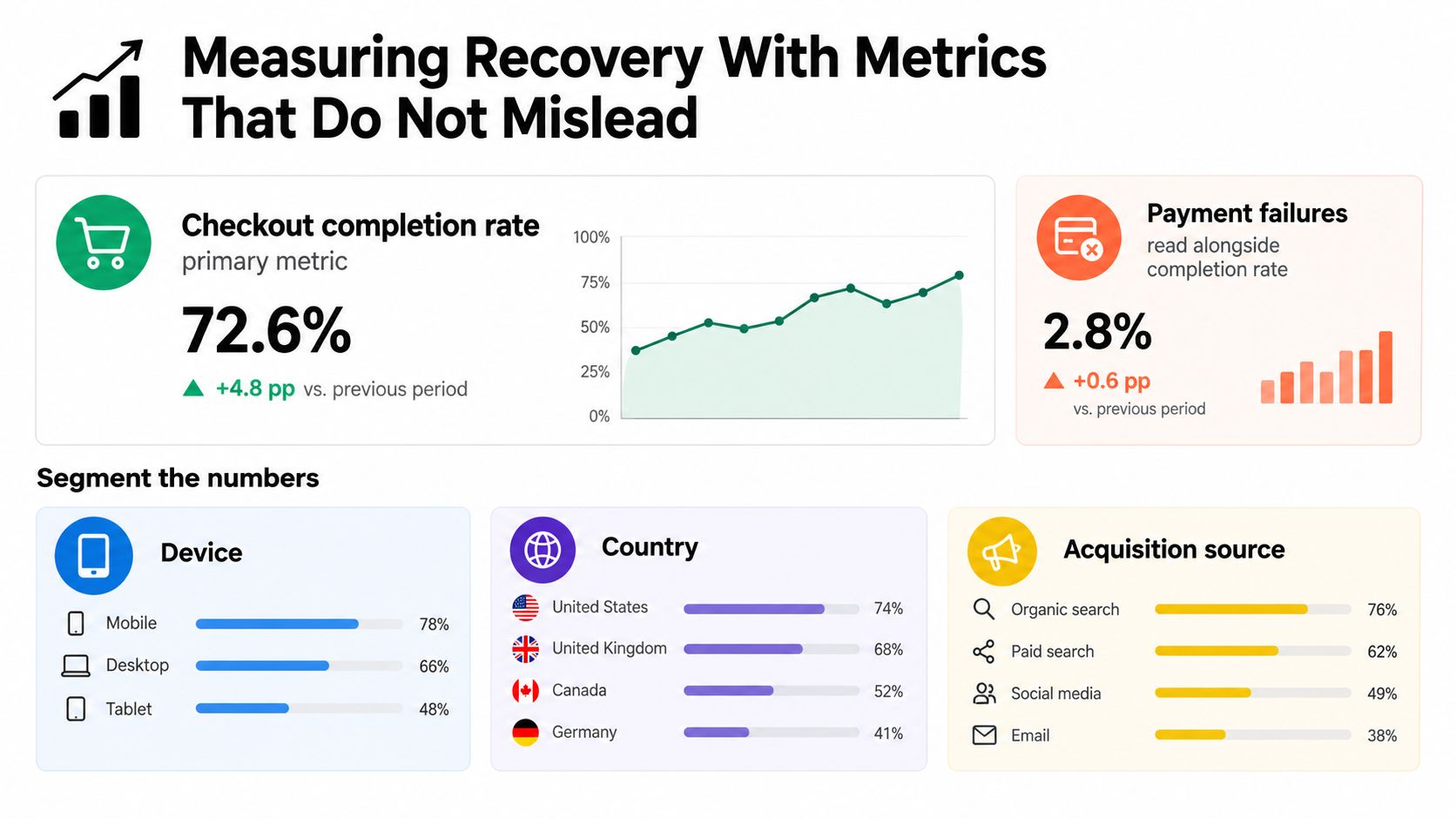
Completion rate plus the numbers that catch a fake win
- Checkout completion rate: Orders divided by checkouts started, split by device and country. This is the number you try to move.
- Payment failures: A higher completion rate next to a spike in declines means you pushed people into a method that fails, or you hid an error instead of fixing it.
- Average order value: Watch it net of discounts. A recovery flow that lifts orders while AOV falls may be buying cheap conversions.
- Refund rate: A smoother checkout that also obscures delivery or fit will show up here a few weeks later.
- Support contacts: A surge in "where is my order" or "payment didn't work" tickets means the change broke something the completion rate hasn't confessed yet.
Measure abandonment by stage: cart, shipping, payment, confirmation. A single blended rate can't tell you whether a fix worked or merely moved the drop one step later. If shipping abandonment falls and payment abandonment rises by the same amount, you clarified cost and then stranded people on the card form.
Baymard's current checkout UX research notes that 9% of shoppers abandoned because there weren't enough payment methods, and 10% because a preferred method wasn't available. That is why coverage should be judged by country, device, and order value. Adding every wallet because a blog listed it will not show up cleanly in a storewide completion rate. Segment the test.
Attribution and the baseline
Set the baseline for 30 days before you change checkout or recovery. Record completion by stage, payment failure rate, AOV, refund rate, and support contacts. When a discount is involved, attribute recovered revenue after the discount, and compare that cohort with a no-incentive holdout. Otherwise you will credit the coupon for orders that were coming back anyway.
A recovery rate with no holdout is a vanity number. It counts people who were going to finish, then congratulates the email.
The traps that fool a monthly review are a recovery rate that ignores organic return, an AOV inflated by pre-discount totals, and a support spike that nobody plotted next to the "successful" checkout release. If you automate the reporting, keep the stage split in the same view as the sends. A practical setup for that kind of reporting sits alongside other ecommerce marketing automation workflows, where the point is the same: trigger on a real signal, then check the guardrail metrics before you scale the flow.
Running Checkout A/B Tests That Actually Change Conversion
Ship one change, hold everything else still, and decide with the metric you named before launch.
Isolate the variable
Queue tests in the order the audit ranked blockers. Typical Shopify tests, run separately:
- Guest checkout as the primary path versus a layout that still pushes account creation.
- Shipping cost and delivery date visible in the cart versus revealed only in checkout.
- A shorter payment form, with optional phone and company fields removed.
- Clearer inline errors on address and card fields, without changing the offer.
Don't combine field removal and a new discount in the same test. You won't know which one moved completion.
Define the primary metric (checkout completion rate) and the guardrails (payment failures, AOV net of discounts, refund rate, support contacts) in the test doc before you turn it on. Segment results by device and country. A desktop win that loses on mobile is not a winner if most of your traffic is on a phone.
How long, and what to do with the result
Run the test until both variants have enough checkouts that a couple of unlucky days can't flip the call. Two days on a small store is noise. If traffic is thin, test the highest-traffic segment first (often mobile, one country) rather than waiting for a perfect storewide sample you will never get.
- Keep the change when completion rises and guardrails stay flat or improve.
- Revert when completion is flat and support contacts or payment failures rise.
- Escalate when completion rises only in one country or on one device. Ship it there, and write a separate test for the segment that lost.
If nothing moves, check three causes before you declare the idea dead. Traffic was too small. The segment mixed browsing carts with blocked carts, so the average hid a real effect. Or the change never deployed, which happens when a theme section overrides checkout content, or when an app still injects the old field. Open the live checkout on the device in the test and complete it yourself.
Step count is a weak goal. A single page with a long, confusing form is often worse than three short steps with clear totals.
Prioritize by blocker rank, not by what is easiest to toggle in an app. Guest checkout and early totals usually come before visual polish. Discount tests come last, and only against a no-incentive control, on the high-intent segment you already classified.
Your 30-Day Cart Abandonment Reduction Plan
Four weeks, one deliverable each. Don't start with a coupon app.
Week 1, instrument and watch. Export checkout drop-off by device, country, source, payment method, and error type. Watch at least a few real sessions through to payment. Deliverable: a ranked blocker list. Check: every line names a stage and a failure, not a design opinion.
Week 2, fix the top blocker. Implement the single change that stops completion most often. Usually that is early totals, guest checkout, or a required field you don't need. Deliverable: the change live on checkout. Check: you can complete a test order on mobile and see the new behavior.
Week 3, segment recovery. Build the signal table from earlier: browsing reminders without a code, blocker messages that restate cost or fix a payment error, SMS or chat only for high-value opted-in carts. Deliverable: flows live with a no-incentive holdout. Check: you can name which carts will never receive a discount.
Week 4, read the baseline and start one test. Compare completion by stage and the guardrails against the week-1 numbers. Launch the next one-variable test only if week 2's change is stable. Deliverable: a keep, revert, or escalate call scheduled, not guessed.
Qualified traffic still matters. Stores that need a steady stream of search visitors into this cleaner funnel can use the Blogger SEO AI Blog Agent for Shopify to generate, schedule, and publish SEO articles, including posts that feature products, without writing each one by hand. If blurry product photos are part of why people hesitate before they ever reach checkout, image cleanup is a separate job from the checkout fixes above. Don't mix the two in one test.
Today, pull stage-level abandonment for the last 30 days and rank the drop points. Don't change a discount, a theme, or an app until that list exists.
Yassine Malti builds Shopify apps and custom automations for merchants who want cleaner funnels, from SEO content that brings in better traffic to workflows that stop wasting margin on the wrong carts. If you want help turning this 30-day plan into something your store runs, visit Yassine Malti and start with the checkout drop-off you pulled today.
Shopify apps by Yassine Malti
Put this into practice
-

Blogger · SEO blog posts
An AI blog agent that writes and publishes for you · 50 credits/month free
-

ALT SEO · Image alt text
AI alt text for every product image · 100 images/month free
-

RANKit · Meta titles & descriptions
AI meta titles and descriptions, sized for Google · 50 meta tags/month free