You've got supplier copy in some product records, empty descriptions in others, and a launch that won't wait for a catalog cleanup. An AI product description generator looks like the obvious shortcut until you have to decide which fields it can trust and whether it should be allowed to publish.
Consider a hypothetical overnight bulk run: the paragraphs read well, but a supplement picks up an unsupported ingredient and a sneaker description promises a size that doesn't belong to the selected option. The mistake wasn't awkward writing. It was letting a drafting system act as a source of product facts.
Table of Contents
- Choosing a Generator That Keeps Product Facts Straight
- How to Configure Your Generator Before the First Run
- Prompt Templates for Each Product Category
- Writing Descriptions That Rank and Convert
- Quality Checks Before Anything Goes Live
- Automating Descriptions Across a Large Catalog
- Run a Holdout Test Before You Roll Out Store-Wide
Choosing a Generator That Keeps Product Facts Straight
Fluency is the wrong acceptance test. A generator should be judged by what it does when a supplier record is incomplete, two variants disagree, or a requested claim has no supporting evidence.
That distinction matters for Shopify catalogs. A product-level paragraph can accidentally turn an option-specific material, size, or compatibility detail into a claim about every variant. Shopify's own guidance on AI in ecommerce tells merchants to verify materials, sizing, ingredients, and other product claims before publishing.
Selection criteria for an AI product description generator
Evaluate tools against the same source records. Don't compare a carefully prepared demonstration in one tool with a bare product title in another.
| Criterion | What to Check | Red Flag | Why It Matters |
|---|---|---|---|
| Source data import | Reads titles, current descriptions, tags, and product images, with control over trusted inputs | Only accepts a product name | Thin input invites unsupported detail |
| Variant handling | Writes or flags differences in size, color, and material | Copies option-specific claims across every variant | A shared description can misrepresent the selected option |
| Provenance label | Records which text was generated for downstream feed handling | No record of generated content | You need to preserve AI-content provenance |
| Bulk and scheduled runs | Background tasks, scheduling, and rules for matching new products | Per-product generation only | Manual generation becomes an operational bottleneck |
| Language and tone control | Category examples, market settings, and banned phrases | Fixed tone with no overrides | Brand language and approved wording vary by market |
| Review workflow | Shows changes, flags unsupported claims, and holds drafts for approval | Publishes directly to the storefront | Review needs to happen before shoppers see errors |
Treat imported sources differently. Images can help identify visible features, but they shouldn't authorize ingredient, certification, or compatibility claims. Existing descriptions and tags also need scrutiny if nobody knows where they came from.
For a broader shortlist, compare AI tools for Shopify against these operational requirements rather than their demonstration copy. If you're improving existing text instead of starting from empty records, Humantext.pro's guide can help you find product description rewriting tools, but rewriting still needs the same factual controls.
The sparse-data test
Give each candidate a product with a title, a category, and deliberately missing specifications. Ask for a finished description, then inspect whether the tool identifies the missing fields or invents plausible details.
Practical rule: Missing data should produce a visible gap, not a confident sentence.
A refusal doesn't have to stop all drafting. The tool can produce a limited description from supported attributes while routing unresolved questions to a reviewer. What should end the evaluation is silent invention, especially when the tool presents the result as ready to publish.
How to Configure Your Generator Before the First Run
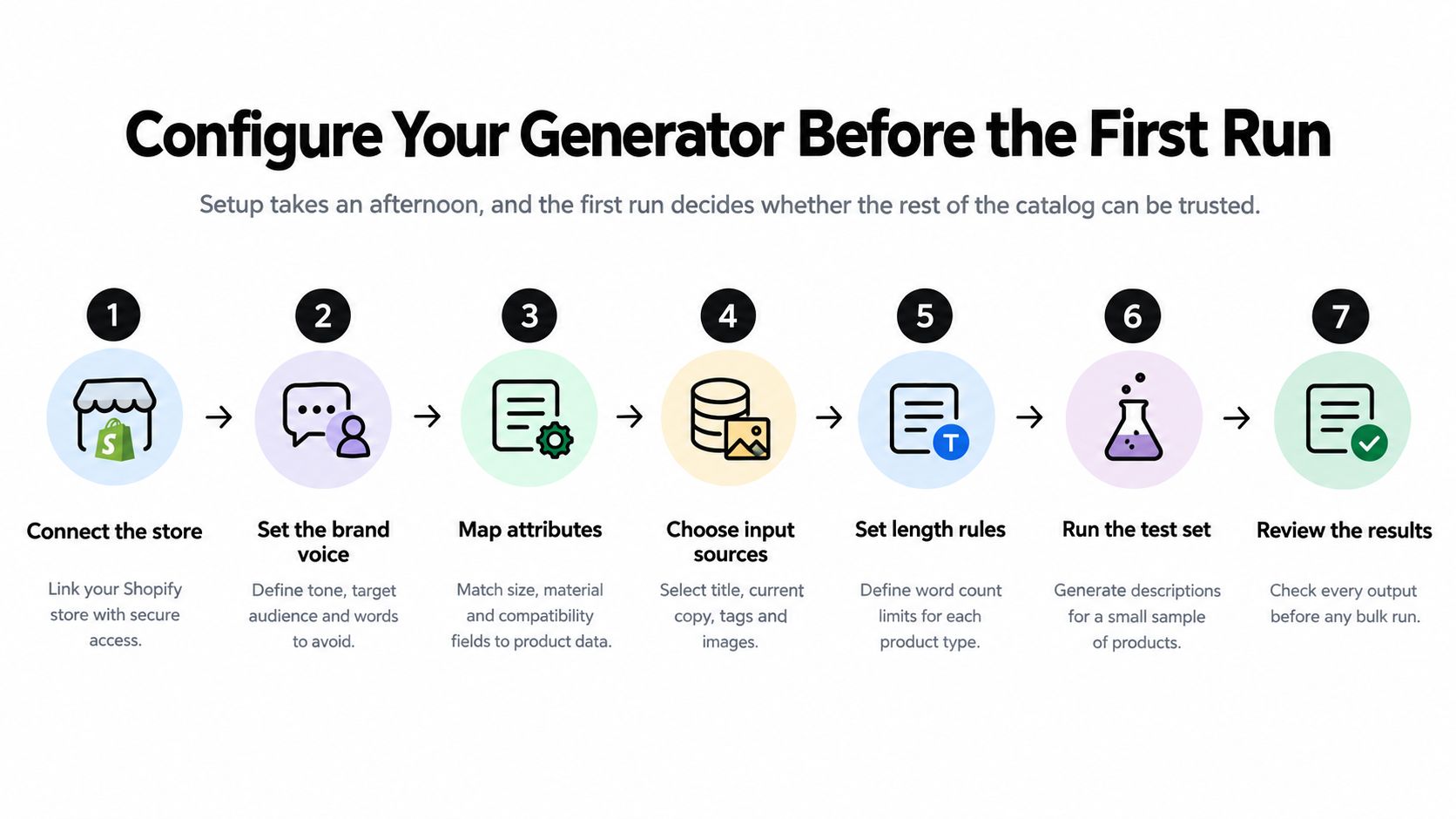
Treat setup as a controlled pilot, not an installation task. The important result isn't a polished paragraph. It's evidence that source mapping, permissions, and review behave correctly before a bulk job starts.
Use the setup flow as an orientation, then apply the controls below.
Configure access and inputs
Connect without enabling publication. Start with product read access where the integration permits it, or disable write-back during the pilot. If the app requests write permissions at installation, confirm that generation can still remain draft-only.
Map materials, dimensions, care instructions, warranty, country of origin, and compatibility to their actual source fields. Prefer explicit metafield mappings over asking the generator to infer specifications from titles, because a title rarely contains the complete record.
Load approved brand examples by category. Include descriptions that demonstrate acceptable restraint as well as tone. A useful example shows how your brand handles missing information without padding the paragraph.
Build a banned-phrase and restricted-claim list. Include unsupported medical or performance promises, superiority claims, “clinically proven,” and promotional stock or discount language; require approved evidence before any exception.
Configure output and testing
Set language and locale separately. Specify market terminology and unit formatting, and keep prices outside generated prose wherever possible. Translation shouldn't become permission to alter specifications or improvise legal wording.
Select a test set that covers different categories, variant-heavy products, and incomplete records. Include conflicting inputs as well as clean ones, because an integration that only handles perfect records hasn't passed a useful test.
Generate, compare, and log before enabling writes. Review every factual statement against its source field and record each mismatch. Change the mapping or prompt that caused the error rather than merely repairing the paragraph.
For a video walkthrough alongside the configuration checklist:
Also decide what happens when sources disagree. A supplier document and an existing description shouldn't have equal authority by default; assign an owner to resolve the conflict and keep the item unpublished until that happens.
Setup is working when thin-data products return flagged gaps. It isn't working when a reviewer has to reverse-engineer which sentences came from the catalog and which came from the model.
Prompt Templates for Each Product Category
A prompt is only as honest as its inputs. “Write an accurate description” doesn't define accuracy, identify authoritative fields, or tell the generator what to do when information is missing.
Google's guidance on using generative AI content warns that generated content can contain inaccuracies and requires attention to accuracy, including metadata and structured data. Treat the prompt as a constrained transformation of catalog facts, not a request for product knowledge.
A reusable prompt skeleton
Use a structure that reviewers can inspect without reading a long creative brief:
Role: Draft product copy from the supplied catalog record only.
Verified facts: Insert approved attributes with their field names and variant scope.
Task: Explain the product's relevant features in the approved category voice.
Restrictions: Don't infer missing specifications, certifications, benefits, or included accessories. Flag missing or conflicting information.
Output: Return factual copy, persuasive copy, and an internal review note listing unresolved fields. Keep review notes out of customer-facing text.
Separating factual and persuasive text makes review easier, but it doesn't exempt persuasion from validation. “Built for demanding outdoor use” can imply performance just as clearly as a specification.
Prompt inputs and limits by product category
| Category | Inputs to Pass In | Description Structure | Never Let the Model Add |
|---|---|---|---|
| Apparel | Fabric composition, fit notes, care label, size-chart reference | Fit and feel, fabric, care, included items | Unsupported fabric percentages or best-selling claims |
| Electronics | Model number, ports, power rating, warranty, compatibility list | Function, key specifications, compatibility, box contents | Untested battery-life figures or universal compatibility |
| Food and supplements | Ingredients, allergens, serving size, certifications, approved storage instructions | Ingredients, label-approved usage, storage, allergen line | Health or cure claims, or dosage advice absent from the label |
| Furniture | Overall and component dimensions, weight limit, assembly details, materials | Dimensions, materials, assembly, placement considerations | Estimated dimensions or inferred load capacity |
| Beauty and skincare | Ingredients, approved skin-type guidance, usage steps, certifications | Ingredients, usage, supported suitability | Unsupported clinical claims or promised results |
Don't force the same opening onto every category. Electronics copy should answer compatibility questions; apparel copy should explain supported fit details; supplement copy should preserve approved ingredient and usage information.
For regulated categories, use a locked template with mandatory legal and safety text supplied by the responsible reviewer. Let the generator work around those lines, not rewrite them.
From a bare title to useful copy
Consider this illustrative prompt test, not a real product record. A bare title such as “Everyday Shirt” might produce: “A premium, breathable shirt with a perfect fit for any occasion.” None of those qualities follows from the title.
Now assume the approved metafields explicitly say cotton fabric, relaxed fit, machine wash cold, and hang dry. A supported rewrite would be: “This cotton shirt has a relaxed fit. Machine wash cold and hang dry according to the care instructions.”
The second version is less theatrical and more useful. If composition percentages or stretch properties are missing, the description should leave them out.
Writing Descriptions That Rank and Convert
A shopper looking at a phone case needs to know whether it fits their device, not whether the copy calls it “premium.” A product description can answer practical questions and support a product page, but it cannot guarantee search visibility. Google's product structured-data documentation explains eligibility for richer search appearances. Product snippets require at least one of review, aggregateRating, or offers, along with applicable requirements and quality guidelines.
Merchant listings can show purchasing details such as price, availability, and shipping. Keep the description aligned with that information, then use its limited space to answer questions the listing does not.
Replace adjectives with decision-making information
For an electronics example, suppose the approved product record identifies a charger's connector type and lists the device models it supports. A useful description names those supported models and tells shoppers to check their device's connector before buying. If the record does not specify charging speed or compatibility with other models, leave those details out.
That copy gives shoppers a clear basis for deciding whether the charger suits their device. Keep the page focused: put compatibility where it is easy to scan, and use separate paragraphs for specifications, included items, or setup guidance when those details are available.
Apply on-page rules without keyword stuffing
- Open naturally. Use the primary product term in the first sentence when it accurately identifies the item.
- Add useful attributes. Include relevant material, use, or compatibility details where the product record supports them. Vary related terms instead of repeating one keyword.
- Give paragraphs distinct jobs. Group specifications, included items, and usage guidance so shoppers can find answers quickly.
- End with a useful action. Point to a compatibility selector, size chart, or care guidance already on the page.
Follow the wider ecommerce SEO implementation. Check that the theme displays the approved copy correctly and that product metadata agrees with it.
More words add little if shoppers still cannot tell whether the product meets their needs.
Measure search visibility at the product-page level. In Search Console, compare impressions and clicks for rewritten product URLs with a matched set of unchanged pages. This helps separate changes on edited pages from broader traffic shifts.
More impressions do not prove that the description improved sales. Search exposure and purchasing behavior are separate outcomes, so assess them separately.
Quality Checks Before Anything Goes Live
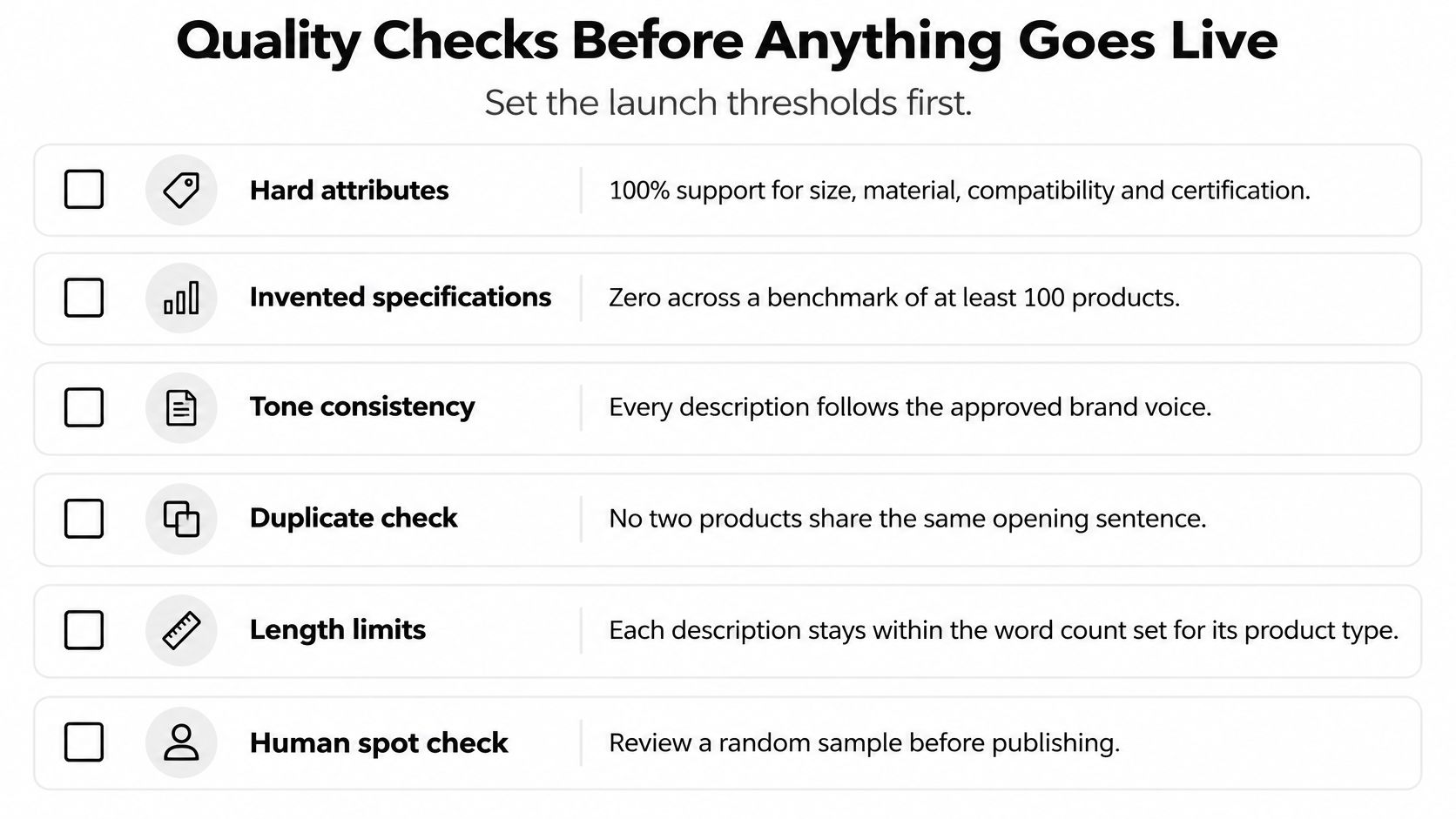
Set explicit release criteria: complete support for hard attributes, no invented specifications in the benchmark, and mandatory approval for regulated or otherwise high-risk products. These are acceptance rules you choose, not performance claims about a generator.
A useful benchmark should include at least 100 products across categories, variants, price tiers, and data-completeness levels. The product-description evaluation study tested 100 products and reported sentiment scores above 0.95 across models, illustrating why positive tone alone is a weak quality signal.
Use this checklist as a starting point, with stricter approval requirements for higher-risk categories.
Pre-publish checks by product field
| Field | Automated Check | Human Review When |
|---|---|---|
| Dimensions and weight | Values and units match the source record | Anything is missing, estimated, or converted |
| Materials and fabric | Every named material exists in approved attributes | Copy adds a material or unsupported percentage |
| Price and availability | Excluded from generation; references checked against live data | Copy mentions a discount or introduces a conflict |
| Certifications and claims | Each claim maps to an approved source entry | Health, safety, or performance wording appears |
| Compatibility | Listed models match the approved compatibility table | Copy implies compatibility beyond that list |
| Legal and safety lines | Required text is present for the category and market | A warning is missing or reworded |
| Image alt text | Describes the product and visible attributes without keyword stuffing | It mentions something the image doesn't show |
A keyword blacklist is useful for routing, but it isn't a factual validator. A claim can be unsupported without containing any banned phrase, and a legitimate warning may contain a restricted word.
Use deterministic checks where the source is structured. Compare measurements, model identifiers, material names, and certification identifiers against approved values; send ambiguous wording to a person instead of allowing another generated assessment to make the final decision.
Score usefulness and preserve the audit trail
Score each sampled output for attribute precision, factual support, completeness, readability, search-intent alignment, duplication, and conversion clarity. Keep those dimensions separate so an attractive paragraph can't compensate for an incorrect specification.
Treat duplication checks with judgment. Repeated legal language is expected; repeated generic openings across unrelated products are a reason to inspect whether the descriptions contain meaningful differentiation.
For every approved write, retain:
- Source snapshot. Preserve the attributes used to generate the draft.
- Generation record. Store the prompt and model version with the original output.
- Approval record. Keep the final text, reviewer, and reason for substantive changes.
- Publication record. Record what was written so a later correction can be traced.
When a reviewer finds an unsupported claim, fix the underlying rule before retrying related items. Re-run the benchmark after prompt or model changes, and don't overwrite a human correction merely because a scheduled job runs again.
Automating Descriptions Across a Large Catalog
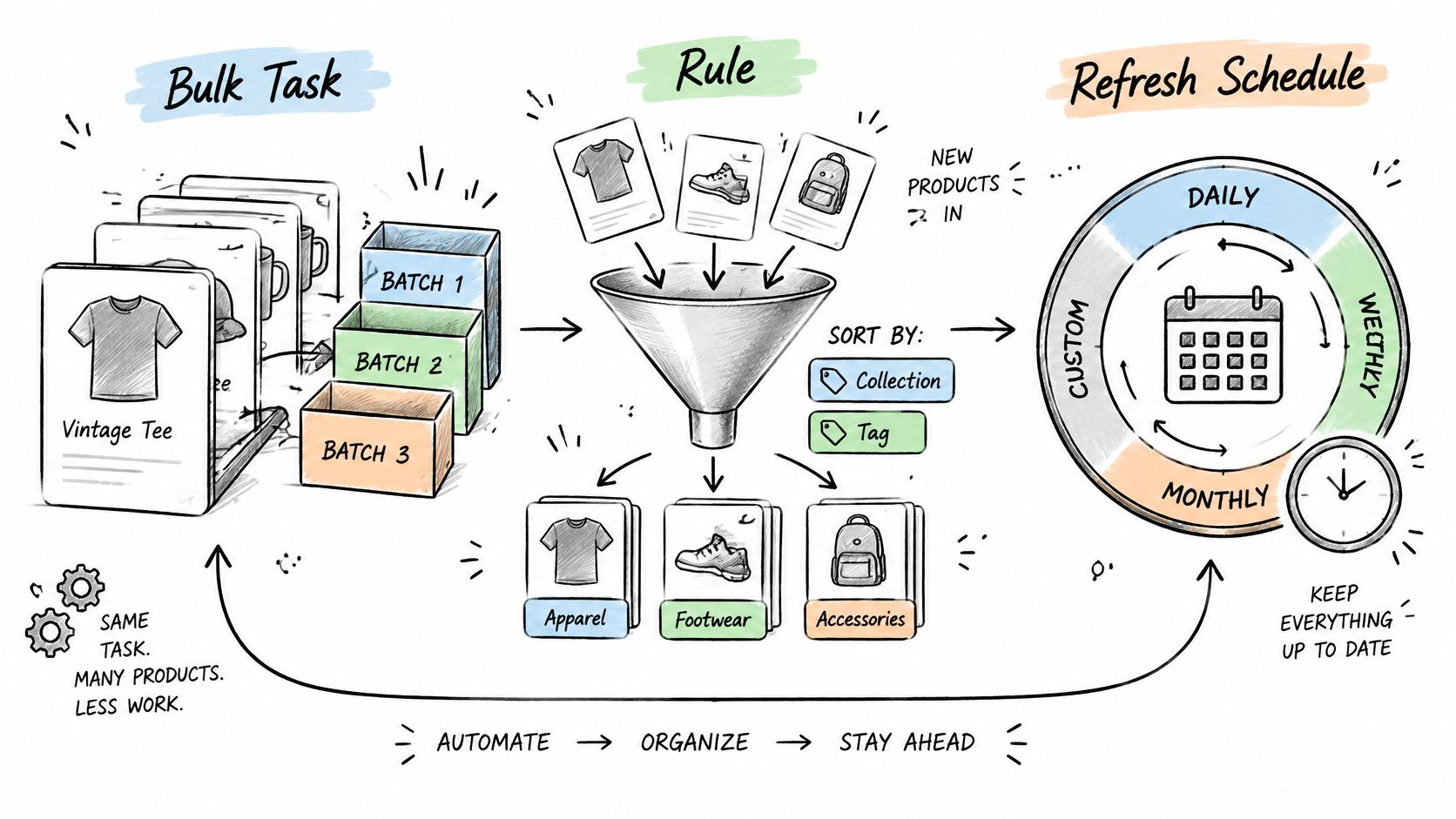
After the pilot passes, separate automation into an existing-catalog bulk task, a rule for eligible new products, and a refresh process for changed specifications. Each should enter the same validation and approval path rather than creating separate standards for scheduled work.
The workflow below shows how those triggers can feed a controlled publishing process.
Integration checklist for a custom build
- Subscribe to product-create and product-update events. Filter for eligible products and relevant source changes rather than regenerating on every update.
- Queue generation work instead of calling the model inside the event handler. Keep retries and failures visible to the merchant.
- Write through the Admin API within applicable rate limits. Keep generation, approval, and publication as separate job states.
- Store a hash of the source fields in a metafield. Skip unchanged inputs, and distinguish your own writes from genuine specification changes to avoid update loops.
- Log the prompt and model version on every write. Preserve manual overrides and make rollback possible.
For tag-based eligibility, TAGit AI Product Tag Generator for Shopify supports tag generation from product images, titles, and descriptions, including bulk processing and automatic processing for new products. Treat generated tags as classification inputs to review, not evidence for new product claims.
Apply channel rules at export
Google's Merchant Center product-data specification requires a description through the applicable description attribute, limits the field to 5,000 characters, and provides structured_description for generative-AI-created descriptions. The text must accurately describe the product and match the landing-page description; promotional clutter, competitor references, links, and unrelated accessory information don't belong in the field.
That makes provenance an export requirement, not just an internal audit preference. Keep the storefront's approved content and the feed mapping synchronized instead of creating an independent feed description that drifts from the page.
Include these checks in your product-feed optimization workflow. Pause exports when validation fails, and resume only after the approved content and feed payload agree.
Run a Holdout Test Before You Roll Out Store-Wide
The final question is whether the new descriptions help shoppers, not whether the team can generate them quickly. The State of Ecommerce research documents growing use of AI-assisted shopping, but that doesn't establish that any particular description template will improve your store's results.
Randomly assign comparable products within categories to the test groups below. Keep enough unchanged products to distinguish the effect of copy from broader changes in demand.
Holdout test groups and measures
| Group | Copy Shown | Measured Against |
|---|---|---|
| Current copy | Existing description, unchanged | Organic landing-page traffic, add-to-cart rate, revenue per session |
| Fully generated | Verified-attribute AI copy without editorial changes, after safety approval | The same metrics against the current-copy baseline |
| Generated and edited | AI copy checked and edited by a person | The same metrics against the current-copy baseline |
Set the decision rule before publishing. Require a commercially meaningful improvement in revenue per session without a deterioration in factual accuracy, and choose the test duration using your traffic and purchase frequency rather than a universal calendar rule.
Log price, photography, review, promotion, and merchandising changes during the experiment. Predefine how you'll handle affected products so you don't selectively remove inconvenient results afterward.
Decision standard: Choose the approach that helps shoppers make better decisions, not the one that produces the most text.
Roll out the winning approach by category, then in controlled batches. If fully generated copy reads well but performs flat, inspect whether it added any useful information. When the source record is thin, the next investment should be better product data, not more variations of the same paragraph.
Yassine Malti builds SEO-focused Shopify apps and custom automations for content generation, on-page optimization, and catalog workflows. Visit Yassine Malti to explore ready-made tools or discuss a description pipeline with source-field mapping, claim validation, and approval controls suited to your store.
Shopify apps by Yassine Malti
Put this into practice
-

TAGit · Product tags
SEO-friendly product tags, generated in bulk · 50 tags/month free
-

Describer · Product descriptions
Product descriptions written from your own product data · Free: 50 descriptions/month
-

LLMs TXT · llms.txt for AI tools
A short llms.txt of your real store links · Free