URL canonicalization is choosing one preferred URL when the same or near-identical content is reachable at several addresses.
You open a product from your Shopify collection, copy its address, and notice it looks different from the link in your email campaign. Both show the same mug, price, and description. Before changing any code, you need to understand why your store creates those addresses and which signals tell search engines where the main page lives.
Table of Contents
- What URL Canonicalization Means in Plain Terms
- Why Duplicate URLs Cost Crawl Budget and Link Equity
- How Canonical Signals Rank and Where They Stop
- Shopify Canonical Pitfalls and How to Avoid Them
- Set Up and Audit Canonical Tags Step by Step
- Troubleshooting Canonical Problems in Search Console
- Canonicals on JavaScript and Regional Stores
What URL Canonicalization Means in Plain Terms
Think of a library that lists the same book under its title, author, and subject. Readers can find it through different catalog entries, but the library keeps an official record for the book. Canonicalization serves a similar purpose for web pages.
Search engines identify identical or highly similar pages and group them into a duplicate cluster. They then select a representative URL, called the canonical URL, which generally appears in search results. Your preferred URL and the search engine's selected URL aren't necessarily the same.
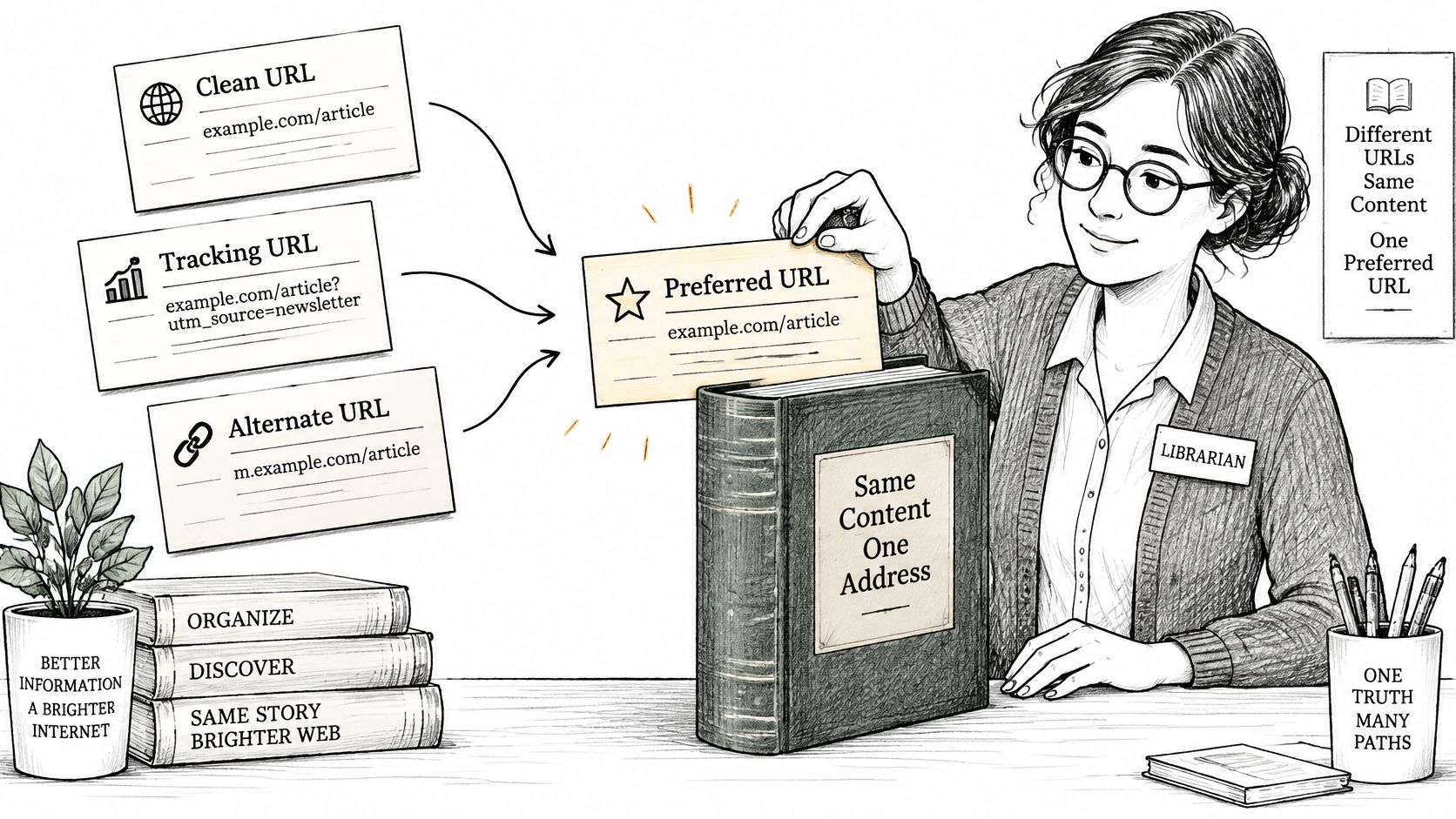
Common URL Variants That Point to One Page
You don't have to copy a product description to create duplicate URLs. Ordinary navigation, campaign tracking, and URL handling can produce them.
The examples below illustrate patterns to inspect, not problems every Shopify store necessarily has.
| Variant | Example | Why it appears |
|---|---|---|
| Protocol | vs |
Old links and incomplete HTTPS redirects |
| Host | example.com vs www.example.com |
Both hostnames resolve to the store |
| Trailing slash | /products/blue-mug vs /products/blue-mug/ |
Server accepts both forms |
| Tracking parameter | /products/blue-mug?utm_source=newsletter |
Campaign and email links |
| Sort or filter | /collections/mugs?sort_by=price-ascending |
Navigation adds sorting or filtering parameters |
| Alternate path | /collections/mugs/products/blue-mug vs /products/blue-mug |
Products are reachable through collections |
A canonical tag is an annotation that communicates your preferred address. Canonicalization is the broader selection process, which uses that annotation alongside other evidence.
That distinction answers a common follow-up to “What is URL canonicalization?” It isn't deleting alternate pages or changing the address visitors see. It's identifying which address should represent equivalent content.
Your first job is therefore investigative. Follow your store's navigation, select filters, and open campaign links to discover which variations exist before deciding what to change.
Why Duplicate URLs Cost Crawl Budget and Link Equity
A Shopify catalog can have straightforward product records while exposing a much more complicated collection of URLs. A customer reaches a mug through a collection, a newsletter subscriber uses a tracking link, and a blogger links to another variation. Search engines must determine how those addresses relate, and every variation your theme, apps, or filters generate is one more signal they have to weigh.
The practical cost is making your preferred structure harder to interpret, even when the duplicates are legitimate.
Search Selection and Crawl Attention
According to Google's explanation of canonicalization, Google chooses the URL it considers the most complete and useful representative. It normally crawls that canonical more regularly and duplicates less frequently to reduce crawling load.
That supports a careful conclusion: canonicalization can improve how search engines handle redundant URLs. It doesn't support promising that removing a parameter will immediately get a new product discovered or a changed price refreshed.
Investigate crawl budget on its own evidence instead of diagnosing it from catalog size alone. A useful audit asks whether your store exposes large amounts of repetitive navigation URLs and whether those URLs serve a meaningful purpose.
Practical rule: Don't label every excluded duplicate a failure. Ask whether Google selected the product or collection you want customers to find.
Consolidating Links Without Oversimplifying Them
Link equity describes the ranking value associated with links. If people link to different addresses for equivalent content, a consistent canonical setup helps search engines consolidate signals around the preferred representative.
Avoid imagining a fixed amount of value mechanically divided between every URL variation. You can't calculate a ranking loss by counting alternate addresses, and a canonical annotation doesn't guarantee a particular ranking improvement.
Use this inspection routine:
- Group by product: Export available URL examples from Search Console's Page indexing report and group addresses that display the same item.
- Identify the source: Check whether collection navigation, campaign links, or filters create each variation.
- Standardize new links: Use the preferred address in navigation, outreach, and guest contributions when tracking requirements don't require an alternate.
For filter-generated duplicates, review the decisions behind your faceted navigation SEO before adding more tags. Preventing unnecessary URL discovery and clarifying legitimate duplicates are related tasks that call for different fixes.
How Canonical Signals Rank and Where They Stop
Canonical signals are evidence, not commands. Google weighs them together rather than treating a tag as an instruction that automatically overrides everything else.
Canonicalization Signals Ranked by Strength
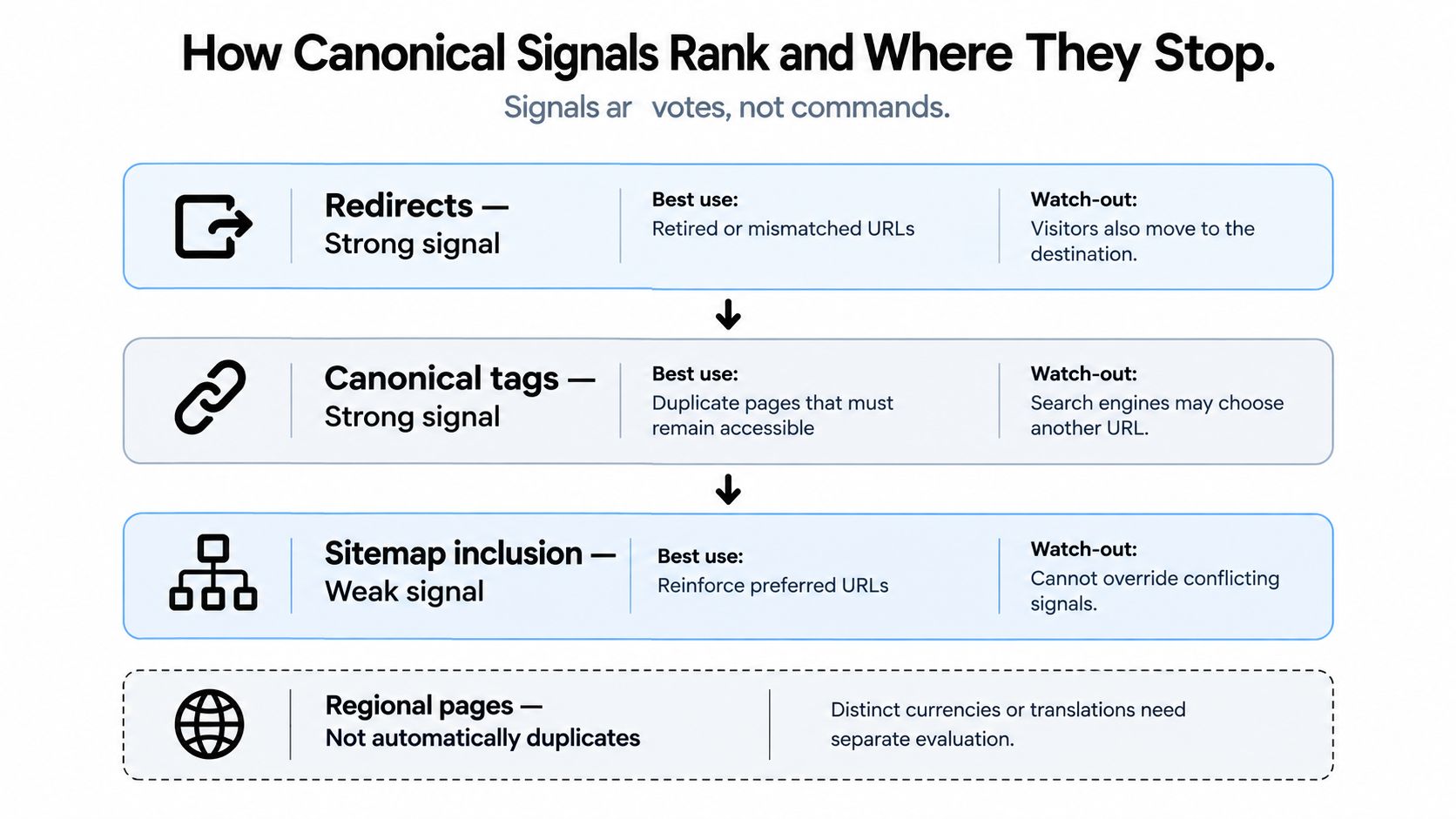
Google's duplicate-URL consolidation guidance classifies redirects and canonical annotations as strong signals, while sitemap inclusion is weaker. It also explains why conflicting instructions can undermine your preferred choice.
| Signal | Strength | Best used for | Watch out |
|---|---|---|---|
| 301 redirect | Strong | Retired or mismatched URLs visitors no longer need | Check for chains and loops |
rel="canonical" tag |
Strong | Duplicates that must remain accessible | Use a single absolute target without fragments |
HTTP Link header |
Strong | Communicating the canonical outside HTML, including non-HTML files | Include response headers in your audit |
| XML sitemap inclusion | Weaker | Reinforcing preferred URLs | Don't list a URL that your canonical setup rejects |
robots.txt rule |
Not a canonical signal | Controlling crawl access | Blocked URLs can still be indexed without their content |
The distinction between redirects and canonical annotations is practical. A redirect moves visitors and crawlers to another address. A canonical annotation leaves the alternate available while identifying the preferred representative.
That makes redirects appropriate when you're retiring an address. An annotation is more suitable when a useful alternate, such as a tracking URL, must continue working.
The hierarchy is illustrated below.
The Boundaries That Matter
Blocking crawling doesn't establish a canonical. If Google can't read a page, that restriction doesn't tell it which equivalent URL should represent the content. Don't use robots.txt as a substitute for canonicalization.
URL fragments, the portion following a hash symbol, are generally unsupported as canonical targets. Choose the actual page address instead.
Conflicts deserve equal attention. If your sitemap identifies an alternate while its canonical annotation identifies another address, you're providing inconsistent evidence. Correct the disagreement rather than adding another signal on top.
Google can still select a different canonical when its overall evidence supports another representative. That's why a technically valid tag isn't the same thing as a confirmed outcome.
A canonical tag is a strong request, not a command. Align the rest of your implementation with that request.
Shopify Canonical Pitfalls and How to Avoid Them
Suppose you inspect a collection after installing a filtering app and discover that its canonical points to the homepage. That's a hypothetical troubleshooting example, not a merchant case study. The annotation would misrepresent the collection as equivalent to a page that serves a different purpose.
The lesson is to inspect the final output, not just the app settings or theme code you expected to run. Theme edits, app-generated metadata, and custom storefront logic should have a clear owner.
Shopify URL Patterns That Create Canonical Problems
Use these patterns as an audit checklist. The correct fix depends on whether the pages contain equivalent content.
| Pitfall | Example URL or output | Risk | Fix |
|---|---|---|---|
| Product via collection path | /collections/mugs/products/blue-mug |
Another address for the same product | Prefer /products/blue-mug when the content is equivalent |
| Variant parameter | A product address with a variant query parameter |
Alternate addresses may repeat the product page | Keep the clean product canonical when the variant isn't a distinct landing page |
| Sort and filter | /collections/mugs?sort_by=price-ascending |
Combinations multiply accessible URLs | Use the base collection for equivalent results; assess meaningful filters separately |
| Internal search results | /search?q=mug |
Repetitive search-result URLs | Review indexing separately rather than forcing unrelated canonicals |
| Paginated collections | /collections/mugs?page=2 |
Later products are represented by the wrong page | Prefer a self-canonical when the product listing differs |
| Blog tag and author archives | /blogs/news/tagged/coffee |
Repeated excerpts can obscure the archive's purpose | Assess unique value before choosing canonicalization or indexing controls |
| Stacked canonicals | Theme and app both output a tag | Conflicting preferred addresses | Retain a single responsible source |
Similar Layouts Aren't Necessarily Duplicates
A collection's later page may share its heading, navigation, and layout with the opening page, but list different products. My recommendation is to preserve that distinction rather than automatically canonicalizing the entire sequence to its beginning.
Apply the same reasoning to filters. Sorting the same items is different from creating a useful, curated collection with its own selection and content.
The underlying test is content equivalence, not whether the URLs look related. The canonical relation identifies a preferred representative for duplicative resources, not a destination for loosely related pages.
Before editing a tag: Compare the actual products and page purpose, not just the template.
After theme updates or metadata-app changes, inspect the page head again. Keep canonical generation under a single owner, and document any exceptions so a later edit doesn't undo them.
Set Up and Audit Canonical Tags Step by Step
Start by recording the preferred structure, then verify that your storefront consistently implements it. Editing tags before mapping the URLs makes it easy to fix a symptom while leaving the source untouched.
The process below connects URL decisions with the checks needed after deployment.
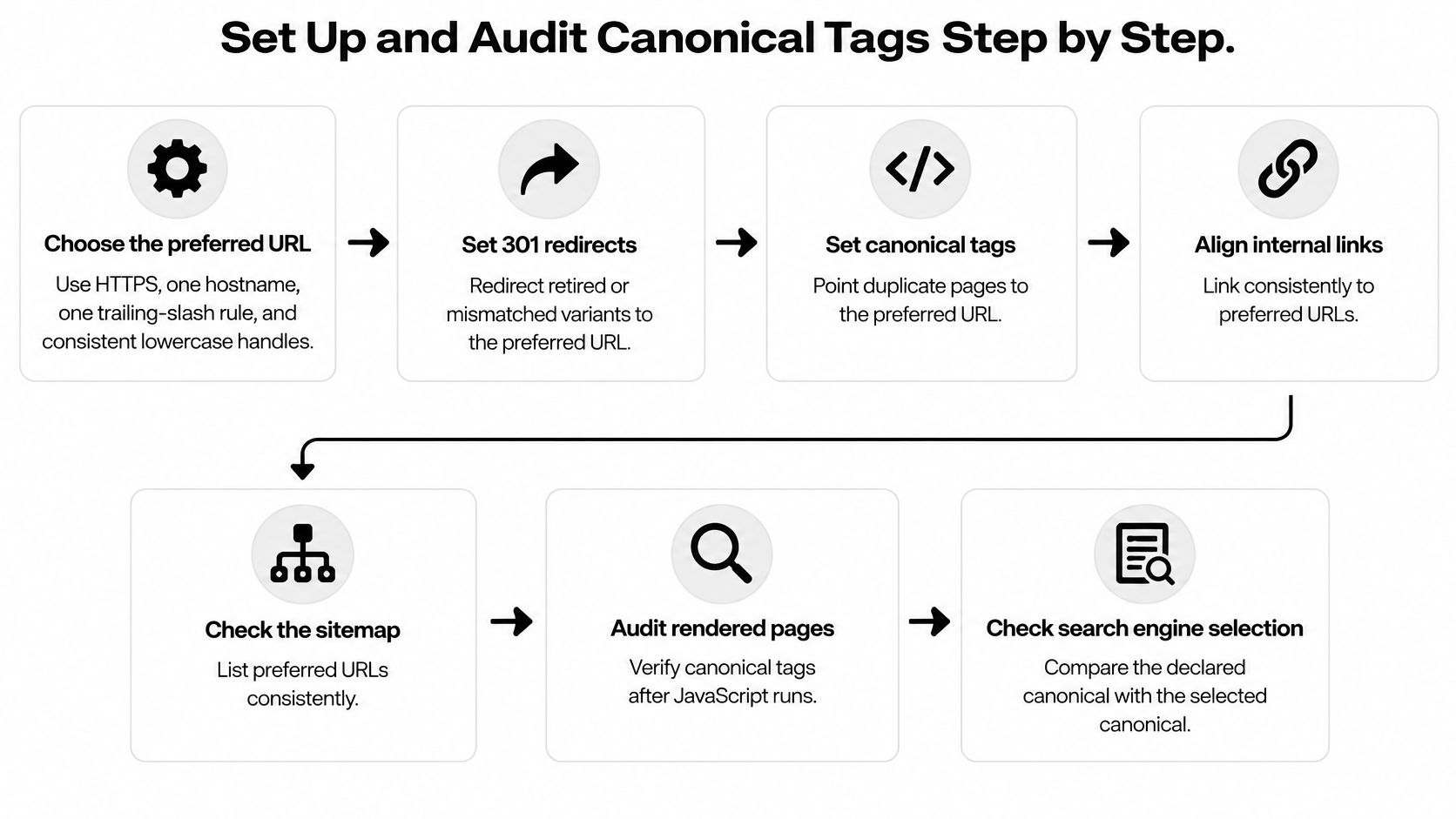
Choose and Implement the Preferred Structure
Write down your URL rules. Choose HTTPS, your preferred hostname, and a consistent trailing-slash convention. For new handles, adopt a consistent lowercase naming practice rather than casually changing established addresses.
Record the preferred structure for products, collections, and articles separately. Your team should be able to identify the intended address without guessing which app or template generated it.
Redirect addresses you're retiring. Use permanent redirects where visitors no longer need the alternate address. Review your Shopify URL redirects before making structural changes, especially where existing links must continue working.
Check the destination directly. Don't deliberately build a sequence of intermediate addresses when you can point to the final page.
For equivalent pages that must stay accessible, publish the canonical in the HTML
<head>or appropriate HTTP header.A product using the preferred address from the examples could contain:
<link rel="canonical" href="https://example.com/products/blue-mug" />.The full address removes ambiguity about the intended protocol, hostname, and path. RFC 6596's definition of the canonical link relation grounds this implementation in the idea of a preferred resource among duplicative resources.
Make the preferred page self-referential. Its canonical should identify its own preferred address. Check that a template rule intended to remove tracking parameters doesn't accidentally remove meaningful pagination or localization information.
Align navigation, breadcrumbs, editorial links, and sitemap entries with the same decisions. Updating the tag while continuing to generate alternate internal links leaves avoidable inconsistency.
Keep a short exception list for pages that intentionally need different treatment. Exceptions should reflect content or functionality, not an unexplained app default.
Audit What the Store Actually Publishes
Crawl the storefront and export the evidence. Include each discovered URL, response status, declared canonical, and indexability assessment. Group results by template so you can distinguish a product-wide issue from an isolated page.
A spreadsheet can help you inspect patterns. A crawler is more practical when navigation and query parameters create too many combinations for manual checking.
Open the canonical targets themselves. Confirm that they're accessible, indexable, and representative of the content declaring them.
Flag errors, blocked destinations, and redirects for review. A product shouldn't identify an unrelated category as its equivalent just because you'd prefer that category to rank.
Inspect the raw HTML. Search the original document for canonical annotations and confirm that the intended tag belongs in the
<head>. Then inspect the rendered output for changes or additions.If the source and rendered page disagree, identify the theme component, app, or script responsible. Don't add another annotation to compensate.
Compare declaration with selection. In Search Console, inspect representative URLs and compare the user-declared canonical with the Google-selected canonical. Prioritize mismatches affecting important product and collection pages, then investigate repetitive parameters and archives.
Record the URL, the discrepancy, the change made, and the date of deployment. That makes follow-up checks more useful than repeatedly editing settings without a change log.
Keep Metadata Automation Separate From Canonical Decisions
Metadata generation and canonical selection solve different problems. RANKit AI Meta Tags Generator for Shopify is an option for individual or bulk product metadata generation using product images, titles, and descriptions; that role shouldn't be confused with verifying canonical targets.
Whatever tools you use, assign responsibility for canonical output explicitly. Your audit should confirm the result rather than assume that an SEO-related app manages every technical requirement.
For an additional walkthrough, use the video alongside your own page-level checks.
Finish by repeating the crawl after deployment and comparing it with the original export. A successful implementation has the intended output across the affected templates, not merely a corrected sample page.
Troubleshooting Canonical Problems in Search Console
Search Console reports Duplicate, Google chose different canonical than user, and the instinct is to rewrite the tag immediately. Resist that instinct. The message is a referee's report on a disagreement between signals: it tells you which evidence won, not which signal is wrong. Begin with URL Inspection and compare the declared address with Google's selected representative on the same screen.
Inspect both pages before deciding which is correct. The page you intended to promote may have inconsistent internal links, an unsuitable target, or content that differs from your assumptions.
Canonical Symptoms, Causes and Fixes
Some rows below are Search Console messages; others are technical findings that surface during the same investigation.
| Symptom | Likely cause | Fix |
|---|---|---|
| Duplicate, Google chose different canonical than user | Other evidence favors another URL | Align internal links, sitemap entries, and the tag around the intended representative |
| Duplicate without user-selected canonical | No clear declaration was detected | Add a self-referential tag to the preferred page and appropriate annotations to equivalents |
| Alternate page with proper canonical tag | An alternate is being treated as a duplicate | No corrective action if that relationship is intentional |
| Canonical URL blocked or not indexable | Target is restricted or returns an error | Restore the intended target or choose a valid equivalent |
| Two canonical tags on one page | Multiple components publish annotations | Remove the extra source |
| Canonical points to a redirect | The annotation names an intermediate address | Update it to the final destination |
Treat the table as a starting hypothesis. A duplicate classification usually reflects several signals at once, so verify the page output, internal links, and sitemap entries before attributing it to any single cause.
Confirm that Google's selected page is the representative you intended, even when the alternate classification looks correct.
Check the Fix Without Chasing Immediate Changes
Google's consolidation guidance notes that a duplicate cluster can persist for up to two weeks after technical or content changes before re-evaluation. Allow that processing time before judging a fix, and expect some clusters to take longer.
Separate deployment verification from search-engine verification:
- Immediately after deployment: Confirm the corrected HTML, response behavior, links, and sitemap output.
- During follow-up: Check whether Search Console reflects the intended representative.
- If disagreement remains: Reassess equivalence and competing evidence before making another change.
Canonical troubleshooting works better when you understand why the alternate exists in the first place. For the wider investigation, follow the workflow for finding and fixing duplicate content on Shopify instead of treating every duplicate label as an isolated error.
Canonicals on JavaScript and Regional Stores
A translated page isn't automatically an unwanted duplicate. A French product page with French copy, euro pricing, and relevant shipping information serves a different audience from an English version.
For that hypothetical storefront, a sensible starting point is a self-canonical on the French page and appropriate hreflang relationships with the English version. Don't collapse useful localized pages into a global address just because they sell the same item.
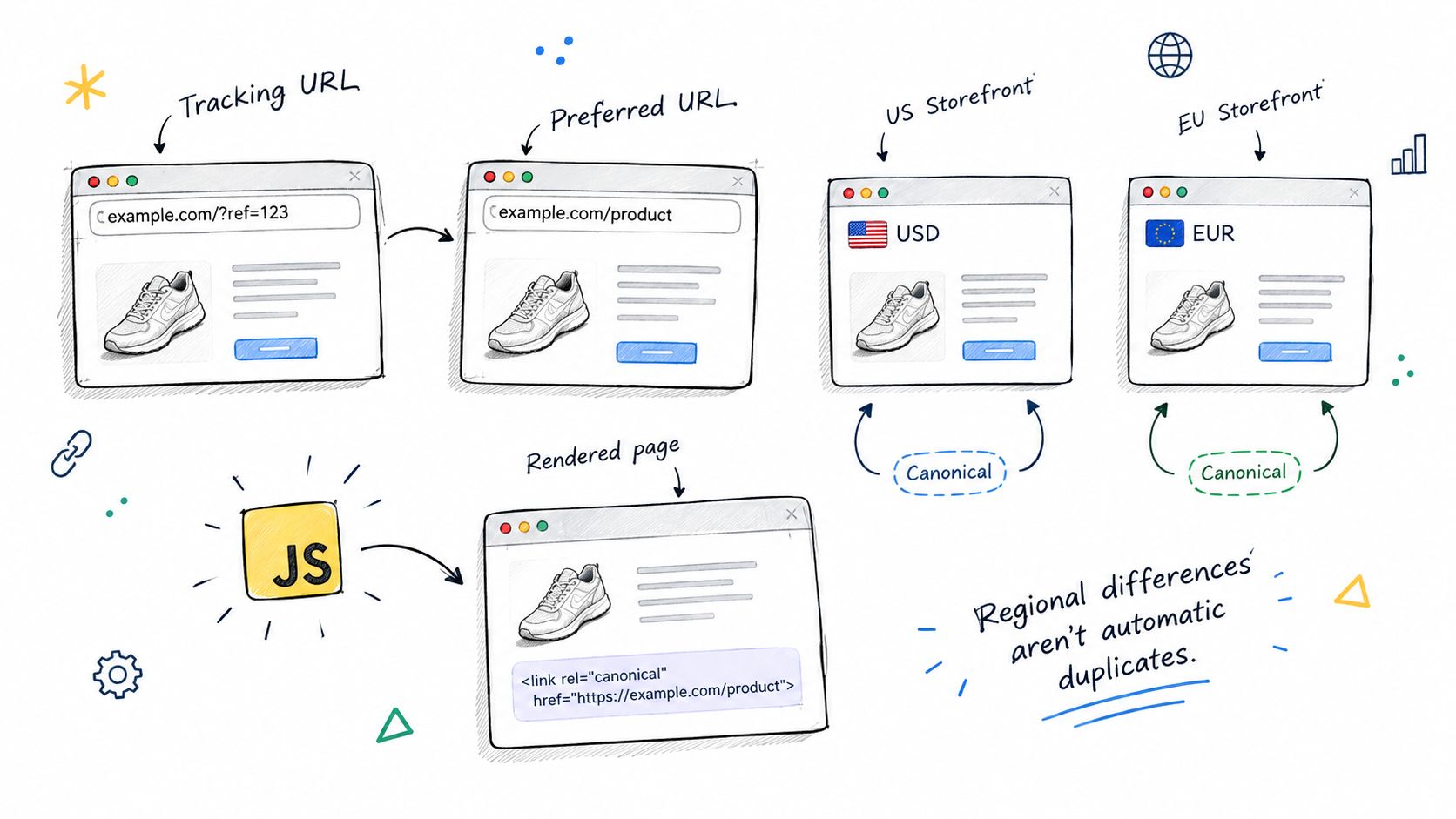
Match the Signal to the Problem
Canonicalization selects the representative of equivalent content. hreflang identifies language or regional alternatives. They answer different questions.
Google's guidance favors a canonical in the same language when hreflang is used. Its Search documentation updates also clarify the need for consistency between canonical annotations in original HTML and JavaScript-rendered output.
For headless Shopify builds and storefronts with client-side metadata changes, inspect both versions. A browser's rendered page alone won't show you whether the original response declared something different.
Test Before and After Rendering
Compare the raw document obtained through view-source or a fetch tool with the rendered DOM. Then check the output after interactions that change filters or navigation state.
- Original HTML: Confirm the intended canonical before scripts run.
- Rendered output: Verify that JavaScript doesn't replace it with a conflicting address.
- Conditional behavior: Test relevant market, language, and filtering states rather than only the default view.
If JavaScript supplies the canonical, it should match the original declaration. Where that can't be maintained consistently, Google's guidance allows omitting the original declaration rather than publishing contradictory annotations.
Apply the same care to faceted navigation. Decide which combinations deserve distinct landing pages and which merely reproduce existing content.
Use canonicalization for genuine equivalents and assess indexing controls separately for pages you don't want searchable. The right outcome isn't fewer URLs at any cost. It's a storefront where each valuable version has a clear representative and redundant variations don't compete with that structure.
Yassine Malti builds SEO-focused Shopify apps and custom automations for merchants who need practical storefront improvements. Visit Yassine Malti to explore available tools or discuss custom development for your theme, app integrations, and SEO workflows, starting with the URL patterns your store creates.
Shopify apps by Yassine Malti
Put this into practice
-

RANKit · Meta titles & descriptions
AI meta titles and descriptions, sized for Google · 50 meta tags/month free
-

ALT SEO · Image alt text
AI alt text for every product image · 100 images/month free
-

TAGit · Product tags
SEO-friendly product tags, generated in bulk · 50 tags/month free