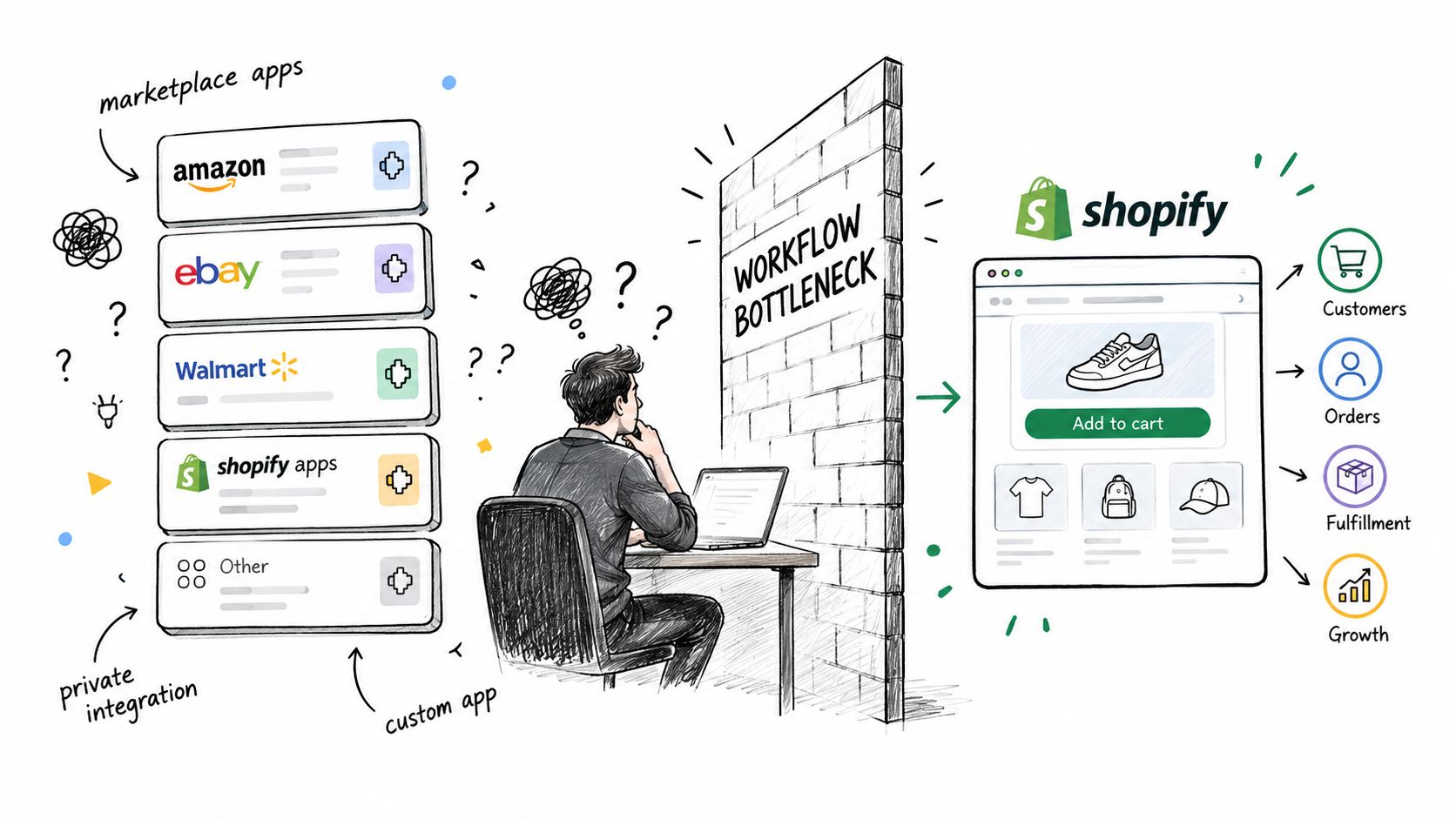
You've installed one app for SEO, another for product feeds, a third for customer support, and a few more to connect operations that Shopify doesn't handle exactly the way your business needs. The store still works, but a simple workflow now depends on several subscriptions, duplicated data, and processes nobody fully owns. That's usually the point where a Shopify app development service becomes worth investigating.
Custom development isn't just theme editing with a larger invoice. It can mean a private integration for one store, an internal automation for a team, or a public app distributed through Shopify's marketplace. The right choice depends on the workflow, the data involved, the number of merchants who'll use it, and whether the solution must pass Shopify's review and billing requirements.
I'm Yassine Malti, a Shopify app developer focused on SEO tools, AI-powered workflows, and custom automations. I maintain live apps and build services around the problems merchants encounter after installation, including API limits, unreliable event processing, privacy questions, App Store review, and unclear success criteria.
Table of Contents
- When a Shopify Store Outgrows Off-the-Shelf Apps
- How the Shopify App Ecosystem Came to Be
- Main Categories of Shopify App Development Work
- Ready-Made Apps Versus Custom Builds in Practice
- Working Inside the GraphQL Admin API and Rate Limits
- Webhook Architecture, Idempotency, and Mandatory Compliance
- Privacy by Design for AI Powered Shopify Apps
- Measuring Whether the App Is Working
- Submitting, Reviewing, and Launching on the App Store
- Quick Reference for Merchants Evaluating a Shopify App Developer
- Next Steps and How to Start the Conversation
When a Shopify Store Outgrows Off-the-Shelf Apps
A store usually outgrows off-the-shelf apps in the middle of an ordinary task. Product data needs to be built from an internal field that no marketplace app reads correctly. Inventory has to sync with a back-office system that has no reliable connector. Support replies need to follow approved rules, not whatever a generic helpdesk app can infer. Nothing is broken in isolation, but the workflow now depends on exports, copy-paste checks, and duplicated records across tools.
At that point, the right starting question is not “what feature do we want?” It is “where does the process fail, and who owns the failure when it does?”
A useful assessment usually looks like this:
- Write the current process down: Note who starts the task, which Shopify objects change, which outside systems receive data, and where a person has to step in.
- Separate inconvenience from structural need: A missing option may be fixable with configuration. A rule that crosses Shopify, an ERP, a feed tool, and a support platform usually needs an integration or custom app.
- Choose the delivery model: A marketplace app fits a common use case. A private app fits one merchant's internal process. A public app only makes sense when the same problem repeats across a broader merchant group.
- Define ownership: Decide who watches failed jobs, handles API changes, reviews webhook issues, answers support requests, and signs off on AI-generated output.
Merchants often underestimate the work at this stage. A serious Shopify app development service should come back with more than mockups and a feature checklist. It should include technical discovery, an API and webhook approach, documented data flows, privacy decisions, testing criteria, a release path, and a maintenance model. Without that, the app may install cleanly and still fail under rate limits, duplicate events, policy edge cases, or ordinary operational drift.
AI adds another constraint. Shopify's partner terms restrict using merchant and customer data, including derived or aggregated data, to develop or train AI systems without written consent. That needs to be addressed before anyone sends catalog, order, or customer data to a model.
Practical rule: Build custom software when the workflow is strategically important, repeatedly expensive, or impossible to express safely through existing apps. Don't commission an app over an imperfect marketplace interface alone.
How the Shopify App Ecosystem Came to Be
Shopify app development started when Shopify chose to make the platform extensible instead of trying to ship every feature itself. On June 2, 2009, Shopify launched its API Platform and App Store while serving more than 5,000 merchants, which created a direct market for third-party software. The first batch of apps covered practical store operations such as invoicing, customer reviews, digital-goods delivery, geolocation, and product synchronization, as described in Shopify's launch announcement.
That choice shaped the ecosystem merchants still buy into now. Shopify owned the core commerce layer. App developers handled narrower jobs that change faster, from operations and merchandising to analytics and customer experience. For merchants, that meant they could extend a store without replacing the platform whenever a workflow became more specialized.
The App Store grew quickly. Shopify's account of the platform's evolution says the marketplace went from fewer than a dozen applications at launch to 100 apps in 2013 and more than 2,000 apps by 2018 in its history of the new App Store. By September 2018, Shopify reported that merchants had completed more than 12 million app installs since 2011, spent over $100 million in the App Store, and that 87% relied on apps to run their businesses.
Those numbers matter because they explain why Shopify app work became an engineering and operations discipline, not just a feature build.
Once apps became part of how merchants run the business, the bottlenecks shifted. A public app has to survive App Store review, fit Shopify's billing and distribution rules, respect privacy requirements, and keep working when merchants install it across very different catalogs and workflows. A custom app avoids public listing, but it still has to deal with authentication, API limits, webhook delivery, and long-term maintenance.
That is the origin story behind the service category. The ecosystem created demand for software that fits Shopify, and for developers who can ship code that stays reliable after install.
Main Categories of Shopify App Development Work
Once a merchant asks for “an app,” the real job is usually to classify the bottleneck correctly. The category shapes the data model, permissions, review flow, failure handling, and what success looks like after launch.
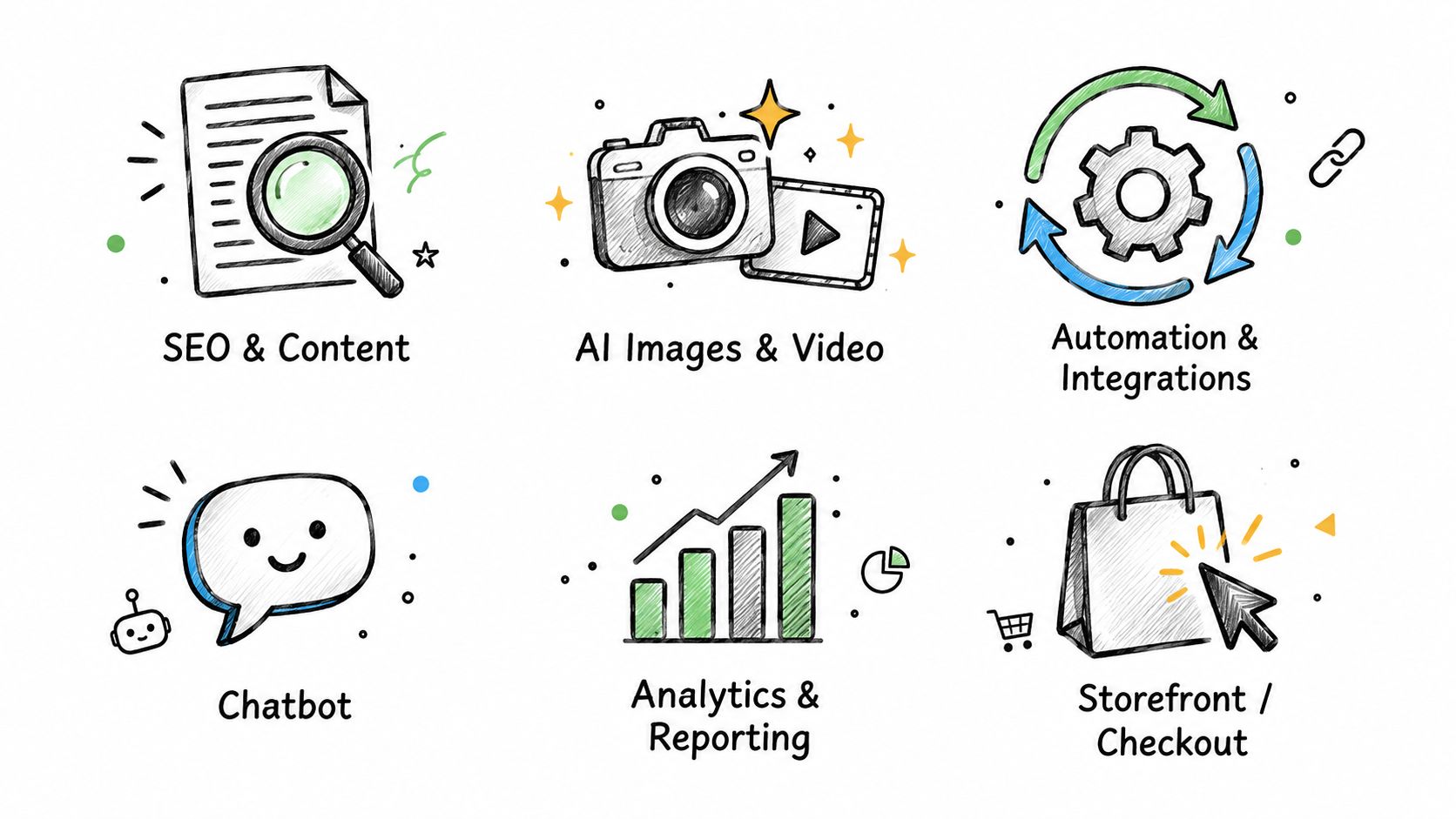
SEO and content operations
These apps handle titles, descriptions, structured content, image metadata, internal linking rules, and publishing queues. The hard part is governance. A merchant usually does not need more text. They need rules that decide which products can change, how brand language is preserved, which edits require approval, and how to roll back a bad batch safely.
AI media production
Media apps support background cleanup, enhancement, lifestyle scene generation, and controlled batch creation for product catalogs. In practice, the engineering work goes beyond model access. Teams need asset versioning, storage choices, review states, and clear limits on where generated media can be published automatically. If those controls are missing, merchants end up with faster production and a messier catalog.
Workflow and back-office automation
Custom app work gets operational fast here. A merchant wants orders, inventory, refunds, purchasing data, or product updates to move between Shopify and an ERP, WMS, spreadsheet process, or internal database without staff rekeying everything.
The first question is ownership. If Shopify says one inventory value and the warehouse system says another, the app has to decide which record wins, when to retry, and who gets alerted. I have seen projects fail here because the client approved screens before anyone defined conflict rules.
Conversational commerce
Chat and assistant features can help with product discovery, basic policy answers, and guided selection. Useful implementations keep retrieval tightly scoped, log uncertain answers, and escalate to a person when the bot is outside its instructions.
Analytics and reporting
A reporting app should support a decision, not just display more fields. Good builds connect commerce data with support, marketing, and operations, then show what a merchant can act on. If no one can name the weekly decision the dashboard improves, the reporting layer is usually overbuilt.
Storefront and checkout extensions
These projects change the buyer or merchant experience within Shopify's extension boundaries. Some needs fit a small extension. Others need a private internal app because the requirement is process control, not a new storefront component.
Across all six categories, the reliable service is rarely the flashiest feature set. It is the one that keeps working after install, under policy limits, with clear approvals and measurable outcomes.
Ready-Made Apps Versus Custom Builds in Practice
The choice between a marketplace app and a custom build is less about ambition than repetition. If many merchants need the same narrowly defined action, a ready-made app can be the fastest route. If your store has a proprietary process, unusual data relationships, or strict control requirements, custom work may be the better investment.
A ready-made app normally gives you a known installation path, an existing interface, and an update process managed by its developer. You trade some control for speed. You also need to check permissions, data retention, billing, export options, support quality, and whether the app's workflow can be reversed safely.
For example, PROMPTit AI Bulk Images Editor for Shopify is described as a bulk image generator powered by Google Gemini Nano Banana Pro. Its documented functions include upscaling low-resolution photos, removing unwanted text and graphic elements, enhancing blurry images, processing backgrounds, and generating lifestyle images from product photos. That type of focused tool can be appropriate when the merchant's need is catalog image production rather than a broader internal media pipeline.

Custom development becomes more defensible when the app must use internal product attributes, apply approval gates, preserve original assets, connect with a proprietary DAM, or trigger actions in another business system. It can also provide a clearer data boundary, but only if the implementation documents where data goes and how deletion works.
A useful comparison is:
| Decision factor | Ready-made app | Custom build |
|---|---|---|
| Setup | Faster when the workflow matches the product | Requires discovery and implementation |
| Control | Limited to documented settings and permissions | Designed around the merchant's process |
| Maintenance | Shared with the app developer | Owned through a maintenance agreement |
| Data handling | Depends on the app's privacy architecture | Defined as part of the project |
| Billing | Usually managed through the marketplace | Must be designed for the chosen distribution model |
| Scope | Focused on a repeatable use case | Can combine unique systems and rules |
Merchants researching adjacent use cases can also consult this guide to practical AI for online stores, especially when deciding whether a workflow needs AI at all. My own overview of apps for Shopify is useful for separating a normal app installation from a custom development engagement.
An SEO app primarily improves discoverability and content operations. An automation app moves data or actions between systems. A chatbot app handles conversational interaction and needs a different safety model. Combining all three may be possible, but it shouldn't be the starting assumption.
Working Inside the GraphQL Admin API and Rate Limits
The GraphQL Admin API measures demand through calculated query cost, not only through the number of requests. That distinction matters during a bulk SEO update, because a query asking for many nested objects and unnecessary fields can consume capacity far faster than a small, targeted query.
Shopify assigns each app-store pair a rate-limit bucket. The restore rate is 100 cost points per second for standard Shopify, 200 for Advanced Shopify, 1,000 for Shopify Plus, and 2,000 for Commerce Components. A single GraphQL query cannot exceed 1,000 cost points, according to Shopify's rate-limit documentation.
The implementation choices that protect the store
A dependable service makes the API layer deliberately boring:
- Select only required fields: Don't request full product, variant, customer, or order objects when the workflow needs a small subset.
- Paginate large collections: Process catalog data in controlled pages rather than attempting one oversized operation.
- Inspect throttle status: Read the returned capacity information and adapt the queue instead of assuming every store can process work at the same speed.
- Use exponential backoff with jitter: Temporary capacity problems should slow a job predictably rather than create a burst of repeated requests.
- Isolate stores: One merchant's workload should not block another merchant's queue, because Shopify assigns buckets per app-store pair.
- Prefer asynchronous work for bulk operations: AI generation, metadata refreshes, and large catalog audits should run through jobs that merchants can monitor.
A product-by-product loop often looks simple in a prototype and fails in production. A professional implementation records query cost, latency, retry count, error type, and per-store throughput. Those metrics show whether a problem comes from expensive selection sets, a slow downstream model, an overloaded queue, or a merchant-specific data pattern.
Engineering test: Ask the developer what happens when a bulk job encounters low capacity halfway through. “We retry it” isn't enough. You need to know how the job pauses, resumes, reports progress, and avoids duplicate updates.
Webhook Architecture, Idempotency, and Mandatory Compliance
Polling Shopify for every change creates unnecessary API work and delays synchronization. Webhooks provide near-real-time event triggers, but they aren't guaranteed business transactions. A webhook handler must accept the event safely, store enough information to process it later, and tolerate duplicate delivery.
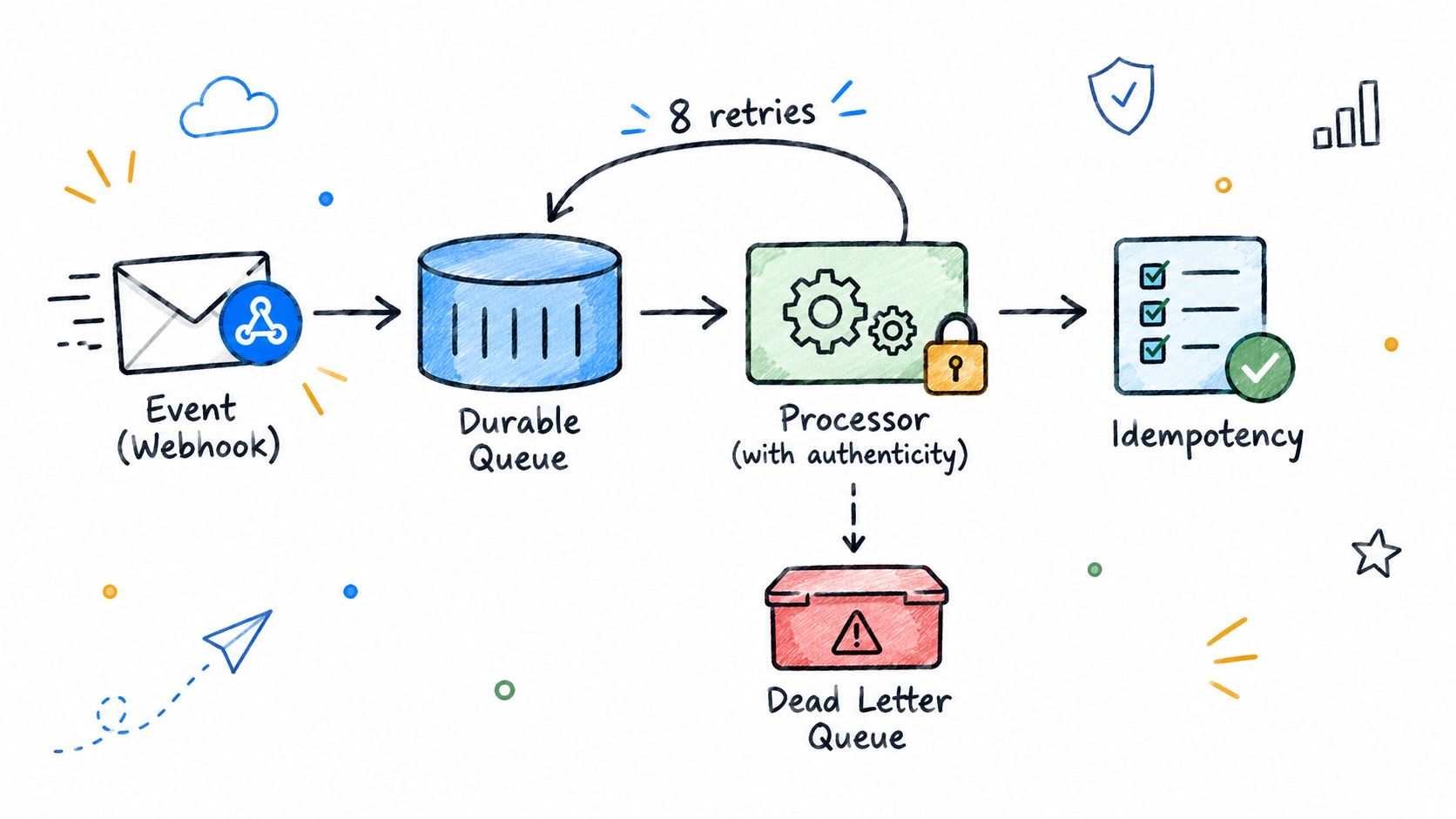
Shopify can retry a failed webhook delivery up to eight times over four hours. Continued failure can cause the subscription to be removed, as explained in Shopify's webhook troubleshooting guidance. A slow handler that waits for image generation or AI content creation before responding is therefore a fragile design.
A safer event path
- Verify authenticity: Check the HMAC before accepting the payload.
- Acknowledge quickly: Return a valid 2xx response once the request is authenticated and durably recorded.
- Persist the event: Store the payload or a normalized event record before starting downstream work.
- Deduplicate: Use Shopify's event identifier, or a deterministic resource-and-version key, so repeated delivery doesn't apply the same change twice.
- Queue processing: Let workers handle enrichment, AI generation, synchronization, and notifications outside the request handler.
- Use dead-letter handling: Move repeatedly failing jobs to a visible queue for investigation rather than losing them without a trace.
- Record an audit trail: Keep status, attempts, timestamps, and the resulting action for support and compliance review.
Public and App Store-distributed apps also need the mandatory privacy webhooks customers/data_request, customers/redact, and shop/redact. Invalid HMAC signatures must receive 401 Unauthorized, and required data actions must be completed within 30 days. These requirements make deletion testing part of application testing, not a document someone adds before submission.
The same architecture helps AI workflows. Webhook ingestion should never depend on a model provider being available at that exact moment. Store the event, acknowledge it, process it asynchronously, and make the resulting action reversible where possible.
Privacy by Design for AI Powered Shopify Apps
A merchant installs an AI app to speed up support or content work. Two weeks later, the real questions start. Which records left Shopify, who can see them, what sits in logs and backups, and can any of it be deleted on request without manual cleanup. That is the point where privacy stops being legal copy and becomes engineering.
For AI powered Shopify apps, privacy by design starts with the data path. It affects scopes, database schema, prompt construction, log redaction, retention jobs, support tooling, and vendor selection. If those decisions are loose at the start, they become expensive to fix after launch, especially once merchants rely on generated content or automated replies.
Before approving an app, get clear answers to six points:
- What is collected: Product data, customer data, order details, content drafts, images, or only technical identifiers?
- What is sent to an AI provider: The full record, or only the minimum context needed to complete the task?
- Is the data used for training: The answer should cover merchant data, customer data, and derived or aggregated data.
- Where is it stored: The app environment, model provider, subprocessors, and relevant storage locations.
- How long is it retained: Source records, generated output, logs, backups, and failed jobs all need defined retention.
- How is deletion confirmed: There should be a request path, processing status, audit record, and a clear rule for downstream copies.
Shopify's partner rules around AI data use have become stricter, including limits on using merchant and customer data for training without explicit written consent, as noted earlier in the article. A label that says “AI-powered” does not answer the operational questions a merchant owns after install.
What should a developer provide before installation? A data flow diagram that shows Shopify, the app backend, model providers, storage, logs, and deletion paths. The scope list should name each permission and why it is needed. Merchants should also ask for subprocessors, retention terms, export capability, and the exact way consent and opt-outs are enforced in the product, not only in policy text.
Human approval helps, but it does not fix bad data handling.
For chatbots and content tools, the safer pattern is data minimization. Do not send customer records if product, inventory, shipping, or policy context is enough. Keep sensitive values out of prompts, debug logs, analytics payloads, and support screenshots. In practice, that usually means prompt templates with field allowlists, redaction before logging, and admin controls that let the merchant disable high-risk flows.
I've covered the implementation side in this guide to Shopify ChatGPT integration. The important test is simple. The merchant should be able to explain what leaves Shopify, why it leaves, where it goes, and how deletion is verified.
Measuring Whether the App Is Working
A Shopify app starts failing long before it crashes. The usual pattern is quieter. Editors stop trusting generated content, support agents bypass the chatbot, or ops teams spend more time checking exceptions than they saved through automation. If you want to know whether the app is working, measure those points first, before a single workflow goes live.
Set a baseline that matches the job the app is supposed to do. For an SEO workflow, that usually means current organic visibility, indexation, conversion behavior, and how long publishing takes from draft to live. For a support assistant, track ticket volume, escalation patterns, product-discovery questions, and the gaps that still end in a human handoff. For back-office automation, look at manual handling time, recurring error types, reconciliation work, and what breaks downstream when the process goes wrong.
Then roll out narrowly. Start with one product set, one template, one support intent, or one operational path. Keep approval gates in place until you have seen enough edge cases to trust the output. That is not caution for its own sake. It is how you avoid blaming the model, the prompt, or the API when the actual problem is a bad workflow boundary.
A practical measurement loop looks like this:
- Baseline: Record the current business and operational measures before activation.
- Pilot: Run the workflow on a limited scope with a named owner.
- Review: Check outputs, exceptions, approvals, and rejected actions.
- Compare: Measure the same outcomes over a defined attribution window.
- Decide: Keep, revise, pause, or roll back using pre-agreed rules.
Here is a simple example. If an app rewrites product titles in bulk, compare the affected SKU group against its pre-launch baseline over the same reporting window. Review impressions, clicks, conversions, approval rates, and how much editing the team still had to do. If the team is rewriting half the output by hand, the app is not saving work, even if usage charts look healthy.
Instrumentation matters. Store the prompt version, output version, approval result, and failure reason so changes can be traced later. Test for brand tone, factual accuracy, prohibited claims, missing product fields, duplicate content, and malformed data. Define stop rules before launch, including repeated bad outputs, rising support escalations, or a review burden that exceeds the old manual process.
Dashboards should connect app activity to business results. Useful views include generated items, approved items, rejected items, processing failures, traffic, conversion rate, support workload, and revenue. API calls and job counts help with debugging. They do not tell a merchant whether the app earned its place in the stack.
Submitting, Reviewing, and Launching on the App Store
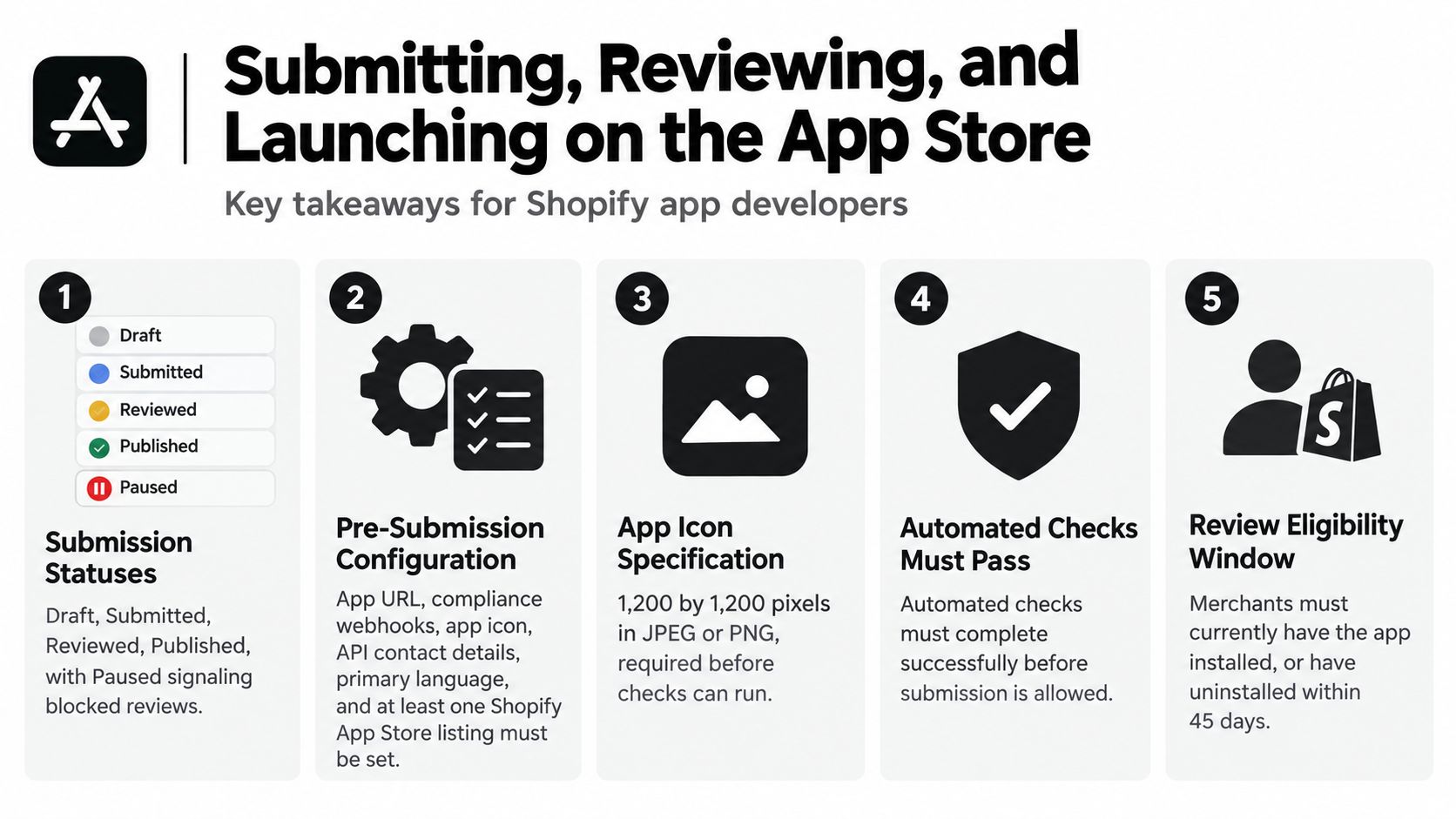
A public app launch is a sequence of statuses and checks, not a single deployment event. A newly created app starts as Draft, moves to Submitted when sent for review, may become Reviewed when Shopify and the developer discuss required fixes, and reaches Published after approval. Shopify can place a submission in Paused status when core issues prevent review and email the developer with required changes, as described in Shopify's App Store review process.
Before submission, configure the app URL, compliance webhooks, app icon, API contact details, primary language, and at least one App Store listing. Shopify requires the icon to be 1,200 by 1,200 pixels in JPEG or PNG format, and automated checks must complete successfully before submission, according to Shopify's submission requirements.
The launch checklist developers often underestimate
- Test on a development store: Exercise installation, authentication, configuration, normal workflows, failure states, uninstall behavior, and privacy requests.
- Write the listing for the reviewer and merchant: Explain the actual use case, required permissions, setup steps, limitations, and support route.
- Configure billing correctly: Shopify says new public apps should use Shopify App Pricing by default, with subscription, usage-based, and free-trial options available through the Partner Dashboard. The Billing API supports manual recurring, usage-based, or one-time pricing models. Apps using off-platform billing generally can't be distributed through the App Store unless Shopify has specifically notified the developer otherwise, as set out in Shopify's App Store requirements.
- Plan for iteration: A reviewer may identify a permission, onboarding, design, or functional issue that requires a new submission.
Reviews also follow a defined eligibility model. Only merchants who have the app installed can submit a review, with an additional 45-day period after uninstalling. Ratings use a one-to-five-star scale and may include written comments, while Shopify evaluates reviews for trust, quality, relevance, and timeliness, according to Shopify's review guidance.
The practical implication is simple. A developer who treats review, billing, support, and listing clarity as part of engineering usually has fewer launch surprises than one who considers them marketing tasks.
For a fuller operational perspective, see this guide to Shopify App Store requirements, especially when deciding whether a project should be public from the beginning or remain private until the workflow is proven.
Quick Reference for Merchants Evaluating a Shopify App Developer
Use this table during discovery. It highlights constraints that should appear in the technical proposal, not surface for the first time after development begins.
| Constraint | Value or Status | Where It Is Set |
|---|---|---|
| Standard Shopify API bucket | 100 cost points per second | Admin GraphQL API behavior |
| Advanced Shopify API bucket | 200 cost points per second | Admin GraphQL API behavior |
| Shopify Plus API bucket | 1,000 cost points per second | Admin GraphQL API behavior |
| Commerce Components API bucket | 2,000 cost points per second | Admin GraphQL API behavior |
| Maximum single GraphQL query | 1,000 cost points | Query design |
| Failed webhook delivery | Up to eight retries over four hours | Webhook handling |
| Mandatory privacy webhooks | customers/data_request, customers/redact, shop/redact | App compliance configuration |
| Invalid privacy webhook signature | 401 Unauthorized | HMAC validation |
| Required privacy action window | 30 days | Data deletion and request handling |
| App icon | 1,200 by 1,200 pixels, JPEG or PNG | App Store listing |
| App submission statuses | Draft, Submitted, Reviewed, Published | App Store review workflow |
| Blocked review status | Paused | Submission issue handling |
| Public review eligibility | Installed merchant, or uninstalled within 45 days | App Store review system |
The table isn't a substitute for technical design. It's a negotiation tool. Ask the developer to map your planned workflows to API cost, queue behavior, webhook recovery, privacy events, listing configuration, billing, and support ownership.
A strong proposal should also state what happens when the project doesn't fit a public app. A private integration may be more appropriate when the workflow contains confidential business logic, depends on internal systems, or has no reason to serve other merchants. Public distribution adds discoverability, but it also adds review, billing, documentation, reputation, and multi-tenant reliability work.
Next Steps and How to Start the Conversation
Bring four things to a discovery call: the workflow you want to change, the systems and data involved, the metric that will define success, and any privacy or access constraints you already know. Screenshots help, but a written example of one successful run and one failed run is usually more valuable.
A useful first conversation should produce:
- A feasibility view: What Shopify can support directly, what needs an external service, and what should remain manual.
- An API and webhook impact estimate: Which resources are read or changed, how bulk work is queued, and how failures are recovered.
- A privacy review: What data is collected, sent to providers, retained, exported, and deleted.
- A phased delivery plan: The smallest workflow that can prove value before broader automation.
- A launch strategy: Private deployment, custom distribution, or App Store submission, with billing and review work included where relevant.
If you're looking for an existing solution first, you can explore my live Shopify apps, including tools focused on SEO, AI media, and store workflows. If the need is specific to your business, use the Shopify developer contact form and describe the process you want to improve.
Some merchants also combine technical automation with human operational support, especially while a new workflow is being validated. A virtual assistant for ecommerce can help with catalog review, support escalation, or approval tasks while the app handles repeatable processing.
A Shopify app development service should leave you with more than installed software. It should give you a workflow that can be monitored, a data boundary you understand, recovery paths for failure, and a measurement plan that tells you whether to expand or stop.
I build SEO-focused Shopify apps, AI-powered tools, and custom automations around real merchant workflows, including integrations that need careful API, webhook, privacy, and App Store planning. Visit Yassine Malti to review the live app catalog or use the contact form to discuss a bespoke Shopify project.
Shopify apps by Yassine Malti
Put this into practice
-

PROMPTit · AI photo editing
Five AI image tools for your product photos · 5 images/month free
-

ALT SEO · Image alt text
AI alt text for every product image · 100 images/month free
-

RANKit · Meta titles & descriptions
AI meta titles and descriptions, sized for Google · 50 meta tags/month free