
Shopify optimization comes down to three layers: a fast theme with few heavy apps, product content that search engines and shoppers can read, and a product page and checkout that earn trust. The first layer is a one-time cleanup. The second is where most store owners lose hours, because alt text, meta titles, descriptions and tags have to be written for every product, again and again. That is the layer worth automating, with rules you set and a review step you control. This guide covers all three in the order we would tackle them.
Table of Contents
- What Shopify already does for you
- Start with speed and mobile
- Product content: where the hours go
- Automating the repetitive layer without losing control
- Trust, product pages and checkout
- Measure, then choose what to do next
- Put the repetitive work on autopilot
- FAQ
- Sources
What Shopify already does for you
Before you optimize anything, know what you can skip. According to Shopify’s SEO overview, the platform automatically adds canonical tags (which tell Google which URL is the main version of a page), generates your sitemap.xml and robots.txt files, activates SSL certificates, and includes product structured data in its themes. Themes also generate title tags that include your store name.
So the answer to “does Shopify do SEO automatically?” is: the technical plumbing, yes. The content, no. The same page says you are responsible for the things only you know about your products:
- Title tags, ideally under 60 characters and containing the main keyword.
- Meta descriptions, under 160 characters.
- Headings (H1, H2, H3) that describe the page.
- Image alt text, the short description that helps search engines and screen readers understand a picture.
- 301 redirects when a product moves or is discontinued, so shoppers and Google do not land on a dead page.
Shopify’s enterprise technical SEO guide draws the same line. The platform maintains defaults, delivery and image handling, while the merchant owns catalog data quality, script audits, internal linking and mobile content parity. Catalog data quality is the phrase to remember. It is where small stores and large ones both fall behind.
Start with speed and mobile
Speed is the layer with the clearest checklist, so do it first.
Find what is slowing the store
Shopify’s web performance guidance names the three biggest factors: your theme, your installed apps, and any third-party code you added by hand, including tag managers. Its recommendations are practical:
- Use an up-to-date, optimized theme. Shopify says Online Store 2.0 themes and the Horizon family are free and optimized.
- Limit the number of sections on each page.
- Turn on pagination for large collections.
- Audit your tag manager and remove tags nobody uses.
- Use appropriately sized images.
- After you uninstall an app, check for leftover code it left in your theme.
That last point matters for every app decision, including ours. Install only what does a job you can name, and clean up after anything you remove.
Know the targets
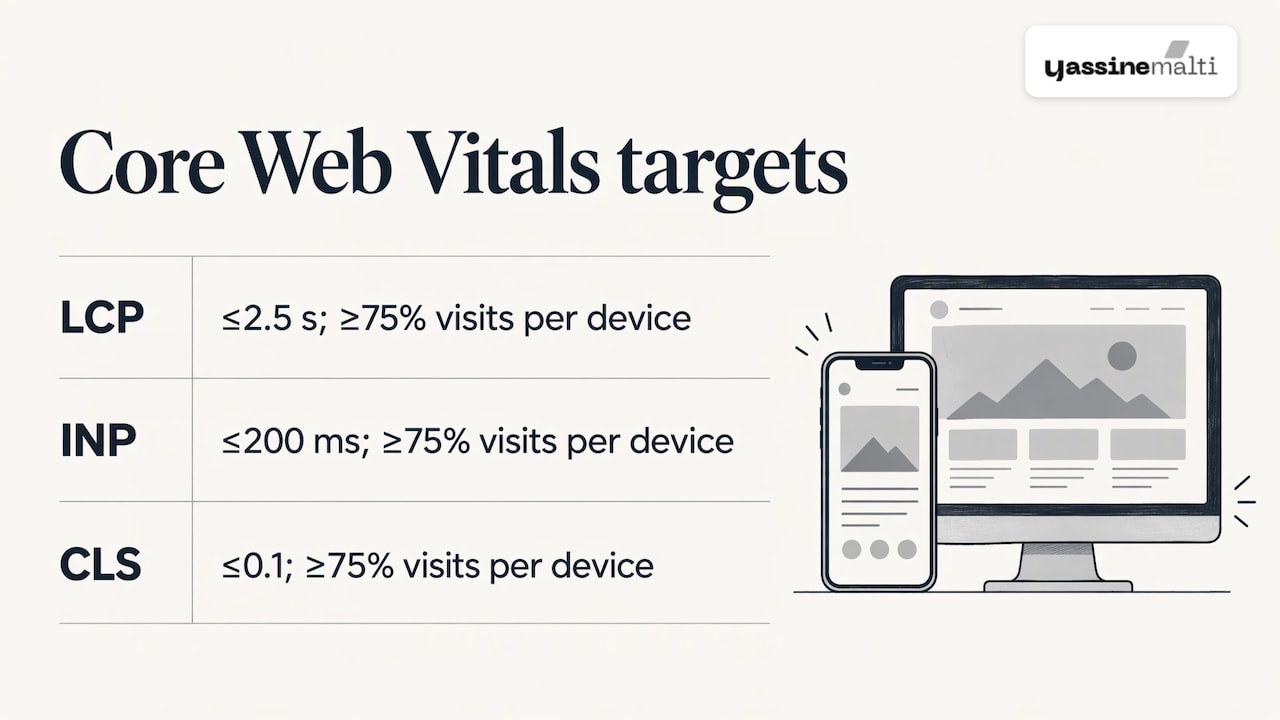
Google’s Core Web Vitals are the measures to watch. Shopify’s website speed guide lists the targets: Largest Contentful Paint (how fast the main content appears) at 2.5 seconds or less, Interaction to Next Paint (how quickly the page responds to taps) at 200 milliseconds or less, and Cumulative Layout Shift (how much the page jumps around) at 0.1 or less. Each should be met for at least 75% of visits, judged separately for mobile and desktop.
Mobile deserves most of your attention. Shopify’s developer documentation says that mobile performance is theme performance, since phones have slower processors and variable connections and Core Web Vitals are measured on mobile by default. If you work on your own theme, the same page gives the developer rules: never lazy-load the main above-the-fold image, mark it with fetchpriority="high", and avoid deeply nested Liquid loops, which it calls the most common cause of slow server response.
To test realistically, Shopify’s mobile testing guide recommends Chrome DevTools with a 4x CPU slowdown and a Slow 4G connection. Testing on your office Wi-Fi flatters the store.
Speed pays. Shopify’s website performance article cites a case where cutting mobile load time from 4.69 to 2.66 seconds raised the conversion rate by 101.47% in an A/B test. That is one retailer’s result, not a promise, but it shows why speed work comes before content polish. For a deeper walkthrough, see our guide on improving Shopify page speed without hurting SEO.
Product content: where the hours go
Once the store is fast, the next gap is the catalog. A store with 40 products can be fixed by hand in an afternoon. A store with 1,500 products and a new batch every month cannot.
The fields that need work on every product
For each product, check four things:
- SEO title. Primary keyword first, under 60 characters, so it is not cut off in results.
- Meta description. Under 160 characters, written to earn the click, not to stuff keywords.
- Image alt text. A plain description of what the image shows, with the product name and a distinguishing detail such as color or material.
- Product description and tags. Unique copy, not the supplier’s text pasted across every competing store, and tags that match how shoppers actually search and filter.
Our Shopify product page SEO checklist and on-page SEO checklist go through these field by field.
Why bulk work goes wrong
The usual bulk route is exporting the product CSV, editing columns and re-importing. It works, but the failure modes are predictable: one badly formatted column breaks an import, a template sentence repeats across hundreds of pages, and alt text ends up describing nothing. Whatever method you use, work in waves, not all at once. Update a small batch, then check that the storefront renders correctly, read a sample of the new titles and descriptions yourself, and only then continue. If a mistake slips in, you find it on 50 products, not 1,500.
Decide what a human must read
Automation suits factual, repeatable information: what the product is, its material, its color, its size. The copy that helps a shopper choose between two similar products, such as who it is for and what makes it different, deserves a human eye. Pages that share one template still need useful, accurate content on every page you want indexed. If a page has nothing to add, consider hiding it from search rather than publishing thin content.
Automating the repetitive layer without losing control
This is the part of Shopify optimization that most rewards a good tool, because the work is identical in shape every time. The risks of a bad tool are the same as the risks of a rushed intern: generic output, no record of what changed, and no way to undo it. So judge any automation by four questions:
- Can you set the rules? Tone, length limits, keywords to include or avoid, how to treat variants.
- Can you run it in bulk and on a schedule? New products should be handled as they arrive, not months later.
- Can you review before anything goes live? Approving output in batches mirrors the wave approach above.
- Can you see what changed? A before-and-after record is how you catch a bad batch.
Those four questions are how our apps are built. Each one does a single job, with instructions you control, bulk or scheduled workflows, and review controls that show what changed. They are designed to work together but stay optional, so you add only the piece your store needs:
| Task | App |
|---|---|
| Image alt text | ALT SEO |
| Meta titles and descriptions | RANKit |
| Product tags | TAGit |
| Product descriptions | Describer (free) |
| Backlinks | Backlinker |
| SEO blog posts | Blogger |
| llms.txt files for AI assistants | LLMs TXT (free) |
We also build tools for product images and video: PROMPTit for AI product photo editing, REMOVEit for background removal and VEOit for product video creation. The full lineup is on the apps page. For a wider look at how the categories compare, read our practical guide to Shopify SEO automation tools.
A review routine for any automated batch
Whichever tool writes your content, run this check on each batch before expanding it:
- Read a sample of titles, descriptions and alt text. Look for repeated phrasing and anything factually wrong about the product.
- Confirm lengths: titles under 60 characters, meta descriptions under 160.
- Open several product pages on mobile and check that nothing renders oddly.
- Confirm that the pages you wanted hidden from search are still hidden.
- Record the date and the batch, so you can match later ranking changes to what you did.
For developers building for clients, the same logic applies at the code level: prefer tools that expose rules and logs over ones that act as a black box. If you need something that does not exist, we also do custom Shopify app development.
Trust, product pages and checkout
Traffic only matters if the page converts. Baymard Institute’s research gives concrete things to check, and most are content you control.
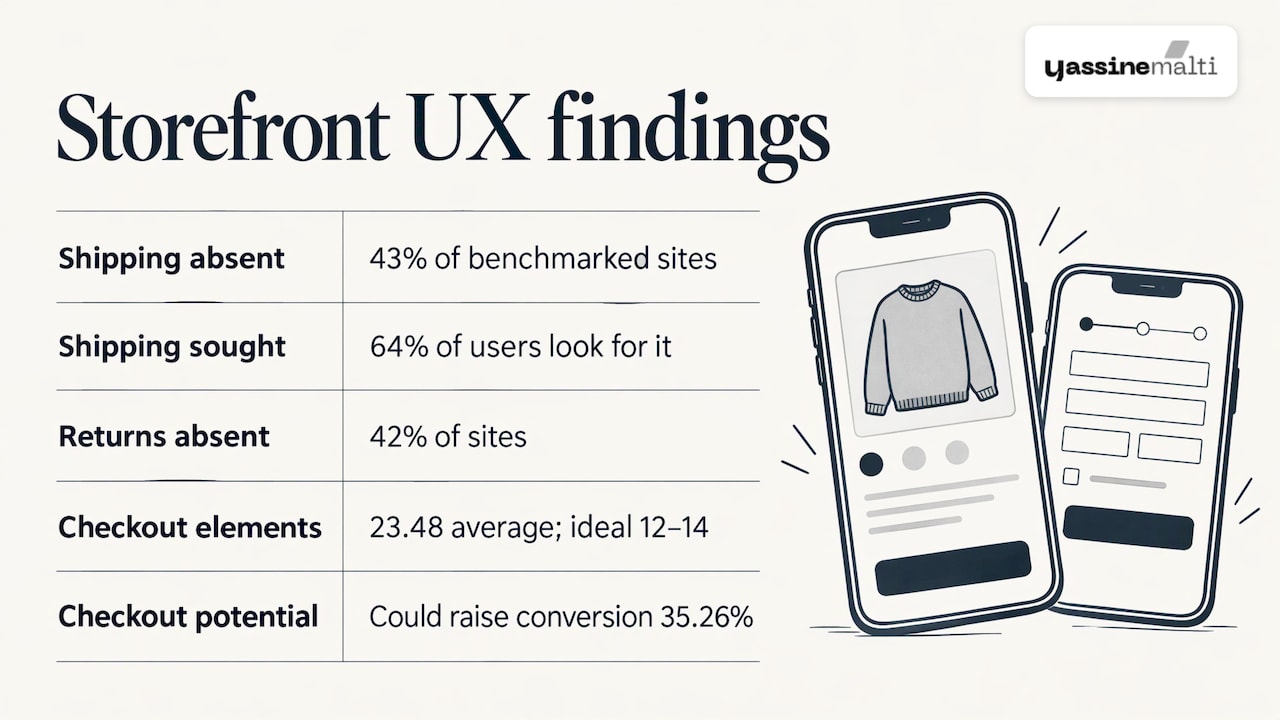
On product pages, Baymard’s UX statistics report that 43% of benchmarked sites gave no shipping information on the product page while 64% of users look for it, and 42% did not display or link return information there. Showing delivery costs, delivery estimates and your return policy on the product page answers questions before they become reasons to leave.
On checkout, the same source reports that the average US checkout displays 23.48 form elements by default against an ideal of 12 to 14, and estimates that the average large e-commerce site could raise its conversion rate by 35.26% through checkout design alone. Shopify’s mobile optimization guide points to a concrete fix: enabling Shop Pay accelerated checkout so returning customers reuse saved details instead of typing on a small screen.
Reviews belong here too. If you display them, make sure they are real: the FTC’s rule announced in August 2024 prohibits fake or AI-generated reviews and reviews bought conditioned on sentiment. Our guide to Shopify conversion rate optimization covers the product page side in more depth.
A caution on all of this research: it comes mostly from large US and European retailers. Treat it as a list of things to check, and let your own data set the order.
Measure, then choose what to do next
Optimization without a baseline is guessing. Shopify’s SEO audit checklist recommends pairing Google Search Console data (clicks, impressions, click-through rate and average position by page) with Shopify Analytics (sessions, conversion rate and sales for the same landing pages). Record the baseline before you change anything, then prioritize pages that earn meaningful revenue but are losing search visibility.
A simple routine:
- Check your tracking first. If your analytics are wrong, every decision after is wrong. Our GA4 setup guide for Shopify walks through it.
- Sort fixes by impact and effort. High impact, low effort goes first: a missing return policy link, uncompressed hero images, empty alt text.
- Change one thing at a time where traffic allows, and keep a log of what you changed and when.
- Test opinions, ship fixes. Removing a documented usability barrier can go live directly. Changes that rest on taste, such as a new layout, are worth an A/B test, as Search Engine Land’s Shopify playbook advises before applying edits sitewide.
Shopify’s performance guidance suggests three layers of measurement: Core Web Vitals show whether shoppers get a good experience, supporting metrics such as server response time show where a delay comes from, and ecommerce numbers such as conversion rate and revenue per session show what the delay costs you.
Small stores often lack the traffic for statistically clean tests. In that case, rely on the documented fixes above and watch the trend in Search Console over several weeks. For the SEO side of the plan, our roadmap to improving Shopify SEO lays out the sequence.
Put the repetitive work on autopilot
If your catalog is growing faster than you can write meta tags, alt text and tags by hand, this is the layer to hand off. Our apps are Freemium: Describer and LLMs TXT are free, and the others run on paid monthly subscriptions or one-time credit packs. Plans are published on the pricing page: Starter at $29 per month or $290 per year, Professional at $59 per month or $590 per year, and Enterprise at $119 per month or $1,190 per year.

Browse the Shopify SEO apps to see which task to automate first, or start with the one that costs you the most hours each month. Each app handles one job, runs in bulk or on a schedule with your rules, and shows you what changed so you stay in control.
FAQ
Does Shopify do SEO automatically?
Partly. Shopify handles canonical tags, sitemaps, robots.txt, SSL and product structured data in its themes. You still write and maintain title tags, meta descriptions, headings, image alt text and redirects. That content work is where optimization effort pays off.
What should I optimize first on a Shopify store?
Start with tracking so your data is trustworthy, then fix speed and mobile experience, then product content and trust signals on product pages. Within content, begin with the pages that already earn revenue, since they show the clearest gains and losses.
Can I optimize product SEO in bulk?
Yes. Work in waves: update a small batch, check the storefront and a sample of the text, then expand. Tools that let you set rules, run bulk or scheduled jobs and review changes before they publish make this faster and safer than editing a CSV by hand.
Do apps slow down a Shopify store?
Shopify lists installed apps among the biggest factors in store performance, along with the theme and added third-party code. Keep only apps that do a job you need, and check your theme for leftover code after uninstalling any app.
Sources
- Shopify Help Center: How search engine optimization (SEO) works
- Shopify: The Enterprise Guide to Ecommerce Technical SEO
- Shopify Help Center: Improving your online store’s performance
- Shopify: Website Speed Optimization for Shopify Stores
- Shopify.dev: Performance best practices for Shopify themes
- Shopify.dev: Test with real mobile CPU and network throttling
- Shopify: Website Performance: Metrics, Tools, and Tips
- Baymard Institute: 40+ UX Statistics
- Shopify: Mobile Optimization
- Shopify: Ecommerce SEO Audit Checklist
- Search Engine Land: The ultimate Shopify SEO and AI readiness playbook
Recommended
Shopify apps by Yassine Malti
Put this into practice
-

LLMs TXT · llms.txt for AI tools
A short llms.txt of your real store links · Free
-

Describer · Product descriptions
Product descriptions written from your own product data · Free: 50 descriptions/month
-

ALT SEO · Image alt text
AI alt text for every product image · 100 images/month free